
omeraltinova@omeraltinova
omeraltinova/claude-usage-footer/tree/main/plugins/usage-footer
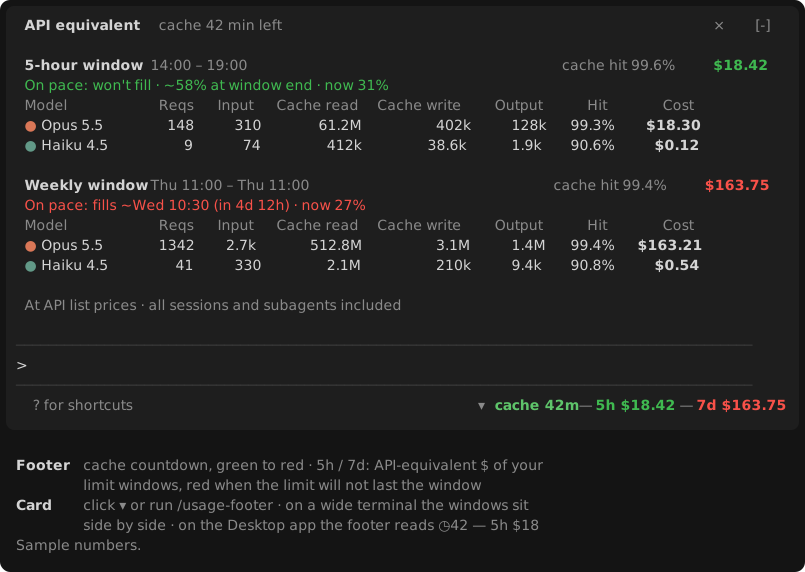
프롬프트 아래 푸터에 프롬프트 캐시 카운트다운과 5시간 및 주간 제한 창의 API 기준 비용을 표시하고, 모델별 토큰과 비용 내역 카드를 클릭으로 여는 Claude Code mod입니다.
omeraltinova/claude-usage-footer/tree/main/plugins/usage-footer
usage-footer는 프롬프트 아래 모델 이름 옆에 사용량 정보를 표시하는 Claude Code 플러그인입니다. 푸터에는 프롬프트 캐시 카운트다운(초록에서 빨강으로 색상 변화)과 현재 5시간 및 주간 제한 창의 요청을 API 목록 가격으로 계산한 비용이 표시됩니다. 속도에 따라 색이 바뀌며, 재설정 전에 제한에 도달할 속도면 빨간색, 85–100%면 노란색, 그 외에는 녹색입니다. ▾를 클릭하거나 /usage-footer를 실행하면 프롬프트 위에 카드가 열립니다. 각 창에는 현재 속도로 제한에 도달하는 시점 또는 끝나는 위치, 총 비용, 캐시 적중률, 모델별 요청·입력·캐시 읽기·캐시 쓰기·출력·적중률·비용 행이 표시됩니다.
계정 자체의 창에서 작동하며(보고된 재설정 시각보다 창 길이 1개만큼 앞서 시작), 비용은 ~/.claude/projects의 로컬 트랜스크립트로 계산합니다. 서브에이전트를 포함해 컴퓨터의 모든 세션을 대상으로 하고 요청별로 중복을 제거하며 API 목록 가격을 적용합니다(구독 요금이 아님). 작은 Node.js 스크립트가 각 턴이 끝날 때와 5분마다 트랜스크립트를 증분 스캔합니다. 수십 밀리초만 걸리고 모델 요청 스트림 안에서는 아무것도 실행하지 않습니다.
요구 사항: Claude Code v2.1.287 이상(터미널 또는 Desktop Code 탭)과 macOS, Linux, Windows의 PATH 또는 표준 설치 위치에 있는 Node.js.
설치: claude plugin marketplace add omeraltinova/claude-usage-footer claude plugin install usage-footer@claude-usage-footer
그 다음 새 세션을 시작하거나 /reload-plugins를 실행합니다. MIT 라이선스입니다.
먼저 작성자의 README에서 marketplace와 플러그인 이름을 확인하세요. 저장소 구조에 따라 명령어가 달라질 수 있습니다.
claude plugin marketplace add omeraltinova/claude-usage-footer
claude plugin install usage-footer
A Claude Code mod that puts your usage where you look anyway: beside the model name under the prompt.
▾ ◷42 — 5h $82 — 7d $115
F $…).The 5h and 7d values are colored by pace: red if, at the pace so far, the limit fills before the window resets; yellow if it ends the window at 85–100%; green otherwise.
Click ▾ (or run /usage-footer) for a card above the prompt with, per window:
~/.claude/projects, including subagents), across every session on this machine, deduplicated per request and priced at API list prices. It is not what a subscription charges.node on PATH, then in the usual install locations on macOS (Homebrew), Linux and Windows.claude plugin marketplace add omeraltinova/claude-usage-footer
claude plugin install usage-footer@claude-usage-footer
Then start a new session, or run /reload-plugins in an open one.
plugins/usage-footer/scripts/usage-scan.mjs, PRICES) and need updating when Anthropic's prices change.MIT

문서 생성, 드리프트 감지, API 문서 자동화 플러그인이며 비밀이 포함된 문서 쓰기나 worker 디스패치를 거부하는 function-hook 가드로도 동작합니다.

Claude 데스크톱 앱용 상태 표시줄입니다. 프롬프트 위에 나타나 세션 품질, 컨텍스트 사용량, 캐시 카운트다운, 5시간 및 주간 한도를 보여 주고 Clawd가 세션의 동작을 연출합니다.

databricks CLI를 따라 Databricks 작업 공간, Unity Catalog, 컴퓨팅, 작업, 파이프라인, 앱, 대시보드를 트리로 보여 주는 /databricks-pane을 제공하는 Claude Code 플러그인 mod입니다. 실시간 강조, 프로필 전환, CLI 인수 복사도 지원합니다.
