
victor-falcon@victor-falcon
victor-falcon/claude-status-bar

프롬프트 아래에 색상 상태 줄을 추가하고 엔진 자체의 힌트 줄(`? for shortcuts`, `esc to interrupt`……)을 함께 보여 주는 Claude Code 모드입니다.
victor-falcon/claude-status-bar
프롬프트 아래에 색상 상태 줄을 추가하고 엔진 자체의 힌트 줄(? for shortcuts, esc to interrupt……)을 함께 보여 주는 Claude Code 모드입니다.

| 구간 | 표시 내용 | 색상 |
| --- | --- | --- |
| 브랜치 | 현재 브랜치. HEAD가 분리된 상태라면 짧은 SHA를 표시 | 브랜치 아이콘 색상 |
| Diff | 기본 브랜치의 merge base를 기준으로 추가되거나 삭제된 줄. 커밋하지 않은 작업도 포함 | +N은 녹색, -N은 빨간색 |
| 풀 리퀘스트 | 브랜치의 PR 번호와 상태를 #42 (Open) 형식으로 표시하고 PR에 연결합니다. 상태는 Merged, Closed, Draft, Open 중 하나입니다 | 보라색, 빨간색, 회색, 녹색 |
| CI | 전체 검사 중 통과한 수를 표시하고, 모두 통과했는지, 실패가 있는지, 아직 실행 중인지에 따라 아이콘을 표시 | 모두 통과하면 통과 수가 녹색, 하나라도 실패하면 빨간색 |
| 사용량 | 플랜의 5시간 세션 사용량과 주간 사용량 | 65%부터 주황색, 75%부터 빨간색(더 많이 찬 시간 창 기준) |
표시할 내용이 없는 구간은 생략됩니다. git 저장소 밖에서는 git 부분이 없고, PR이 없으면 PR과 CI 부분이 없으며, Claude 구독을 사용하지 않으면 사용량 부분이 없습니다.
git 및 로그인된 GitHub CLI (gh).claude plugin marketplace add victor-falcon/claude-status-bar
claude plugin install status-bar@claude-status-bar
새 세션을 시작하거나 실행 중인 세션에서 /reload-plugins를 실행하세요.
설정에 statusLine 명령이 있다면 제거해도 됩니다. 이 모드가 대신 사용합니다.
gh pr, git push, git checkout 또는 git switch를 실행한 직후에도 갱신합니다./config에서 각 구간을 끄고 아이콘을 바꿀 수 있습니다. 각 옵션은 한 줄로 표시됩니다. Claude Code는 settings.json의 pluginConfigs 아래에 저장하며, 값이 하나라도 바뀌면 모드를 즉시 다시 불러옵니다.

| 옵션 | 기본값 | 동작 |
| --- | --- | --- |
| showBranch | true | 브랜치 표시 |
| showDiff | true | 추가되거나 삭제된 줄 표시(끄면 모드가 git diff를 건너뜀) |
| showPullRequest | true | 링크가 걸린 풀 리퀘스트 번호와 상태 표시 |
| showChecks | true | CI 검사 표시(풀 리퀘스트도 끄면 모드가 gh를 호출하지 않음) |
| showUsage | true | 플랜 사용량 표시 |
| iconBranch | Nerd Font branch | 브랜치 이름 앞에 그림 |
| iconDiff | 없음 | 추가되거나 삭제된 줄 앞에 그림 |
| iconPullRequest | Nerd Font GitHub | 풀 리퀘스트 번호 앞에 그림 |
| iconChecksPassed | Nerd Font check | 모든 검사가 통과했을 때 검사 앞에 그림 |
| iconChecksFailed | Nerd Font cross | 하나라도 실패했을 때 검사 앞에 그림 |
| iconChecksPending | Nerd Font hourglass | 일부 검사가 실행 중일 때 검사 앞에 그림 |
| iconUsage | 없음 | 플랜 사용량 앞에 그림 |
아이콘은 공백을 포함해 입력한 그대로 사용됩니다. 비워 두면 기본 아이콘을 쓰고, none을 입력하면 아이콘을 그리지 않습니다. 설치 시 Claude Code가 여는 대화 상자는 텍스트 필드에 기본값을 채우지 않으므로 모든 아이콘 필드가 비어 있습니다. 그대로 저장하면 기본 아이콘이 유지됩니다.
기본 아이콘, 색상, 임계값은 hooks/format.ts 상단의 상수(DEFAULT_ICONS, COLOR_*, PULL_REQUEST_COLORS, USAGE_WARNING_PERCENT, USAGE_CRITICAL_PERCENT)입니다. 색상은 Claude Code 테마 키 또는 원시 색상(green, #ff8700)으로 지정할 수 있습니다.
자신의 복사본을 실행하려면 이 저장소를 복제한 뒤 설치하지 않고 디스크에서 불러오세요.
claude --plugin-dir /path/to/claude-status-bar
또는 모든 세션에서 사용하려면 ~/.claude/settings.json의 env 블록에서 CLAUDE_CODE_PLUGIN_DIRS를 해당 경로로 설정하세요. 폴더를 감시하므로 파일을 저장하면 모드가 다시 로드됩니다.
claude plugin validate .
claude plugin test .
먼저 작성자의 README에서 marketplace와 플러그인 이름을 확인하세요. 저장소 구조에 따라 명령어가 달라질 수 있습니다.
claude plugin marketplace add victor-falcon/claude-status-bar
claude plugin install status-bar
A Claude Code mod that adds a colored status line under the prompt, with the
engine's own hint line (? for shortcuts, esc to interrupt…):
| Segment | What it shows | Color |
| --- | --- | --- |
| Branch | Current branch, or the short SHA on a detached HEAD | Branch icon colored |
| Diff | Lines added and removed against the merge base with the default branch, uncommitted work included | +N green, -N red |
| Pull request | The branch's PR number and state, as #42 (Open), linked to the PR. The state is Merged, Closed, Draft or Open | Purple, red, gray, green |
| CI | Passed checks out of the total, with an icon for all passed, any failed, or still running | Passed count green when all passed, red when any failed |
| Usage | Your plan's 5-hour session usage and weekly usage | Orange from 65%, red from 75% (whichever window is fuller) |
Segments with nothing to show are left out: outside a git repository there is no git part, without a PR there is no PR or CI part, and off a Claude subscription there is no usage part.
git, and the GitHub CLI (gh) logged in for the PR and CI segments.claude plugin marketplace add victor-falcon/claude-status-bar
claude plugin install status-bar@claude-status-bar
Start a new session, or run /reload-plugins in a running one.
If you had a statusLine command in your settings, you can remove it: this mod replaces it.
gh pr, git push, git checkout or git switch run by
Claude.Every section can be switched off and every icon changed from /config, where each option is a row. Claude Code
stores them in settings.json under pluginConfigs, and the mod reloads as soon as one changes.
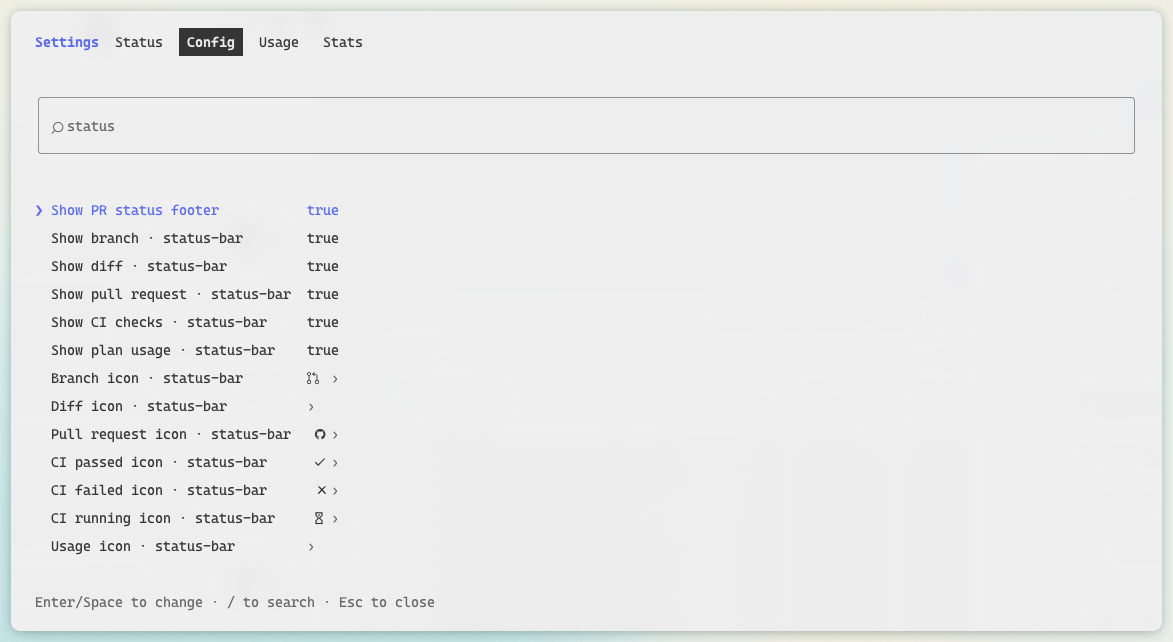
| Option | Default | What it does |
| --- | --- | --- |
| showBranch | true | Show the branch |
| showDiff | true | Show the lines added and removed (off, the mod skips git diff) |
| showPullRequest | true | Show the pull request number, linked, and its state |
| showChecks | true | Show the CI checks (with the pull request off too, the mod never calls gh) |
| showUsage | true | Show the plan usage |
| iconBranch | Nerd Font branch | Drawn before the branch name |
| iconDiff | none | Drawn before the added and removed lines |
| iconPullRequest | Nerd Font GitHub | Drawn before the pull request number |
| iconChecksPassed | Nerd Font check | Drawn before the checks when every one passed |
| iconChecksFailed | Nerd Font cross | Drawn before the checks when any failed |
| iconChecksPending | Nerd Font hourglass | Drawn before the checks while some are still running |
| iconUsage | none | Drawn before the plan usage |
Icons are used as written, spaces included. Leave one empty for its default, or write none to draw no icon. The
dialog Claude Code opens on install shows every icon field empty, as it never fills a text field with its default:
save it as it is to keep the default icons.
Default icons, colors and thresholds are constants at the top of hooks/format.ts (DEFAULT_ICONS,
COLOR_*, PULL_REQUEST_COLORS, USAGE_WARNING_PERCENT, USAGE_CRITICAL_PERCENT). Colors are a Claude Code theme
key or a raw color (green, #ff8700).
To run your own copy, clone this repository and load it from disk instead of installing it:
claude --plugin-dir /path/to/claude-status-bar
or, for every session, set CLAUDE_CODE_PLUGIN_DIRS to that path in the env block of ~/.claude/settings.json. The
folder is watched, so saving a file reloads the mod.
claude plugin validate .
claude plugin test .

문서 생성, 드리프트 감지, API 문서 자동화 플러그인이며 비밀이 포함된 문서 쓰기나 worker 디스패치를 거부하는 function-hook 가드로도 동작합니다.

Claude 데스크톱 앱용 상태 표시줄입니다. 프롬프트 위에 나타나 세션 품질, 컨텍스트 사용량, 캐시 카운트다운, 5시간 및 주간 한도를 보여 주고 Clawd가 세션의 동작을 연출합니다.

databricks CLI를 따라 Databricks 작업 공간, Unity Catalog, 컴퓨팅, 작업, 파이프라인, 앱, 대시보드를 트리로 보여 주는 /databricks-pane을 제공하는 Claude Code 플러그인 mod입니다. 실시간 강조, 프로필 전환, CLI 인수 복사도 지원합니다.
