
LorcanChinnock@LorcanChinnock
LorcanChinnock/claude-desk-neighbours/tree/main/plugins/show-and-tell
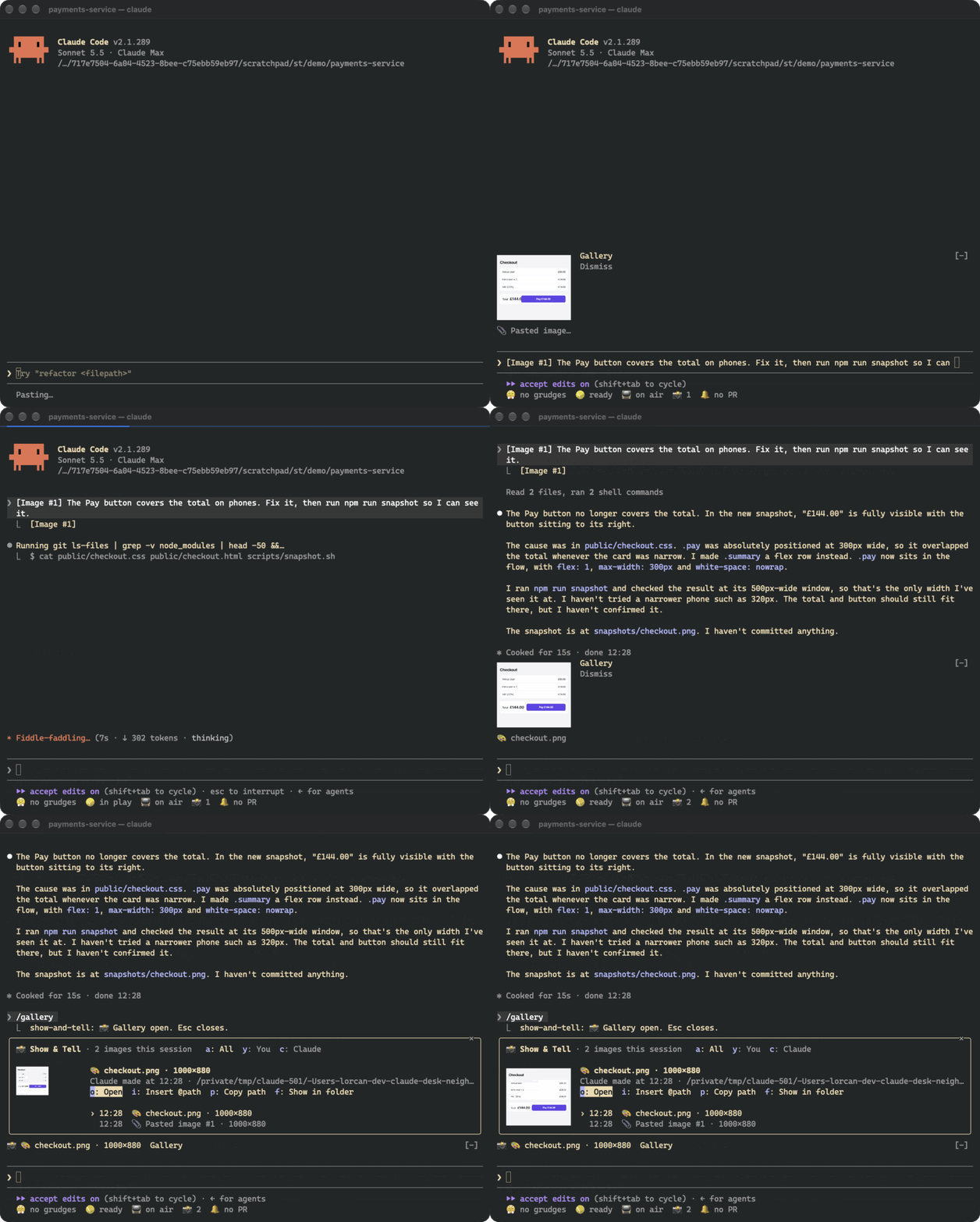
스크린샷을 붙여 넣는 즉시 썸네일을 표시하고, 사용자와 Claude가 주고받은 모든 이미지를 세션 갤러리에 보관합니다.
LorcanChinnock/claude-desk-neighbours/tree/main/plugins/show-and-tell
Show & Tell은 초안에서 Claude Code의 [Image #N] 마커를 감시하고 해당 이미지를 복사합니다. 붙여 넣은 뒤 약 4분의 1초 안에, 전송하기 전에 프롬프트 위에 썸네일이 나타납니다. Claude가 읽고 쓰고 편집한 이미지와 browser/MCP 스크린샷 및 셸 명령 같은 도구가 작업 디렉터리에 만든 이미지도 수집합니다. 프롬프트 위의 띠에는 최신 썸네일과 Gallery, Dismiss 버튼이 표시됩니다. /gallery(또는 상태 행의 📸 카운터)는 세션의 모든 이미지를 미리 보는 전체 갤러리를 열고, 사용자 이미지와 Claude 이미지 필터, 열기, 다시 첨부(@path), 경로 복사, 파일 표시 작업을 제공합니다. 이미지는 kitty graphics protocol(Ghostty, kitty)로 렌더링하고 다른 터미널에서는 텍스트 자리 표시자로 대체합니다. PNG가 아닌 형식은 sips, ImageMagick 또는 qlmanage로 한 번 변환합니다. 모델 호출은 없습니다. 복사본은 ~/.claude/show-and-tell/<session>/에 저장되고 manifest.json이 /resume 뒤에 갤러리를 복원합니다. 7일보다 오래된 복사본은 세션 시작 시 정리됩니다. 설치: /plugin install show-and-tell@claude-desk-neighbours
먼저 작성자의 README에서 marketplace와 플러그인 이름을 확인하세요. 저장소 구조에 따라 명령어가 달라질 수 있습니다.
claude plugin marketplace add LorcanChinnock/claude-desk-neighbours
claude plugin install show-and-tell
Shows a thumbnail as soon as you paste a screenshot, and keeps a gallery of every image in the session.
/plugin install show-and-tell@claude-desk-neighbours
Hit ctrl+v with an image on your clipboard and a thumbnail appears above the prompt within about a quarter of a
second, before you've sent anything. Show & Tell watches your draft for Claude Code's [Image #1] and copies the
image Claude Code saved for it. If that file isn't where it expects, it reads the clipboard itself (osascript
on macOS, wl-paste or xclip on Linux, PowerShell on Windows). If that doesn't work either, it grabs the image
when you send the prompt.
Claude's pictures get picked up the same way. That covers images Claude opens with Read, screenshots returned by
browser or MCP tools, pictures Claude writes or edits, and images a shell command creates in the working
directory or one level down (playwright screenshot, a chart script).
The band above the prompt shows the newest thumbnails, with Gallery and Dismiss buttons. A pasted thumbnail goes
away when you send it. Everything else disappears after 20 seconds, which you can change in /config.
Click 📸 4 in the status row, or run /gallery, to see every image from this session, newest first, with a big
preview of whichever one you select. a, y and c filter to all images, yours, or Claude's. o opens the
image in your viewer, i puts @path in your prompt so Claude can look at it again, p copies the path, and
f shows it in its folder. Tab moves through the list. This is after Claude fixed the checkout and took a
snapshot:
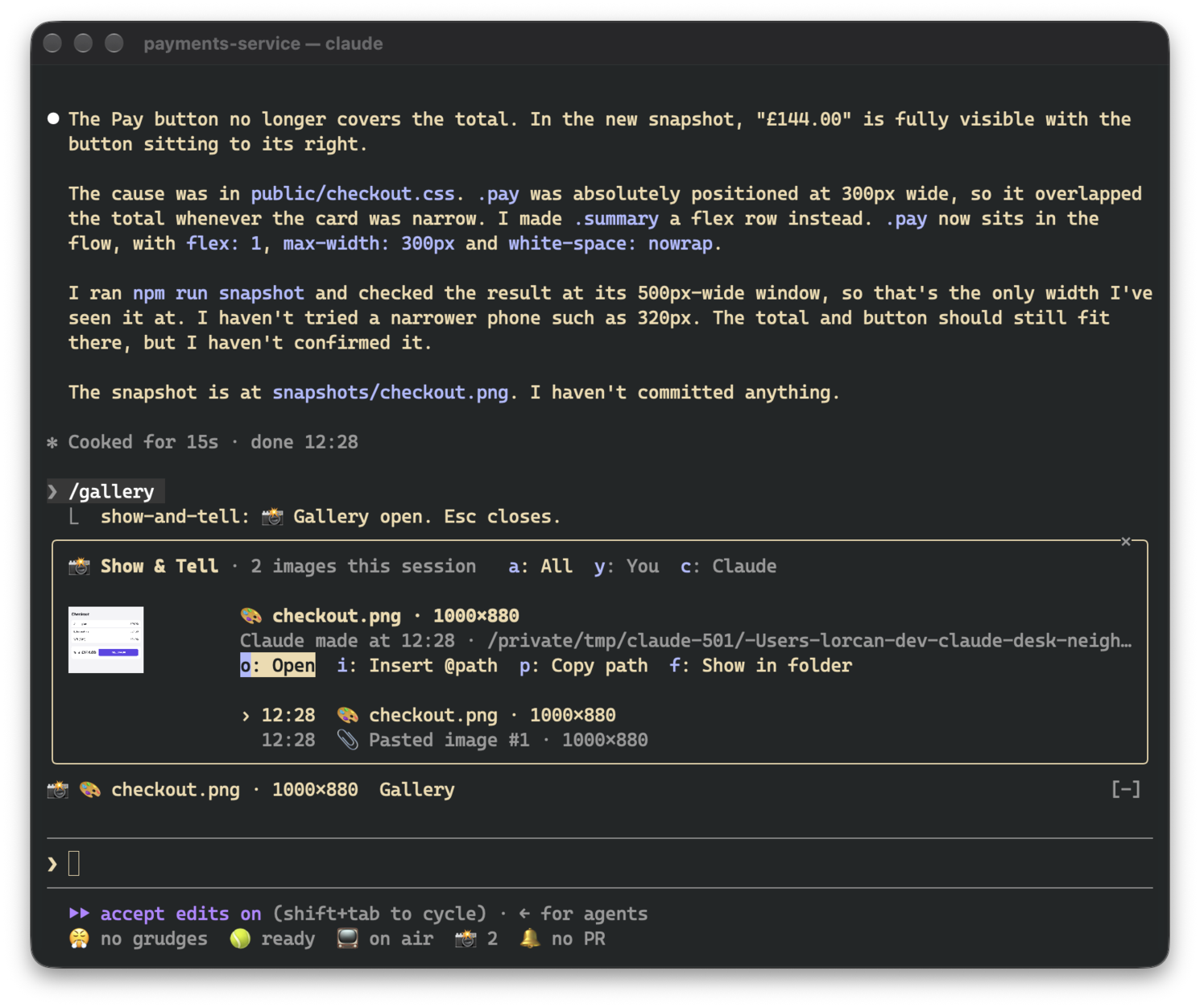
The gallery asks for enough room to show a picture. If it doesn't get it (say, an inline pane in a small terminal), the picture shrinks to fit and the footer is hidden so the header, actions and list stay visible.
Pictures only render in terminals that support the kitty graphics protocol, which means Ghostty and kitty. In
other terminals, in tmux and in the desktop app, the band and gallery show the same thing as text
(📎 Pasted image #1 · 200×120), and all the buttons still work.
Thumbnails have to be PNGs, so other formats get converted once: with sips on macOS and ImageMagick (magick or
convert) elsewhere. On macOS, qlmanage handles SVG and PDF. If there's no converter, the image is still
listed, just without a picture.
There are no model calls. Pasted images, and images that only exist inside a tool's result, are copied to
~/.claude/show-and-tell/<session>/ next to a manifest.json that restores the gallery after /resume. Files
Claude read or created stay where they are. Copies older than seven days are deleted when a session starts. The
cleanup uses find, so on Windows they stick around until you delete them yourself.
While a session is open, the draft is checked four times a second. That's just a read of the prompt box, and
nothing runs unless a new [Image #N] shows up. Where Claude Code saves pastes (/tmp/claude-<uid>/…/images/)
isn't part of the plugin API, so a future version of Claude Code might move it. If that happens, Show & Tell
falls back to reading the clipboard.

문서 생성, 드리프트 감지, API 문서 자동화 플러그인이며 비밀이 포함된 문서 쓰기나 worker 디스패치를 거부하는 function-hook 가드로도 동작합니다.

Claude 데스크톱 앱용 상태 표시줄입니다. 프롬프트 위에 나타나 세션 품질, 컨텍스트 사용량, 캐시 카운트다운, 5시간 및 주간 한도를 보여 주고 Clawd가 세션의 동작을 연출합니다.

databricks CLI를 따라 Databricks 작업 공간, Unity Catalog, 컴퓨팅, 작업, 파이프라인, 앱, 대시보드를 트리로 보여 주는 /databricks-pane을 제공하는 Claude Code 플러그인 mod입니다. 실시간 강조, 프로필 전환, CLI 인수 복사도 지원합니다.
