
simplecore-inc@simplecore-inc
simplecore-inc/claude-mods/tree/main/mods/workspace
Claude Code용 워크스페이스 패널: 에이전트, 워크트리, 체크포인트, 노트, 변경 사항을 하나의 탭 패널로 통합 관리
simplecore-inc/claude-mods/tree/main/mods/workspace




Claude Code용 플러그인으로 터미널에 패널, 상태 표시줄, 슬래시 명령어를 추가합니다. 여러 Claude 계정 간에 전환하고, 사용량 제한 및 토큰 사용을 모니터링하며, Claude Code가 머신에 저장한 내용을 확인 및 정리하고, 에이전트, 워크트리, 체크포인트, diff, 메모리 파일을 한 패널에서 관리할 수 있습니다. sc 플러그인 하나만 설치하면 모든 기능을 사용할 수 있습니다.
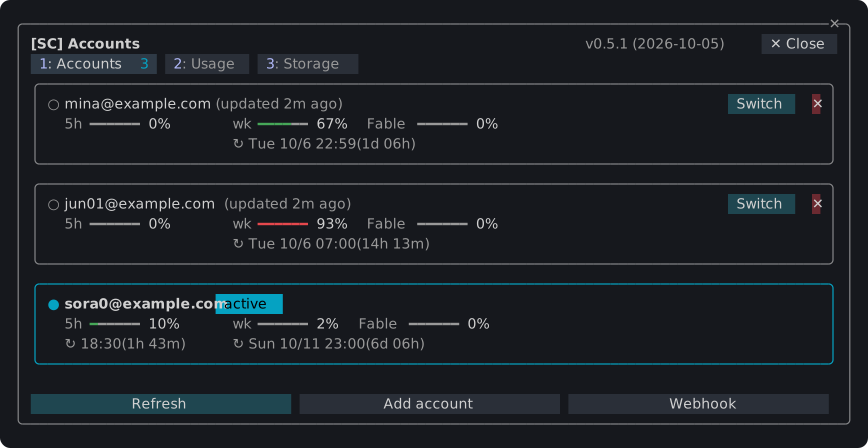
/sc:accounts

~/.claude가 종류별, 프로젝트별로 차지하는 공간과 입력 확인으로 유휴 세션을 정리하는 기능./sc:workspace
취소할 수 없는 작업은 먼저 대화 상자에서 확인을 요청합니다. Esc로 취소할 수 있습니다.
claude plugin marketplace add simplecore-inc/claude-mods
claude plugin install sc@simplecore-mods
sc는 sc-accounts와 sc-workspace를 함께 설치합니다. 플러그인은 사용자 단위로 설치되므로 모든 세션에서 실행됩니다. 이미 열려 있는 세션에서 /reload-plugins를 실행하세요.
로컬 클론을 사용하려면 해당 폴더를 마켓플레이스로 추가합니다.
git clone https://github.com/simplecore-inc/claude-mods.git
claude plugin marketplace add ./claude-mods
claude plugin install sc@simplecore-mods
claude plugin marketplace update simplecore-mods
claude plugin update sc@simplecore-mods
claude plugin update sc-accounts@simplecore-mods
claude plugin update sc-workspace@simplecore-mods
각 열려 있는 세션에서 /reload-plugins를 실행하세요. 로컬 클론의 경우, 클론에서 git pull을 실행하고 /reload-plugins를 실행하기만 하면 됩니다. 폴더 마켓플레이스의 플러그인은 해당 폴더에서 읽습니다.
claude plugin uninstall sc@simplecore-mods
claude plugin prune
claude plugin marketplace remove simplecore-mods
prune은 sc의 의존성으로 설치된 sc-accounts와 sc-workspace를 제거합니다. 직접 설치한 경우 이름으로 제거하세요. marketplace remove는 더 이상 해당 마켓플레이스에서 설치하지 않을 때만 필요합니다.
이 mod는 일부 데이터를 남기고 있으며, 수동으로 삭제할 수 있습니다.
| 항목 | 위치 |
| --- | --- |
| 저장된 로그인 | macOS: 서비스 account-switch의 키체인 항목. 기타: ~/.claude/account-switch/ |
| Webhook 토큰 | macOS: 서비스 sc-webhook의 키체인 항목. 기타: ~/.claude/sc-accounts/webhook-token |
| Webhook 템플릿 | ~/.claude/sc-accounts/ |
| 설정, 계정 인덱스, 노트, 체크포인트 목록 | ~/.claude/plugins/store/sc-*.json |
| 체크포인트 | 각 저장소에서: refs/sc/ 아래의 참조 및 파일 .git/sc-snapshot-*.index |
~/.claude는 CLAUDE_CONFIG_DIR이 설정된 경우 해당 값입니다. 저장소의 체크포인트를 삭제하려면:
git for-each-ref --format='%(refname)' refs/sc/ | xargs -n 1 git update-ref -d
rm -f "$(git rev-parse --git-dir)"/sc-snapshot-*.index
현재 로그인한 계정은 로그인 상태를 유지하며, 저장된 복사본만 제거됩니다.
mod는 영어를 표시하며, Claude Code의 language 설정이 한국어일 때는 한국어를 표시합니다. 다른 언어는 영어로 폴백됩니다. 해당 설정이 없으면 LC_ALL, LC_MESSAGES, LANG 순서로 결정됩니다.
mod 개발은 레이아웃, 엔진이 적용하는 규칙, 검사 및 릴리스 방법을 다룹니다.
먼저 작성자의 README에서 marketplace와 플러그인 이름을 확인하세요. 저장소 구조에 따라 명령어가 달라질 수 있습니다.
claude plugin marketplace add simplecore-inc/claude-mods
claude plugin install sc-workspace
Plugins for Claude Code that add panes, a status band and slash commands to the terminal: switch between several Claude accounts, watch their usage limits and token use, see and clean up what Claude Code keeps on the machine, and keep agents, worktrees, checkpoints, diffs and memory files in one pane. Install one plugin, sc, and you get them all.
/sc:accounts

~/.claude holds by kind and project, and a cleanup of idle sessions confirmed by typing a word./sc:workspace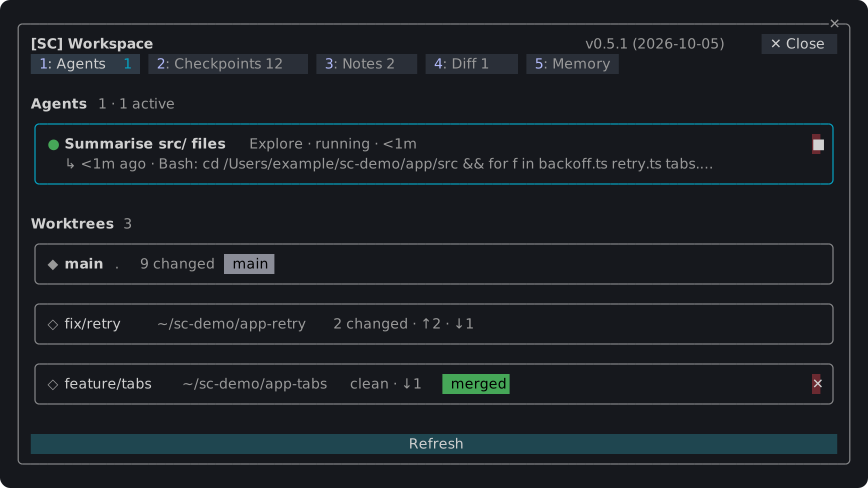
Anything that cannot be taken back asks in a dialog first; Esc cancels.
claude plugin marketplace add simplecore-inc/claude-mods
claude plugin install sc@simplecore-mods
sc installs sc-accounts and sc-workspace with it. The plugins are installed for your user, so they run in every session. Run /reload-plugins in a session that was already open.
To use a local clone instead, add its folder as the marketplace:
git clone https://github.com/simplecore-inc/claude-mods.git
claude plugin marketplace add ./claude-mods
claude plugin install sc@simplecore-mods
claude plugin marketplace update simplecore-mods
claude plugin update sc@simplecore-mods
claude plugin update sc-accounts@simplecore-mods
claude plugin update sc-workspace@simplecore-mods
Then run /reload-plugins in each open session. With a local clone, git pull in the clone and /reload-plugins are enough: a plugin from a folder marketplace is read from that folder.
claude plugin uninstall sc@simplecore-mods
claude plugin prune
claude plugin marketplace remove simplecore-mods
prune removes sc-accounts and sc-workspace, which were installed as dependencies of sc; uninstall them by name instead if you installed them yourself. marketplace remove is only needed when you will not install from it again.
The mods leave some data behind, which you can delete by hand:
| What | Where |
| --- | --- |
| Saved logins | macOS: keychain items of the service account-switch. Elsewhere: ~/.claude/account-switch/ |
| Webhook token | macOS: the keychain item of the service sc-webhook. Elsewhere: ~/.claude/sc-accounts/webhook-token |
| Webhook template | ~/.claude/sc-accounts/ |
| Settings, account index, notes, checkpoint lists | ~/.claude/plugins/store/sc-*.json |
| Checkpoints | in each repository: the refs under refs/sc/ and the files .git/sc-snapshot-*.index |
~/.claude is CLAUDE_CONFIG_DIR when that is set. To delete a repository's checkpoints:
git for-each-ref --format='%(refname)' refs/sc/ | xargs -n 1 git update-ref -d
rm -f "$(git rev-parse --git-dir)"/sc-snapshot-*.index
The account you are logged in with stays logged in; only the saved copies go.
The mods show English, and Korean where Claude Code's language setting is Korean; any other language falls back to English. Without that setting, LC_ALL, LC_MESSAGES and LANG decide, in that order.
Developing a mod covers the layout, the rules the engine enforces, the checks and how to release.

Ruflo 메모리 기반용 플러그인입니다. AgentDB 컨트롤러 브리지(15개 agentdb_* MCP 도구), RuVector ONNX 임베딩(RaBitQ 32x 양자화를 포함한 10개 embeddings_* 도구), WASM HNSW 패턴 라우터(3개 ruvllm_hnsw_* 도구)를 제공합니다. mod(ADR-445)로서 프롬프트에 안전한 선택적 회수를 넣고, 비밀이 메모리에 들어가지 않도록 쓰기 가드를 두며, /agentdb와 콘솔이 보여 주는 상태 파일을 제공합니다.

pbir CLI를 따르는 리포트 패널에서 Claude가 읽고 변경하는 내용을 보여 주면서 대화형 Power BI 리포트를 만들고, 형식을 지정하고, 최적화하고, 검토합니다.


프롬프트 위, 상태 줄과 toast에 읽지 않은 AMP 메시지를 표시하고 유휴 Claude Code 세션을 깨워 읽게 합니다. Claude Code 2.1.287 이상이 필요합니다.

