23blocks-OS@23blocks-OS
23blocks-OS/ai-maestro/tree/main/mods/amp-inbox-band

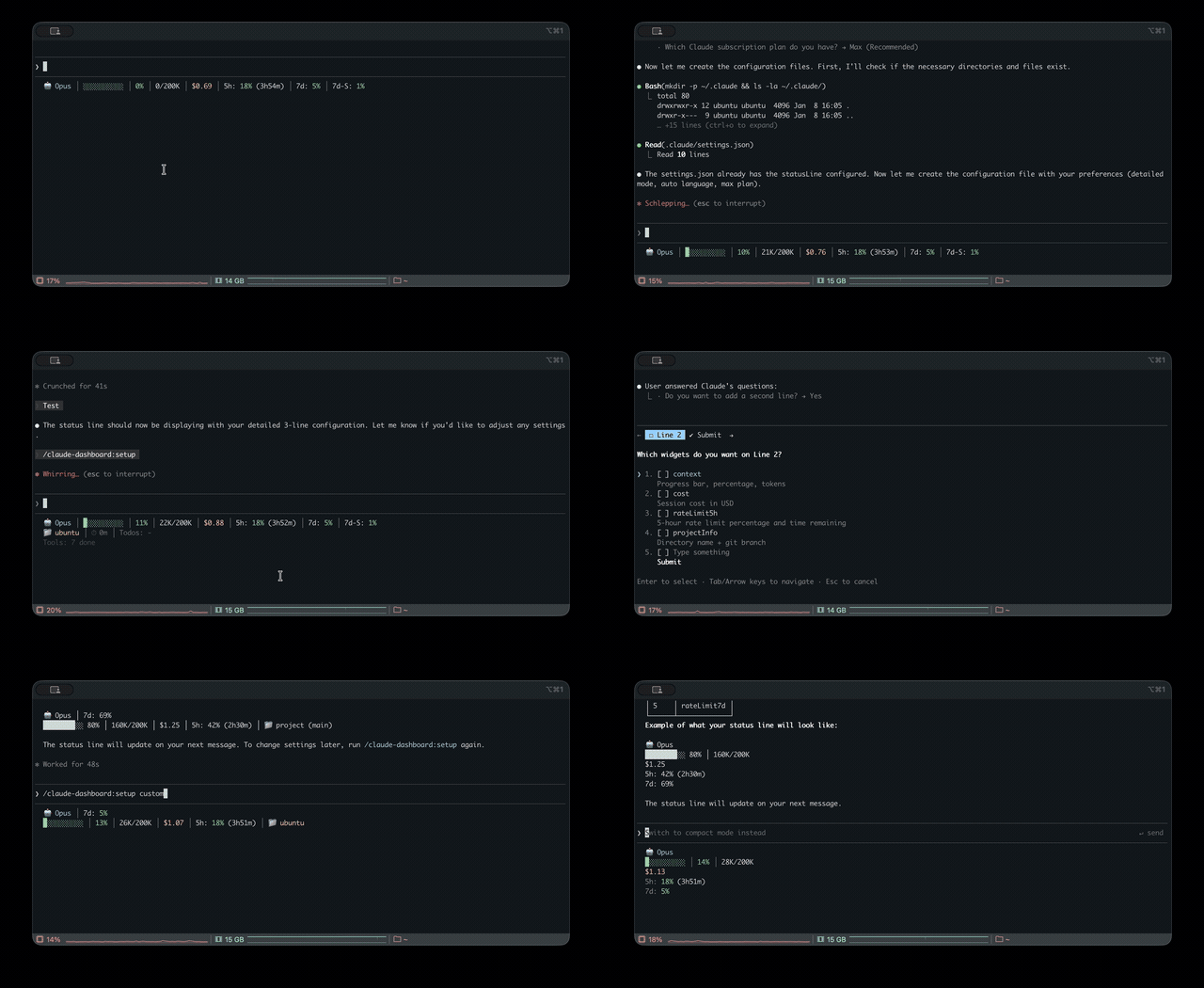
프롬프트 위, 상태 줄과 toast에 읽지 않은 AMP 메시지를 표시하고 유휴 Claude Code 세션을 깨워 읽게 합니다. Claude Code 2.1.287 이상이 필요합니다.
23blocks-OS/ai-maestro/tree/main/mods/amp-inbox-band
여러 터미널에서 AI 에이전트 35개를 실행하다가 에이전트 사이의 인간 우편배달부가 되었습니다. 그래서 AI Maestro를 만들었습니다.
AI 우선 조직을 위한 운영 체제 —— 영구 메모리, 에이전트 간 메시징과 다중 머신 지원으로 어떤 AI 에이전트든 오케스트레이션합니다.

-lightgrey)


AI 에이전트에게 진짜 작업을 맡겼습니다. 자동 완성이 아니라 실제 엔지니어링 문제였습니다. 코드를 확인하고 로그를 읽고 데이터베이스를 조회한 뒤 답을 가져왔습니다. 그 순간 생각했습니다. 이건 정말 작동하겠구나.
일주일도 지나지 않아 터미널 여러 곳에서 에이전트 35개를 실행하고 있었습니다. 생산적이었지만 서로 대화할 수 없었습니다. 한 터미널의 컨텍스트를 복사해 다른 터미널에 붙여 넣는 인간 메시지 버스가 된 탓에, 제 AI 팀의 병목은 저였습니다.
그래서 AI Maestro를 만들었습니다. 모든 머신의 모든 에이전트를 하나의 대시보드에서 보고, 영구 메모리와 에이전트 간 직접 통신을 제공합니다. 지금은 여러 컴퓨터에서 에이전트 80+개를 실행하며 매일 그들과 실제 회사를 만들고 있습니다.
다른 점은 다음과 같습니다.
AI Maestro는 AI 우선 회사의 운영 체제입니다. 작업 실행기가 아니라 상시 팀이 일하는 공간입니다.
이곳의 에이전트는 작업보다 직원에 가깝습니다. 이름, 얼굴, 세션을 넘어 남는 메모리와 받은 편지함이 있고, 제품·저장소·프로세스·고객 중 무언가를 소유합니다. 소유한 대상에 맞춰 메모리와 코드 그래프가 색인되므로 매일 아침 처음부터 시작하는 대신 몇 달에 걸쳐 그 일을 더 잘하게 됩니다.
소유하는 것이 있으므로 에이전트는 작업 복사본을 공유하지 않습니다. 같은 저장소가 필요한 두 에이전트는 각각 clone하고 자기 브랜치에서 작업한 뒤 git —— push, pull request, review, merge ——를 통해 통합합니다. 팀의 두 엔지니어가 하는 방식과 같습니다.
이는 의도적인 설계이며 제품을 정의하는 사실에서 나옵니다. 에이전트는 서로 다른 머신에서 실행됩니다. 공유 checkout에는 공유 파일 시스템이 필요합니다. 단일 머신 에이전트 IDE의 격리 원시 기능인 Git worktree는 한 디스크의 하나의 .git 저장소 위에 여러 작업 디렉터리를 두는 방식이므로 백엔드 에이전트가 Linux에 있고 iOS 에이전트가 Mac에 있는 순간 작동을 멈춥니다. 이동을 견디는 유일한 원시 기능은 clone입니다. 그래서 에이전트를 다른 호스트로 옮기면 저장소를 대상에 clone합니다. 에이전트의 저장소가 에이전트와 함께 이동하는 것입니다.
curl -fsSL https://raw.githubusercontent.com/23blocks-OS/ai-maestro/main/scripts/remote-install.sh | sh
필요한 모든 것을 설치합니다.
시간: 5-10분 · 필요: Node.js 18+, tmux · 선택 사항: inbox mod를 위한 Claude Code 2.1.287+
<details> <summary>Windows(WSL2)/ Linux 참고 사항</summary>Windows: 먼저 WSL2를 설치하고(관리자 권한으로 PowerShell을 연 뒤 재시작)시작 메뉴에서 Ubuntu를 열어 그곳에서 curl 명령을 실행하세요.
wsl --install
WSL이 처음인가요? WSL은 자체 디스크가 있는 Linux 시스템이므로 home 폴더가 비어 있는 상태로 시작합니다. 에이전트는 그곳(기본값 ~/agents/<name>)에 두고 WSL에서 훨씬 느린 C:\ 폴더에는 두지 마세요. Windows에서는 \\wsl.localhost\Ubuntu\home\<you>\agents로 파일을 열 수 있습니다.Windows 5분 안내 · 전체 Windows 가이드
Linux: 빌드 도구가 설치되어 있는지 확인하세요: sudo apt install tmux build-essential
git clone https://github.com/23blocks-OS/ai-maestro.git
cd ai-maestro
yarn install
yarn dev
자세한 설정은 QUICKSTART.md를 참고하세요.
</details>대시보드는 http://localhost:23000에서 열립니다.
모든 기능은 실제 AI 우선 조직을 운영하면서 생겼습니다. 필요했던 순서대로 만들었습니다.
터미널이 35개나 있어서 어느 것이 어느 것인지 알 수 없었습니다.
한 곳에서 모든 AI 에이전트를 보고 관리하세요. 안내 마법사로 UI에서 에이전트를 만들고 스마트한 이름으로 정리할 수 있습니다(project-backend-api가 자동 색상을 적용한 3단계 트리로 바뀜). 클릭 한 번으로 에이전트를 전환합니다. 배포 모드는 tmux(로컬), Docker(컨테이너화), AWS EC2(전용 인스턴스), AWS ECS Fargate(서버리스) 네 가지입니다. tmux 세션, Docker 컨테이너, 클라우드 배포와 독립 에이전트를 자동으로 찾습니다.
Mac Mini가 놀고 있었습니다. 거기에도 에이전트를 실행하면 어떨까요?
모든 머신이 동등한 피어 메시 네트워크입니다. 컴퓨터를 추가하면 메시 네트워크에 들어옵니다. 모든 머신의 모든 에이전트를 하나의 대시보드에서 볼 수 있습니다. Mac은 iOS 빌드, Linux는 Docker, 클라우드는 무거운 계산처럼 각 머신이 잘하는 일에 사용하세요. 중앙 서버가 필요 없습니다.
워커 머신은 헤드리스(yarn headless)로 실행할 수 있습니다. UI 없이 전체 API와 에이전트 런타임을 약 100MB 메모리로 실행합니다. 대시보드는 있는 곳에서, 에이전트는 계산 자원이 있는 곳에서 실행하세요.
에이전트끼리 대화할 수 없어서 메시지를 복사해 주던 인간 우편배달부였습니다.
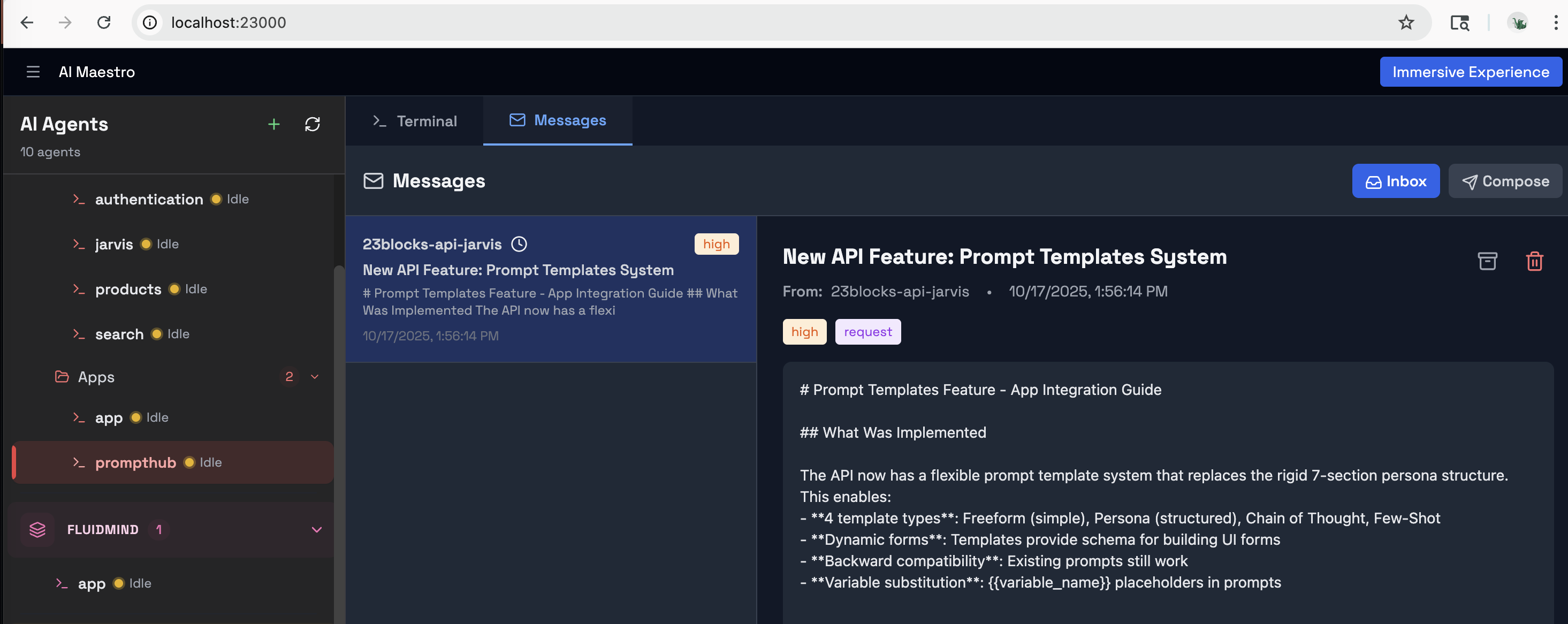
Agent Messaging Protocol(AMP)은 에이전트에게 이메일 같은 통신을 제공합니다. 우선순위, 메시지 유형, 암호화 서명과 푸시 알림을 지원합니다. 에이전트에게 *「send a message to backend about the deployment」*라고 말하면 바로 작동합니다. 에이전트는 직접 조율하고 여러분은 큰 그림을 관리합니다.
AMP 이전: 한 터미널의 조사 결과를 복사해 다른 터미널에 붙여 넣는 일을 하루 50번 반복합니다. AMP 이후: 「Research agent, send your findings to the writing agent.」 끝입니다.
싱가포르의 친구가 자기 에이전트와 내 에이전트를 대화시키고 싶어 했지만 내 네트워크에 접근하게 하고 싶지는 않았습니다.
조직 게이트웨이를 통해 AI 에이전트를 Slack, Discord, Email, WhatsApp에 연결합니다. 스마트 라우팅(@AIM:agent-name), 스레드를 이해하는 응답과 콘텐츠 보안을 제공하며, 게이트웨이에서 34개의 프롬프트 인젝션 패턴을 감지해 에이전트가 메시지를 보기 전에 막습니다.
매일 아침 에이전트들은 기억상실증처럼 깨어났습니다.
장기 메모리는 에이전트별로 켜는 skill입니다. 매일 밤 각 에이전트의 대화가 메모리가 됩니다. 배운 내용을 짧게 적고 각각의 근거가 된 문단을 연결하며, 에이전트가 다루는 것과 관계를 나타내는 엔티티 그래프(runs on, depends on, stores data in, deploys to)를 최신으로 유지하고 끝난 관계에는 표시를 남깁니다. Claude Code는 30일 후 transcript를 삭제하지만 AI Maestro는 에이전트 자체의 메시지 인덱스에서 기록을 재구성해 몇 달의 작업이 사라지지 않고 메모리가 되게 합니다. 프롬프트에 무언가가 나오면 에이전트가 행동하기 전에 그것과 관계된 대상을 알려 주므로 변경의 영향을 볼 수 있습니다. 여러 세션에서 더 자주 나타나는 지식은 더 높은 가중치를 얻고 비밀은 가려져 저장되지 않습니다.작동 방식 →
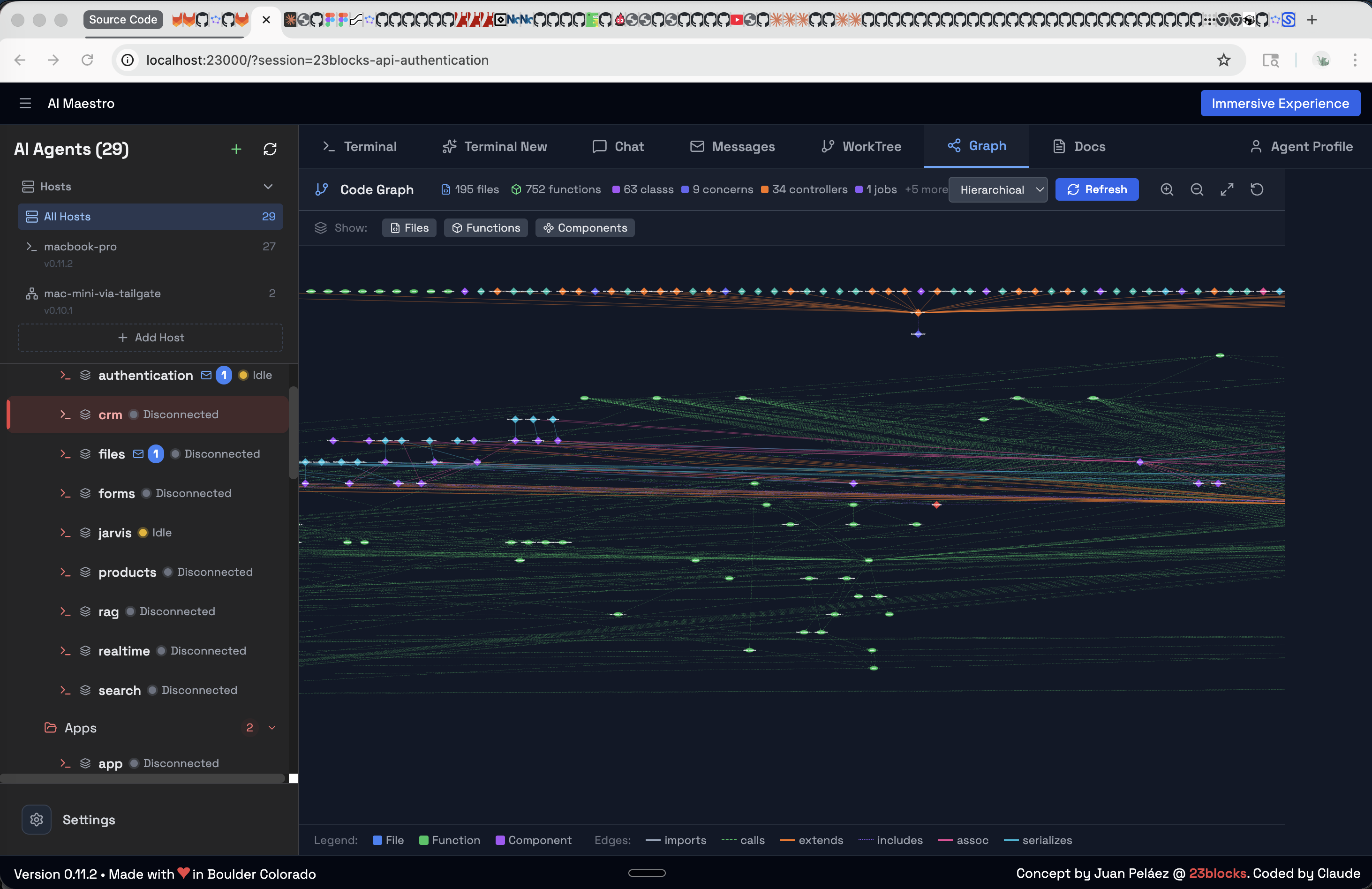
그 옆에 Code Graph(델타 인덱싱이 적용된 전체 코드베이스의 대화형 시각화)와 Documentation(코드에서 자동 생성되는 검색 가능한 문서)도 있습니다. 함께 일할수록 에이전트는 더 똑똑해집니다.
말만 하는 것은 충분하지 않았습니다. 실제 결과물을 조정할 에이전트가 필요했습니다.
에이전트를 팀으로 묶고 분할 화면 war room에서 회의를 열며 드래그 앤 드롭·의존성을 지원하는 전체 Kanban 보드로 작업을 추적합니다. 5개의 상태 열이 있고 머신을 가로지르는 팀도 자연스럽게 작동합니다. AI 인력을 위한 프로젝트 관리입니다.
기억해서 요청할 때까지 기다리면 안 되는 작업도 있습니다.
에이전트에게 자체 일정 —— 아침 분류, 야간 의존성 점검, 월요일 보고서 —— 을 줍니다. 타이머는 머신이 아니라 에이전트에 속하므로 호스트를 옮길 때 일정도 따라가고, 작업 중간에 방해하지 않고 에이전트가 유휴 상태가 되었을 때 실행됩니다.
에이전트가 80개가 되자 모두 똑같아 보였습니다.
각 에이전트에 사용자 지정 아바타, 성격 프로필과 역할을 설정합니다. 얼굴과 직함이 있으면 실제 팀처럼 자연스럽게 알맞은 일을 맡기게 됩니다.
에이전트는 말하고 보일 수도 있습니다. 원하는 TTS 제공자의 음성 파이프라인과 에이전트가 말할 때 움직이는 실시간 애니메이션 얼굴을 제공합니다. 에이전트와 통화를 열면 에이전트가 이쪽을 바라봅니다. 산책하며 계획을 들으면서 검토하고 나면 터미널이 다운그레이드처럼 느껴질 정도입니다.
분명히 말할 주의점이 하나 있습니다. 진짜 립싱크 —— 실제 오디오가 이끄는 입 움직임 —— 에는 OpenAI 또는 ElevenLabs 음성과 API key가 필요합니다. 기본 브라우저 음성(web-speech)은 스피커로 바로 출력되고 측정할 오디오 스트림을 노출하지 않으므로 얼굴은 합성 엔벨로프에 따라 애니메이션됩니다. 살아 있는 듯 보이지만 말을 추적하는 것은 아닙니다. 이는 Web Speech API의 한계이며 우회할 계획인 문제가 아닙니다.
내 노트북에 에이전트 하나, EC2에 하나, Fargate에 하나가 있고 모두 같은 대시보드에 있습니다.
에이전트를 실행하는 방법은 네 가지이며 각각 다른 필요를 위한 것입니다.
| 모드 | 내용 | 적합한 용도 | |------|------|----------| | tmux | 머신에서 직접 실행하는 터미널 세션 | 로컬 개발, 설정 없음 | | Docker | 리소스 제한이 있는 컨테이너 에이전트 | 격리, 재현성, 여러 프로젝트 | | AWS EC2 | 기본 설치와 Nginx + SSL이 있는 전용 Graviton 인스턴스 | 상시 에이전트, SSH 접근, 지속 작업 | | AWS ECS Fargate | Docker 이미지를 자동 빌드하는 서버리스 컨테이너 | 버스트 확장, 유지 관리 없음, 사용량 과금 |
클라우드 에이전트는 Terraform으로 관리합니다. EC2는 ARM64 하드웨어에 Node.js, tmux와 AI CLI를 직접 설치합니다(Docker 오버헤드 없음). ECS는 Docker 이미지를 자동으로 빌드해 ECR로 푸시하고 Fargate에서 실행합니다. 둘 다 대시보드나 CLI에서 한 명령으로 배포합니다.
# EC2: dedicated instance with SSL
aimaestro-agent.sh create my-api --ec2 \
  --domain api.example.com --ssl-email [email protected] --key-name my-key

# ECS Fargate: serverless (auto-builds image)
aimaestro-agent.sh create worker --ecs
모든 AI 우선 조직은 에이전트 하나로 시작합니다. Lola는 AI Maestro를 위해 만들어진 올인원 Chief of Staff 프레임워크입니다. 이메일 분류, 의미 메모리, 작업 관리와 콘텐츠 보안을 기본으로 처리합니다. 플랫폼을 설치하고 Lola를 배포하면 첫날부터 첫 직원을 얻습니다.
# Clone and deploy Lola on AI Maestro
git clone https://github.com/23blocks-OS/lolabot.git
cd lolabot && ./setu
먼저 작성자의 README에서 marketplace와 플러그인 이름을 확인하세요. 저장소 구조에 따라 명령어가 달라질 수 있습니다.
claude plugin marketplace add 23blocks-OS/ai-maestro
claude plugin install amp-inbox-band
I was running 35 AI agents across multiple terminals and became the human mailman between them. So I built AI Maestro.
The OS for AI-first organizations — orchestrate any AI agent with persistent memory, agent-to-agent messaging, and multi-machine support.
Quick Start · Features · Documentation · Contributing
</div>I gave an AI agent a real task — not autocomplete, a real engineering problem. It checked the code, read the logs, queried the database, and came back with the answer. That was the moment. This thing can actually work.
Within a week I was running 35 agents across terminals. They were productive, but they couldn't talk to each other. I became the human message bus — copying context from one terminal, pasting into another. I was the bottleneck in my own AI team.
So I built AI Maestro — one dashboard to see every agent, on every machine, with persistent memory and direct agent-to-agent communication. Today I run 80+ agents across multiple computers, building real companies with them every day.
What makes this different:
AI Maestro is an operating system for an AI-first company. Not a task runner — a place where a standing team works.
An agent here is closer to an employee than to a job. It has a name, a face, a memory that survives the session, an inbox — and it owns something: a product, a repository, a process, a customer. Its memory and code graph are indexed against what it owns, which is why it gets better at that thing over months rather than starting cold every morning.
Because agents own things, they don't share a working copy. Two agents that need the same repository each clone it, work on their own branch, and integrate through git — push, pull request, review, merge — exactly like two engineers on a team.
That's deliberate, and it follows from the one thing that defines this product: your agents run on different machines. A shared checkout needs a shared filesystem. Git worktrees — the isolation primitive the single-machine agent IDEs are built on — are several working directories over one .git store on one disk, so they stop working the moment your backend agent is on a Linux box and your iOS agent is on a Mac. A clone is the only primitive that survives the move. It's why transferring an agent to another host clones its repos to the destination: an agent's repositories travel with the agent.
curl -fsSL https://raw.githubusercontent.com/23blocks-OS/ai-maestro/main/scripts/remote-install.sh | sh
This installs everything you need:
Time: 5-10 minutes · Requires: Node.js 18+, tmux · Optional: Claude Code 2.1.287+ for the inbox mod
<details> <summary>Windows (WSL2) / Linux notes</summary>Windows: Install WSL2 first (PowerShell as Administrator, then restart), then open Ubuntu from the Start menu and run the curl command there:
wsl --install
New to WSL? WSL is a Linux system with its own disk, so its home folder starts empty. Keep agents there (~/agents/<name>, the default), not in C:\ folders, which are much slower from WSL. Open their files from Windows at \\wsl.localhost\Ubuntu\home\<you>\agents. Windows in 5 minutes · Full Windows guide
Linux: Ensure build tools are installed: sudo apt install tmux build-essential
git clone https://github.com/23blocks-OS/ai-maestro.git
cd ai-maestro
yarn install
yarn dev
See QUICKSTART.md for detailed setup options.
</details>Dashboard opens at http://localhost:23000
Every feature was born from running a real AI-first organization. We built them in the order we needed them.
I had 35 terminals and couldn't tell which was which.
See and manage all your AI agents in one place. Create agents from the UI with a guided wizard, organize them with smart naming (project-backend-api becomes a 3-level tree with auto-coloring), and switch between any agent with a click. Four deployment modes: tmux (local), Docker (containerized), AWS EC2 (dedicated instance), and AWS ECS Fargate (serverless). Auto-discovers tmux sessions, Docker containers, cloud deployments, and standalone agents.
My Mac Mini was sitting there idle. What if I ran agents on that too?
A peer mesh network where every machine is equal. Add a computer, it joins the mesh. Every agent on every machine, visible from one dashboard. Use each machine for what it's best at — Mac for iOS builds, Linux for Docker, cloud for heavy compute. No central server required.
Worker machines can run headless (yarn headless) — the full API and agent runtime with no UI, in about 100MB of RAM. Run the dashboard where you sit; run agents wherever the compute is.
I was the mailman — copying messages between agents because they couldn't talk to each other.
The Agent Messaging Protocol (AMP) gives your agents email-like communication. Priority levels, message types, cryptographic signatures, and push notifications. Tell your agent "send a message to backend about the deployment" — it just works. Agents coordinate directly while you manage the big picture.
Before AMP: You copy research from one terminal, paste into another, repeat 50 times a day. With AMP: "Research agent, send your findings to the writing agent." Done.
A friend in Singapore wanted his agents to talk to mine. But I didn't want to give him access to my network.
Connect your AI agents to Slack, Discord, Email, and WhatsApp through organizational gateways. Smart routing (@AIM:agent-name), thread-aware responses, and content security with 34 prompt injection patterns detected at the gateway — before any agent sees the message.
Every morning, my agents woke up with amnesia.
Long-term memory is a skill you switch on per agent. Every night each agent's conversations become memory: short statements of what it learned, each backed by the passages it came from, and an entity graph of the things it works with and how they relate (runs on, depends on, stores data in, deploys to), kept current, with ended relations marked. Claude Code deletes transcripts after 30 days; AI Maestro rebuilds that history from the agent's own message index, so months of work become memory instead of disappearing. When a prompt names something, the agent is told what it relates to before it acts, so it can see what a change affects. Knowledge that comes up in more sessions weighs more; secrets are redacted and never stored. How it works →
Alongside it: Code Graph (interactive visualization of your entire codebase with delta indexing) and Documentation (auto-generated, searchable docs from your code). Agents get smarter the longer they work with you.
Talking isn't working. I needed agents to coordinate on actual deliverables.
Assemble agents into teams, run meetings in split-pane war rooms, and track tasks on a full Kanban board with drag-and-drop, dependencies, and 5 status columns. Cross-machine teams work seamlessly. This is project management for your AI workforce.
Some jobs shouldn't wait for me to remember to ask.
Give an agent its own schedule — morning triage, a nightly dependency check, a Monday report. The timer belongs to the agent, not the machine, so a schedule travels with the agent when it moves hosts, and fires when that agent goes idle instead of interrupting it mid-task.
At 80 agents, they all looked the same.
Custom avatars, personality profiles, and roles for every agent. When an agent has a face and a job title, you instinctively assign it the right work — just like a real team.
Agents can also speak and be seen: a voice pipeline with your choice of TTS provider, and live animated faces that move while the agent talks. Open a call with an agent and it looks back at you. Nobody else is doing this, and once you've reviewed a plan by listening to it on a walk, the terminal feels like a downgrade.
One caveat worth stating plainly: true lip-sync — mouth movement driven by the actual audio — needs the OpenAI or ElevenLabs voice and an API key. The default browser voice (web-speech) renders straight to your speakers and exposes no audio stream to measure, so the face animates from a synthetic envelope instead. It looks alive; it is not tracking the words. That is a limit of the Web Speech API, not something we plan to work around.
One agent on my laptop. Another on EC2. A third on Fargate. All in the same dashboard.
Four ways to run agents, each for a different need:
| Mode | What | Best For | |------|------|----------| | tmux | Direct terminal sessions on your machine | Local development, zero setup | | Docker | Containerized agents with resource limits | Isolation, reproducibility, multi-project | | AWS EC2 | Dedicated Graviton instance with native install, Nginx + SSL | Always-on agents, SSH access, persistent workloads | | AWS ECS Fargate | Serverless containers, auto-built Docker image | Burst scaling, zero maintenance, pay-per-use |
Cloud agents are Terraform-managed. EC2 installs Node.js, tmux, and AI CLIs directly on ARM64 hardware (no Docker overhead). ECS auto-builds your Docker image, pushes to ECR, and runs on Fargate. Both deploy with one command from the dashboard or CLI.
# EC2: dedicated instance with SSL
aimaestro-agent.sh create my-api --ec2 \
  --domain api.example.com --ssl-email [email protected] --key-name my-key

# ECS Fargate: serverless (auto-builds image)
aimaestro-agent.sh create worker --ecs
Every AI-first organization starts with one agent. Lola is yours — a batteries-included Chief of Staff framework built for AI Maestro. She handles email triage, semantic memory, task management, and content security out of the box. Install the platform, deploy Lola, and you have your first employee on day one.
# Clone and deploy Lola on AI Maestro
git clone https://github.com/23blocks-OS/lolabot.git
cd lolabot && ./setup.sh
The LolaBot Ecosystem:
Every agent is built from five dimensions:
| | Dimension | What | Where | |-|-----------|------|-------| | WHO | Personality | Domain expertise, workflows, deliverables | Agent Library (150+) | | HOW | Capabilities | Skills, scripts, CLI tools, Canvas | Plugin Builder | | TRUST | Identity | Cryptographic keys, OAuth tokens | AID | | TALK | Communication | Agent-to-agent messaging | AMP | | ACT | Actions | Tool execution, API calls, workflows | AAP |
Open Protocols — AI Maestro is built on three open standards:
AI Maestro is the stage. Pick personalities, give them skills, and run them from one dashboard.
Read the full ecosystem guide →
Founders building AI-first organizations. You're the CEO, your agents are the team. Solo operators, agency owners, and anyone running a business where AI agents do the work and you drive the strategy. Start with Lola, add specialists, scale your AI workforce.
Developers running multiple AI agents. If you have 3+ agents and you're switching between terminals, losing context, and playing messenger — this is for you. Works with Claude Code, Codex, Aider, Cursor, or any terminal-based AI.
Teams coordinating AI-assisted work. Multiple developers, multiple agents, multiple machines. One dashboard. Agent-to-agent messaging replaces you as the bottleneck.
Creators and operators who want to connect AI agents to the outside world through Slack, Discord, or Email — without exposing their infrastructure.
Code Graph — Interactive codebase visualization
Agent Inbox — Direct agent-to-agent messaging
New here?
Going deeper:
Troubleshooting:
Open Protocols:
Extending:
See the full roadmap and join the discussion.
We love contributions. See CONTRIBUTING.md for guidelines.
AI Maestro is better because of people outside the team who hit something, read the source, and sent a fix. In order of arrival:
C-m instead of Enter for tmux
send-keys, which is still how every message reaches an agent today, and a fix
stopping undefined values from overwriting task fields on update.ecosystem.config.js.We built this because one of us was running 35 agents across terminals and had become the human message bus between them. It solved our problem. That it solves yours too is the best thing that has happened to this project — and a patch from someone who hit a rough edge and read the source is the most useful thing we can receive. Open a PR.
<details> <summary><b>Acknowledgments</b></summary>Built with Next.js, xterm.js, CozoDB, ts-morph, tmux, and Claude Code.
</details>MIT — see LICENSE. Free for any purpose, including commercial.
Made with love in Boulder (USA), Roma (Italy), and many other cool places
Built by AI Agents with Humans in the driver seat — for AI-first organizations, AI-enabled humans, and autonomous agents
</div>Do I need to use Claude Code? No. AI Maestro works with any terminal-based AI agent — Claude Code, Codex, Aider, Cursor, OpenClaw, Hermes, Droid, or your own scripts. We're agent-agnostic.
Does it work on Linux / Windows? Yes. macOS and Linux natively. Windows via WSL2 — see the Windows guide.
Can agents on different machines talk to each other? Yes. The Agent Messaging Protocol (AMP) handles cross-machine messaging with cryptographic signatures and push notifications. No central server required.
What are AID and AAP? AID (Agent Identity) gives each agent a portable cryptographic identity. AAP (Agent Actions Protocol) standardizes how agents execute tools and trigger workflows. Together with AMP, they form the open protocol stack that AI Maestro is built on.
What is the Canvas skill? Canvas lets agents generate visual artifacts — diagrams, charts, and interactive documents — directly from conversations. It's part of the plugin system and available to any agent.
How is this different from just using tmux? tmux gives you terminals. AI Maestro gives you an organization — persistent memory, agent-to-agent messaging, team coordination, Kanban boards, multi-machine mesh, cloud deployment, and gateway integrations. tmux is the foundation; AI Maestro is the building.
What is LolaBot? LolaBot is an open-source agent framework — a batteries-included Chief of Staff that handles email, memory, tasks, and security. The LolaBot Factory offers pre-built agent templates for one-click deployment.
What does it cost? Nothing. MIT licensed, free for any purpose including commercial — no seats, no usage fees, no paid tier. You bring your own agent subscriptions (Claude Code, Codex, whatever you already pay for) and AI Maestro just runs them. Note that some tools in this space are source-available rather than open source, under licenses that forbid offering them as a service; MIT has no such restriction.
Do you collect telemetry?
No. No analytics SDK, no account, no login, no phone-home. The only telemetry in the product is the agent metrics shown on your own dashboard, and those post to localhost:23000 — your machine. Point them at a central collector only if you choose to run one.
How does this compare to the parallel-agent IDEs? Different job, and deliberately so. Tools like Orca, Paseo, Superset and Conductor run several agents on one repository on one machine, each in an isolated git worktree, then diff the results so you can merge the best one. It's a disposable fan-out: five attempts at the same task, keep one, throw away four. They're good at it. If that's the workflow you want today, use one of them.
AI Maestro is built for the case after that one — a standing team of agents that own things, remember their work, message each other, and run across every machine you have. We don't use worktrees because worktrees can't leave the machine they're on: they're several working directories over one .git store on one disk. Our agents each clone what they own and integrate through pull requests, like a human team, which is the only model that works when the backend agent is on Linux and the iOS agent is on a Mac. See the mental model.
Can I run several agents on the same repository?
Yes — give each one its own clone. Backend owns the API, frontend owns the web app, infra owns the Terraform, even inside a monorepo. They coordinate over AMP and merge through git. For a large repo, git clone --filter=blob:none or --reference to a local mirror keeps the disk cost down. And an individual agent is free to use git worktree inside its own clone — worktrees are a fine tool within an agent, just not how we isolate agents from each other.
Is there a hosted / cloud version? Not yet. AI Maestro runs on your machines. You own your data, your agents, and your infrastructure.
How do I add more agents?
Create them from the dashboard UI, the CLI (aimaestro-agent.sh create), or just start a new tmux session — AI Maestro auto-discovers it.

Ruflo 메모리 기반용 플러그인입니다. AgentDB 컨트롤러 브리지(15개 agentdb_* MCP 도구), RuVector ONNX 임베딩(RaBitQ 32x 양자화를 포함한 10개 embeddings_* 도구), WASM HNSW 패턴 라우터(3개 ruvllm_hnsw_* 도구)를 제공합니다. mod(ADR-445)로서 프롬프트에 안전한 선택적 회수를 넣고, 비밀이 메모리에 들어가지 않도록 쓰기 가드를 두며, /agentdb와 콘솔이 보여 주는 상태 파일을 제공합니다.

pbir CLI를 따르는 리포트 패널에서 Claude가 읽고 변경하는 내용을 보여 주면서 대화형 Power BI 리포트를 만들고, 형식을 지정하고, 최적화하고, 검토합니다.


Claude Code용 통합 상태 줄로, 여러 CLI(Claude, Codex, Gemini, Antigravity, z.ai)의 사용량, 컨텍스트, 속도 제한과 비용을 모니터링합니다.