
uppinote20@uppinote20
uppinote20/claude-dashboard
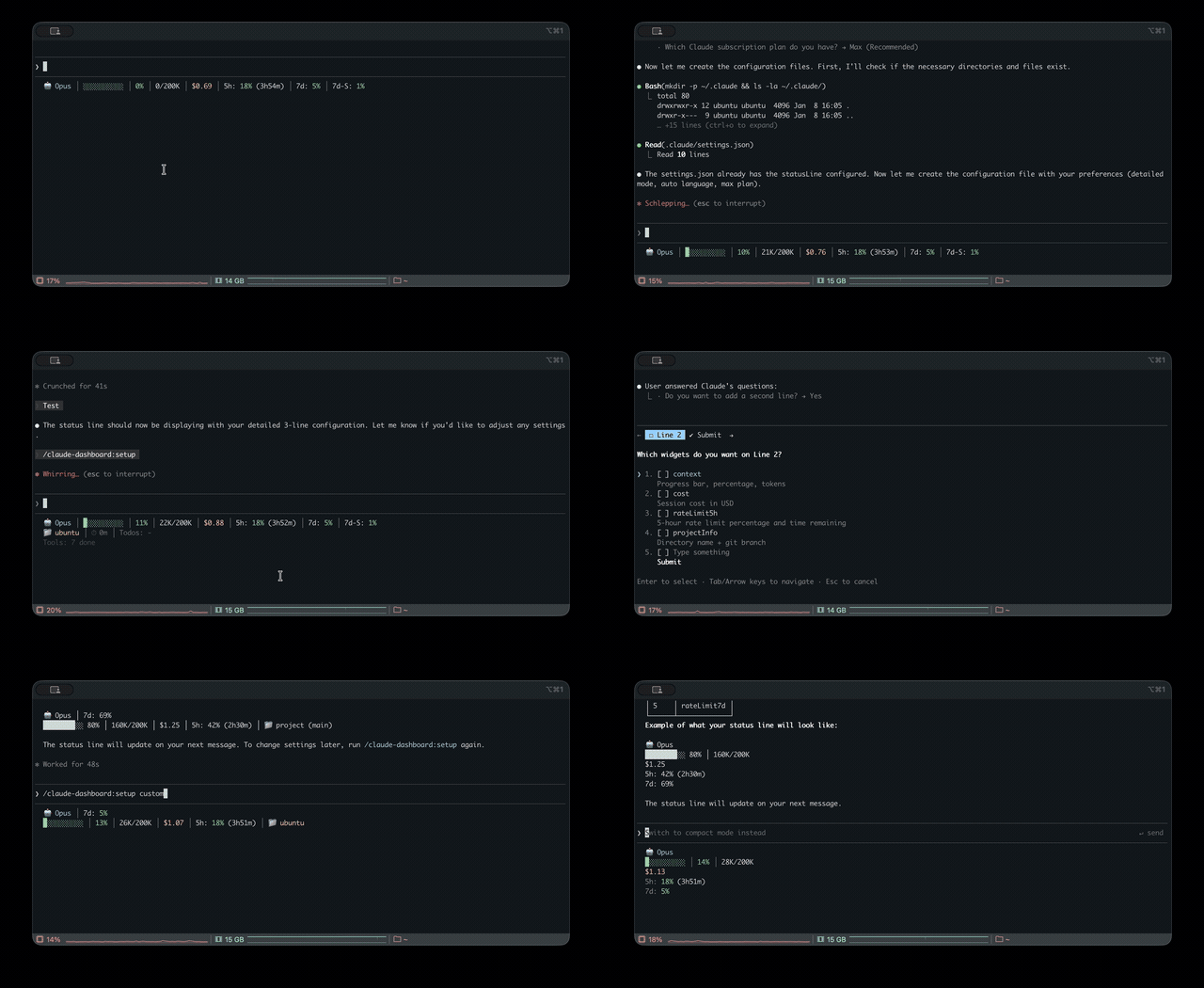
Claude Code용 통합 상태 줄로, 여러 CLI(Claude, Codex, Gemini, Antigravity, z.ai)의 사용량, 컨텍스트, 속도 제한과 비용을 모니터링합니다.
uppinote20/claude-dashboard

Claude Code용 종합 상태 줄 플러그인입니다. Claude, Codex, Gemini, Antigravity, z.ai CLI의 사용량을 통합 모니터링하고 컨텍스트, 속도 제한, 비용 추적과 모듈형 위젯 시스템을 제공합니다.

요구 사항: Claude Code v1.0.80+ / Node.js 18+
/plugin marketplace add uppinote20/claude-dashboard
/plugin install claude-dashboard
/claude-dashboard:setup
git clone https://github.com/uppinote20/claude-dashboard.git "${CLAUDE_CONFIG_DIR:-$HOME/.claude}/plugins/claude-dashboard"
/claude-dashboard:setup
/claude-dashboard:setup은plugins/cache/claude-dashboard/claude-dashboard/아래에서 플러그인을 찾습니다. 수동으로plugins/claude-dashboard/에 clone하면 이 경로와 맞지 않으므로 setup 명령의 shim 검색에서 복사할 항목을 찾지 못합니다.statusLine.command를settings.json에서 clone한 디렉터리의dist/index.js로 직접 지정하세요(예:node "${CLAUDE_CONFIG_DIR:-$HOME/.claude}/plugins/claude-dashboard/dist/index.js"). 수동 설치는 버전을 자동으로 가져오지 않으므로 릴리스마다git pull을 실행하고 경로도 직접 업데이트해야 합니다.
컴팩트(1줄)- 기본:

모델, 컨텍스트 진행률 표시줄, 비용, 속도 제한(5h/7d)또는 z.ai 사용량(제공자별 상호 배타적)
일반(2줄):

프로젝트 정보, 세션 ID, 세션 시간, 소모 속도, todo 진행률을 추가합니다.
상세(6줄):

소진 예상 시간, 설정 수, 도구/에이전트 상태, 캐시 적중, 성능 배지, token 내역, 예측, 예산, Codex/Gemini/Antigravity 사용량을 추가합니다.
다중 제공자를 지원하며, 설치되어 있으면 z.ai/ZHIPU, Codex, Gemini, Antigravity를 자동 감지합니다.
| 범주 | 위젯 | 설명 |
|----------|--------|-------------|
| 핵심 | model | emoji가 포함된 모델 이름과 버전(예: Opus 5.5), Opus/Sonnet/Fable의 effort 수준(MAX/X/H/M/L), Opus의 빠른 모드(↯). stdin에서 현재 effort.level / fast_mode를 읽고, 이전 Claude Code에서는 settings.json으로 대체합니다. |
| | context | 진행률 표시줄, 백분율, token(🟢 0-50% / 🟡 51-80% / 🔴 81-100%) |
| | contextBar | 진행률 표시줄만 표시(context의 하위 위젯) |
| | contextPercentage | 백분율만 표시(context의 하위 위젯) |
| | contextUsage | token 수만 표시. 예: 42K/200K(context의 하위 위젯) |
| | cost | 세션 비용(USD) |
| | projectInfo | 디렉터리 + git 브랜치(클릭 가능한 OSC8 링크)+ ahead/behind(↑↓), project_dir의 하위 경로, worktree 표시기(🌳) |
| 속도 제한 | rateLimit5h | 5시간 속도 제한 및 재설정 카운트다운 |
| | rateLimit7d | 7일 속도 제한(Pro 및 Max) |
| | rateLimit7dSonnet | 7일 Sonnet 제한(Max만 해당)—지원 중단 ~2026-06: Anthropic이 Sonnet 5 출시 때 통합 주간 버킷으로 합쳤으므로 API가 null을 반환하고, 필드가 돌아올 때까지 위젯을 숨깁니다. |
| | rateLimit7dFable | 7일 Fable 제한(Max만 해당) |
| 세션 | sessionId | 세션 ID(짧은 8-char) |
| | sessionIdFull | 세션 ID(전체 UUID) |
| | sessionName | /rename 명령에서 가져온 세션 이름 |
| | sessionDuration | 세션 시간 |
| | lastPrompt | 타임스탬프가 있는 마지막 사용자 프롬프트 |
| | configCounts | CLAUDE.md, AGENTS.md, rules, MCPs, hooks, +Dirs |
| 활동 | toolActivity | 대상이 포함된 실행 중/완료된 도구(예: Read(app.ts)) |
| | agentStatus | 확인된 모델이 표시된 서브에이전트 진행 상황. 예: Explore(Opus)(Agent 도구의 model 매개변수 또는 CLAUDE_CODE_SUBAGENT_MODEL에서 가져옴) |
| | todoProgress | todo 완료율 |
| 분석 | burnRate | 분당 token 소비량, 세션 평균(입력 + 캐시 쓰기 + 출력) |
| | cacheHit | 캐시 적중률 백분율(마지막 요청) |
| | promptCache | 세션 프롬프트 캐시 상태: ♨️ 따뜻함, 식기 전 남은 시간 / ❄️ 차가움, 적중률, 미스 수. 예: ♨️ 4m 91% miss 2(prompt_cache에서 가져오며 Claude Code ≥ 2.1.251)。따뜻함→차가움 전환은 자동으로 일어납니다. 유휴 상태에서도 분 카운트다운을 계속 움직이려면 statusLine.refreshInterval(예: 60)을 설정하세요. |
| | promptCacheState | 따뜻함/차가움 아이콘과 남은 시간만 표시. 예: ♨️ 4m(promptCache의 하위 위젯) |
| | promptCacheHit | 세션 캐시 적중률만 표시(promptCache의 하위 위젯) |
| | promptCacheMisses | 미스 수만 표시. 예: miss 2; 0이면 숨김(promptCache의 하위 위젯) |
| | depletionTime | 속도 제한까지 남은 예상 시간(근사값)¹ |
| 멀티 CLI | codexUsage | OpenAI Codex CLI 사용량(설치되지 않았으면 자동 숨김)² |
| | geminiUsage | Google Gemini CLI - 현재 모델(설치되지 않았으면 자동 숨김)³ |
| | geminiUsageAll | Google Gemini CLI - 모든 모델(설치되지 않았으면 자동 숨김)³ |
| | antigravityUsage | Google Antigravity CLI - 모델 계열별 주간 할당량(설치되지 않았으면 자동 숨김)⁸ |
| | antigravityUsageAll | Google Antigravity CLI - 모델별 할당량(설치되지 않았으면 자동 숨김)⁸ |
| | zaiUsage | z.ai/ZHIPU 사용량(z.ai를 사용하지 않으면 자동 숨김)⁴ |
| 인사이트 | tokenBreakdown | 입력/출력/캐시 쓰기/읽기 token 내역 |
| | performance | 종합 효율 배지(캐시 적중 + 출력 비율) |
| | forecast | 세션 속도를 기준으로 한 시간당 예상 비용 |
| | budget | 일일 지출과 설정된 예산 한도 비교⁵ |
| | tokenSpeed | 출력 token 생성 속도(tok/s), 세션 평균 |
| | tokenSpeedLast | 가장 최근 응답의 출력 token 생성 속도만 표시 |
| | todayCost | 오늘 모든 세션의 총 지출 |
| 상태 | peakHours | 카운트다운이 있는 피크 시간 표시기(PeakClaude 기반)⁶ |
| | tagStatus | 일치하는 git 태그보다 앞선 커밋 수(기본 패턴 v*, tagPatterns로 사용자 지정)⁷ |
| | slashCommand | 현재 턴의 활성 slash 명령(🎯), 다음 일반 텍스트 메시지에서 지워짐 |
| | agentMode | 세션 에이전트 정체성: 👤 사용자 지정 에이전트(/agent <name> 사용)또는 🤖 서브에이전트 유형 |
| 정보 | linesChanged | 추적되지 않은 파일을 포함한 커밋되지 않은 추가/삭제 줄(+N -N) |
| | outputStyle | 현재 출력 스타일("default"일 때 숨김) |
| | version | Claude Code 버전 표시 |
| | vimMode | Vim 모드(NORMAL/INSERT), Vim이 비활성화되면 자동 숨김 |
| | apiDuration | 전체 세션 시간에서 API 시간이 차지하는 비율 |
¹ 모든 사용량이 이 세션에서 발생했다고 가정하며, 세션이 길어질수록 정확도가 좋아집니다. ²
~/.codex/auth.json을 찾지 못하면 자동으로 숨깁니다. ³~/.gemini/oauth_creds.json을 찾지 못하면 자동으로 숨깁니다. Gemini CLI 개인 요금제는 2026-06-18에 종료되고 Antigravity CLI로 대체되었습니다(기업 지원은 계속됨). ⁴ANTHROPIC_BASE_URL로 감지되지 않으면 자동으로 숨깁니다. ⁵ 설정에"dailyBudget"가 필요합니다. ⁶ Peak = 평일 5-11 AM PT이며 다음 전환까지의 카운트다운을 표시합니다. ⁷tagPatterns설정을 사용합니다(기본값["v*"]). 도달 가능한 태그와 일치하는 패턴이 없으면 자동으로 숨깁니다. ⁸~/.gemini/antigravity-cli/antigravity-oauth-token을 찾지 못하면 자동으로 숨깁니다.
i18n: 영어와 한국어를 지원합니다(자동 감지 또는 setup에서 설정)。
# Preset modes
/claude-dashboard:setup compact             # 1 line (default)
/claude-dashboard:setup normal en pro       # 2 lines, English, Pro plan
/claude-dashboard:setup detailed ko max     # 6 lines, Korean, Max plan

# Custom mode: control widget order and line composition
# Format: "widget1,widget2,...|widget3,widget4,..." (| separates lines)
/claude-dashboard:setup custom auto max "model,context,cost|projectInfo,todoProgress"
플랜 차이:
| 기능 | Max | Pro | |---------|--------|-----| | 5h 속도 제한 + 카운트다운 | ✅ | ✅ | | 7d 모든 모델 | ✅ | ❌ |
<details> <summary><strong>고급 구성</strong></summary>대화형 모드: 인수 없이 /claude-dashboard:setup을 실행합니다. 프리셋 선택에 적합하며, 위젯을 완전히 제어하려면 직접 모드를 사용하거나 JSON 파일을 직접 편집하세요.
표시 모드 프리셋(zaiUsage와 rateLimit*은 제공자에 따라 상호 배타적):
| 모드 | 줄 수 | 위젯 |
|---------|-------|---------|
| compact | 1 | model, context, cost, rateLimit5h/7d/7dSonnet, zaiUsage |
| normal | 2 | + projectInfo, sessionId, sessionDuration, burnRate, todoProgress |
| detailed | 6 | + depletionTime, configCounts, toolActivity, agentStatus, cacheHit, promptCache, performance, tokenBreakdown, forecast, budget, codexUsage, geminiUsage, antigravityUsage, linesChanged, outputStyle, version, peakHours, lastPrompt, vimMode, apiDuration, tagStatus |
구성 파일(~/.claude/claude-dashboard.local.json):
{
  "language": "auto",
  "plan": "max",
  "displayMode": "custom",
  "lines": [
    ["model", "context", "cost", "rateLimit5h"],
    ["projectInfo", "todoProgress"]
  ],
  "theme": "default",
  "separator": "pipe",
  "dailyBudget": 15,
  "disabledWidgets": [],
  "modPane": "detailed",
  "modBand": "MC$R|BDO",
  "modBandDefault": false,
  "cache": { "ttlSeconds": 60 }
}
또는 프리셋 축약형으로 빠르게 구성합니다.
{
  "preset": "MC$R|BDO",
  "theme": "tokyoNight",
  "separator": "dot"
}
테마: default(pastel)/ minimal(monochrome)/ catppuccin / catppuccinLatte(light-mode)/ dracula / gruvbox / nord / tokyoNight / solarized
구분자: pipe(│, 기본)/ space / dot(·)/ arrow(›)
프리셋 단축키: 한 글자로 된 빠른 레이아웃——"preset": "MC$R|BDO"(M=model, C=context, $=cost, R=rateLimit5h 등)
예산 추적: "dailyBudget": 15을 설정해 일일 지출을 추적합니다. 80%에서 ⚠️, 95%에서 🚨를 표시합니다.
태그 상태: "tagPatterns": ["v*", "release-*"]로 tagStatus 패턴을 사용자 지정합니다. 기본값은 ["v*"]입니다. 도달 가능한 태그와 일치하는 패턴이 없으면 위젯을 자동으로 숨깁니다.
위젯 전환: 위젯 ID를 disabledWidgets에 추가하면 어느 표시 모드에서든 숨길 수 있습니다.
Mod 레이아웃: modPane(/claude-dashboard-pane 패널, 기본 detailed)와 modBand(/claude-dashboard-band 밴드, 기본값은 상태 줄 레이아웃)는 표시 모드 이름(compact / normal / detailed)또는 "MC$R|BDO" 같은 프리셋 문자열을 받습니다. "modBandDefault": true로 설정하면 세션 시작 시 밴드가 켜집니다. Mods를 참조하세요.
색상 범례: 🟢 0-50% 안전 / 🟡 51-80% 경고 / 🔴 81-100% 위험
</details>/claude-dashboard:setup상태 줄 표시 모드, 언어 및 플랜을 구성합니다. 구성을 참조하세요.
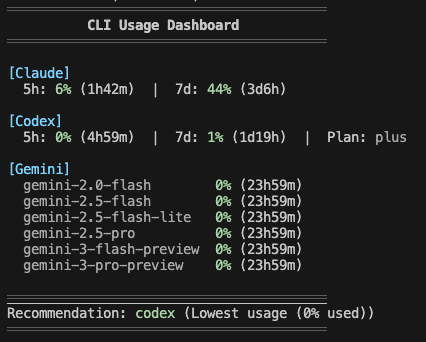
/claude-dashboard:check-usage모든 AI CLI(Claude, Codex, Gemini, Antigravity, z.ai)의 사용 제한을 한 번에 확인하고 가장 여유 있는 CLI를 추천합니다.
/claude-dashboard:check-usage              # Interactive output with colors
/claude-dashboard:check-usage --json       # JSON output for scripting
/claude-dashboard:check-usage --lang ko    # Specify language

/claude-dashboard:setup-alias터미널에서 모든 AI CLI 사용량을 빠르게 확인하는 check-ai shell 별칭을 추가합니다. macOS/Linux(zsh/bash)와 Windows(PowerShell)을 지원합니다.
/claude-dashboard:setup-alias
설정 후:
check-ai          # Pretty output
check-ai --json   # JSON output for scripting
/claude-dashboard:updatestatusLine shim을 복구하거나 확인합니다. 보통은 필요하지 않습니다. /plugin update 후 상태 줄이 새 버전을 자동으로 사용하기 때문입니다. hooks를 비활성화했거나 상태 줄 업데이트가 멈춘 경우 사용하세요.
/claude-dashboard:update
claude-dashboard는 Claude Code mod(function-hook 플러그인, 얼리 액세스, Claude Code 2.1.289에서 테스트됨)로도 제공됩니다. 같은 플러그인(hooks/hooks.json → "modules": ["../dist/mod.js"])에 포함되어 있으므로 추가 설치가 필요 없습니다. Mods는 그립니다
먼저 작성자의 README에서 marketplace와 플러그인 이름을 확인하세요. 저장소 구조에 따라 명령어가 달라질 수 있습니다.
claude plugin marketplace add uppinote20/claude-dashboard
claude plugin install claude-dashboard
Comprehensive status line plugin for Claude Code — unified usage monitoring across Claude, Codex, Gemini, Antigravity, and z.ai CLIs, with context, rate limits, cost tracking, and a modular widget system.
Requirements: Claude Code v1.0.80+ / Node.js 18+
/plugin marketplace add uppinote20/claude-dashboard
/plugin install claude-dashboard
/claude-dashboard:setup
git clone https://github.com/uppinote20/claude-dashboard.git "${CLAUDE_CONFIG_DIR:-$HOME/.claude}/plugins/claude-dashboard"
/claude-dashboard:setup
/claude-dashboard:setuplooks for the plugin underplugins/cache/claude-dashboard/claude-dashboard/, which a manual clone intoplugins/claude-dashboard/does not match — the setup command's shim lookup will find nothing to copy. PointstatusLine.commandinsettings.jsondirectly at your clone'sdist/index.jsinstead (e.g.node "${CLAUDE_CONFIG_DIR:-$HOME/.claude}/plugins/claude-dashboard/dist/index.js"), and note that manual installs do not get automatic version pickup —git pulland update the path yourself after each release.
Compact (1 line) - Default:

Model, context progress bar, cost, rate limits (5h/7d) or z.ai usage (mutually exclusive by provider)
Normal (2 lines):

Adds project info, session ID, session duration, burn rate, todo progress
Detailed (6 lines):

Adds depletion time, config counts, tool/agent status, cache hit, performance badge, token breakdown, forecast, budget, Codex/Gemini/Antigravity usage
Multi-provider support: z.ai/ZHIPU, Codex, Gemini, Antigravity auto-detected when installed.
| Category | Widget | Description |
|----------|--------|-------------|
| Core | model | Model name and version with emoji (e.g. Opus 5.5), effort level for Opus/Sonnet/Fable (MAX/X/H/M/L), fast mode for Opus (↯). Reads the live effort.level / fast_mode from stdin, falling back to settings.json on older Claude Code |
| | context | Progress bar, percentage, tokens (🟢 0-50% / 🟡 51-80% / 🔴 81-100%) |
| | contextBar | Progress bar only (sub-widget of context) |
| | contextPercentage | Percentage only (sub-widget of context) |
| | contextUsage | Token count only, e.g. 42K/200K (sub-widget of context) |
| | cost | Session cost in USD |
| | projectInfo | Directory + git branch (clickable OSC8 link) + ahead/behind (↑↓), subpath from project_dir, worktree indicator (🌳) |
| Rate Limits | rateLimit5h | 5-hour rate limit with reset countdown |
| | rateLimit7d | 7-day rate limit (Pro and Max) |
| | rateLimit7dSonnet | 7-day Sonnet limit (Max only) — deprecated ~2026-06: Anthropic merged it into the unified weekly bucket at the Sonnet 5 launch, so the API returns null and the widget stays hidden until/unless the field returns |
| | rateLimit7dFable | 7-day Fable limit (Max only) |
| Session | sessionId | Session ID (short 8-char) |
| | sessionIdFull | Session ID (full UUID) |
| | sessionName | Session name from /rename command |
| | sessionDuration | Session duration |
| | lastPrompt | Last user prompt with timestamp |
| | configCounts | CLAUDE.md, AGENTS.md, rules, MCPs, hooks, +Dirs |
| Activity | toolActivity | Running/completed tools with targets (e.g., Read(app.ts)) |
| | agentStatus | Subagent progress with resolved model, e.g. Explore(Opus) (from the Agent tool's model param or CLAUDE_CODE_SUBAGENT_MODEL) |
| | todoProgress | Todo completion rate |
| Analytics | burnRate | Token consumption per minute, session average (input + cache write + output) |
| | cacheHit | Cache hit rate percentage (last request) |
| | promptCache | Session prompt-cache health: ♨️ warm with time left before it goes cold / ❄️ cold, hit ratio, miss count, e.g. ♨️ 4m 91% miss 2 (from prompt_cache, Claude Code ≥ 2.1.251). The warm→cold switch happens on its own; set statusLine.refreshInterval (e.g. 60) to keep the minute countdown ticking while idle |
| | promptCacheState | Warm/cold icon + time left only, e.g. ♨️ 4m (sub-widget of promptCache) |
| | promptCacheHit | Session cache hit ratio only, e.g. 91% (sub-widget of promptCache) |
| | promptCacheMisses | Miss count only, e.g. miss 2; hidden at 0 (sub-widget of promptCache) |
| | depletionTime | Estimated time to rate limit (approx)¹ |
| Multi-CLI | codexUsage | OpenAI Codex CLI usage (auto-hide if not installed)² |
| | geminiUsage | Google Gemini CLI - current model (auto-hide if not installed)³ |
| | geminiUsageAll | Google Gemini CLI - all models (auto-hide if not installed)³ |
| | antigravityUsage | Google Antigravity CLI - weekly quota by model family (auto-hide if not installed)⁸ |
| | antigravityUsageAll | Google Antigravity CLI - per-model quota (auto-hide if not installed)⁸ |
| | zaiUsage | z.ai/ZHIPU usage (auto-hide if not using z.ai)⁴ |
| Insights | tokenBreakdown | Input/output/cache write/read token breakdown |
| | performance | Composite efficiency badge (cache hit + output ratio) |
| | forecast | Estimated hourly cost based on session rate |
| | budget | Daily spending vs configured budget limit⁵ |
| | tokenSpeed | Output token generation speed (tok/s), session average |
| | tokenSpeedLast | Output token generation speed of the most recent response only |
| | todayCost | Total spending across all sessions today |
| Status | peakHours | Peak hours indicator with countdown (based on PeakClaude)⁶ |
| | tagStatus | Commits ahead of matched git tags (default pattern v*, customize via tagPatterns)⁷ |
| | slashCommand | Active slash command for the current turn (🎯), cleared by next plain-text message |
| | agentMode | Session agent identity: 👤 custom agent (via /agent <name>) or 🤖 subagent type |
| Info | linesChanged | Uncommitted lines added/removed, including untracked files (+N -N) |
| | outputStyle | Current output style (hidden when "default") |
| | version | Claude Code version display |
| | vimMode | Vim mode (NORMAL/INSERT), auto-hides when vim disabled |
| | apiDuration | API time as % of total session time |
¹ Assumes all utilization came from this session; improves as session runs longer. ² Auto-hides if
~/.codex/auth.jsonnot found. ³ Auto-hides if~/.gemini/oauth_creds.jsonnot found — Gemini CLI personal tiers were retired 2026-06-18 in favor of Antigravity CLI (enterprise still supported). ⁴ Auto-hides if not detected viaANTHROPIC_BASE_URL. ⁵ Requires"dailyBudget"in config. ⁶ Peak = weekdays 5-11 AM PT; shows countdown to next transition. ⁷ UsestagPatternsconfig (default["v*"]); auto-hides when no pattern matches a reachable tag. ⁸ Auto-hides if~/.gemini/antigravity-cli/antigravity-oauth-tokennot found.
i18n: English and Korean supported (auto-detect or set via setup).
# Preset modes
/claude-dashboard:setup compact             # 1 line (default)
/claude-dashboard:setup normal en pro       # 2 lines, English, Pro plan
/claude-dashboard:setup detailed ko max     # 6 lines, Korean, Max plan

# Custom mode: control widget order and line composition
# Format: "widget1,widget2,...|widget3,widget4,..." (| separates lines)
/claude-dashboard:setup custom auto max "model,context,cost|projectInfo,todoProgress"
Plan differences:
| Feature | Max | Pro | |---------|-----|-----| | 5h rate limit + countdown | ✅ | ✅ | | 7d all models | ✅ | ❌ |
<details> <summary><strong>Advanced Configuration</strong></summary>Interactive Mode: Run /claude-dashboard:setup without arguments. Best for preset selection; for full widget control, use Direct Mode or edit the JSON file directly.
Display Mode Presets (zaiUsage and rateLimit* are mutually exclusive based on provider):
| Mode | Lines | Widgets |
|------|-------|---------|
| compact | 1 | model, context, cost, rateLimit5h/7d/7dSonnet, zaiUsage |
| normal | 2 | + projectInfo, sessionId, sessionDuration, burnRate, todoProgress |
| detailed | 6 | + depletionTime, configCounts, toolActivity, agentStatus, cacheHit, promptCache, performance, tokenBreakdown, forecast, budget, codexUsage, geminiUsage, antigravityUsage, linesChanged, outputStyle, version, peakHours, lastPrompt, vimMode, apiDuration, tagStatus |
Configuration file (~/.claude/claude-dashboard.local.json):
{
  "language": "auto",
  "plan": "max",
  "displayMode": "custom",
  "lines": [
    ["model", "context", "cost", "rateLimit5h"],
    ["projectInfo", "todoProgress"]
  ],
  "theme": "default",
  "separator": "pipe",
  "dailyBudget": 15,
  "disabledWidgets": [],
  "modPane": "detailed",
  "modBand": "MC$R|BDO",
  "modBandDefault": false,
  "cache": { "ttlSeconds": 60 }
}
Or use preset shorthand for quick configuration:
{
  "preset": "MC$R|BDO",
  "theme": "tokyoNight",
  "separator": "dot"
}
Themes: default (pastel) / minimal (monochrome) / catppuccin / catppuccinLatte (light-mode) / dracula / gruvbox / nord / tokyoNight / solarized
Separators: pipe (│, default) / space / dot (·) / arrow (›)
Preset Shortcuts: Quick layout with single characters — "preset": "MC$R|BDO" (M=model, C=context, $=cost, R=rateLimit5h, etc.)
Budget Tracking: Set "dailyBudget": 15 to track daily spending. Shows ⚠️ at 80% and 🚨 at 95%.
Tag Status: Customize tagStatus patterns via "tagPatterns": ["v*", "release-*"]. Default is ["v*"]. The widget auto-hides when no pattern matches a reachable tag.
Widget Toggle: Add widget IDs to disabledWidgets to hide them from any display mode.
Mod Layouts: modPane (the /claude-dashboard-pane pane, default detailed) and modBand (the /claude-dashboard-band band, default = your status line layout) take a display mode name (compact / normal / detailed) or a preset string like "MC$R|BDO". Set "modBandDefault": true to turn the band on at session start. See Mods.
Color Legend: 🟢 0-50% Safe / 🟡 51-80% Warning / 🔴 81-100% Critical
</details>/claude-dashboard:setupConfigure the status line display mode, language, and plan. See Configuration.
/claude-dashboard:check-usageCheck usage limits for all AI CLIs (Claude, Codex, Gemini, Antigravity, z.ai) at once and get a recommendation for which CLI has the most available capacity.
/claude-dashboard:check-usage              # Interactive output with colors
/claude-dashboard:check-usage --json       # JSON output for scripting
/claude-dashboard:check-usage --lang ko    # Specify language
/claude-dashboard:setup-aliasAdd a check-ai shell alias to quickly check all AI CLI usage from your terminal. Supports macOS/Linux (zsh/bash) and Windows (PowerShell).
/claude-dashboard:setup-alias
After setup:
check-ai          # Pretty output
check-ai --json   # JSON output for scripting
/claude-dashboard:updateRepair or verify the statusLine shim. Usually unnecessary — after /plugin update, the
status line picks up the new version on its own. Use this if you have hooks disabled or the
status line stops updating.
/claude-dashboard:update
claude-dashboard also ships as a Claude Code mod (function-hook plugin, early access, tested on Claude Code 2.1.289). It is bundled in the same plugin (hooks/hooks.json → "modules": ["../dist/mod.js"]), so there is nothing extra to install. Mods are drawn only in the terminal and the desktop Code tab (not the VS Code panel, not claude -p).
| Command | What it does |
|---------|--------------|
| /claude-dashboard-pane [on\|off] | Open or close a dashboard pane beside the transcript (no argument flips it). Layout from modPane (default detailed). |
| /claude-dashboard-band [on\|off] | Draw the dashboard above the prompt and hide the status line for this session only (settings.json is untouched). Layout from modBand (default = your status line layout). |
{
  "modPane": "detailed",
  "modBand": "MC$R|BDO",
  "modBandDefault": true
}
modPane / modBand accept a display mode name (compact / normal / detailed) or a preset string. modBandDefault: true turns the band on at session start./claude-dashboard:setup asks how you want to use the mod dashboard (status line only, peek with pane, replace with band, or both) and writes these keys; rerunning setup keeps keys it does not ask about.~/.cache/claude-dashboard/band-<sessionId>), refreshed on every render (at most every 60s) and ignored after 180s. It is deleted on off and at session end, so if the mod stops the status line comes back by itself within 3 minutes.disabledWidgets follow your normal config. cacheHit, tokenBreakdown, and performance are hidden in the pane and band (the mod API has no per-request cache usage).dist/index.js, run as a subprocess./plugin listsettings.json has a statusLine entry pointing at
plugins/data/claude-dashboard-claude-dashboard/statusline.mjscache.ttlSeconds, default 300 seconds)Claude Code relocates its whole config directory — credentials, settings, and history — when CLAUDE_CONFIG_DIR is set. That is how two accounts run side by side:
# Personal Max account, kept separate from the default ~/.claude
CLAUDE_CONFIG_DIR=~/.claude-max claude
The status line follows the same variable, so each session reports the account that is actually rendering it. Leave it unset and the default ~/.claude is used, as before.
Notes:
CLAUDE_CONFIG_DIR separates settings.json and history.jsonl reads, but rate-limit API calls use whichever OAuth token the Keychain holds./claude-dashboard:setup and /claude-dashboard:update register the status line into the session's config dir ($CLAUDE_CONFIG_DIR if set, ~/.claude otherwise) — run them once per account. The dashboard's own display config ~/.claude/claude-dashboard.local.json is intentionally shared across accounts.Run setup with explicit language:
/claude-dashboard:setup normal ko  # Korean
/claude-dashboard:setup normal en  # English
API response cache is stored in ~/.cache/claude-dashboard/. To clear:
rm -rf ~/.cache/claude-dashboard/
Cache files are automatically cleaned up after 1 hour.
</details>npm install && npm run build
See CONTRIBUTING.md for details.
If you find this plugin useful, support development:
<div style="display: flex; gap: 20px; align-items: center;"> <a href="https://ko-fi.com/uppinote" target="_blank"> <img src="https://storage.ko-fi.com/cdn/kofi5.png" alt="Buy Me a Coffee at ko-fi.com" style="height:60px; width:217px;"> </a> <a href="https://www.buymeacoffee.com/uppinote" target="_blank"> <img src="https://cdn.buymeacoffee.com/buttons/v2/default-yellow.png" alt="Buy Me A Coffee" style="height:60px; width:217px;"> </a> </div>MIT

Ruflo 메모리 기반용 플러그인입니다. AgentDB 컨트롤러 브리지(15개 agentdb_* MCP 도구), RuVector ONNX 임베딩(RaBitQ 32x 양자화를 포함한 10개 embeddings_* 도구), WASM HNSW 패턴 라우터(3개 ruvllm_hnsw_* 도구)를 제공합니다. mod(ADR-445)로서 프롬프트에 안전한 선택적 회수를 넣고, 비밀이 메모리에 들어가지 않도록 쓰기 가드를 두며, /agentdb와 콘솔이 보여 주는 상태 파일을 제공합니다.

pbir CLI를 따르는 리포트 패널에서 Claude가 읽고 변경하는 내용을 보여 주면서 대화형 Power BI 리포트를 만들고, 형식을 지정하고, 최적화하고, 검토합니다.


프롬프트 위, 상태 줄과 toast에 읽지 않은 AMP 메시지를 표시하고 유휴 Claude Code 세션을 깨워 읽게 합니다. Claude Code 2.1.287 이상이 필요합니다.

