
r3al1tym@r3al1tym
r3al1tym/claude-review
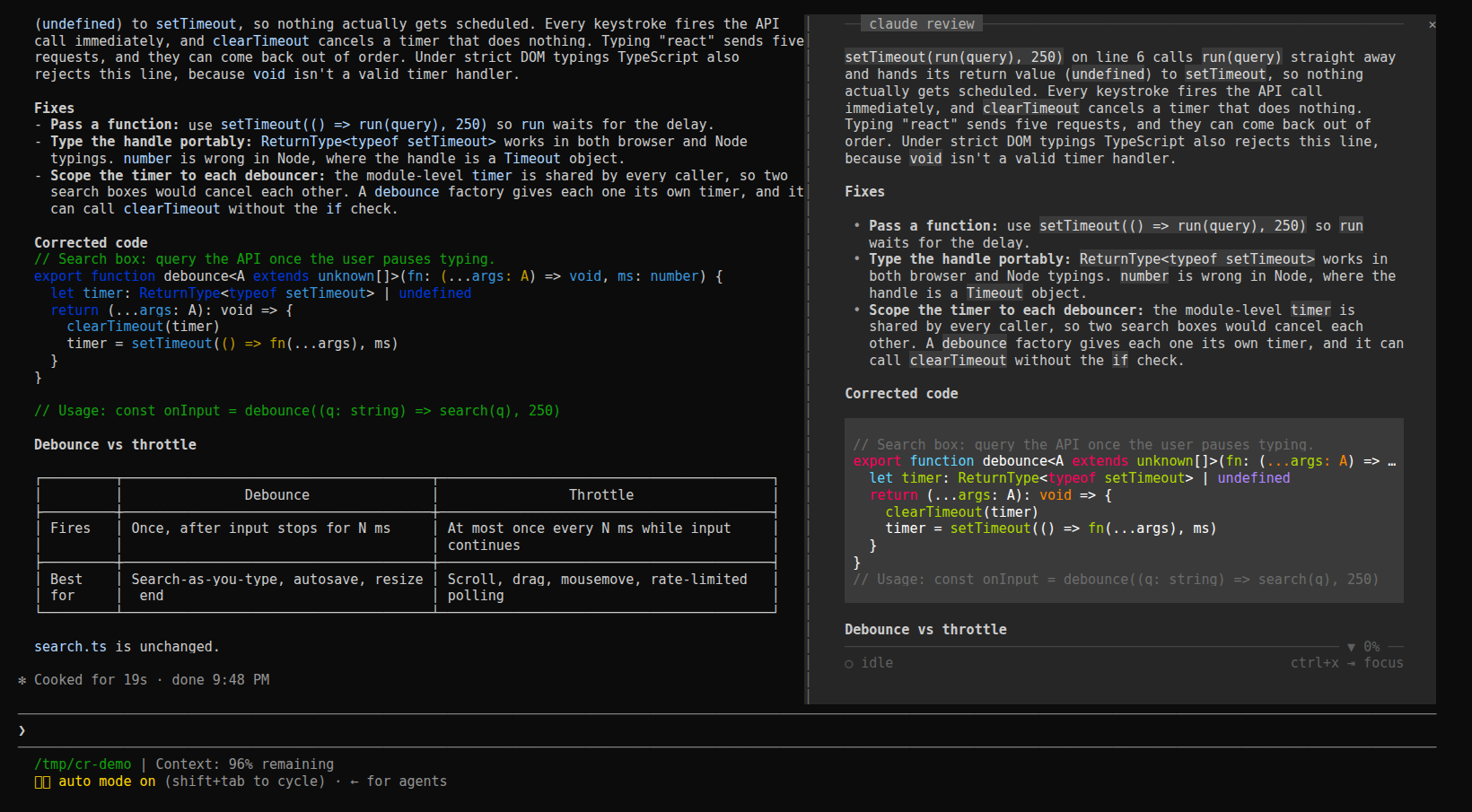
대화 옆에 읽기 창을 고정하고 세션의 최신 답변, 계획, 대기 중인 질문, 작업 목록을 여유 있는 차분한 열에 표시하며 키보드 탐색을 지원하는 Claude Code 플러그인입니다.
r3al1tym/claude-review
claude-review(review-pane)는 function hooks 플러그인으로 Claude Code 안에서 실행되는 Claude Code mod이므로 동기화해야 할 두 번째 터미널이나 트랜스크립트 경로가 없습니다. hooks API($.session.messages())로 대화를 읽고 행이 들어올 때(session.append)새로 고치며 Claude가 쓰는 현재 턴을 따라갑니다. h/l은 이전/다음 턴, 스크롤 키, f는 고정, r은 실시간으로 돌아가기, t는 화면(plan, question, response, tasks)순환, y는 복사, m은 안내서, q는 닫기입니다. 창은 144열 이상인 터미널에서 자동으로 열리며 /claude-review로도 열 수 있습니다. claude plugin marketplace add r3al1tym/claude-review 및 claude plugin install review-pane@claude-review로 설치하거나 저장소를 ~/.claude/skills/review-pane에 심볼릭 링크하고 claude --plugin-dir를 사용할 수 있습니다. 네트워크 요청을 하지 않고 세션에도 아무것도 쓰지 않습니다. 요구 사항: function hooks는 얼리 액세스 기능이며 Claude Code 2.1.287을 대상으로 테스트했습니다.
먼저 작성자의 README에서 marketplace와 플러그인 이름을 확인하세요. 저장소 구조에 따라 명령어가 달라질 수 있습니다.
claude plugin marketplace add r3al1tym/claude-review
claude plugin install review-pane


Faster than HTML. Calmer than the terminal.
A reading pane docked inside Claude Code, beside the conversation. It shows the session's latest reply, rendered for reading in a padded column, and follows the live turn as Claude writes. Its plan, the question Claude is waiting on, and the task list are one key away.
claude-review is a Claude Code mod: a plugin of function hooks that runs inside Claude Code, so there is no second terminal, no transcript path and nothing to keep in sync.
claude plugin marketplace add r3al1tym/claude-review
claude plugin install review-pane@claude-review
The next session opens the pane by itself once the terminal is 144 columns or wider. At any width, /claude-review opens it and closes it again.
From a clone, link the folder into your skills directory, where Claude Code loads it in every session as review-pane@skills-dir and reloads it when you save a file:
git clone https://github.com/r3al1tym/claude-review ~/src/claude-review
ln -s ~/src/claude-review ~/.claude/skills/review-pane
For one session only: claude --plugin-dir ~/src/claude-review.
The pane follows the live turn. Give it the keyboard with ctrl+x then Tab (until you do, its key row says ctrl+x ⇥ focus), and Esc hands the keys back.
| Keys | What they do |
| --- | --- |
| h l | earlier / later turn; an earlier turn leads with the prompt it answered |
| ↑ ↓ j k, wheel, PgUp PgDn, Home End, g | scroll |
| f | freeze the view while Claude keeps working; again to unfreeze |
| r | back to the live turn |
| t | next surface: plan, question, response, tasks, whichever this turn has |
| y | copy the surface shown |
| m | the guide: every key, plus the session's diagnostics |
| q | close the pane |
A plan waiting for your approval and a pending question lead while Claude waits on them. While the view is frozen or on an earlier turn, new reply lights up in the key row when a reply lands on the live turn.
To change the default, set Open on start in /config (on: the pane opens by itself on a wide terminal; off: only /claude-review opens it). claude plugin disable review-pane@claude-review turns the mod off everywhere, and enable turns it back on.
The mod reads the conversation through the hooks API ($.session.messages()) and refreshes as rows land (session.append), so the pane updates while Claude writes, not only when a turn ends. It writes nothing to the session, makes no network calls and touches no files; y puts text on your clipboard through Claude Code.
In the terminal it lays out its own rows (hooks/markdown.ts, hooks/screen.tsx): a monochrome markdown theme where emphasis comes from weight and only code keeps its syntax colours, a 4-cell gutter, and chrome pinned at the edges. A rule with the claude review label sits at the top, and a rule and one key row sit at the bottom. The rules carry ▲ and ▼ N% when there is more above or below. The desktop app and VS Code draw the same reply with their own Markdown and buttons.
claude plugin validate . and claude plugin test ..m and surfaces are t, and the pane needs the keyboard (ctrl+x then Tab) before they work.claude-review began as a Python TUI you ran in a second terminal pane. The mod replaces it. Its last release, v0.5.3, still installs with pipx install git+https://github.com/r3al1tym/[email protected], and its source lives at that tag.
See CONTRIBUTING.md for the development loop. Security posture and how to report a vulnerability are in SECURITY.md; the project follows a Code of Conduct.
MIT © r3al1tym.

문서 생성, 드리프트 감지, API 문서 자동화 플러그인이며 비밀이 포함된 문서 쓰기나 worker 디스패치를 거부하는 function-hook 가드로도 동작합니다.

Claude 데스크톱 앱용 상태 표시줄입니다. 프롬프트 위에 나타나 세션 품질, 컨텍스트 사용량, 캐시 카운트다운, 5시간 및 주간 한도를 보여 주고 Clawd가 세션의 동작을 연출합니다.

databricks CLI를 따라 Databricks 작업 공간, Unity Catalog, 컴퓨팅, 작업, 파이프라인, 앱, 대시보드를 트리로 보여 주는 /databricks-pane을 제공하는 Claude Code 플러그인 mod입니다. 실시간 강조, 프로필 전환, CLI 인수 복사도 지원합니다.
