
RyanEmslie@RyanEmslie
RyanEmslie/prompt-posse
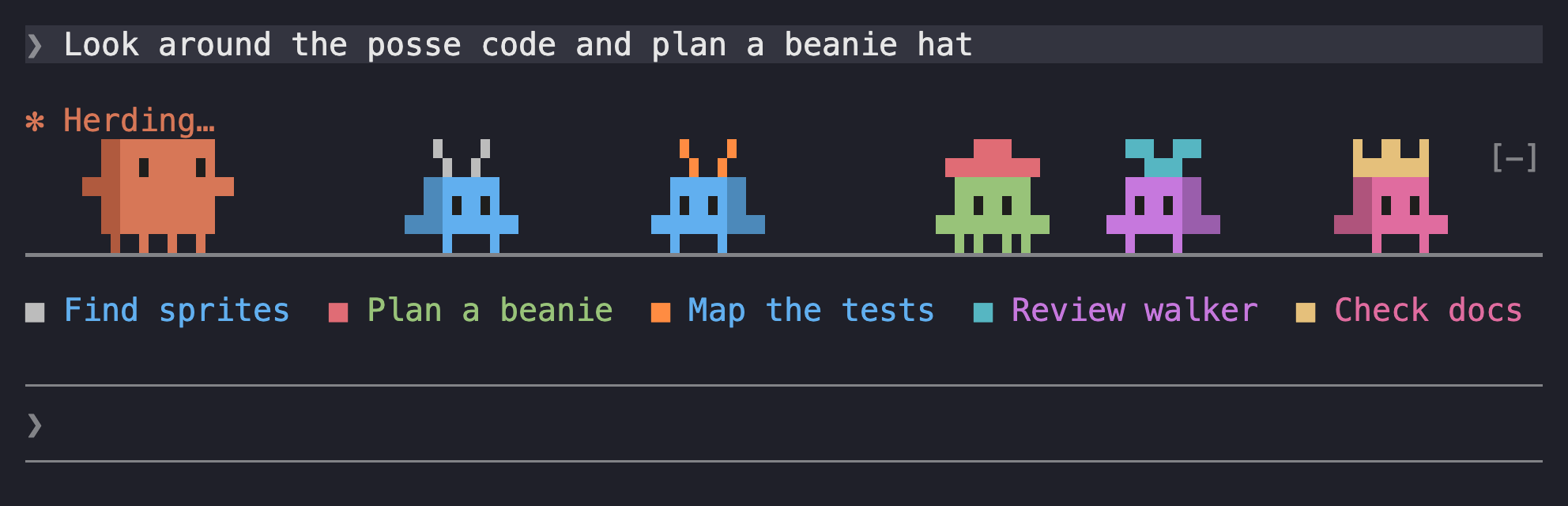
Claude가 작업하는 동안 프롬프트 위에 약간의 퍼레이드를 놓는 Claude Code 모드입니다. 보스는 앞뒤로 걸어다니고, Claude가 시작하는 모든 하위 에이전트는 자신만의 생명체로 합류합니다.
RyanEmslie/prompt-posse
Prompse-posse는 Claude Code 프롬프트 위에 애니메이션 스트립을 그립니다. 즉, 턴이 실행되는 동안 전체 너비로 걷는 보스와 실행 중인 각 하위 에이전트에 대한 더 작은 생물체를 그립니다. 하위 에이전트의 모자, 몸체 및 모자 색상은 하위 에이전트 유형(탐색, 계획, 범용, Claude, 포크 또는 사용자 정의)에 따라 다릅니다. 범례 행에는 각 하위 에이전트의 작업이 해당 생물의 색상으로 나열되어 가장 긴 작업을 적합하게 자르고 오버플로를 +N more로 요약합니다. 생물은 에이전트의 최근 출력 토큰에서 파생된 속도로 걷고, 속도 간 용이성을 가지며, 배경 하위 에이전트는 기본 회전이 끝난 후에도 계속 걷습니다. 명령에는 /posse, /posse on|off, /posse legend 및 /posse demo가 포함됩니다. Claude Code 2.1.289+가 필요합니다. 터미널(텍스트 문자로 20xQXZKQZXIQ를 다시 칠함) 및 데스크톱 앱(자체 애니메이션 SVG)에서 작동합니다. VS Code 및 모바일은 지원되지 않습니다. 저장소를 복제하고 --plugin-dir를 전달하거나 CLAUDE_CODE_PLUGIN_DIRS에 경로를 추가하여 설치합니다. Anthropic과 관련이 없는 MIT 라이선스 팬 프로젝트입니다.
README에는 사용자 정의 지점(hooks/walker.ts의 TICK_MS, Hooks/pace.ts의 속도 임계값, Hooks/looks.ts의 보기, Hooks/sprite.ts의 스프라이트, Hooks/svg.ts의 SVG 그리기)과 고정 RGB 색상, [-] 축소 버튼이 모자와 겹치고 팀원이 10의 달리기 보고 후 은퇴했습니다.
먼저 작성자의 README에서 marketplace와 플러그인 이름을 확인하세요. 저장소 구조에 따라 명령어가 달라질 수 있습니다.
claude plugin marketplace add RyanEmslie/prompt-posse
claude plugin install prompt-posse
A Claude Code mod that puts a little parade above your prompt while Claude works. The boss walks back and forth, and every subagent Claude starts joins in as a creature of its own.
The whole lineup, as text:
  █▜██▜█      ▝▖▗▘        ▗▄██▄▖        ▀▙▟▀         ▙▟▙▟         ▝▀▀▘
 ▀██████▀     █▜▛█         █▜▛█         █▜▛█         █▜▛█         █▜▛█
  ▜▀▛▜▀▛     ▀▛▛▜▜▀       ▀▛▛▜▜▀       ▀▛▛▜▜▀       ▀▛▛▜▜▀       ▀▛▛▜▜▀
▔▔▔▔▔▔▔▔▔▔▔▔▔▔▔▔▔▔▔▔▔▔▔▔▔▔▔▔▔▔▔▔▔▔▔▔▔▔▔▔▔▔▔▔▔▔▔▔▔▔▔▔▔▔▔▔▔▔▔▔▔▔▔▔▔▔▔▔▔▔▔▔
From left to right: the boss, the biggest of them, then the creatures for Explore, Plan, general-purpose, claude and fork subagents. The boss is drawn after Claude Code's mascot. Every creature has dark eyes and a darker side at its back, which flips when it turns; when one stops to face you, it stands square on.
The boss appears when a turn starts and walks the full width of the prompt. At each edge it stops, looks at you, and turns around. It blinks now and then. It leaves once the turn has ended and no subagent is still walking.
Each running subagent gets its own, smaller creature. Its headwear, body color and headwear color depend on the subagent's type:
| Subagent type | Headwear | Body | Headwear color |
| --- | --- | --- | --- |
| main turn (the boss) | none; bigger than everyone else | orange, with a darker side at its back and dark eyes | — |
| Explore | antennae | blue | light gray |
| Plan | top hat | green | red |
| general-purpose | propeller cap | purple | cyan |
| claude | crown | pink | gold |
| fork | halo | peach | pale yellow |
| any other type | ears, horns, a mohawk or a sprout | picked from the type's name | picked from the type's name |
A custom type always gets the same look, never headwear a built-in type wears, and never a hat the color of its body.
No two creatures on the strip wear the same hat color. When a hat color is already taken, often by another agent of the same type, the newcomer keeps its body and headwear but wears a spare color, and keeps it until it leaves.
While subagents walk, a legend row under the ground lists each one's task, as the Agent call described it, in the order they joined. Each entry starts with a mark in its creature's hat color, and the task is written in its body color. When the row is too narrow, the longest tasks are cut short first, down to 10 characters, so that more of them fit. What doesn't fit even then is counted at the end as +N more.
The boss always walks at the same pace: 10 columns a second at the default speed. Each subagent's creature gets one of six speeds of its own, from 7 to 12 columns a second, picked from the subagent's id. How fast it actually walks follows how hard its agent is working: the output tokens its model wrote over the last 10 seconds. An agent waiting on a tool strolls at half its own speed; one writing 50 tokens a second or more runs at one and a half times it. A creature eases into a new pace over about a second. In the desktop app, a creature's SVG is drawn again once its pace has changed by a tenth or more, setting out from where it already is, so it never jumps; one pausing at an edge waits to walk on first. In the terminal, when two meet, they stop briefly and turn around. In the desktop app they walk past each other.
Subagents running in the background keep walking after the main turn ends, with the boss leading them. The strip disappears when the last one finishes.
The mod checks which subagents are running whenever one starts, whenever a turn ends, and every half second while anything is walking. So a creature can arrive or leave up to half a second after its subagent starts or finishes.
The strip steps aside while Claude Code is showing a survey, when there are fewer than 4 free rows above the prompt (the legend row needs a fifth, and is the first to go), or when it's under 8 columns wide, too narrow for the boss. It comes back when there's room again.
/posse switches the posse on or off. The setting is remembered across sessions./posse on and /posse off pick one./posse legend shows which creature is which./posse demo brings the whole posse out for 20 seconds, even while Claude isn't working: the boss, a creature for each kind of agent, and a second Explore in a spare hat, with the legend naming each one. Each walks at a different pace, as agents doing more or less work would. It starts no agents and uses no tokens. Run it again to end it sooner.The command runs right away, even while Claude is working and the posse is walking.
In the terminal, the creatures are drawn in text characters and repainted 20 times a second. In the desktop app, they're one SVG that animates itself, so nothing is sent per frame. It's redrawn when a creature arrives or leaves, when a creature's pace changes by a tenth or more, when a turn starts or ends, and when the window is resized. A resize changes how far each creature has to walk, so the creatures jump to new spots.
Clone the repo:
git clone https://github.com/RyanEmslie/prompt-posse.git
The steps below write the folder this makes as /path/to/prompt-posse. Use its absolute path instead, such as /Users/you/code/prompt-posse.
To try it in one session, point Claude Code at the folder:
claude --plugin-dir /path/to/prompt-posse
To load it in every session, add the folder's absolute path to the env block of ~/.claude/settings.json:
{
  "env": {
    "CLAUDE_CODE_PLUGIN_DIRS": "/path/to/prompt-posse"
  }
}
If CLAUDE_CODE_PLUGIN_DIRS already names other plugin folders, keep them and add this one to the list, separated by : (; on Windows):
"CLAUDE_CODE_PLUGIN_DIRS": "/path/to/another-plugin:/path/to/prompt-posse"
Sessions the desktop app starts read the same setting.
Interactive terminal sessions watch the folder, so edits reload in sessions that are already open. Desktop sessions only do that when CLAUDE_CODE_PLUGIN_DIR_WATCH is also set to 1. Otherwise edits show up in new sessions.
Start a new session and run /posse demo. The whole posse walks above the prompt box for 20 seconds. Or send any prompt: the boss walks while Claude works, and leaves when the turn ends. /posse legend lists who's who. If nothing shows, check that the strip has room: it needs at least 4 free rows above the prompt and 8 columns.
Pull the latest version into the folder:
git -C /path/to/prompt-posse pull
Terminal sessions that watch the folder pick it up on their own. Other sessions show it once restarted.
To hide the posse but keep it installed, run /posse off. It stays off in new sessions until you run /posse on.
To remove it, take its path out of CLAUDE_CODE_PLUGIN_DIRS (or stop passing --plugin-dir), start a new session, and delete the folder.
TICK_MS in hooks/walker.ts. Lower is faster.hooks/pace.ts sets how an agent's work moves its creature's pace: WINDOW_MS is how far back its output tokens count, FULL_RATE the tokens a second for the fastest pace, and MIN_PACE and MAX_PACE the slowest and fastest pace as a share of the creature's own speed.hooks/looks.ts. Headwear is two text rows of 12 characters, with # for a filled pixel. Colors are 0xRRGGBB values.hooks/sprite.ts, drawn the same way, with % for a pixel of the shaded side and o for an eye. The shade is a darker version of the body color unless the look sets shadeColor, and the eyes are near black unless it sets eyeColor.hooks/svg.ts turns the same sprites into the animated SVG.claude plugin validate .
claude plugin test .
What changed in each version is in CHANGELOG.md.
[-] collapse button sits on the strip's top row, so near the right edge it briefly covers a creature's headwear.MIT. See LICENSE.
This is an unofficial fan project, not affiliated with or endorsed by Anthropic. Claude and Claude Code are trademarks of Anthropic.

문서 생성, 드리프트 감지, API 문서 자동화 플러그인이며 비밀이 포함된 문서 쓰기나 worker 디스패치를 거부하는 function-hook 가드로도 동작합니다.

Claude 데스크톱 앱용 상태 표시줄입니다. 프롬프트 위에 나타나 세션 품질, 컨텍스트 사용량, 캐시 카운트다운, 5시간 및 주간 한도를 보여 주고 Clawd가 세션의 동작을 연출합니다.

databricks CLI를 따라 Databricks 작업 공간, Unity Catalog, 컴퓨팅, 작업, 파이프라인, 앱, 대시보드를 트리로 보여 주는 /databricks-pane을 제공하는 Claude Code 플러그인 mod입니다. 실시간 강조, 프로필 전환, CLI 인수 복사도 지원합니다.
