
alvaro-hi@alvaro-hi
alvaro-hi/progress-ring
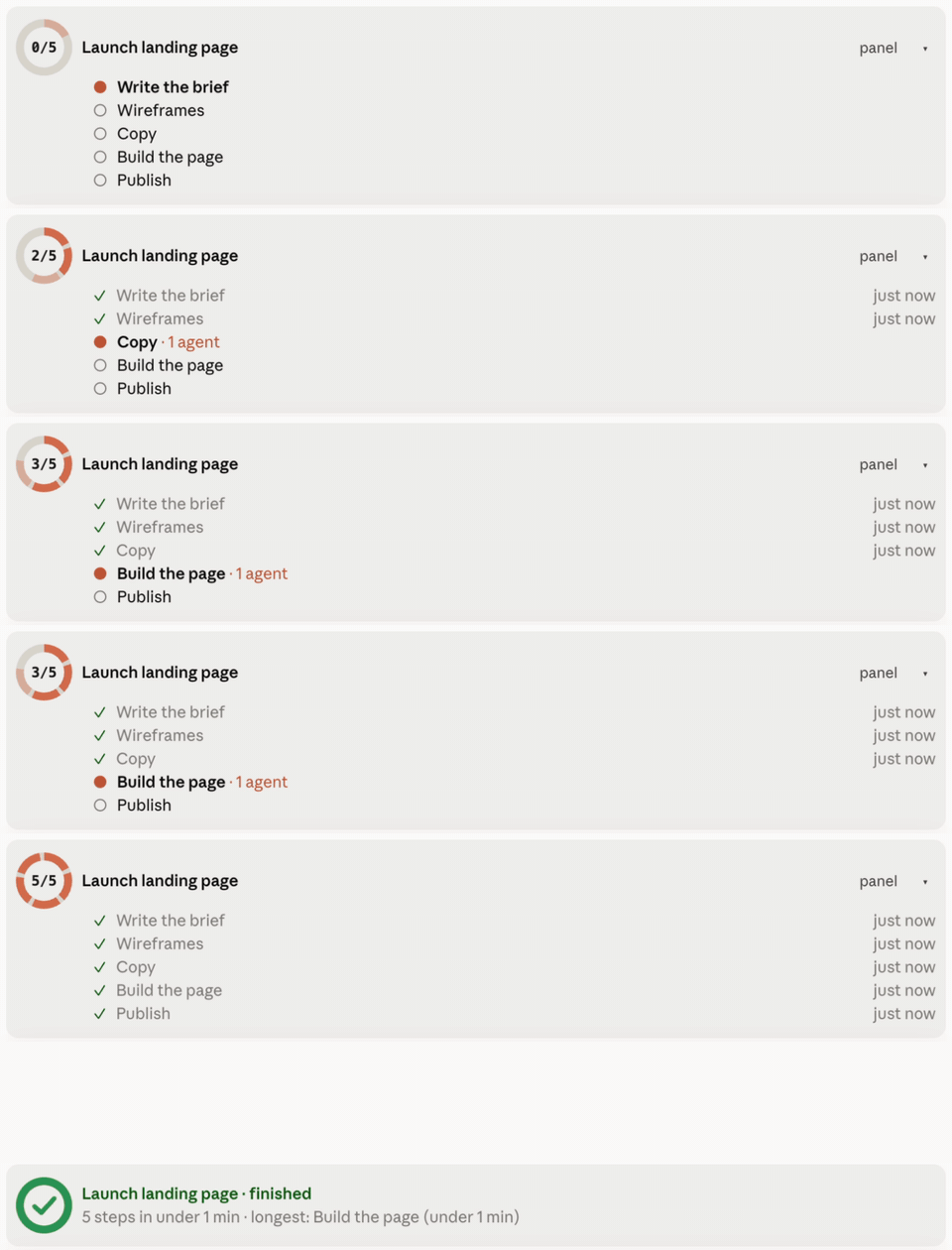
Progress Ring — 긴 계획에서 Claude Code의 진행 상황을 확인: 프롬프트 위에 링, 백분율, 현재 단계가 있는 밴드, 채팅 전반의 /progress 패널, 마일스톤 행.
alvaro-hi/progress-ring
Progress Ring은 트랜스크립트를 읽지 않고도 Claude Code에서 계획 진행 상황을 보여줍니다. 세 개 이상의 단계가 있는 계획이 시작되면 진행 카드를 열고 각 단계가 완료될 때마다 닫습니다: 프롬프트 위에 링, 백분율, 현재 단계 및 계획 상태가 있는 밴드; 이 채팅 및 다른 채팅의 계획을 나열하고 채팅으로 이동하는 버튼이 있는 /progress 패널; 대화의 마일스톤 행. /plugin install progress-ring --marketplace alvaro-hi/progress-ring을 통해 설치됨; hooks 모듈이 있는 Claude Code 빌드, macOS 또는 Linux, python3 3.9+가 필요합니다. 모든 것은 ~/.claude/progress 아래에 로컬로 유지되며 네트워크 트래픽이 없습니다.
먼저 작성자의 README에서 marketplace와 플러그인 이름을 확인하세요. 저장소 구조에 따라 명령어가 달라질 수 있습니다.
claude plugin marketplace add alvaro-hi/progress-ring
claude plugin install progress-ring@progress-ring
English · Español
See how far along Claude Code is in a long plan, without reading the transcript. When Claude starts a plan with three or more steps, it opens a progress card and closes each step as it finishes. You see it:
/progress panel: every plan in this chat and in other chats, with their steps, subagents waiting for review, and a button to jump to the chat that owns each plan.You don't have to tell Claude to use it: the plugin teaches it when to open a card, close steps, accept subagent work and finish.
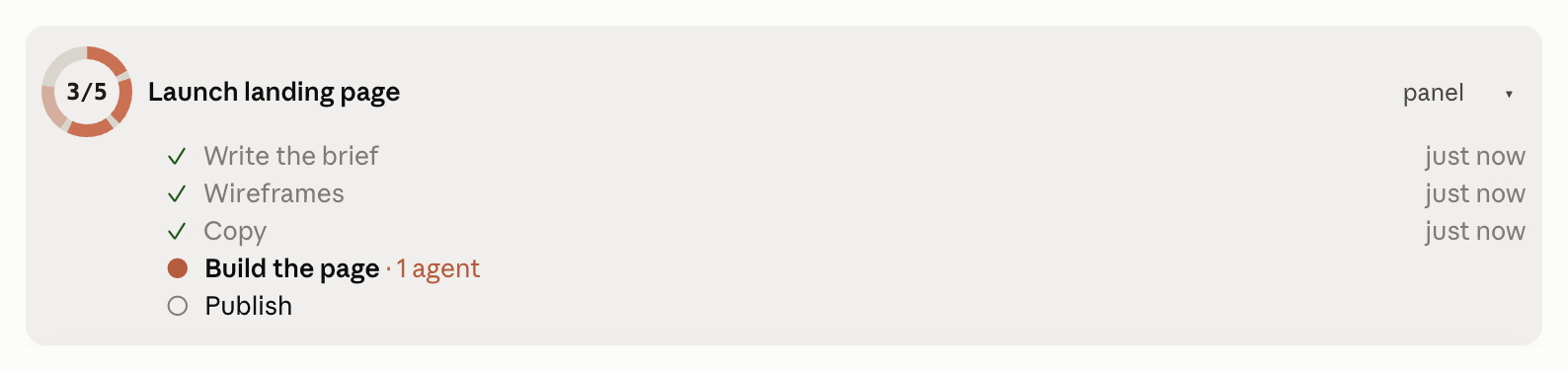
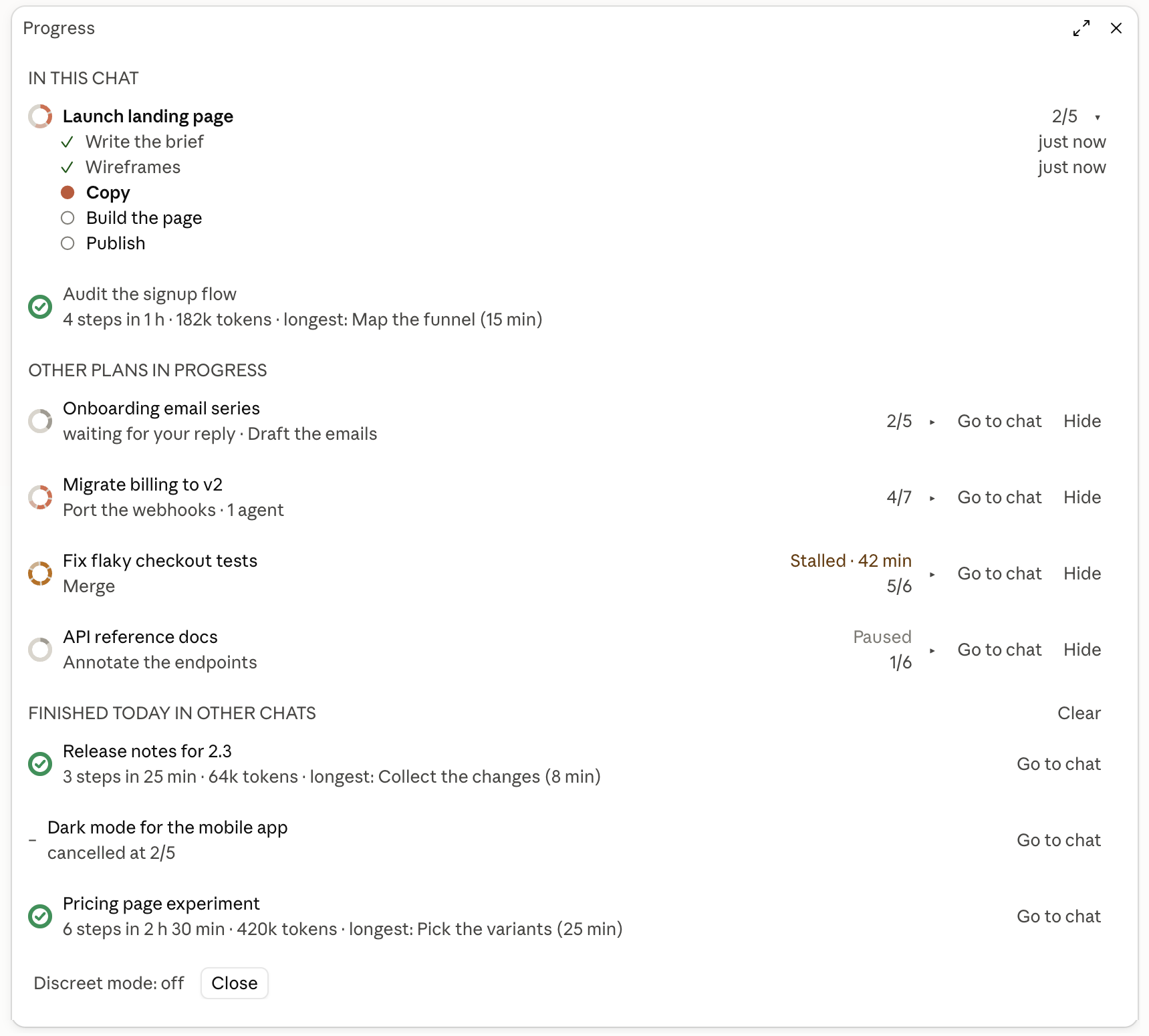
Screenshots use demo data (scripts/demo.py).
At the prompt of a Claude Code session:
/plugin install progress-ring --marketplace alvaro-hi/progress-ring
Answer y to add the marketplace and pick the user scope. Or from a shell:
claude plugin marketplace add alvaro-hi/progress-ring
claude plugin install progress-ring@progress-ring --scope user
Start a new session afterwards. Uninstall with claude plugin uninstall progress-ring@progress-ring.
Requirements: a Claude Code build with mods (hooks modules), tested on 2.1.287; macOS or Linux; python3 3.9 or later on the PATH.
Language: the interface follows your system language (Spanish or English). To force one, set the plugin's language option to en or es in /plugin → progress → configure.
| Piece | Where | What it does |
|---|---|---|
| CLI | bin/progress, bin/progresslib.py | Creates and updates the cards in ~/.claude/progress/<id>.json, with a lock per card |
| Hook | bin/progress_hook.py | Injects the active card's state into each prompt; registers subagents as rows; records turn start and end, the owning chat and tokens per step; closes a plan with every step done when the turn ends |
| Mod | hooks/register.tsx and the rest of hooks/ | Draws the band, the panel and the milestones; passes Claude Code's hook events to the Python hook; adds the usage rule to the system prompt |
The mod only reads cards: every write goes through the CLI. The hook never blocks a session: any error is logged to ~/.claude/progress/_hook-errors.log and the session goes on. Nothing leaves your machine.
bin/progress_hook.py on Claude Code's hook events (prompt sent, turn end, tool use, subagent start and stop, an Agent call about to run), and bin/progress when you press Hide, Clear, Discreet mode or Go to chat. To open a chat, progress chat runs open (macOS) or xdg-open (Linux) with a claude:// link.~/.claude/progress, the session's id and folder, the hook events' data (the transcript path included: the hook reads the transcript to add up the tokens spent per step) and, for Go to chat on older cards, the Claude desktop app's session list. It reads no credentials.~/.claude/progress./progress, draws the band, the panel and the milestone rows, and hides the result row of progress commands, which the milestone row already shows. It never allows, denies or asks for a permission.~/.claude/progress/_done/; nothing is deleted.Claude calls the CLI with its full path. To use it from your own shell:
alias progress="$(ls -dt ~/.claude/plugins/cache/progress-ring/progress-ring/*/ | head -1)bin/progress"
progress start release "Release 2.0" --total 5          # new card
progress plan release build="Build" qa="QA" ship="Ship"  # planned steps (the total follows the plan)
progress step release "Build is green" --key build       # close a step
progress plan release --add docs="Docs" --after qa       # replan
progress child accept release <cid>                      # accept a subagent's delivery
progress done release                                    # finish (or: cancel, pause)
progress hide release                                    # out of the list until it moves again
progress clear                                           # finished and cancelled → _done/
progress chat release                                    # open its last chat, or print `claude --resume <id>`
progress discreet toggle                                 # hide titles while sharing your screen
CLAUDE_PROGRESS_DIR moves the cards somewhere other than ~/.claude/progress.
python3 -m unittest discover tests
claude plugin test .
claude plugin validate .claude-plugin/plugin.json
scripts/demo.py runs a demo plan that moves on its own (for screenshots); --clean removes it.
To try local changes, add the repo folder as a marketplace (claude plugin marketplace add .) and install from it: Claude Code then reads the plugin straight from the folder and /reload-plugins picks up edits.
Designed by Álvaro del Pozo. MIT license. Not affiliated with Anthropic; "Claude" and "Claude Code" are trademarks of Anthropic.

문서 생성, 드리프트 감지, API 문서 자동화 플러그인이며 비밀이 포함된 문서 쓰기나 worker 디스패치를 거부하는 function-hook 가드로도 동작합니다.
Repowise의 Lens는 색인된 코드베이스를 실시간으로 시각화하는 Claude Code mod입니다. Claude가 파일을 검색하고 읽고 편집하면 파일이 켜지며, 임포터와 역방향 종속성도 강조됩니다. 영향을 받은 파일과 커버리지 테스트를 보여 주는 Flow 탭과 상태 변화 및 추천 테스트 실행 버튼이 있는 리뷰 행도 포함합니다.


Claude 데스크톱 앱용 상태 표시줄입니다. 프롬프트 위에 나타나 세션 품질, 컨텍스트 사용량, 캐시 카운트다운, 5시간 및 주간 한도를 보여 주고 Clawd가 세션의 동작을 연출합니다.