
rodbegbie@rodbegbie
rodbegbie/rod-claude-mods/tree/main/plugins/pro-limits
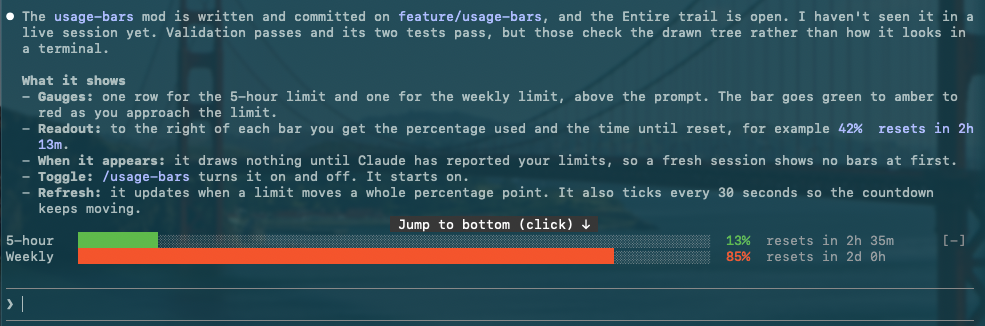
/pro-limits로 전환하며 프롬프트 위에 5시간 및 주간 사용량 한도 게이지를 그리고 임계값을 넘을 때 토스트를 표시하는 Claude Code 플러그인입니다.
rodbegbie/rod-claude-mods/tree/main/plugins/pro-limits
/pro-limits로 전환하는 프롬프트 위의 5시간 및 주간 Claude 사용량 한도 게이지입니다. 각 막대는 한도에 가까워질수록 초록에서 주황, 빨강으로 바뀌고 사용 비율과 해당 윈도우가 재설정될 때까지의 시간이 뒤따릅니다. 윈도우는 Claude가 보고한 뒤에만 나타나므로 API 키 계정에서는 아무것도 표시되지 않습니다. 각 윈도우가 20%, 40%, 60%, 80%, 90% 또는 95%를 넘을 때마다 토스트가 뜨며 100%가 되면 백분율이 해골 두 개로 바뀝니다. 세션 시작에 본 값은 알리지 않고 그 이후의 초과만 알립니다. /plugin marketplace add rodbegbie/rod-claude-mods 다음 /plugin install pro-limits@rod-claude-mods로 설치합니다.
먼저 작성자의 README에서 marketplace와 플러그인 이름을 확인하세요. 저장소 구조에 따라 명령어가 달라질 수 있습니다.
claude plugin marketplace add rodbegbie/rod-claude-mods
claude plugin install pro-limits
Rod Begbie's mods for Claude Code, published as a plugin marketplace.
Add the marketplace, then install the mods you want:
/plugin marketplace add rodbegbie/rod-claude-mods
/plugin install context-bar@rod-claude-mods
/plugin install pro-limits@rod-claude-mods
/plugin install sportsball@rod-claude-mods
To try the marketplace from a local checkout, point at the folder instead:
/plugin marketplace add /path/to/rod-claude-mods
| Mod | What it does | | --- | --- | | context-bar | Stacked context-window bar above the prompt | | pro-limits | 5-hour and weekly usage-limit gauges above the prompt | | sportsball | Live score of a followed team above the prompt |
Draws the context window as a stacked bar above the prompt, with one
colour per category as in /context. A legend underneath lists each
category's tokens and share of the window, then the total.
Toggle it with /context-bar. It starts on, and refreshes at session
start and after every turn.
Draws one gauge per subscription limit (5-hour and weekly) above the prompt. Each bar shifts from green through amber to red as you approach the limit, followed by the percentage used and the time until that window resets. Windows only appear once Claude has reported them, so nothing shows on API-key accounts.
A toast pops up each time a window passes 20%, 40%, 60%, 80%, 90% or 95%. Hit 100% and the percentage turns into two skulls. Readings seen at session start never toast, only crossings after that.
Toggle it with /pro-limits. It starts on, refreshes whenever a limit
moves a whole point, and ticks every 30 seconds to keep the countdown
honest.
Follows one team and draws its live game above the prompt: a sport emoji, both team names, the score, the game status and the competition, on a single line. A "Powered by SportScore" credit, linking to sportscore.com, sits at the right of that row. It appears once, on the last game row, however many teams are shown, and drops to a row of its own underneath only when the terminal is too narrow for both. The band is empty when the team has no live game.
<!-- screenshot placeholder -->/follow-team <name> follows a team, for example
/follow-team golden state valkyries or /follow-team club atletico tigre. It searches basketball and football together. If the name
matches more than one team, even exactly, it asks which. Each choice
shows a sport emoji, the team name and the league of its latest game
(left off when the lookup fails or the team has no games). Up to four
teams are offered in a question dialog. More than that opens a pane
with a list, so none are cut off. Dismissing either follows nothing
and keeps your current team. A name that matches a single team is
followed straight away. A team is left out, and named in the reply,
when SportScore's lookup for it returns a different team, as it does
for Rangers F.C. (Glasgow)./unfollow-team [name] stops following./sportsball shows or hides the band. The followed team is kept
across sessions either way.A toast appears when the game moves to a new period (for example
"Half time" or "4th quarter") and at full time, each with the score.
In football, a change of score also toasts (Goal 60', or Score change
if a goal is ruled out), with the match minute when there is one.
Basketball scores change too often, so only periods toast there.
The first reading after a load is silent, so starting Claude mid-game
doesn't toast. /sportsball off mutes toasts without losing track.
Football games also show the match minute next to the status, for
example 2nd half 84'. It comes from a second request per poll, so a
failed lookup just leaves the minute off.
It polls every 30 seconds while a game is live and every 5 minutes otherwise. If a poll fails, the last score stays on screen, dimmed, for up to 10 minutes. Basketball and football are supported.
Scores come from the SportScore public API, which asks for a visible "Powered by SportScore" link, hence the credit row. Terminals without hyperlink support show the URL next to the name.
Team names are coloured from their logos. To do that the mod runs a
short Python 3 script (standard library only) on your machine, once per
logo, and caches the result. This is optional: without python3 the
names simply draw in the default colour. Two things to know about it:
On a Mac without the Command Line Tools the mod skips the script rather than trigger the install dialog.
Each mod lives in its own folder under plugins/ and is listed in
.claude-plugin/marketplace.json. Check the lot with:
claude plugin validate .
claude plugin validate plugins/<mod-name>
claude plugin test plugins/<mod-name>

문서 생성, 드리프트 감지, API 문서 자동화 플러그인이며 비밀이 포함된 문서 쓰기나 worker 디스패치를 거부하는 function-hook 가드로도 동작합니다.

Claude 데스크톱 앱용 상태 표시줄입니다. 프롬프트 위에 나타나 세션 품질, 컨텍스트 사용량, 캐시 카운트다운, 5시간 및 주간 한도를 보여 주고 Clawd가 세션의 동작을 연출합니다.

databricks CLI를 따라 Databricks 작업 공간, Unity Catalog, 컴퓨팅, 작업, 파이프라인, 앱, 대시보드를 트리로 보여 주는 /databricks-pane을 제공하는 Claude Code 플러그인 mod입니다. 실시간 강조, 프로필 전환, CLI 인수 복사도 지원합니다.
