
jack21@jack21
jack21/claude-mod-usage

Claude Code Desktop( VS Code 및 모바일 앱도 지원)에서 Claude 사용량을 프롬프트 바로 위의 세 가지 그라데이션 진행률 막대로 보여 주는 Claude Code Mod입니다.
jack21/claude-mod-usage
컨텍스트 창, 5-hour 세션 제한, 7-day 사용량을 프롬프트 바로 위에 초록색에서 빨간색으로 변하는 세 개의 그라데이션 진행률 막대로 표시하는 Claude Code Mod입니다. 재설정 카운트다운과 12개의 자동 감지 언어를 포함하며 프롬프트 위에 표시되는 다른 mod와도 깔끔하게 쌓입니다. 빠른 프롬프트 또는 CLAUDE_CODE_PLUGIN_DIRS 수동 설정으로 설치하며, Mods function-hooks를 지원하는 Claude Code와 Claude 구독이 필요합니다.
먼저 작성자의 README에서 marketplace와 플러그인 이름을 확인하세요. 저장소 구조에 따라 명령어가 달라질 수 있습니다.
claude plugin marketplace add jack21/claude-mod-usage
claude plugin install mod-usage
English · 简体中文 · 繁體中文 · 日本語 · हिन्दी · Español · العربية · Français · বাংলা · Português · Русский · Bahasa Indonesia
A Claude Code Mod that shows your Claude usage as three gradient progress bars right above the prompt in Claude Code Desktop (also VS Code and the mobile app):
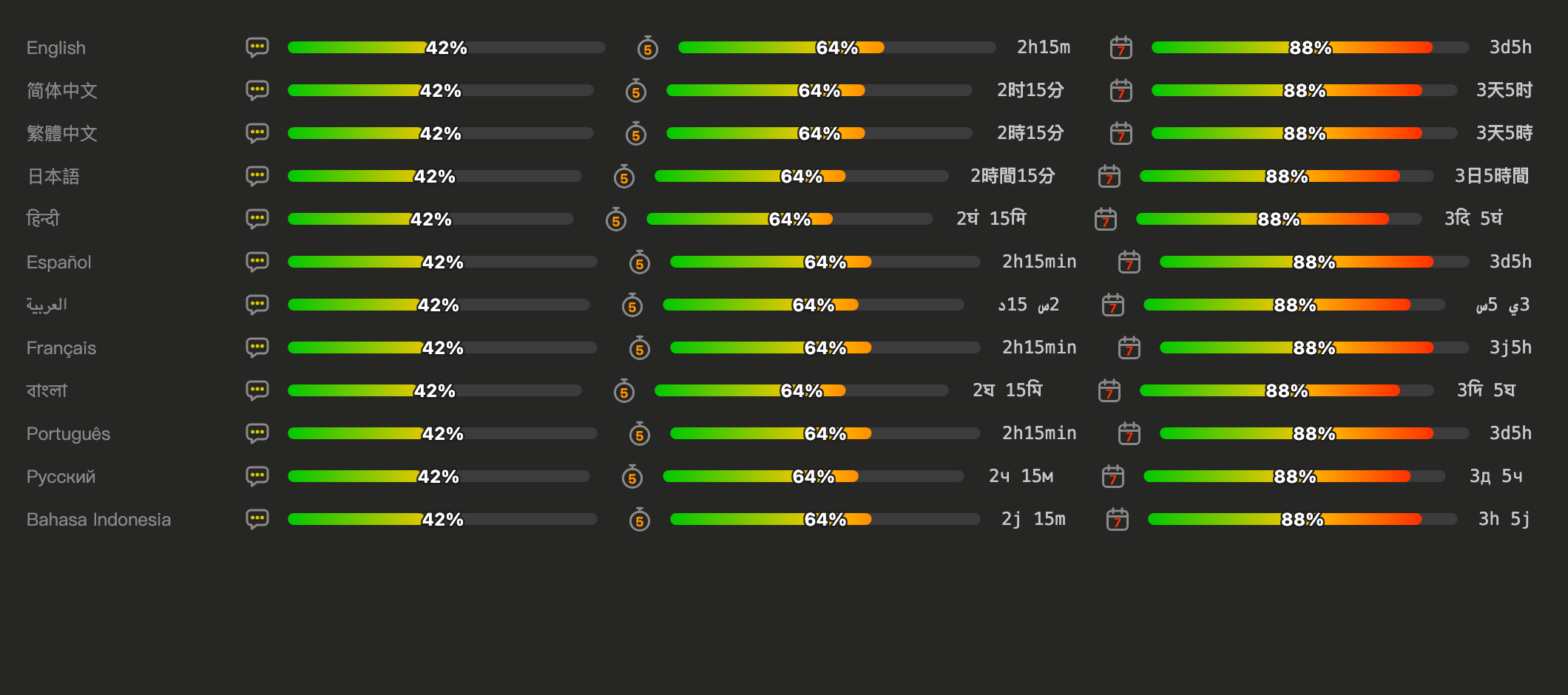
Copy this prompt and paste it into Claude Code (Desktop, CLI or VS Code). Claude clones the mod, updates your settings and checks them:
Install the claude-mod-usage Claude Code mod: clone https://github.com/jack21/claude-mod-usage into ~/.claude/mods/claude-mod-usage (if the folder already exists, run git pull there instead). Then add that folder to CLAUDE_CODE_PLUGIN_DIRS in the "env" block of ~/.claude/settings.json, keeping any folders already listed (join them with ":" on macOS/Linux, ";" on Windows) and changing no other setting. Make sure settings.json is still valid JSON, run `claude plugin validate ~/.claude/mods/claude-mod-usage`, and tell me to start a new session.
Get the files:
git clone https://github.com/jack21/claude-mod-usage ~/.claude/mods/claude-mod-usage
Tell Claude Code to load it. Claude Code Desktop cannot pass command-line flags, so add the folder to the env block of ~/.claude/settings.json:
{
  "env": {
    "CLAUDE_CODE_PLUGIN_DIRS": "~/.claude/mods/claude-mod-usage"
  }
}
Several folders are separated by : (macOS / Linux) or ; (Windows).
Start a new session. The bars appear after the first reply.
For a one-off try in the CLI: claude --plugin-dir ~/.claude/mods/claude-mod-usage.
Optional: add "CLAUDE_CODE_PLUGIN_DIR_WATCH": "1" to the same env block so Desktop reloads the mod when you edit its files.
The display language is chosen in this order:
auto by default)language setting (e.g. "japanese", "繁體中文")LC_ALL, LC_MESSAGES, LANGLANG)To pin a language without the menu, add this to ~/.claude/settings.json:
{
  "pluginConfigs": {
    "mod-usage": { "language": "ja" }
  }
}
Supported codes: en, zh-CN, zh-TW, ja, hi, es, ar, fr, bn, pt, ru, id.
session.measure pushes the context and rate-limit figures; session.start reads the current ones with $.session.usage().AbovePrompt slot with Svg elements. A plain-image SVG is stretched horizontally to its box, so the bar is a round-capped line with vector-effect="non-scaling-stroke", which keeps the ends circular at any width. Text (percent, countdown) is a separate fixed-size SVG so it is never distorted.isInteractive SVG frames on a white background, so everything here is drawn as plain images.claude plugin validate . # checks the manifest and what the module hooks and calls
claude plugin test . # runs tests/*.test.tsx against the engine
hooks/register.tsx is the hooks module; hooks/i18n.ts holds the strings and locale detection helpers; types/index.d.ts is the state contract.
To add a language: add its code to types/index.d.ts and .claude-plugin/plugin.json, its strings to MESSAGES and SUPPORTED_LOCALES in hooks/i18n.ts, and a name hint to LANGUAGE_NAME_HINTS.
MIT © 2026 Jack Chiang

문서 생성, 드리프트 감지, API 문서 자동화 플러그인이며 비밀이 포함된 문서 쓰기나 worker 디스패치를 거부하는 function-hook 가드로도 동작합니다.

Claude 데스크톱 앱용 상태 표시줄입니다. 프롬프트 위에 나타나 세션 품질, 컨텍스트 사용량, 캐시 카운트다운, 5시간 및 주간 한도를 보여 주고 Clawd가 세션의 동작을 연출합니다.

databricks CLI를 따라 Databricks 작업 공간, Unity Catalog, 컴퓨팅, 작업, 파이프라인, 앱, 대시보드를 트리로 보여 주는 /databricks-pane을 제공하는 Claude Code 플러그인 mod입니다. 실시간 강조, 프로필 전환, CLI 인수 복사도 지원합니다.
