
cjavdev@cjavdev
cjavdev/mods/tree/main/link-bar
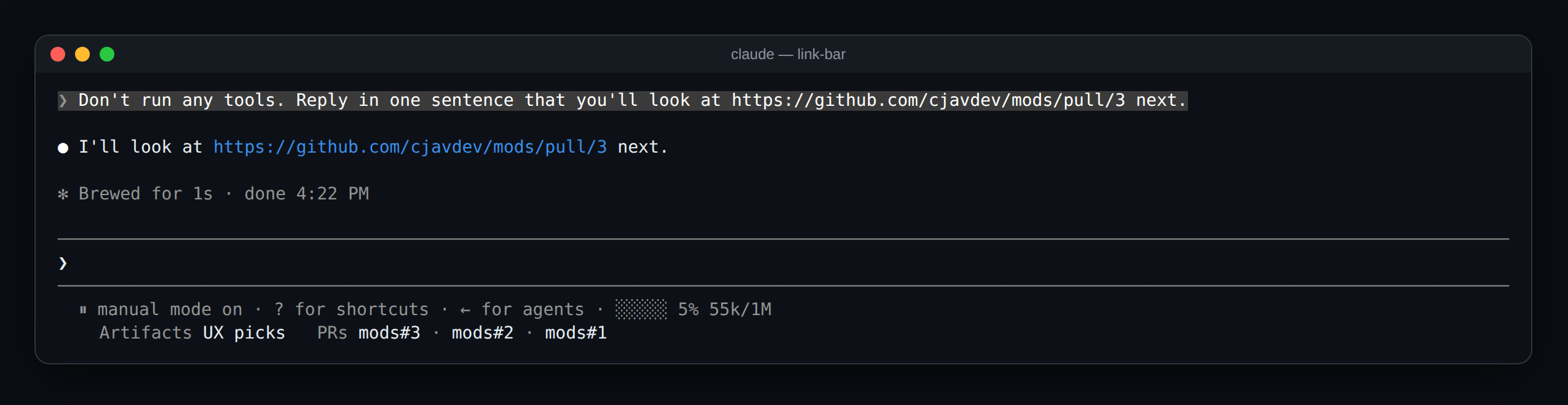
최근 언급한 claude.ai 산출물과 GitHub pull request를 한 번 클릭으로 열어 주는 Claude Code mod입니다.
cjavdev/mods/tree/main/link-bar
link-bar는 프롬프트 아래에 링크 줄을 추가해 대화에서 최근 언급한 claude.ai 산출물 3개와 GitHub pull request 5개를 표시합니다. 링크는 OSC 8 하이퍼링크로 렌더링되며 iTerm2, Ghostty, kitty, WezTerm, VS Code에서는 cmd/ctrl-click으로 엽니다. 단일 hooks 모듈에서 session.append로 링크를 추적하고 PromptHint에서 ui.render로 줄을 그립니다. /config에서 enabled, artifacts 및 pullRequests 개수를 설정할 수 있습니다. Claude Code 2.1.287 이상이 필요하며 저장소를 clone해 --plugin-dir로 실행하거나 경로를 CLAUDE_CODE_PLUGIN_DIRS에 추가하면 됩니다.
먼저 작성자의 README에서 marketplace와 플러그인 이름을 확인하세요. 저장소 구조에 따라 명령어가 달라질 수 있습니다.
claude plugin marketplace add cjavdev/mods
claude plugin install link-bar
A Claude Code mod that keeps the artifacts and pull requests you've been talking about one click away. It adds a row of links under the prompt: the 3 claude.ai artifacts and the 5 GitHub pull requests mentioned most recently in the conversation.
  ⏸ manual mode on · ? for shortcuts · ← for agents
    Artifacts UX picks   PRs mods#3 · mods#2 · mods#1
claude.ai/artifact/… and claude.ai/code/artifact/… links. One written as a markdown link, like [UX picks](https://claude.ai/artifact/…), shows its label. A bare one shows the start of its id, like artifact DhK2K2.github.com/<owner>/<repo>/pull/<n> links, shown as repo#n.Only your prompts and Claude's replies count. Tool output (a gh pr list, say), system reminders and subagents' messages don't, so the row holds what the conversation was actually about. Nothing shows until the first link is mentioned.
You need Claude Code 2.1.287 or newer.
git clone https://github.com/cjavdev/mods.git ~/mods
claude --plugin-dir ~/mods/link-bar
Or add ~/mods/link-bar to CLAUDE_CODE_PLUGIN_DIRS in the env block of ~/.claude/settings.json.
It shares the space under the prompt with context-meter and cache-shot-clock: they stay at the end of the hint line, and the links get the row below it.
In /config, or under pluginConfigs["link-bar"].options in settings:
| Setting | Default | |
| --- | --- | --- |
| enabled | true | Turns the mod off without unloading it. |
| artifacts | 3 | How many of the most recently mentioned artifacts to link. 0 shows none. |
| pullRequests | 5 | How many of the most recently mentioned pull requests to link. 0 shows none. |
The mod is one hooks module, hooks/register.tsx, with the link finding in hooks/links.ts:
session.append hook sees every row the conversation keeps. For your prompts and Claude's replies on the main thread, it pulls out artifact and PR links and moves them to the front of two lists in session state ($.state, declared in types/index.d.ts). A change redraws the row.--resume and --continue load a conversation without appending it, so on a resume the mod reads the recent end of the transcript file and picks the links back up. /clear empties the lists.ui.render hook on the PromptHint component draws the engine's own hint line and adds a row under it with a Link element per entry. The hint line's tail is plain text cut at the row's end, which is why the links get a row of their own.claude plugin validate ~/mods/link-bar # manifest and hooks check
claude plugin test ~/mods/link-bar # runs tests/*.test.tsx
The screenshot is a real capture of Claude Code running the mod (with context-meter beside it) in tmux (tmux capture-pane -p -e), turned into a page with scripts/ansi2html.py and screenshotted.

문서 생성, 드리프트 감지, API 문서 자동화 플러그인이며 비밀이 포함된 문서 쓰기나 worker 디스패치를 거부하는 function-hook 가드로도 동작합니다.

Claude 데스크톱 앱용 상태 표시줄입니다. 프롬프트 위에 나타나 세션 품질, 컨텍스트 사용량, 캐시 카운트다운, 5시간 및 주간 한도를 보여 주고 Clawd가 세션의 동작을 연출합니다.

databricks CLI를 따라 Databricks 작업 공간, Unity Catalog, 컴퓨팅, 작업, 파이프라인, 앱, 대시보드를 트리로 보여 주는 /databricks-pane을 제공하는 Claude Code 플러그인 mod입니다. 실시간 강조, 프로필 전환, CLI 인수 복사도 지원합니다.
