
JeongJaeSoon@JeongJaeSoon
JeongJaeSoon/hintvim/tree/main/plugin
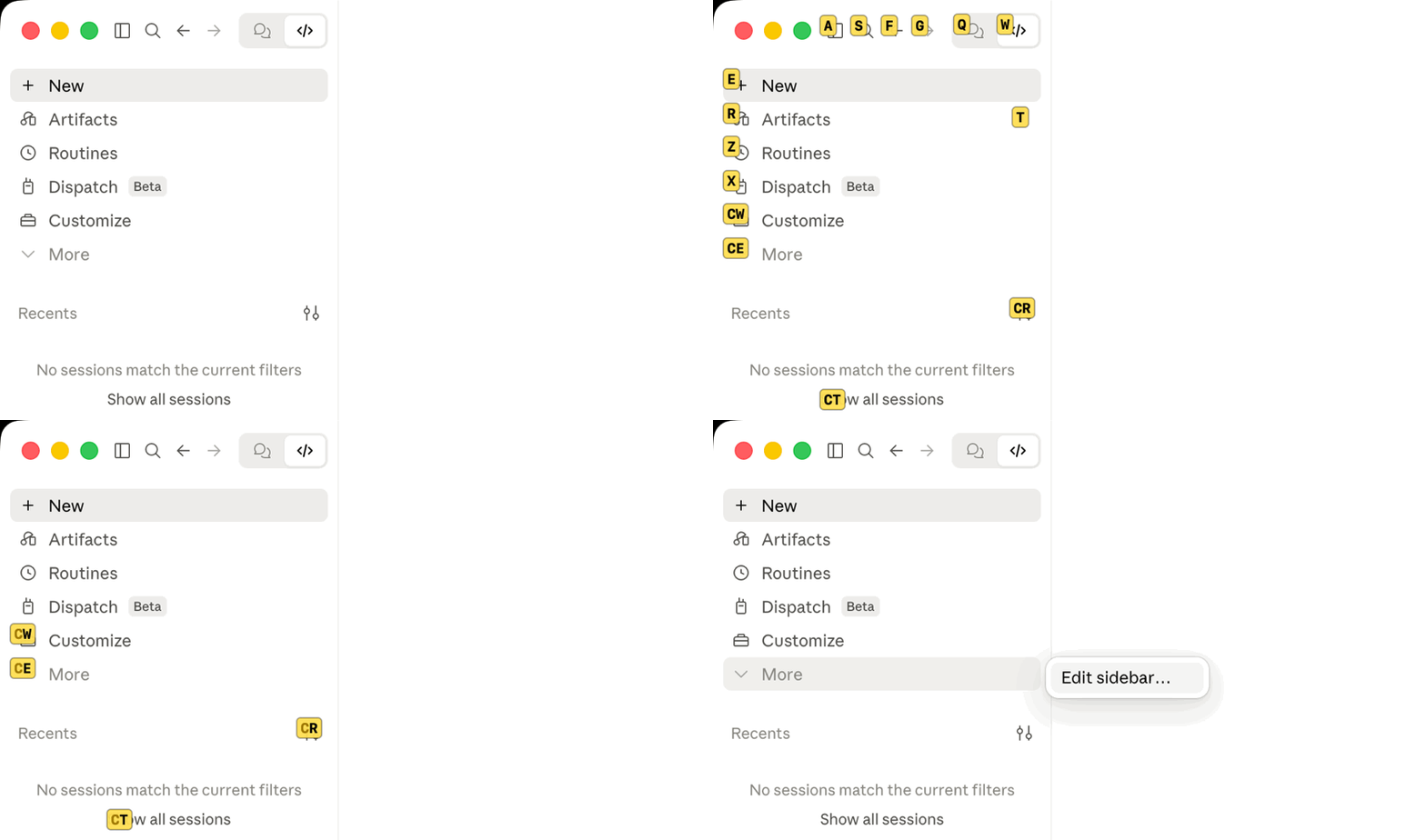
Claude Desktop 앱에 Vimium 스타일 힌트를 표시합니다: `/hintvim` 또는 Ctrl+;. macOS의 hintvim 앱이 필요합니다.
JeongJaeSoon/hintvim/tree/main/plugin
Claude desktop app을 위한 Vimium 스타일 키보드 힌트입니다.
Ctrl+;를 누르고 레이블을 입력하면 해당 버튼이 눌립니다.
hintvim은 작은 macOS 메뉴 막대 앱입니다. Ctrl+;를 누르면 Claude 창의 접근성으로 노출된 최대 169개의 보이는 컨트롤에 레이블을 붙입니다. 사이드바, 제목 표시줄, 모델 및 모드 메뉴, 각 메시지의 버튼이 대상입니다. 레이블을 입력하면 해당 요소가 눌립니다. 마우스는 필요 없습니다.

Ctrl+;            →  접근 가능한 버튼, 링크, 입력란에 레이블 표시
type "sf"         →  해당 요소 누르기
j / k / d / u     →  스크롤
Esc               →  나가기
hintvim은 비공식 커뮤니티 프로젝트입니다. Anthropic과 제휴하지 않았고 승인이나 후원을 받지 않습니다. “Claude”는 Anthropic, PBC의 상표입니다.
Claude Desktop에는 단축키가 많지만(Cmd+K, Cmd+1…9, Cmd+Shift+F), 키 바인딩이 없는 항목은 마우스가 필요합니다. 작업 디렉터리 필, 모델 및 모드 메뉴, 메시지별 작업이 그렇습니다. 힌트 모드는 컨트롤마다 단축키를 만들지 않고도 이 컨트롤에 레이블을 붙입니다.
macOS 13 이상과 Claude Desktop이 필요합니다.
brew install jeongjaesoon/tap/hintvim && hintvim setup
그런 다음 시스템 설정 → 개인정보 보호 및 보안 → 손쉬운 사용에서 hintvim을 켭니다. 앱이 처음 시작될 때 macOS가 묻습니다. 이제 Claude를 클릭하고 Ctrl+;를 누르면 됩니다.
이 formula는 Mac에서 소스부터 앱을 빌드하므로 Developer ID가 필요하지 않고 Gatekeeper가 막지 않습니다. Homebrew에는 이 빌드가 사용하는 Command Line Tools가 이미 필요합니다.
hintvim setup이 바꾸는 것Setup은 멱등적이며 각 단계를 ~/Library/Logs/hintvim/setup.log에 기록하고, hintvim uninstall은 모든 변경을 되돌립니다.
~/Library/LaunchAgents/io.github.jeongjaesoon.hintvim.plist를 추가하고 앱을 시작합니다. Ctrl+;에 필요한 것은 이것뿐입니다.claude plugin marketplace add JeongJaeSoon/hintvim 및 claude plugin install hintvim@hintvim. Desktop의 Code 탭에 /hintvim 명령을 제공합니다."CLAUDE_CODE_ENABLE_FUNCTION_HOOKS": "1"를 ~/.claude/settings.json의 env에 추가합니다. 이전 릴리스는 이 스위치가 있어야만 플러그인 mod를 로드합니다. 2.1.287부터 기본으로 로드하며 이 스위치는 무시합니다. Setup은 스위치를 추가했다는 사실을 기록하고 Desktop이 2.1.287 이상이 되면 제거하며, 직접 설정한 스위치는 건드리지 않습니다.~/.claude를 건드리지 않으려면 hintvim setup --app-only를 실행합니다. Ctrl+;와 메뉴 막대 아이콘은 얻지만 플러그인, 스위치, /hintvim은 추가되지 않습니다.
Claude의 플러그인 관리자에서 시작한다면 marketplace를 추가하고 플러그인을 설치합니다(터미널에서 실행하거나 Desktop의 Code 탭에서 + → Plugins → Add plugin을 선택).
claude plugin marketplace add JeongJaeSoon/hintvim
claude plugin install hintvim@hintvim
새 Code 세션에서 /hintvim:setup을 실행합니다. Claude가 Homebrew가 있으면 이를 사용하고 없으면 소스에서 앱을 빌드한 뒤 hintvim setup을 실행합니다. 플러그인만으로는 힌트 모드를 사용할 수 없습니다. 작동 원리에서 앱이 필요한 이유를 설명합니다.
Claude 창을 클릭하고 Ctrl+;를 누릅니다.
| 키 | 동작 |
|---|---|
| Ctrl+; | 레이블을 표시하거나 숨깁니다. Claude가 맨 앞 앱일 때만 가져가므로 다른 앱은 이 키 조합을 계속 사용할 수 있습니다. |
| a s f g q w e r t z x c v | 레이블을 입력합니다. 요소를 누르거나 텍스트 필드라면 포커스를 맞춥니다. |
| j / k | 조금 아래 / 위로 스크롤한 뒤 레이블을 다시 붙입니다 |
| d / u | 반 페이지 아래 / 위로 스크롤한 뒤 레이블을 다시 붙입니다 |
| Delete | 입력한 문자 하나를 되돌리거나, 아무것도 입력하지 않았다면 나갑니다 |
| Esc | 나가기 |
| Cmd + 무엇이든 | 나가지만 단축키는 계속 작동합니다(Cmd+Tab, Cmd+W) |
레이블이 표시되는 동안 키는 hintvim으로 가고 Claude에는 전달되지 않으므로 프롬프트에 새지 않습니다. 다른 앱으로 전환하면 힌트 모드가 끝납니다. 창을 옮기거나 크기를 바꾸면 레이블도 창을 따라갑니다. 창의 닫기, 최소화, 전체 화면 버튼에는 레이블을 붙이지 않으므로 오타로 창을 닫을 수 없습니다.
문자는 US(ANSI) 배열의 물리적 위치로 읽으므로 한국어 또는 일본어 입력 소스를 켜도 레이블이 작동합니다. Dvorak 또는 AZERTY에서는 QWERTY 위치의 키를 입력합니다.
메뉴 막대 아이콘(키보드)은 힌트를 표시하고 접근성 허용 여부를 보여 주며 앱을 종료합니다.
Ctrl+;와 메뉴 막대에는 앱만 필요합니다. Desktop Code 탭의 Local 세션(또는 터미널의 claude)에서 플러그인이 다음을 추가합니다.
/hintvim: Ctrl+;와 같습니다. 앱이 없으면 설치 방법을 알려 줍니다./hintvim-palette: 6개의 동작이 있는 패널입니다(마지막 답변, 마지막 코드 블록, 작업 디렉터리 또는 세션 id 복사, 컨텍스트 사용량 표시, 압축). Desktop에서는 클릭하고 문자 단축키는 터미널에서만 작동합니다./hintvim:setup 및 /hintvim:doctor: 앱을 설치하거나 힌트가 나타나지 않는 이유를 찾는 스킬입니다.Desktop의 프롬프트 상자는 어느 명령 아래에도 /hintvim isn't a command here.를 출력합니다. 내장 명령만 알고 있기 때문입니다. 명령 자체는 실행됩니다.
brew upgrade hintvim && hintvim setup
hintvim은 1.0.0 전에는 claude-vimium이라고 불렸습니다. brew upgrade는 claude-vimium 설치를 hintvim으로 옮기고, hintvim setup은 claude-vimium의 로그인 항목, 플러그인, 상태, 접근성 항목을 제거합니다.
Setup은 앱을 다시 시작해 새 버전을 실행합니다. 앱은 Mac에서 임시 방식으로 서명되고 Developer ID로 서명되지 않았으므로 macOS는 업그레이드된 각 빌드를 새 앱으로 취급합니다. 이전 접근성 항목은 켜짐으로 표시되지만 더 이상 적용되지 않습니다. 접근성 목록에서 **−**로 hintvim을 제거한 뒤 요청이 나타나면 다시 허용합니다. 업그레이드 사이에 권한을 유지하는 서명 및 공증 빌드는 #4에서 추적 중입니다.
Claude Desktop이 업데이트되어도 다시 할 일은 없습니다. 앱은 macOS를 통해 Desktop 창에서 작동하고 플러그인은 ~/.claude에 남으며 로그인 항목이 mod 스위치를 다시 확인합니다.
hintvim uninstall && brew uninstall hintvim
uninstall은 로그인 항목, 플러그인과 marketplace, setup이 추가한 mod 스위치, 앱의 상태와 로그를 제거합니다. 앱에 tccutil reset Accessibility를 실행하는 것도 시도합니다. 실패하면 접근성 목록에서 hintvim을 직접 제거하라고 알려 줍니다.
hintvim doctor를 실행하거나 Code 세션에서 /hintvim:doctor를 실행합니다. Doctor는 앱, 로그인 항목, 접근성 권한, Claude 창에서 힌트 모드가 볼 수 있는 요소 수, 플러그인, mod 스위치를 확인합니다. 실패한 각 줄에 해결 방법이 적힙니다.
| 증상 | 해결 |
|---|---|
| Ctrl+;에 아무것도 표시되지 않음 | Claude가 맨 앞 앱이어야 합니다. 마지막 창을 닫았다면 Ctrl+;로 다시 엽니다. 창이 돌아오지 않으면 Dock에서 Claude를 클릭한 뒤 hintvim doctor를 실행합니다. |
| 접근성은 켜져 있지만 아무 일도 일어나지 않음 | 이전 빌드에 속한 항목입니다. **−**로 제거하고 hintvim stop && hintvim start를 실행한 뒤 다시 허용합니다. |
| brew untap jeongjaesoon/tap이 거부됨 | tap에 설치한 다른 formula가 있습니다. tap은 그대로 두고 brew uninstall hintvim만 실행하면 됩니다. |
| /hintvim을 알 수 없음 | mod는 setup 후 시작한 세션에서만, 그리고 Local 세션에서만 로드됩니다. 새 세션을 시작하세요. 그래도 없으면 hintvim doctor가 mod를 로드할 수 있는지 알려 줍니다. Anthropic은 설치된 mod를 원격으로 끌 수 있으며, 그러면 다시 켤 때까지 /hintvim이 사라집니다. 앱은 플러그인에 의존하지 않으므로 Ctrl+;는 계속 작동합니다. |
| | 테스트됨 | |---|---| | macOS | 26.5(Apple silicon). 앱은 universal로 빌드되며 macOS 13을 대상으로 합니다. | | Claude Desktop | 2.7032.0, Claude Code 2.1.280 포함(mod 스위치 켜짐) | | Claude Code | 2.1.287(터미널, mod 기본 활성화) | | 입력 소스 | US English, Korean |
힌트 모드는 클래스 이름이 아니라 접근성 역할로 요소를 찾습니다(앱의 클래스 이름은 해시되고 릴리스마다 바뀜). 따라서 Claude Desktop 업데이트가 영향을 주는 일은 드뭅니다. 큰 UI 재설계는 영향을 줄 수 있습니다. 업데이트 후 레이블이 나타나지 않으면 hintvim doctor의 버전과 함께 issue를 열어 주세요.
Claude Desktop ── Code session ──▶ hintvim plugin (a Claude Code mod)
                                      │ /hintvim → open hintvim://toggle
                                      ▼
Ctrl+; ──────────────────────────▶ hintvim app (menu bar, starts at login)
                                      │ macOS Accessibility API
                                      ▼
                         labels over the whole Claude window
플러그인만으로는 힌트 모드를 사용할 수 없습니다. Claude Code mod는 창이 아니라 Claude Code 엔진에 훅을 겁니다. 엔진 자체의 위치(패널, 프롬프트 위 밴드, 도구 행)에만 그릴 수 있으므로 앱의 사이드바와 제목 표시줄에는 닿지 않습니다. mod는 전역 키도 등록할 수 없습니다. Button 단축키는 한 글자이고 mod 자체 패널에 포커스가 있을 때만 작동하며, Desktop에서는 패널을 클릭해도 키보드가 프롬프트 상자를 떠나지 않습니다.
macOS의 접근성 API는 창을 볼 수 있습니다. AXManualAccessibility를 통해 요청하면 Chromium이 웹 콘텐츠와 chrome을 포함한 Claude 창의 전체 트리를 노출하고 AXPress가 클릭과 같은 핸들러를 실행합니다. 그래서 작업을 나눕니다.
app/**는 메뉴 막대 앱입니다. Ctrl+;용 Carbon 단축키, 보이는 스크롤 영역에 잘린 클릭 가능한 역할을 순회하는 접근성 탐색, 레이블을 그리는 투명 패널, 레이블이 표시되는 동안 키를 가져가는 이벤트 탭을 제공합니다. 접근성 권한만 필요하고 입력 모니터링은 필요하지 않습니다.plugin/**은 선택적 mod입니다. hintvim:// URL 스킴으로 앱에 연결하며, 앱이 실행 중이 아니면 앱도 시작합니다.bin/hintvim**은 주변의 모든 항목을 설정하고 확인하고 제거합니다.처음 계획은 mod였고 플러그인도 그 계획의 일부입니다. 하지만 mod로는 이 작업을 할 수 없습니다.
Ctrl+;가 없습니다./hintvim이 사라집니다.창에 스크립트를 주입하는 방법도 막혀 있습니다. 창은 원격 claude.ai를 렌더링하고, 앱은 디버거와 주입된 라이브러리를 거부하는 강화된 바이너리이며, 원격 디버깅 플래그로 시작하면 종료됩니다. 접근성 API는 앱 밖에서 작동하므로 Desktop 업데이트나 mod 스위치 비활성화 뒤에도 Ctrl+;는 작동합니다.
DevTools 스니펫은 창 안의 웹 페이지(사이드바나 제목 표시줄은 제외)에서 같은 힌트 모드를 제공하고 설정 및 도움말 패널도 보여 줍니다. 권한과 설치가 필요 없지만 앱을 다시 시작할 때마다 다시 실행해야 합니다. 페이지에는 스니펫을 Claude Desktop에 영구적으로 설치할 수 없는 이유도 설명되어 있습니다.
먼저 작성자의 README에서 marketplace와 플러그인 이름을 확인하세요. 저장소 구조에 따라 명령어가 달라질 수 있습니다.
claude plugin marketplace add JeongJaeSoon/hintvim
claude plugin install hintvim
Vimium-style keyboard hints for the Claude desktop app.
Press
Ctrl+;, type a label, and that button is pressed.
hintvim is a small macOS menu bar app. Press Ctrl+; to label up to 169 visible controls exposed through Accessibility in the Claude window: the sidebar, the title bar, the model and mode menus, each message's buttons. Type the label and that element is pressed. No mouse.
Ctrl+;            →  labels appear on accessible buttons, links, and inputs
type "sf"         →  that element is pressed
j / k / d / u     →  scroll
Esc               →  leave
hintvim is an unofficial community project. It is not affiliated with, endorsed by, or sponsored by Anthropic. "Claude" is a trademark of Anthropic, PBC.
Claude Desktop ships plenty of shortcuts (Cmd+K, Cmd+1…9, Cmd+Shift+F), but anything without a binding needs the mouse: the working-directory pill, the model and mode menus, per-message actions. Hint mode labels these controls without a shortcut per control.
Requires macOS 13 or later and Claude Desktop.
brew install jeongjaesoon/tap/hintvim && hintvim setup
Then turn on hintvim in System Settings → Privacy & Security → Accessibility. macOS asks the first time the app starts. That's it: click into Claude and press Ctrl+;.
The formula builds the app from source on your Mac, so it needs no Developer ID and Gatekeeper does not stop it. Homebrew already requires the Command Line Tools this build uses.
hintvim setup changesSetup is idempotent, logs each step to ~/Library/Logs/hintvim/setup.log, and hintvim uninstall reverts all of it.
~/Library/LaunchAgents/io.github.jeongjaesoon.hintvim.plist, and starts the app. This is all Ctrl+; needs.claude plugin marketplace add JeongJaeSoon/hintvim and claude plugin install hintvim@hintvim. It gives Desktop's Code tab the /hintvim command."CLAUDE_CODE_ENABLE_FUNCTION_HOOKS": "1" to env in ~/.claude/settings.json, after a backup. Older releases load plugin mods only behind this switch; from 2.1.287 they load by default and ignore it. Setup records that it added the switch, removes it once Desktop is on 2.1.287 or later, and never touches a switch you set yourself.To keep ~/.claude untouched, run hintvim setup --app-only: you get Ctrl+; and the menu bar icon, without the plugin, the switch, or /hintvim.
If you start from Claude's plugin manager, add the marketplace and install the plugin (in a terminal, or + → Plugins → Add plugin in Desktop's Code tab):
claude plugin marketplace add JeongJaeSoon/hintvim
claude plugin install hintvim@hintvim
Then, in a new Code session, run /hintvim:setup. Claude installs the app for you, with Homebrew if you have it or by building from source if you don't, and runs hintvim setup. The plugin alone can't do hint mode: How it works explains why it needs the app.
Click into the Claude window and press Ctrl+;.
| Key | Action |
|---|---|
| Ctrl+; | Show or hide the labels. Claimed only while Claude is the frontmost app, so other apps keep the chord. |
| a s f g q w e r t z x c v | Type a label. The element is pressed, or focused if it's a text field. |
| j / k | Scroll down / up a little, then relabel |
| d / u | Scroll down / up half a page, then relabel |
| Delete | Undo one typed letter, or leave if nothing is typed |
| Esc | Leave |
| Cmd + anything | Leave, and the shortcut still works (Cmd+Tab, Cmd+W) |
While labels show, keys go to hintvim and never reach Claude, so nothing leaks into the prompt. Switching to another app ends hint mode. Labels follow the window when it moves or resizes. The window's close, minimize and full-screen buttons get no label, so a typo can't close the window.
Letters are read by physical position on a US (ANSI) layout, so labels work with a Korean or Japanese input source on. With Dvorak or AZERTY, type the key in the QWERTY position.
The menu bar icon (a keyboard) shows hints, shows whether Accessibility is allowed, and quits the app.
Ctrl+; and the menu bar need only the app. In a Local session of Desktop's Code tab (or in claude in a terminal), the plugin adds:
/hintvim: the same as Ctrl+;. If the app is missing, it says how to install it./hintvim-palette: a pane of six actions (copy the last reply, the last code block, the working directory or the session id; show context usage; compact). In Desktop you click them; their letter hotkeys only work in the terminal./hintvim:setup and /hintvim:doctor: skills that install the app or find out why hints don't appear.Desktop's prompt box prints /hintvim isn't a command here. under either command because it only knows built-in commands. The command still runs.
brew upgrade hintvim && hintvim setup
hintvim was called claude-vimium before 1.0.0. brew upgrade moves a claude-vimium install to hintvim, and hintvim setup then removes claude-vimium's login item, plugin, state and Accessibility entry.
Setup restarts the app so the new version runs. Because the app is signed on your Mac (ad hoc) rather than with a Developer ID, macOS treats each upgraded build as a new app: the old Accessibility entry still shows as on but no longer applies. Remove hintvim with − in the Accessibility list, then allow it again when asked. A signed and notarized build that keeps the permission across upgrades is tracked in #4.
When Claude Desktop updates, nothing needs redoing. The app works on Desktop's window through macOS, the plugin stays installed in ~/.claude, and the login item re-checks the mods switch.
hintvim uninstall && brew uninstall hintvim
uninstall removes the login item, the plugin and its marketplace, the mods switch if setup added it, and the app's state and logs. It also tries tccutil reset Accessibility for the app. If that fails, it tells you to remove hintvim from the Accessibility list yourself.
Run hintvim doctor, or /hintvim:doctor in a Code session. Doctor checks the app, the login item, the Accessibility permission, how many elements hint mode can see in Claude's window, the plugin, and the mods switch. Each failing line names its fix.
| Symptom | Fix |
|---|---|
| Ctrl+; shows nothing | Claude must be the frontmost app. If you closed its last window, Ctrl+; reopens it; if no window comes back, click Claude in the Dock. Then run hintvim doctor. |
| Accessibility is on but nothing happens | The entry belongs to an older build. Remove it with −, then hintvim stop && hintvim start and allow it again. |
| brew untap jeongjaesoon/tap refuses | The tap holds other formulae you have installed. Leave it tapped; brew uninstall hintvim is enough. |
| /hintvim is unknown | The mod loads only in a session started after setup, and only in Local sessions. Start a new one. Still missing: hintvim doctor says whether mods can load. Anthropic can turn installed mods off remotely, and then /hintvim is gone until they turn them back on; Ctrl+; keeps working, since the app does not depend on the plugin. |
| | Tested | |---|---| | macOS | 26.5 (Apple silicon). The app is built universal and targets macOS 13. | | Claude Desktop | 2.7032.0, bundling Claude Code 2.1.280 (mods switch on) | | Claude Code | 2.1.287 (terminal, mods on by default) | | Input sources | US English, Korean |
Hint mode finds elements by their Accessibility roles, not by class names (the app's are hashed and change every release), so a Claude Desktop update rarely affects it. A large UI redesign could. Please open an issue with the versions from hintvim doctor if labels stop appearing after an update.
Claude Desktop ── Code session ──▶ hintvim plugin (a Claude Code mod)
                                      │ /hintvim → open hintvim://toggle
                                      ▼
Ctrl+; ──────────────────────────▶ hintvim app (menu bar, starts at login)
                                      │ macOS Accessibility API
                                      ▼
                         labels over the whole Claude window
A plugin alone can't do hint mode. Claude Code mods hook the Claude Code engine, not the window: they draw only in the engine's own places (panes, the band above the prompt, tool rows), so the app's sidebar and title bar are out of reach. A mod can't register a global key either. A Button hotkey is one letter, and only while the mod's own pane has the focus, and in Desktop clicking a pane doesn't take the keyboard from the prompt box.
macOS's Accessibility API can see the window. Asked through AXManualAccessibility, Chromium exposes the full tree of Claude's window, web content and chrome alike, and AXPress fires the same handlers a click would. So the work splits:
app/ is the menu bar app: a Carbon hotkey for Ctrl+;, an Accessibility walk over clickable roles clipped to visible scroll areas, a transparent panel that draws the labels, and an event tap that takes the keys while they show. It needs only the Accessibility permission, not Input Monitoring.plugin/ is the optional mod. It reaches the app through the hintvim:// URL scheme, which also starts the app if it isn't running.bin/hintvim sets up, checks, and removes everything around them.Mods were the first plan, and the plugin is one. But a mod can't do this job:
Ctrl+;./hintvim disappears.Injecting a script into the window is closed too: the window renders remote claude.ai, the app is a hardened binary that refuses debuggers and injected libraries, and it quits when started with remote-debugging flags. The Accessibility API works from outside the app, so a Desktop update or a mods switch-off leaves Ctrl+; working.
A DevTools snippet gives the same hint mode over the web page inside the window (not its sidebar or title bar), with a settings and help panel. It needs no permissions and nothing installed, but you run it again after each app restart. The page also explains why the snippet can't be installed into Claude Desktop permanently.
make test                                  # Node, shell and Swift unit tests
make app                                   # build/Hintvim.app (universal)
claude plugin validate plugin              # what the mod hooks and calls
claude plugin test plugin                  # plugin/hooks/register.test.tsx
bin/hintvim run from the repository uses build/Hintvim.app, and HINTVIM_MARKETPLACE=$PWD bin/hintvim setup installs the plugin from your checkout. Every rebuild is a new app to macOS, so allow Accessibility again after each one.
See CONTRIBUTING.md for the manual checks a change to the app needs, and SECURITY.md to report a vulnerability. docs/superpowers/ holds the original design spec, plan, and research notes.
If hintvim saves you some clicks, you can sponsor its development.

Ruflo 메모리 기반용 플러그인입니다. AgentDB 컨트롤러 브리지(15개 agentdb_* MCP 도구), RuVector ONNX 임베딩(RaBitQ 32x 양자화를 포함한 10개 embeddings_* 도구), WASM HNSW 패턴 라우터(3개 ruvllm_hnsw_* 도구)를 제공합니다. mod(ADR-445)로서 프롬프트에 안전한 선택적 회수를 넣고, 비밀이 메모리에 들어가지 않도록 쓰기 가드를 두며, /agentdb와 콘솔이 보여 주는 상태 파일을 제공합니다.

pbir CLI를 따르는 리포트 패널에서 Claude가 읽고 변경하는 내용을 보여 주면서 대화형 Power BI 리포트를 만들고, 형식을 지정하고, 최적화하고, 검토합니다.


프롬프트 위, 상태 줄과 toast에 읽지 않은 AMP 메시지를 표시하고 유휴 Claude Code 세션을 깨워 읽게 합니다. Claude Code 2.1.287 이상이 필요합니다.
