
blackpaw-studio@blackpaw-studio
blackpaw-studio/claude-plugins/tree/main/plugins/github-actions-pane
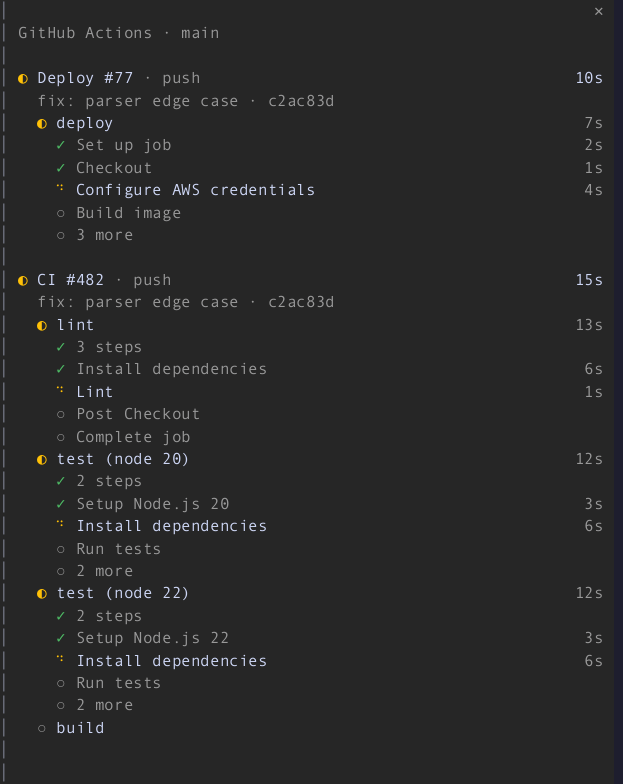
실행 중에 트랜스크립트 옆의 창에서 GitHub Actions 실행을 표시하는 Claude Code mod(함수 후크 플러그인)로, GitHub의 실행 보기처럼 그려집니다. 각 실행과 해당 작업, 실행 중인 작업의 단계, 상태 아이콘, 실시간으로 흐르는 소요 시간이 표시됩니다.
blackpaw-studio/claude-plugins/tree/main/plugins/github-actions-pane
트랜스크립트 옆의 창에서 실시간 GitHub Actions 실행을 표시하는 Claude Code mod입니다. 브랜치에서 실행이 시작되면 창이 자동으로 열리고, 각 실행과 해당 작업, 실행 중인 작업의 단계, 상태 아이콘, 실시간 소요 시간이 표시됩니다. 실패한 작업은 실패한 단계로 축소되고, 완료된 실행은 잠시 남아 있으며, 표시할 것이 없으면 창이 스스로 닫힙니다. 창을 배치할 수 없는 곳에서는 상태 줄로 대체됩니다. Claude Code 2.1.296+, 로그인된 gh CLI, GitHub 원격이 있는 체크아웃이 필요합니다. /plugin marketplace add blackpaw-studio/claude-plugins로 설치한 다음 /plugin install github-actions-pane@blackpaw-plugins를 실행합니다. 명령: /actions, /actions commit, /actions branch, /actions repo. 설정에는 범위, 잔류 초, 활성/유휴 폴링 초, 자동 열기가 포함됩니다.
먼저 작성자의 README에서 marketplace와 플러그인 이름을 확인하세요. 저장소 구조에 따라 명령어가 달라질 수 있습니다.
claude plugin marketplace add blackpaw-studio/claude-plugins
claude plugin install github-actions-pane@blackpaw-plugins
A Claude Code mod (function-hook plugin) that shows your GitHub Actions runs in a pane beside the transcript while they are running, drawn like GitHub's run view: each run with its jobs, the running job's steps, status icons, and durations that tick live.
The pane opens by itself when a run starts on your branch. Finished runs stay for a short linger, and the pane closes itself once nothing is left to show. A failed job collapses to the step that failed.
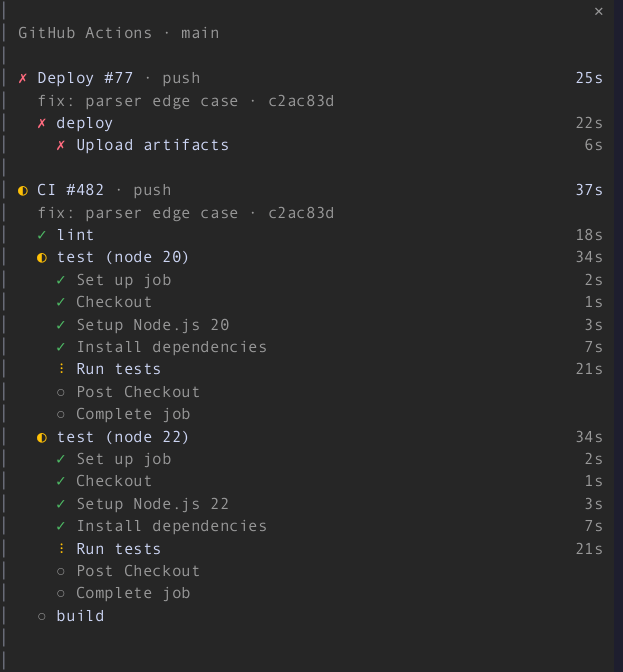

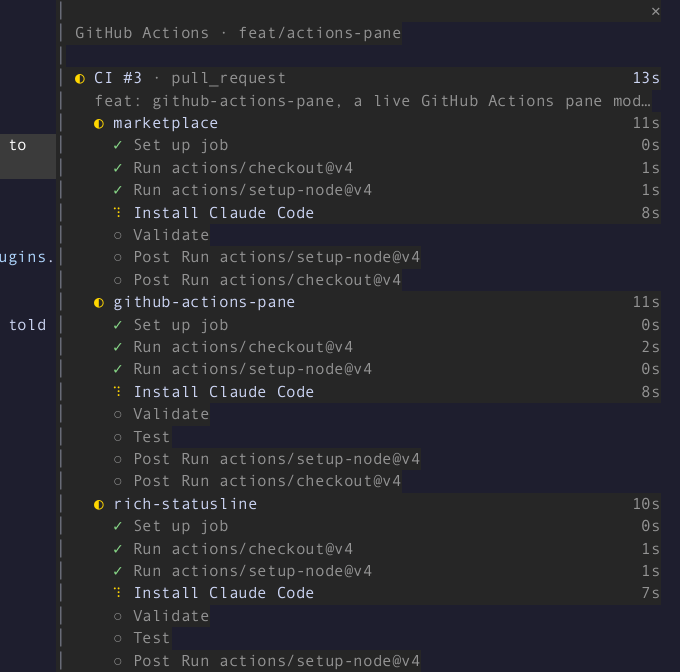
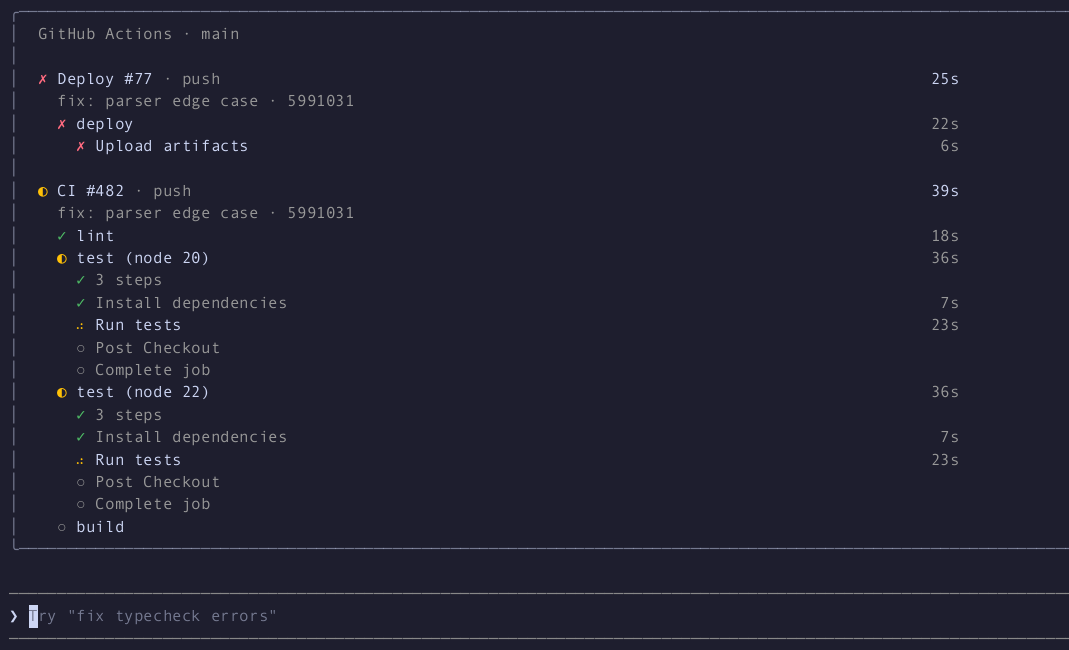
In the main-screen layout (CLAUDE_CODE_NO_FLICKER=0) the pane sits above
the prompt:
Where the pane cannot seat, the status line says what is running:

gh, logged in (gh auth login), and a
checkout with a GitHub remote.From this marketplace:
/plugin marketplace add blackpaw-studio/claude-plugins
/plugin install github-actions-pane@blackpaw-plugins
There is nothing to run. Push, or start a workflow, and the pane opens on the next poll.
| Command | |
|---|---|
| /actions | Open the pane by hand, or close it. Opened by hand, it stays until you close it, and with nothing running it shows the latest run. |
| /actions commit | Watch the runs for HEAD only, for this session. |
| /actions branch | Watch the runs on the current branch, for this session. |
| /actions repo | Watch every active run in the repository, for this session. |
Click a run's name to open it on github.com (gh run view --web).
If you close the pane, it stays closed for the runs already in flight, and a new run opens it again.
These are the plugin's options. Set them when you enable it, or in settings.json under
pluginConfigs["github-actions-pane"].options (scope, lingerSeconds,
activePollSeconds, idlePollSeconds, autoOpen).
| Setting | Default | |
|---|---|---|
| Scope | branch | commit (HEAD), branch (falls back to the commit on a detached HEAD) or repo |
| Linger seconds | 30 | How long finished runs stay before the pane closes; 0 closes at once |
| Active poll seconds | 10 | Poll interval while a run is active; at least 5 |
| Idle poll seconds | 60 | Poll interval while nothing is active; at least 15 |
| Open automatically | on | Off: no pane opens by itself, and the status line shows what is running |
gh run list (20 runs, filtered to the
scope), plus one gh run view --json jobs for each active run shown. When
those 20 are all newer than a run still going, two more lists
(--status in_progress, --status queued) find it. A run that is
waiting, requested or pending and older than the newest 20 is not
found until it moves to queued or in progress. A
finished run's jobs are read once and then cached. A git push,
gh workflow run, gh pr create or gh run rerun through Claude's Bash
tool polls at once, then at the active rate for two minutes.git rev-parse reads
the remote-tracking ref of the branch in scope (its push target, else
origin/<branch>, re-read on every poll and on every look while it is only
guessed, so a first git push -u <remote> is seen; under repo scope the
current branch's). When it moves,
the same kick happens: a poll at once, then the active rate for two
minutes. No GitHub calls are made while idle, and the watch is off when
there is no repository or the HEAD is detached.◐ 2 running · ✗ 1 failed instead. A pane
you open with /actions seats at any width. In the main-screen layout it
draws inline above the prompt, with the body capped at 96 columns.gh drops polling to the idle rate, and
the header shows rate limited until a poll succeeds. When the data is
more than two polls old, the header shows stale · 40s.gh, logged out of
gh, or with no GitHub remote, nothing opens and gh is not polled.
/actions says which one applies. A Bash cd into a repository starts
watching again.gh says completed, so a run's header can keep
ticking for up to one poll after its last job finished.gh run view --web
rather than a link.claude plugin validate plugins/github-actions-pane
claude plugin test plugins/github-actions-pane
CI (.github/workflows/ci.yml) runs both, plus the marketplace validation,
on every pull request. It skips tsc, because the declarations below need a
logged-in session to be written.
Type-checking needs the declarations the engine lays into
.claude-plugin/types/ when it loads the mod from a folder you own (a
--plugin-dir or the session's mods folder). Run tsc -p on the
plugin folder.
gh fixtures in src/testing/gh-fixtures.ts are real gh output from
cli/cli. dev/capture-fixtures.sh refreshes them with read-only calls.
The screenshots and GIF come from a real Claude Code session. That session
watches a scripted timeline that a fake gh (dev/demo/bin/gh) replays: CI
#482 with four jobs, and Deploy #77 failing at "Upload artifacts". Nothing
reaches GitHub. The demo polls at the floors (5 s active, 15 s idle).
dev/demo/record.sh full150 fullscreen 150 40 100   # also: main, other sizes
dev/demo/render.py still full150 42 docs/failure.png --crop 86,0,150,30
dev/demo/render.py gif full150 -12 92 docs/demo.gif --crop 86,0,150,35 --speed 2
record.sh runs Claude in a throwaway tmux session inside a scratch repository,
records it with asciinema, and saves tmux capture-pane -e frames each
second under dev/demo/out/<name>/. render.py turns a recording into
stills and a GIF with agg and ffmpeg.

문서 생성, 드리프트 감지, API 문서 자동화 플러그인이며 비밀이 포함된 문서 쓰기나 worker 디스패치를 거부하는 function-hook 가드로도 동작합니다.

Claude 데스크톱 앱용 상태 표시줄입니다. 프롬프트 위에 나타나 세션 품질, 컨텍스트 사용량, 캐시 카운트다운, 5시간 및 주간 한도를 보여 주고 Clawd가 세션의 동작을 연출합니다.

databricks CLI를 따라 Databricks 작업 공간, Unity Catalog, 컴퓨팅, 작업, 파이프라인, 앱, 대시보드를 트리로 보여 주는 /databricks-pane을 제공하는 Claude Code 플러그인 mod입니다. 실시간 강조, 프로필 전환, CLI 인수 복사도 지원합니다.
