
natsukium@natsukium
natsukium/claude-code-figures-plugin
natsukium/claude-code-figures-plugin
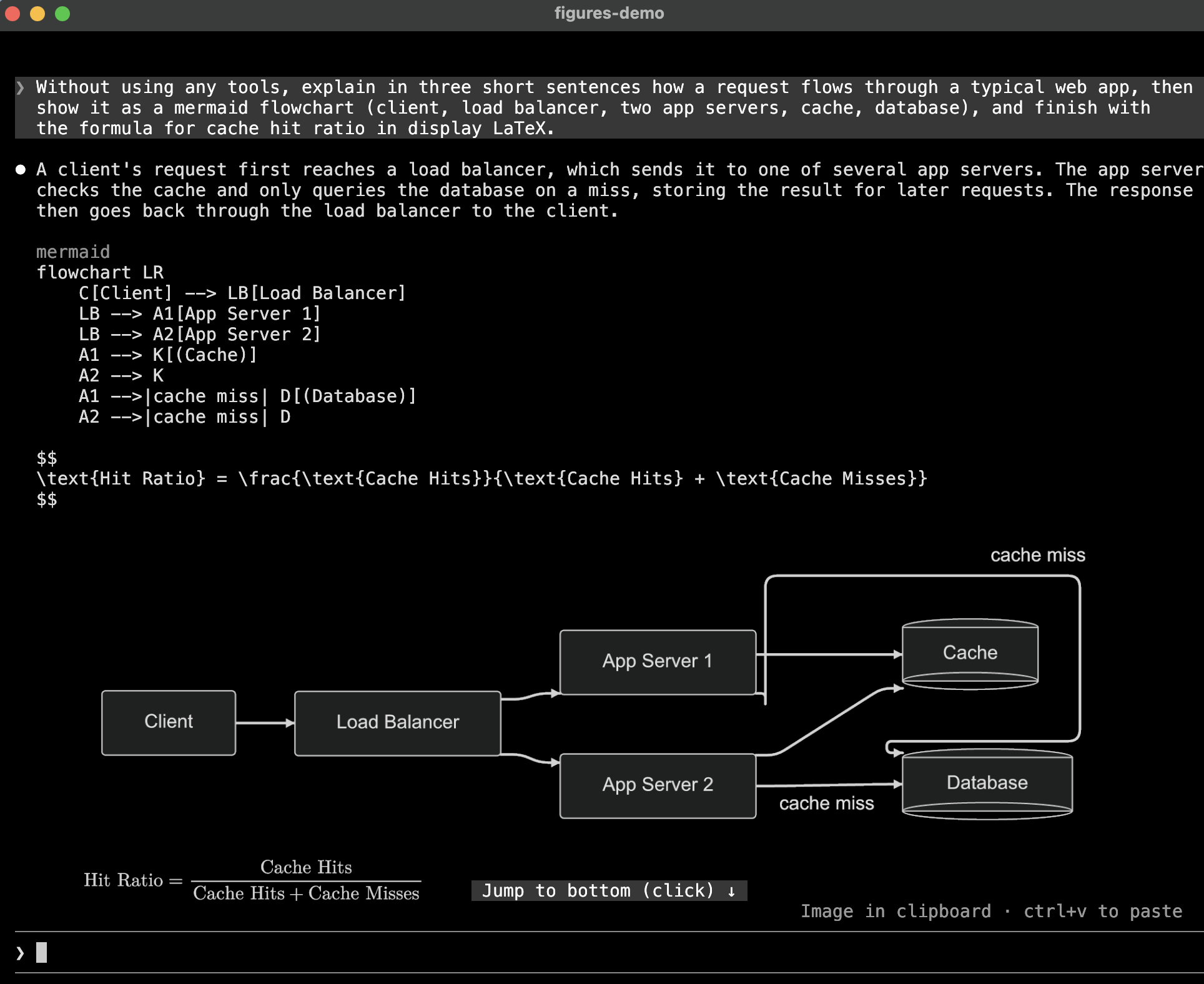
kitty graphics 프로토콜을 사용해 터미널 트랜스크립트 안에 다이어그램, LaTeX 수식, 도구 결과 이미지를 인라인으로 그리는 Claude Code mod입니다.

크기 제한 때문에 자연 크기의 60% 아래로 줄어들 그림은 터미널 높이까지 키웁니다. 그래도 작으면 shown at 43% · /figures to enlarge처럼 그림 아래에 표시합니다.
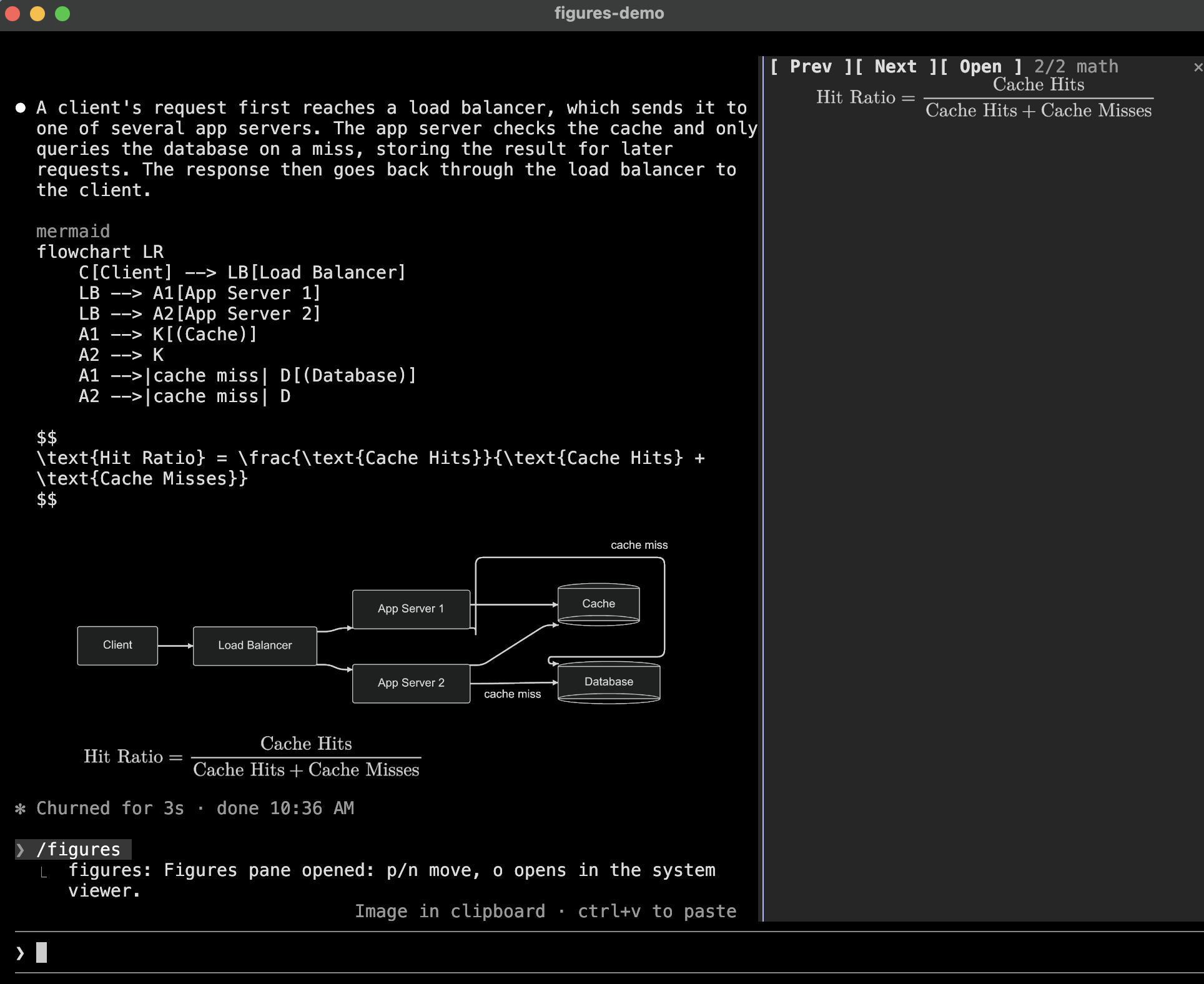
/figures는 세션의 그림을 보여 주는 창을 엽니다. 읽기 어려울 만큼 작게 그려진 가장 최근 그림에서 시작하고, 그런 그림이 없으면 최신 그림에서 시작합니다. p와 n으로 이동하고, o는 open(macOS) 또는 xdg-open으로 현재 그림을 엽니다. Escape 또는 다음 프롬프트로 창을 닫습니다.

플러그인에는 diagrams skill도 포함되어 있습니다. 어떤 언어를 그릴 수 있는지, 렌더링되도록 어떻게 작성해야 하는지 Claude에 알려 줍니다.
렌더링된 각 PNG는 $TMPDIR/claude-figures/ 아래에 캐시됩니다. 원본과 테마의 해시로 이름을 정하므로, 세션을 재개해도 다시 렌더링하지 않고 그림을 그릴 수 있습니다. 세션이 시작될 때 칠 일보다 오래된 파일을 삭제합니다.
mods(function-hook plugins)를 활성화하고 Claude Code가 kitty-graphics를 지원한다고 인식하는 터미널에서 Claude Code 2.1.287 이상을 사용해야 합니다. Terminal support를 참고하세요. 그림 종류마다 PATH에 다음 프로그램도 있어야 합니다.
| 그림 | 필요한 항목 | | -------------------------- | ---------------------------------------------------------------------------------------------------------------------------------------------------------------------------- | | mermaid | mmdr 또는 mmdc; resvg 권장 | | dot, graphviz | Graphviz의 dot 및 resvg | | d2 | d2 및 resvg | | svg, 수식 | resvg | | PNG가 아닌 도구 이미지 | magick(ImageMagick) 또는 sips(macOS 기본 제공) |
claude plugin marketplace add natsukium/claude-code-figures-plugin
claude plugin install figures@figures
cargo install mermaid-rs-renderer로 mmdr을 설치합니다.
/config 또는 claude plugin configure figures로 설정합니다.
| 옵션 | 기본값 | 의미 | | --------------------- | ------------- | --------------------------------------------------------------------------------------------------------------------------------------------------------------------------------- | | theme | auto | auto는 Claude Code의 테마를 따릅니다. 또는 dark, default, forest, neutral, modern을 사용할 수 있습니다(mmdr 전용이며 mmdc는 default로 그립니다). dark에서는 수식을 밝게, 그 외에는 어둡게 그립니다 | | background | transparent | 다이어그램 배경. transparent이면 터미널 배경이 비칩니다 | | scale | 2 | 그림의 픽셀 밀도. 1보다 크면 resvg가 필요합니다 | | cell_width_px | 8 | 터미널 셀 하나의 너비로 가정하는 값. 다이어그램 배치에 사용하는 픽셀 단위입니다 | | cell_aspect | 2.1 | 터미널 셀 하나의 높이 대 너비 비율로 가정하는 값 | | max_columns | 120 | 그림의 최대 너비. 셀 단위이며 터미널 안에도 맞춥니다 | | max_rows | 30 | 가독성을 위해 키우기 전 허용되는 그림의 최대 높이. 셀 단위입니다 | | renderers | (비어 있음) | 우선순위 순서의 렌더러 id를 쉼표로 구분합니다. 아래를 참고하세요 | | tool_images | true | 도구 결과에서 찾은 이미지를 그립니다 | | tool_image_max_rows | 12 | 도구 결과 썸네일의 최대 높이. 셀 단위입니다 |
renderers는 각 언어를 그리는 프로그램을 선택하고 순서를 정합니다. id는 mmdr와 mmdc(mermaid), dot, d2, svg, mathjax입니다. 어떤 언어에 렌더러가 하나라도 지정되면 지정한 것만 나열된 순서로 사용하고, 나머지는 기본값을 유지합니다. 따라서 mmdc는 mmdc만으로 mermaid를 그리고, mmdc,mmdr은 mmdc를 먼저 시도합니다. 렌더러가 없는 id는 세션 시작 시 보고합니다.
터미널의 XTVERSION 응답이 kitty(0.28.0 이상) 또는 Ghostty라고 이름을 지정할 때만 Claude Code가 그림을 활성화합니다. 다른 이름으로 kitty graphics 쿼리에 올바르게 답하는 터미널도 [mermaid diagram 1] 같은 alt 텍스트를 받습니다. TERM 또는 TERM_PROGRAM을 설정해도 효과가 없습니다.
그런 터미널에서 플러그인을 사용하려면 Claude Code가 읽는 재정의를 설정합니다.
CLAUDE_CODE_FORCE_TERMINAL_IMAGES=1 claude
Claude Code의 tmux 검사도 건너뜁니다. tmux 안에서는 그림에 더해 set -g allow-passthrough on이 필요합니다.
Claude Code의 판단을 보려면 --debug로 시작하고 디버그 로그에서 Terminal capabilities: 줄을 찾으세요.
tsconfig.json은 .claude-plugin/types/의 엔진 타입을 확장하며 Vite, Vitest, tsc가 읽습니다. Claude Code는 이 폴더에서 플러그인을 로드할 때만 타입을 작성하고 다른 명령은 단독으로 작성하지 않으므로, pnpm types는 더미 API key로 claude -p --plugin-dir .를 시작하고 타입이 존재하면 실패한 요청을 무시합니다. build, test, typecheck는 먼저 이를 실행합니다. Claude Code는 개발 의존성이므로 스크립트와 pnpm exec claude는 PATH의 claude가 무엇이든 pnpm-lock.yaml에 고정된 버전을 사용합니다.
pnpm install
pnpm build              # regenerate hooks/vendor/
pnpm test               # unit tests (Vitest, tests/unit/*.spec.ts)
pnpm typecheck
pnpm exec claude plugin validate .
pnpm exec claude plugin test .    # hooks through the engine (tests/engine/*.test.ts)
Claude Code는 hooks/를 TypeScript 소스로 로드하므로 타사 코드만 빌드됩니다. pnpm build는 Vite로 MathJax와 @noble/hashes를 hooks/vendor/에 번들하고 커밋하여 저장소를 그대로 설치할 수 있게 합니다. Hooks 모듈은 1 MiB를 넘는 파일을 임포트할 수 없고 런타임에 모듈을 임포트할 수도 없으므로 빌드가 번들을 청크로 나누고 글꼴의 각 글리프 범위를 JSON으로 작성합니다. 플러그인은 수식에서 해당 범위가 처음 사용될 때 읽습니다.
엔진은 import 사이에 $를 전달하는 모듈을 거부하므로 hooks/register.tsx는 플러그인에 필요한 $의 내용을 Io 객체(hooks/io.ts)로 감싸고 다른 모든 모듈이 이를 받습니다.
Apache-2.0. hooks/vendor/는 MathJax와 그 New Computer Modern font(둘 다 Apache-2.0), 그리고 noble-hashes(MIT)를 바탕으로 빌드됩니다.
먼저 작성자의 README에서 marketplace와 플러그인 이름을 확인하세요. 저장소 구조에 따라 명령어가 달라질 수 있습니다.
claude plugin marketplace add natsukium/claude-code-figures-plugin
claude plugin install figures
A Claude Code mod that draws diagrams, LaTeX math, and tool-result images inline in the terminal transcript, using the kitty graphics protocol.
mermaid, dot (or graphviz), d2, or svg in Claude's
reply is rendered and drawn under the reply. The code stays visible above the picture.$$ … $$, \[ … \], or a math, latex, or tex code block, is
typeset with MathJax. Inline $…$ stays text, since a picture cannot
sit inside a line, and a latex block holding a whole document (\documentclass) stays code.Read on a PNG, JPEG, GIF, WebP, or SVG file, or a screenshot an MCP
tool returns, is drawn under the tool's row, where Claude Code otherwise shows only a size line;
an SVG read only in part is left alone. In a collapsed tool group they are thumbnails; ctrl+o
unfolds the group and draws them full size. A PNG, JPEG, GIF, WebP, or SVG Claude sends to another
device with SendUserFile is drawn under its attachment line too, so it is on screen when you
come back to the terminal. It is read from disk when the row is first drawn; overwriting the file
later leaves that picture as it was.A picture the size caps would shrink below 60% of its natural size grows up to the terminal's
height, and one still smaller says so under it, such as shown at 43% · /figures to enlarge.
/figures opens a pane with the session's pictures, starting on the newest one drawn too small to
read, or else the newest. p and n step through them, o opens the current one with open
(macOS) or xdg-open, and Escape or your next prompt closes the pane.
The plugin also ships a diagrams skill, which tells Claude which languages are drawn and how to
write them so they render.
Each rendered PNG is cached under $TMPDIR/claude-figures/, named by a hash of the source and the
theme, so a resumed session draws its pictures again without re-rendering. Files older than seven
days are removed when a session starts.
Claude Code 2.1.287 or later, with mods (function-hook plugins) enabled, in a terminal it treats as
kitty-graphics capable; see Terminal support. Each kind of picture also needs
programs on PATH:
| Picture | Needs |
| -------------------------- | ---------------------------------------------------------------------------------------------------------------------------------------------------------------------------- |
| mermaid | mmdr or mmdc; resvg recommended |
| dot, graphviz | Graphviz's dot and resvg |
| d2 | d2 and resvg |
| svg, math | resvg |
| Tool images other than PNG | magick (ImageMagick) or sips (built into macOS) |
scale option.claude plugin marketplace add natsukium/claude-code-figures-plugin
claude plugin install figures@figures
Install mmdr with cargo install mermaid-rs-renderer.
Set these with /config or claude plugin configure figures.
| Option | Default | Meaning |
| --------------------- | ------------- | --------------------------------------------------------------------------------------------------------------------------------------------------------------------------------- |
| theme | auto | auto follows Claude Code's theme; or dark, default, forest, neutral, modern (mmdr only; mmdc draws it as default). Math is drawn light on dark and dark otherwise |
| background | transparent | Diagram background; transparent lets the terminal's background show through |
| scale | 2 | Pixel density of the picture; above 1 needs resvg |
| cell_width_px | 8 | Assumed width of one terminal cell, in the pixels diagrams are laid out in |
| cell_aspect | 2.1 | Assumed height-to-width ratio of one terminal cell |
| max_columns | 120 | Widest a picture may be, in cells; it is also kept inside the terminal |
| max_rows | 30 | Tallest a picture may be before it is grown for legibility, in cells |
| renderers | (empty) | Renderer ids in preference order, comma-separated; see below |
| tool_images | true | Draw images found in tool results |
| tool_image_max_rows | 12 | Tallest a tool-result thumbnail may be, in cells |
renderers picks and orders the programs that draw each language. The ids are mmdr and mmdc
(mermaid), dot, d2, svg, and mathjax. A language with any of its renderers listed uses only
those, in the listed order; the others keep the default. So mmdc draws mermaid with mmdc alone,
and mmdc,mmdr tries mmdc first. An id no renderer has is reported when a session starts.
Claude Code enables pictures only when the terminal's XTVERSION reply names kitty (0.28.0 or later)
or Ghostty. A terminal that answers the kitty graphics query correctly under any other name still
gets the alt text, such as [mermaid diagram 1]. Setting TERM or TERM_PROGRAM has no effect.
To use the plugin on such a terminal, set the override Claude Code reads:
CLAUDE_CODE_FORCE_TERMINAL_IMAGES=1 claude
This also skips Claude Code's tmux check. Inside tmux, the pictures additionally need
set -g allow-passthrough on.
To see what Claude Code decided, start it with --debug and look for the Terminal capabilities:
line in the debug log.
cell_width_px and cell_aspect, since mods are
not told the terminal's cell size in pixels. Adjust them if pictures look stretched.theme=auto follows Claude Code's own
theme (/config): a light variant draws light pictures, the others dark. When Claude Code's
theme is itself auto, its resolved value is not exposed, so COLORFGBG decides where the
terminal exports it, and dark otherwise.A --> B -->|ok| C) is misparsed; write one edge per line. Such a block renders
without an error, so it is not handed to mmdc; set renderers to mmdc to avoid mmdr.\text{日本語}, is drawn by resvg with a system
font./figures pane shares the screen with the prompt, so in a short terminal it has only a few
rows; o opens the picture at full size outside the terminal.tsconfig.json extends the engine's typings in .claude-plugin/types/, which Vite and Vitest read
as well as tsc. Claude Code writes them only when it loads the plugin from this folder, and no
command writes them alone, so pnpm types starts claude -p --plugin-dir . with a dummy API key
and ignores the failed request once the typings exist. build, test, and typecheck run it
first. Claude Code is a dev dependency, so the scripts and pnpm exec claude use the version
pinned in pnpm-lock.yaml, whatever claude is on PATH.
pnpm install
pnpm build              # regenerate hooks/vendor/
pnpm test               # unit tests (Vitest, tests/unit/*.spec.ts)
pnpm typecheck
pnpm exec claude plugin validate .
pnpm exec claude plugin test .    # hooks through the engine (tests/engine/*.test.ts)
Claude Code loads hooks/ as TypeScript source, so only third-party code is built. pnpm build
bundles MathJax and @noble/hashes with Vite into hooks/vendor/, which is committed so the
repository stays installable as is. A hooks module imports no file over 1 MiB and cannot import
modules at run time, so the build splits the bundle into chunks and writes each of the font's
glyph ranges as JSON, which the plugin reads the first time a formula uses it.
The engine refuses a module that passes $ across an import, so hooks/register.tsx wraps what
the plugin needs from $ in an Io object (hooks/io.ts), and every other module takes that.
Apache-2.0. hooks/vendor/ is built from MathJax and its
New Computer Modern font, both Apache-2.0, and
@noble/hashes, MIT.

Ruflo 메모리 기반용 플러그인입니다. AgentDB 컨트롤러 브리지(15개 agentdb_* MCP 도구), RuVector ONNX 임베딩(RaBitQ 32x 양자화를 포함한 10개 embeddings_* 도구), WASM HNSW 패턴 라우터(3개 ruvllm_hnsw_* 도구)를 제공합니다. mod(ADR-445)로서 프롬프트에 안전한 선택적 회수를 넣고, 비밀이 메모리에 들어가지 않도록 쓰기 가드를 두며, /agentdb와 콘솔이 보여 주는 상태 파일을 제공합니다.

pbir CLI를 따르는 리포트 패널에서 Claude가 읽고 변경하는 내용을 보여 주면서 대화형 Power BI 리포트를 만들고, 형식을 지정하고, 최적화하고, 검토합니다.


프롬프트 위, 상태 줄과 toast에 읽지 않은 AMP 메시지를 표시하고 유휴 Claude Code 세션을 깨워 읽게 합니다. Claude Code 2.1.287 이상이 필요합니다.
