
reporails@reporails
reporails/arcade/tree/main/doom
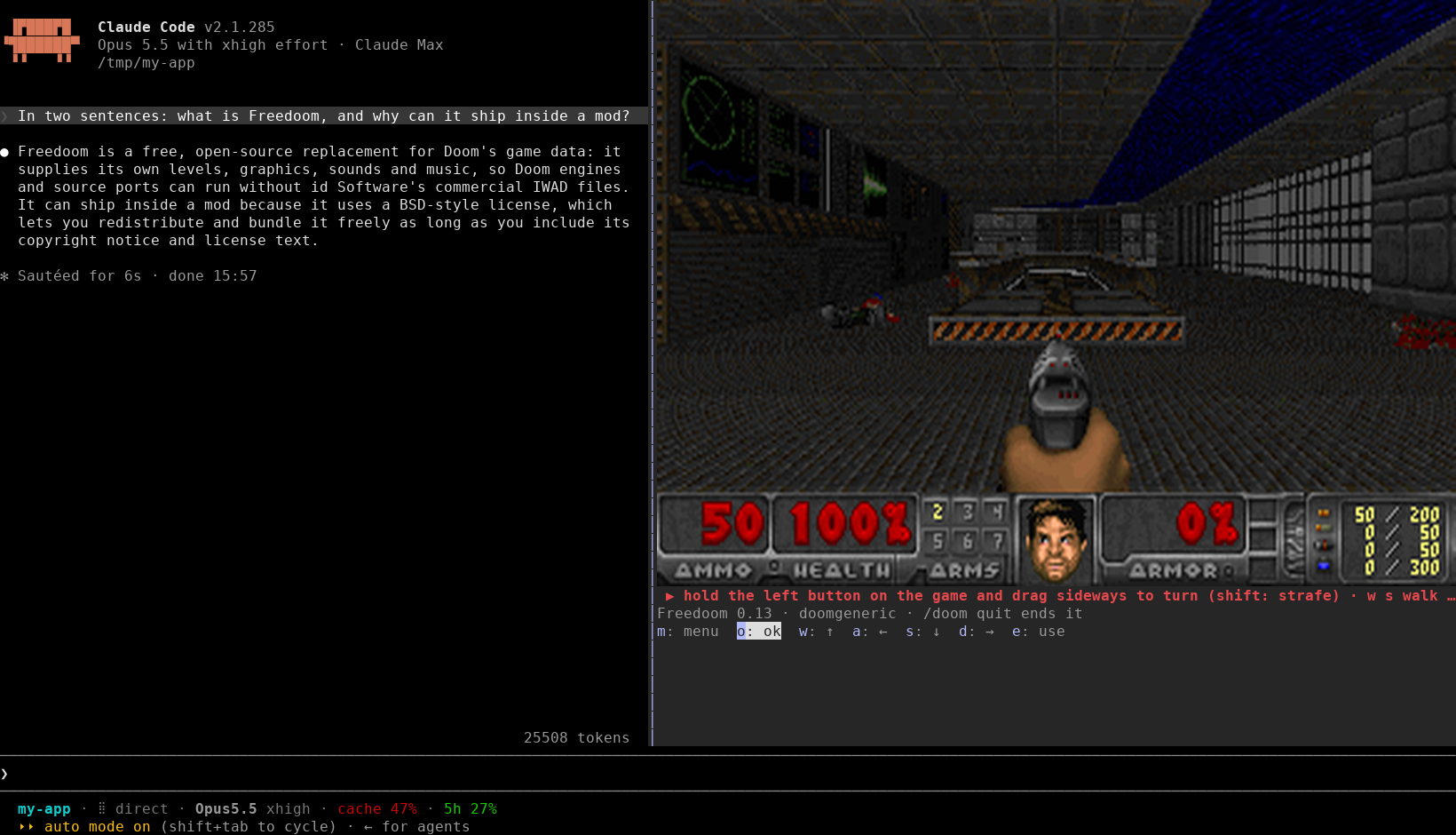
Claude Code 패널 안에서 즐기는 Doom. doomgeneric 엔진 위에서 Freedoom을 실행하며, kitty와 Ghostty에서는 실제 화면으로, 그 밖의 터미널에서는 블록 문자로 표시됩니다. Claude가 작업하는 동안 키보드와 마우스로 플레이할 수 있습니다. Linux, macOS, Windows용 사전 빌드 엔진이 포함되어 있습니다.
reporails/arcade/tree/main/doom
Claude Code 패널에서 Doom을 플레이할 수 있습니다. 플러그인으로 제공되는 모드이며, /doom을 실행하면 패널이 열리고 Claude가 작업하는 동안 doomgeneric 엔진에서 Freedoom이 실행됩니다. kitty 또는 Ghostty에서는 화면이 Doom 원본 해상도인 320×200의 실제 그림으로 표시됩니다. 그 밖의 터미널에서는 사분면 블록 문자로 그려지며, 한 셀에 픽셀 4개가 들어갑니다. 이 모드는 모델이 보는 내용을 읽지 않고, 모델에 아무것도 추가하지 않습니다. 다른 아케이드 게임과 달리 프롬프트 입력창을 가로채지만, 플레이하는 동안에만 그렇습니다. 프롬프트 입력창에 들어간 게임 키는 Doom으로 전달됩니다(/를 입력하면 입력창이 다시 돌아옵니다). 엔진은 자식 프로세스로 실행되며, 같은 컴퓨터 안에서만 Unix 소켓 또는 127.0.0.1을 통해 통신합니다.

Linux, macOS, Windows의 x86_64와 arm64용 사전 빌드 엔진이 포함되어 있어 컴파일러가 필요하지 않습니다. 지금까지 실제로 실행해 본 엔진은 Linux x86_64뿐입니다(검증된 내용 참고).
Claude Code 세션에서 다음을 입력합니다.
/plugin marketplace add reporails/arcade
/plugin install doom@reporails-arcade
그다음 전체 화면 레이아웃으로 Claude Code를 시작하고 /doom을 실행합니다.
CLAUDE_CODE_NO_FLICKER=1 claude
모드가 early access 단계인 2.1.285 또는 2.1.286에서는 CLAUDE_CODE_ENABLE_FUNCTION_HOOKS=1을 추가하세요. 2.1.287부터는 모드가 기본으로 로드됩니다. 2.1.285에서만 플레이해 보았습니다. 소스 체크아웃에서 실행하려면 claude --plugin-dir ./doom을 사용하세요.
| 플랫폼 | 엔진 | 화면 |
|---|---|---|
| Linux x86_64 / arm64 | engine/bin/linux-*/doom-claude, 정적 링크(musl), 모든 배포판에서 동작 | kitty 또는 Ghostty: 실제 그림; 그 밖의 경우: 블록 |
| macOS Apple silicon / Intel | engine/bin/macos-*/doom-claude | kitty 또는 Ghostty: 실제 그림; Terminal.app과 iTerm2: 블록 |
| Windows x86_64 / arm64 | engine/bin/windows-*/doom-claude.exe | 블록(모드가 감지하는 kitty 그림 프로토콜을 지원하는 Windows 터미널이 없음) |
| C 컴파일러가 있는 그 밖의 환경 | 처음 /doom을 실행할 때 make로 빌드 | 위와 같음 |
WSL에서 Claude Code는 Linux 프로그램이므로 Linux 엔진을 사용합니다.
전체 그림을 보려면 kitty나 Ghostty에서 실행하세요. 모드는 TERM / TERM_PROGRAM으로 이들을 찾습니다. Claude Code가 그림 표시를 거부하는 경우(예: tmux 안에서)에는 블록으로 대체됩니다. 그 밖의 터미널에서는 화면 크기가 터미널의 높이를 따릅니다. 독(dock)의 높이는 프롬프트 위의 공간과 같고, 화면의 행 수는 열 수의 3/8(Doom의 4:3 비율)입니다. 패널은 화면 너비만큼 좁아지고, 나머지 공간은 대화 기록이 사용합니다. 126×38 터미널에서는 약 72×27 ~ 85×32셀, 즉 144×54 ~ 170×64픽셀입니다. 행이 많을수록(글꼴을 줄이거나 창을 더 높게 할수록) 그림이 선명해집니다.
CLAUDE_CODE_NO_FLICKER=1은 전체 화면 레이아웃을 켭니다. 이때 패널은 오른쪽에 독으로 붙고 클릭에도 반응합니다. 이 설정이 없으면 패널은 프롬프트 위에 나타나고, Doom은 버튼 키로만 조작합니다.
| 입력 | 동작 |
|---|---|
| /doom | 패널을 열고 Doom을 시작합니다. Doom이 이미 실행 중이면 패널을 다시 앞으로 가져옵니다. |
| /doom quit | Doom을 종료하고 패널을 닫습니다. |
| Esc | 키보드를 Claude Code 프롬프트로 돌려줍니다(Claude Code가 Escape를 이 용도로 쓰므로 어떤 모드도 이를 가로챌 수 없습니다). 계속 누르고 있는 게임 키는 여전히 Doom에 전달됩니다. 플레이하는 동안 모드가 이 키들을 프롬프트에서 빼내 게임으로 넘깁니다. |
| Ctrl+X 다음 X | 패널을 닫고, 그에 따라 Doom도 종료됩니다. |
/doom은 즉시 실행되는 명령이므로 Claude가 응답하는 도중에도 사용할 수 있습니다.
마우스로 방향을 돌리고 키로 걷습니다. 터미널은 마우스 버튼이 눌리고 떼어지는 시점을 알려 주지만, 키에 대해서는 떼어지는 시점을 알려 주지 않습니다. 정확히 멈춰야 하는 회전은 마우스가 담당하는 이유입니다.
| 게임 위에서의 마우스 | Doom |
|---|---|
| 왼쪽 버튼을 누른 채 좌우로 드래그 | a와 d와 똑같은 속도로 회전합니다(누르고 있는 키처럼 처음 6분의 1초 동안은 절반 속도). 드래그 거리는 제한이 없습니다. 위아래 드래그는 아무 효과가 없습니다. |
| Shift를 누른 채 | 회전 대신 옆으로 이동(스트레이프) |
| 버튼에서 손 떼기 | 즉시 회전을 멈춥니다. |
| 오른쪽 버튼을 누른 채 | 누르고 있는 동안 발사 |
드래그는 버튼을 누른 위치에서부터 계산되며, 버튼을 누른 상태라면 게임 화면 가장자리를 넘어가도 계속 동작합니다. 게임 화면 아래의 빨간 띠도 같은 드래그를 받고, 조이스틱이 무엇을 하는지 표시합니다(“◉ turn right”). 드래그하는 동안 w와 s로 걸을 수도 있습니다. 키와 마우스가 동시에 동작합니다. 게임 화면이나 띠를 한 번 클릭하면 Doom이 키보드 입력도 받게 됩니다.
| 키 | Doom |
|---|---|
| Space | 발사 |
| e | 사용(문, 스위치) |
| 1부터 7 | 무기 |
| m 또는 Backspace | 메뉴 |
| Return | 메뉴에서 선택. Doom의 질문(종료, 새 게임, 악몽 난이도)에 예라고 답합니다. |
| 화살표, w a s d | 이동과 회전. 터미널이 허용하는 방식으로 계속 누르고 있을 수 있습니다(아래 참고). |
| , . | 옆으로 이동(스트레이프) |
| Tab | 지도 |
| p | 일시정지 |
| y n | 예(Return을 보냄), 아니요 |
| Esc | 키보드를 프롬프트로 돌려줍니다. 플레이하는 동안에도 게임 키는 Doom에 전달됩니다(아래 참고). |
클릭하지 않은 상태에서는 띠 아래의 버튼이 해당 글자에 반응합니다. m은 메뉴, o는 확인, w a s d, e는 사용입니다. Return은 “확인”을 눌러 패널의 포커스 링을 유지합니다. 그 밖의 게임 키(Space, 숫자, , .)는 Claude Code 프롬프트로 들어가며, Esc 이후의 모든 키도 마찬가지입니다. 따라서 플레이하는 동안(최근 10초 안에 게임이 입력을 받았다면)에는 프롬프트가 Doom의 것이 됩니다(prompt.edit 훅). 프롬프트에 들어온 게임 키는 Doom으로 가고, 그 밖의 키는 버려지며, 프롬프트에는 아무것도 남지 않습니다. /를 입력하면 프롬프트가 바로 돌아옵니다(/doom quit을 입력하거나, 그 글자를 지우고 Claude에게 쓰기 위해서입니다). 아니면 10초 동안 아무것도 하지 않으면 됩니다. 입력하던 초안은 절대 건드리지 않습니다. 클릭하지 않은 상태에서는 화살표 키가 Doom에 전달되지 않습니다. 프롬프트에서는 이전 프롬프트를 불러옵니다. m을 누르고 Return을 세 번 누르면 기본 난이도로 새 게임이 시작됩니다. 엔진은 Enter를 Doom의 확인 키로 삼기 때문에 Return은 예가 되고, n은 아니요가 됩니다. 마우스는 전체 화면 레이아웃(CLAUDE_CODE_NO_FLICKER=1)이 필요합니다.
타이틀 데모 중에는 아무 키나 누르면 메뉴가 열립니다(Doom 자체의 규칙입니다). 메뉴가 열려 있을 때는 m(Escape)으로 다시 닫을 수 있습니다.
터미널은 키 떼기를 보내지 않고, 누름과 그 뒤의 자동 반복만 보냅니다. 자동 반복은 GNOME에서 반 초 뒤에 시작되고, 그 뒤로는 30밀리초마다 반복됩니다. 또한 가장 최근에 누른 키만 반복합니다. w를 누르고 있는 동안 a를 누르면, w는 실제로 누르고 있든 아니든 반복이 멈춥니다. 그래서 doom-cli와 같은 방식으로, 키는 다음 반복이 와야 할 때까지 눌려 있는 것으로 간주합니다. 이동 키나 회전 키를 누르면 터미널의 첫 반복이 올 때까지 눌린 상태가 유지됩니다(터미널의 반복 지연 시간에, 엔진이 보낸 반복에서 학습한 값을 더하고 60밀리초를 더한 시간입니다). 이후 반복마다 160밀리초씩 더 유지됩니다. 그래서 누르고 있는 키가 멈추는 일은 없고, 뗀 키는 마지막 반복 후 6분의 1초가 지나면 멈춥니다. 플레이 중 회전 키는 Doom의 마우스 회전을 통해 처리됩니다. 터미널이 반복을 시작하기 전까지는 느리게 돌고, 그 뒤에는 Doom의 화살표 키와 똑같이 빠르게 돕니다(처음 6분의 1초는 절반 속도로, Doom이 누르고 있는 키를 가속하는 방식과 같습니다). 따라서 가볍게 한 번 두드리면 약 10° 돌며, 실제 키보드로 Doom에서 가볍게 한 번 두드렸을 때와 같습니다. 누르고 있는 키가 멈추지 않는다는 점도 같습니다(doom-cli의 소스도 “just turn more slowly outside of state repeat”라고 제안합니다). 메뉴, 타이틀 데모, 일시정지 중에는 회전 키가 여전히 키로 동작하므로 메뉴 슬라이더에서도 쓸 수 있습니다. 발사와 사용은 120밀리초 동안 유지되므로, 가볍게 두드리면 한 발만 나갑니다. 이동 키는 서로 순서를 나눠 씁니다. w a s d, 화살표, , 또는 . 중 하나를 누르면 다른 이동 키는 모두 한꺼번에 떼어집니다. 그래서 회전 키는 회전만 하고, 회전하는 순간 걷기도 멈춥니다. 걸으면서 회전하려면 이동 키 하나에 마우스를 옆으로 드래그하면 됩니다. 발사, 사용, 무기 키는 각자 따로 유지되며 다른 키를 떼지 않습니다. 걷는 동안 Space를 누르면 발사하면서 걷기 키의 유지 시간이 끝날 때까지 계속 걷습니다.
doom/
├── .claude-plugin/plugin.json
├── hooks/
│   ├── hooks.json            register.ts를 가리킴
│   ├── register.ts           훅: 명령, 패널, 프레임 가져오기, 키
│   ├── pad.ts                서피스 모듈: 키보드를 받는 띠
│   └── lib.ts                순수 함수: 키 맵, 화면 크기, URL, 엔진 인자
├── engine/
│   ├── doomgeneric/          doomgeneric 엔진, 수정 없음(GPL-2.0)
│   ├── doomgeneric_claude.c  플랫폼 계층: 창 대신 Unix 소켓 또는 127.0.0.1의 HTTP 사용
│   ├── bin/<os>-<arch>/      사전 빌드 엔진: linux, macos, windows × x86_64, arm64
│   ├── build-all.sh          zig cc로 모든 플랫폼용 bin/을 빌드
│   └── Makefile              이 컴퓨터용 ./doom-claude를 빌드. 맞는 사전 빌드 엔진이 없으면 모드가 실행
├── wad/freedoom1.wad         Freedoom Phase 1, 0.13.0(BSD; wad/COPYING.freedoom)
├── data/                     첫 실행 시 생성: Doom의 설정, 세이브, engine.log(엔진의 마지막 실행 기록)
├── tests/doom.test.ts        `claude plugin test`로 실행
└── README.md
구성 방식은 다음과 같습니다.
/doom은 기기 환경(Windows에서는 %OS%와 %PROCESSOR_ARCHITECTURE%, 그 밖에서는 uname -sm)을 확인해 engine/bin/<os>-<arch>/doom-claude를 고르고, 맞는 것이 없으면(Windows에서는 제외) 여기서 make로 빌드한 것을 사용한 뒤 $.process.spawn으로 실행합니다. 엔진은 모드가 출력을 계속 읽는 동안 실행됩니다. Claude Code는 모드가 언로드될 때 엔진을 종료합니다. 모드는 엔진이 수신을 시작하면 출력하는 doom-claude listening 줄을 기다립니다. 엔진이 출력한 내용은 모두 보관되고, 엔진이 끝나면 data/engine.log에 기록됩니다. 잘못 끝난 경우에는 마지막 줄이 패널에 표시됩니다.XDG_RUNTIME_DIR)에 있는 Unix 소켓을 사용합니다. 없으면 사용자의 임시 디렉터리(TMPDIR, macOS와 같음)를, 그것도 없으면 data/를 씁니다. 소켓 경로에 맞는(약 100바이트) 첫 번째 경로를 선택합니다. Windows이거나 어떤 경로도 맞지 않으면, 엔진은 빈 포트에서 127.0.0.1을 수신하고 doom-claude listening port=N을 출력합니다. 이때는 모드가 환경 변수(DOOM_CLAUDE_TOKEN)로 넘긴 무작위 64자리 숫자 토큰을 담은 X-Doom-Token 헤더가 있는 요청만 받습니다. 그 밖의 요청은 403으로 거부됩니다. DOOM_CLAUDE_TRANSPORT=tcp를 설정하면 Linux와 macOS도 127.0.0.1을 사용합니다. Linux에서 이 경로를 시험한 방법이 바로 이것입니다./image?since=…를 요청합니다. 더 새로운 프레임이 있으면 엔진은 원시 320×200 RGB 형식으로 소켓과 같은 비공개 디렉터리의 파일에 씁니다(옆에 쓴 다음 덮어쓰기로 이름을 바꿔서, 절반만 쓰인 파일을 읽는 일은 없습니다). 그리고 그 번호를 응답합니다. 훅 모듈은 키가 있는 Image를 { file, format: 'rgb', width: 320, height: 200, generation }으로 바꿉니다. Claude Code는 파일 경로를 kitty에 넘기고, kitty가 픽셀을 직접 읽으므로 픽셀이 Claude Code를 거치지 않습니다. 교체가 연속 10번 거부되면(Image가 대체 텍스트를 보이면) 화면은 블록으로 바뀝니다.$.http.fetch로 /frame?c=…&r=…을 가져옵니다. 엔진은 화면을 이미 Raster 셀로 인코딩해 돌려주고, 훅 모듈은 그 텍스트를 $.ui.blit으로 마운트된 Raster에 그립니다. 마지막으로 그린 프레임보다 새롭지 않은 프레임은(엔진은 그림이 바뀐 경우에만 프레임으로 셉니다), 빈 204로 응답합니다.Raster는 색 쌍을 최대 1024개까지만 그릴 수 있고, 넘는 것은 가장 가까운 색으로 맞춰지며 그림에 얼룩이 생깁니다. 32×32가 정확히 1024입니다. 셀은 왼쪽 이웃의 색이 거의 같을 만큼 잘 맞으면 그 색을 그대로 씁니다. Claude Code의 그리기는 한 행에서 색이 바뀌는 횟수가 많을수록 느려지기 때문입니다(측정값: 재사용 없이 64색 팔레트를 쓰면 초당 12~14프레임, 이 방식을 쓰면 초당 20~35프레임이며, 모두 같은 고부하 기기에서 측정했습니다). 행 끝의 빈칸은 Claude Code가 그리지 않으므로, 빈 셀은 만들지 않습니다.먼저 작성자의 README에서 marketplace와 플러그인 이름을 확인하세요. 저장소 구조에 따라 명령어가 달라질 수 있습니다.
claude plugin marketplace add reporails/arcade
claude plugin install doom
Doom in a Claude Code pane. A mod, shipped as a plugin: /doom opens a pane and plays Freedoom on the doomgeneric engine while Claude works. In kitty or Ghostty the screen is a real picture at Doom's own 320×200; in any other terminal it is drawn in quadrant block characters, four pixels a cell. It reads nothing the model sees and adds nothing to it. Unlike the other arcade games it does hook the prompt box, and only while you play: game keys that land there go to Doom instead (type / to have it back). It runs the engine as a child process and talks to it on this machine only, over a Unix socket or 127.0.0.1.
It carries a prebuilt engine for Linux, macOS and Windows, each on x86_64 and arm64, so no compiler is needed. Only the Linux x86_64 engine has been run so far (see What has been verified).
In a Claude Code session:
/plugin marketplace add reporails/arcade
/plugin install doom@reporails-arcade
Then start Claude Code in the fullscreen layout and run /doom:
CLAUDE_CODE_NO_FLICKER=1 claude
On 2.1.285 or 2.1.286, where mods are early access, add CLAUDE_CODE_ENABLE_FUNCTION_HOOKS=1; from 2.1.287 mods load by default. It has been played on 2.1.285 only. From a checkout: claude --plugin-dir ./doom.
| Platform | Engine | Picture |
|---|---|---|
| Linux x86_64 / arm64 | engine/bin/linux-*/doom-claude, static (musl): any distribution | kitty or Ghostty: the picture; elsewhere blocks |
| macOS Apple silicon / Intel | engine/bin/macos-*/doom-claude | kitty or Ghostty: the picture; Terminal.app and iTerm2: blocks |
| Windows x86_64 / arm64 | engine/bin/windows-*/doom-claude.exe | blocks (no Windows terminal speaks kitty's picture protocol that the mod detects) |
| Anything else with a C compiler | built on first /doom with make | as above |
Under WSL, Claude Code is a Linux program and uses the Linux engine.
Run it in kitty or Ghostty for the full picture; the mod finds them by TERM / TERM_PROGRAM, and falls back to blocks if Claude Code refuses the picture anyway (as it does inside tmux). In any other terminal the screen's size follows the terminal's height: the dock is as tall as the space above the prompt, the screen is 3/8 as many rows as columns (Doom's 4:3), and the pane narrows to the screen's width so the transcript keeps the rest. On a 126×38 terminal that is about 72×27 to 85×32 cells, 144×54 to 170×64 pixels. More rows (a smaller font, or a taller window) give a sharper picture.
CLAUDE_CODE_NO_FLICKER=1 turns on the fullscreen layout: the pane docks on the right and takes clicks. Without it the pane sits above the prompt and Doom is played with the button keys alone.
| Input | What it does |
|---|---|
| /doom | Opens the pane and starts Doom. If Doom is running, brings the pane back. |
| /doom quit | Ends Doom and closes the pane. |
| Esc | Gives the keyboard back to Claude Code's prompt (Claude Code keeps Escape for that; no mod can take it). Game keys you go on pressing still reach Doom: while you play, the mod takes them out of the prompt and hands them to the game. |
| Ctrl+X then X | Closes the pane, which ends Doom. |
/doom is an immediate command, so it works while Claude is mid-turn.
The mouse turns and the keys walk: a terminal tells when a mouse button goes down and when it comes up, which it never does for a key, so turning, which needs to stop exactly, is the mouse's job.
| Mouse, on the game | Doom |
|---|---|
| Hold the left button and drag left or right | Turn, exactly as fast as a and d (half speed for the first sixth of a second, as Doom turns a held key), however far you drag; an up or down drag does nothing |
| …with shift held | Strafe instead of turn |
| Let go | Stop turning, at once |
| Hold the right button | Fire, for as long as it is held |
The drag is measured from where the button went down, and keeps working past the edge of the game once the button is down. The red strip under the game takes the same drags and says what the stick is doing ("◉ turn right"). Walk with w and s while you drag: the keys and the mouse work at once. A click on the game or the strip also gives Doom the keyboard:
| Key | Doom |
|---|---|
| Space | Fire |
| e | Use (doors, switches) |
| 1 to 7 | Weapons |
| m or backspace | Menu |
| Return | Pick in a menu; yes to Doom's questions (quit, new game, nightmare) |
| Arrows, w a s d | Move and turn, held the way a terminal allows (below) |
| , . | Strafe |
| Tab | Map |
| p | Pause |
| y n | Yes (sends Return), no |
| Esc | Hands the keyboard back to the prompt; game keys still reach Doom while you play (below) |
Without a click, the buttons under the strip answer their letters: m menu, o ok, w a s d, e use; and Return presses ok, which holds the pane's focus ring. Every other game key (space, the digits, , .) lands in Claude Code's prompt, and so does every key after Esc. So while you play (the game had input in the last 10 seconds), the prompt is Doom's (a prompt.edit hook): a game key that lands there goes to Doom, any other key is dropped, and nothing stays in the prompt. Type / to have it back at once (for /doom quit, or delete it and write to Claude), or leave the game alone for 10 seconds. A draft you had typed before is never touched. The arrows never reach Doom without a click: in the prompt they recall earlier prompts. m, then Return three times, starts a new game on the default skill. The engine makes Enter Doom's confirm key, so Return answers yes; n answers no. The mouse needs the fullscreen layout (CLAUDE_CODE_NO_FLICKER=1).
During the title demo any key opens the menu (Doom's own rule), and m (Escape) closes it again when it is open.
A terminal sends no key-up, only a press and then its auto-repeat (half a second later on GNOME, then every 30 ms), and it repeats only the newest key: once a is pressed while w is held, w goes quiet whether it is still held or not. So, as doom-cli does, a key counts as held until its next repeat is due: a press of a movement or turn key holds it until the first repeat could come (the terminal's repeat delay, which the engine learns from the repeats it sends, plus 60 ms), each repeat for 160 ms more, so a held key never stops and a key let go stops a sixth of a second after its last repeat. A turn key in play turns through Doom's mouse instead: slowly until the terminal repeats it, then as fast as Doom's arrow keys (half speed for their first sixth of a second, as Doom ramps a held key), so a tap turns about 10°, as a quick tap does in Doom with a real keyboard, and a held key never stops (doom-cli's own source suggests this: "just turn more slowly outside of state repeat"). In a menu, the title demo or a pause the turn keys stay keys, so menu sliders still take them. Fire and use hold 120 ms, so a tap is one shot. Movement keys take turns: pressing w a s d, an arrow, , or . lets go of every other movement key at once, so a turn key only turns and walking stops the moment you turn. Walking and turning together is a walking key plus a sideways drag of the mouse. Fire, use and weapons are held on their own and let go of nothing: space while walking fires and keeps walking until the walking key's hold runs out.
doom/
├── .claude-plugin/plugin.json
├── hooks/
│   ├── hooks.json            points at register.ts
│   ├── register.ts           the hooks: the command, the pane, the frame pull, the keys
│   ├── pad.ts                the surface module: the strip that takes the keyboard
│   └── lib.ts                pure functions: key map, screen size, URLs, engine arguments
├── engine/
│   ├── doomgeneric/          the doomgeneric engine, unchanged (GPL-2.0)
│   ├── doomgeneric_claude.c  its platform layer: HTTP on a Unix socket or 127.0.0.1 instead of a window
│   ├── bin/<os>-<arch>/      prebuilt engines: linux, macos, windows × x86_64, arm64
│   ├── build-all.sh          builds bin/ for every platform with zig cc
│   └── Makefile              builds ./doom-claude for this machine; the mod runs it when no prebuilt engine fits
├── wad/freedoom1.wad         Freedoom Phase 1, 0.13.0 (BSD; wad/COPYING.freedoom)
├── data/                     made at first run: Doom's config, saves, engine.log (the engine's last run)
├── tests/doom.test.ts        runs with `claude plugin test`
└── README.md
How it fits together:
/doom works out the machine (%OS% and %PROCESSOR_ARCHITECTURE% on Windows, uname -sm elsewhere), picks engine/bin/<os>-<arch>/doom-claude, falls back to one built here with make (never on Windows), and starts it with $.process.spawn. The engine runs for as long as the mod reads its output: Claude Code ends it when the mod unloads. The mod waits for the line doom-claude listening the engine prints once it listens; whatever the engine writes is kept, and written to data/engine.log when it ends, the last line shown in the pane if it ends badly.XDG_RUNTIME_DIR), else the user's temporary directory (TMPDIR, as on macOS), else data/: the first whose path fits a socket (about 100 bytes). On Windows, or when no path fits, the engine listens on 127.0.0.1 on a free port it prints (doom-claude listening port=N), and takes only requests carrying the X-Doom-Token header with a random 64-digit token the mod hands it in its environment (DOOM_CLAUDE_TOKEN); anything else is refused with 403. DOOM_CLAUDE_TRANSPORT=tcp makes Linux and macOS use 127.0.0.1 too, which is how that path was tried on Linux./image?since=…. When there is a newer frame the engine writes it as raw 320×200 RGB to a file in the same private directory as its socket (written beside it and renamed over it, so it is never read half-written) and answers with its number. The hooks module swaps the keyed Image to { file, format: 'rgb', width: 320, height: 200, generation }. Claude Code hands kitty the file's path and kitty reads the pixels itself, so no pixel passes through Claude Code. Ten refused swaps in a row (the Image showing its alt text) switch the screen to blocks./frame?c=…&r=… with $.http.fetch. The engine answers with the screen already encoded as Raster cells, and the hooks module blits that text onto the mounted Raster with $.ui.blit. A frame not newer than the last one painted (the engine counts a frame only when the picture changed) is answered with an empty 204.Raster paints at most 1024 colour pairs and snaps the rest to the nearest, which speckles the picture, and 32 by 32 is 1024. A cell takes its left neighbour's colours when they fit nearly as well, because Claude Code's paint gets slower the more often the colour changes along a row (measured: 12–14 frames a second with a 64-colour palette and no reuse, 20–35 with this, on the same loaded machine). No cell is a blank, because Claude Code leaves blanks at the end of a row undrawn.Client) is the only thing that gets the pointer, and it cannot draw a Raster or an Image. So a second instance of pad.ts lies over the screen in a position: "absolute" Box the screen's size, drawing nothing, so the picture shows through while it takes the pointer and the keys.pad.ts posts what it takes to the hooks module: the keys go to /key, the stick to /stick?t=…&f=0&b=… (it only turns, so its forward move is always 0). A surface module may post once a frame, and a later post replaces one not yet delivered, so each post carries the last 24 keys, numbered per instance (the hooks module keeps the ones it has not seen), and the stick as it is now. The engine posts the stick to Doom as one mouse event a tic, its sideways move turning (or strafing) and its forward move walking, its buttons held until the next /stick; a held stick is sent again every 300 ms, and one not heard of for 1.5 s is let go. The buttons send their key directly./doom quit and the session's end each send /quit, and end the engine's output stream should it not answer. The engine also exits on its own after 30 seconds with no request, so nothing is left running if Claude Code dies. A fatal error inside Doom prints and exits (the engine passes -nogui), rather than opening a dialog box nobody would see.The engine also answers /stats (frames drawn and served, keys taken, the longest wait between frames served, holds that ended while the key was still down, the keys down, the stick, the player's facing in degrees and the repeat delay learnt; ?reset=1 starts the counts again), which is how the figures below were measured.
Frame delivery, re-measured with all six engines rebuilt (Claude Code 2.1.285, the title demo, load 5–6 on 8 cores, other sessions running):
Since a turn key turns slowly until it repeats (the linux-x86_64 engine only so far):
d in a level turned 10.5° (61.5° before). Held 1.5 s with GNOME's timing it never stopped for longer than 28 ms: 9.0° at 0.5 s, 55.8° at 1 s, 136.6° at 1.5 s. On the title demo d still opened the menu, and with a menu open it turned the player 0°.Since keys hold until their next repeat is due, as doom-cli's do:
/stats about every 10 ms. With GNOME's timing (first repeat at 500 ms, then every 30 ms): held 1.5 s, it never stopped turning for longer than 26 ms and let go 160 ms after the last repeat; a tap turned 61.5°. With the old 220 ms turn hold the same held key stopped for 308 ms, and a tap turned 19.3°.a pressed lets w go; space while walking keeps both down), and claude plugin test passes 19 of 19.d (GNOME's repeat timing) turned 5.3° and 7.1° at 100 ms, 51.0° and 52.8° at 500 ms, 114.3° and 112.5° at 1 s: the same within a tic. A held w stayed down in 71 of 71 samples while the drag turned the view.Since the engine became a spawned child with prebuilt binaries:
claude plugin validate passes on 2.1.285, and claude plugin test passes 17 of 17: the platform and engine choice, where the engine listens, the listening line, the spawned engine's frames, the token on every request over 127.0.0.1, an engine that ends (the pane says so, data/engine.log keeps its output), one that cannot start (the pane shows its last line), the make fallback, and Windows with no engine.build-all.sh): static ELF for Linux, Mach-O for macOS, PE32+ console programs for Windows./stats and /image answer, the frame file is 192,000 bytes, /quit removes the socket and the file) and 127.0.0.1 (403 without the token or with a wrong one, 200 with it, an 80×30 frame is 38,400 bytes of base64; no port without a token: exit 2). A missing WAD exits at once (255, in 17 ms) with its message, and no dialog.linux-x86_64 engine: over the Unix socket the game drew in the pane, the engine ran as a child of claude (no fork), the m button reached it, Esc ended it (exit 0, socket and frame file gone, data/engine.log written). With DOOM_CLAUDE_TRANSPORT=tcp: the engine listened on 127.0.0.1 only, refused a request without the token, and served the pane's fetches. Killing claude with SIGKILL: the engine was gone a second later, its files removed.Before that change, on the daemon build:
claude plugin validate passes on 2.1.285./stats: w held then a held keeps w down (carried) the whole time a is held and lets both go 160 ms after; w held then a tapped keeps w down for 560 ms after the tap; s after w lets w go at once; w alone held has no gap.claude plugin test passes, 13 of 13, on 2.1.285 with the early-access switch. The tests cover the key map, the screen size, the key numbering across replaced posts, the engine's command line, the frame pull and blit, keys from the strip and the buttons, the engine going away, /doom quit, fitting the docked pane to the screen (and keeping that width), the picture in kitty (the engine's file, swapped generation by generation), the fall back to blocks when the picture is refused, the stick (its curve, and its drag, release and fire on the game and on the strip), and a surface with no terminal.script): Claude Code sent kitty the frame file by path (a=T,U=1,f=24,s=320,v=200,t=f,c=90,r=33 with /run/user/1000/claude-doom-….rgb). During the demo 33 frames a second were served and 34 picture swaps a second reached kitty (Doom runs at 35), the longest wait between frames 58 ms, and Claude Code used 7% of a core.TERM=xterm-kitty, Claude Code drew no picture and the mod fell back to blocks, as designed.TMUX unset and COLORTERM=truecolor, which is how the sessions above were run.m. Holds are timed: a movement or turn key holds from a press until the terminal's first repeat is due (its repeat delay, learnt, at most 600 ms, plus 60 ms), anything else 120 ms, and each repeat extends the hold by 160 ms, so a key let go stops within about a sixth of a second; a turn key turns slowly until its repeats come, so a tap turns about 10° and a held turn takes half a second to reach full speed.Image is untried.Three licences, by folder:
hooks/ and tests/: MIT, as the rest of this repository (../LICENSE).engine/: GPL-2.0-or-later. The engine is doomgeneric (engine/doomgeneric/LICENSE), and its platform layer engine/doomgeneric_claude.c and the prebuilt binaries under engine/bin/ are built with it, so they carry the same licence. The mod only runs the engine as a separate program.wad/freedoom1.wad: Freedoom, BSD-3-Clause (wad/COPYING.freedoom)."Doom" is id Software's name for its game. This mod plays Freedoom, a free game made for Doom engines, and contains nothing of id's.

Cognitum Seed 하드웨어의 IoT 장치 수명 주기, 텔레메트리 이상 탐지, 플릿 관리 및 증인 체인 검증

rayfin CLI를 따라가는 pane으로 설명된 data-goblin/power-bi-agentic-development Claude Code 플러그인 marketplace의 Fabric Data App 플러그인입니다.


프롬프트 위, 상태 줄과 toast에 읽지 않은 AMP 메시지를 표시하고 유휴 Claude Code 세션을 깨워 읽게 합니다. Claude Code 2.1.287 이상이 필요합니다.
