
KyongSik-Yoon@KyongSik-Yoon
KyongSik-Yoon/claude-mods/tree/main/desktop-look
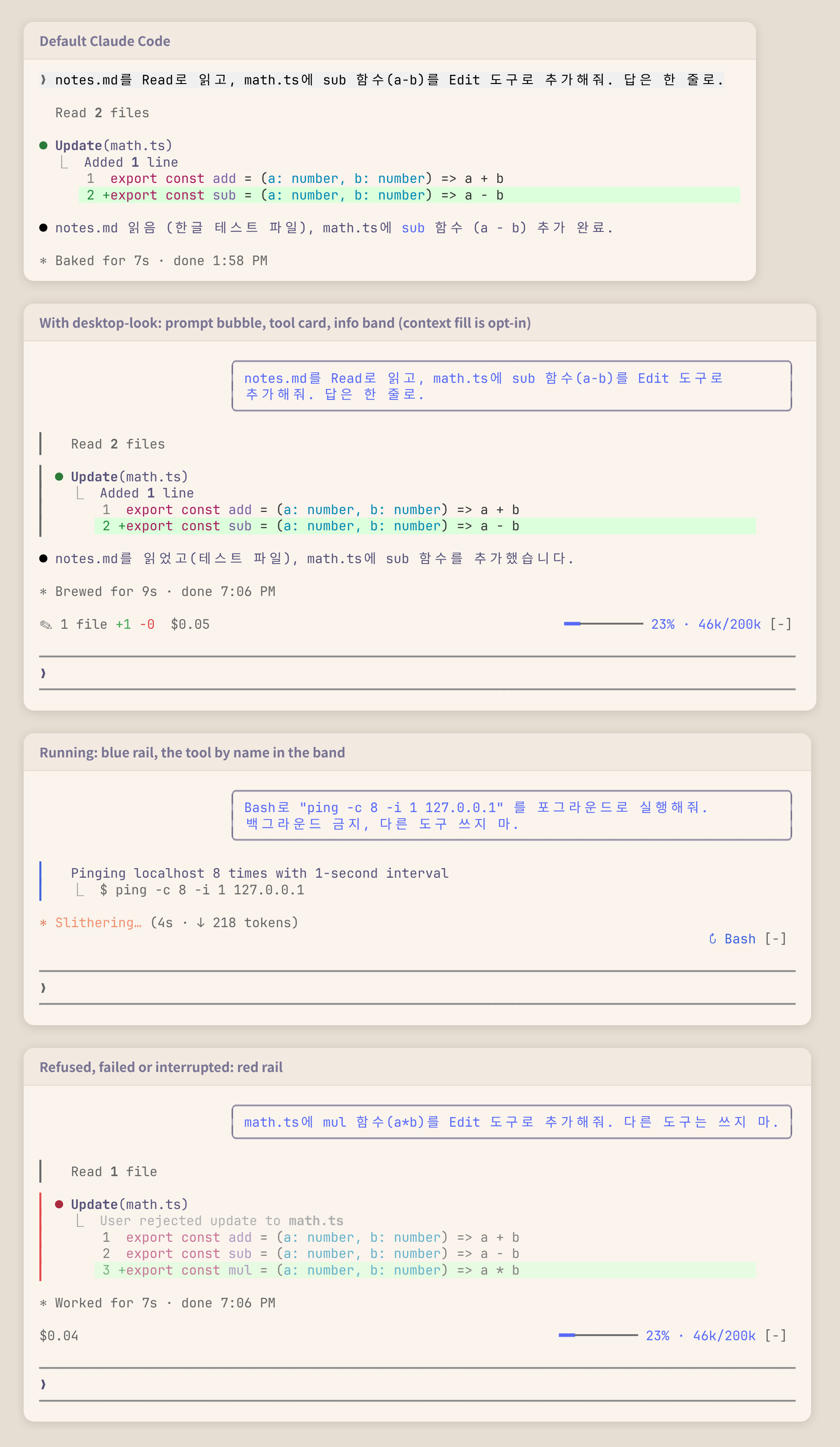
터미널 트랜스크립트를 Claude Code 데스크톱 앱처럼 보이게 합니다. 프롬프트 버블, 도구 카드, 정보 밴드를 제공합니다.
KyongSik-Yoon/claude-mods/tree/main/desktop-look
터미널 트랜스크립트를 데스크톱 앱과 비슷하게 만드는 Claude Code mod입니다.

✎ 2 files +7 -0)과 사용한 비용($0.05)을, 오른쪽에 실행 중인 도구(↻ Read ×3, Grep, 좁을 때는 ↻ 4 running)를 표시하며 보여 줄 것이 없으면 숨깁니다claude plugin marketplace add KyongSik-Yoon/claude-mods
claude plugin install desktop-look@kyongsik-mods
그 다음 /reload-plugins를 실행하거나 새 세션을 시작합니다. mods를 지원하는 Claude Code 빌드가 필요합니다(2.1.289, 전체 화면, 라이트/다크 테마에서 테스트됨).
설정할 필요가 없습니다. 하나를 바꾸려면 /plugin configure desktop-look@kyongsik-mods(또는 /config)를 실행합니다.
| 옵션 | 기본값 | |
| --- | --- | --- |
| 버블 너비 | 75% | 터미널의 60%, 75%, 90% |
| 정보 밴드 | on | 프롬프트 위의 밴드 |
| 밴드: 모델 | off | 표시하지 않는 상태 줄을 위한 모델과 effort |
| 밴드: 컨텍스트 | off | 컨텍스트 사용량: 안정적일 때 파란색, 300k 토큰 또는 70%부터 노란색, 500k 토큰 또는 90%부터 빨간색이며 먼저 도달한 기준을 따름 |
비용은 Claude Code가 API 가격으로 계산한 값이며 구독에서 청구되는 금액이 아닙니다.
UserMessage(자신의 프롬프트만 해당하며 작업 알림이나 다른 세션의 메시지는 제외)는 오른쪽 정렬된 둥근 테두리의 Box로 그립니다.ToolUse, ToolGroup, ToolProgress, ToolResult는 별도 렌더링 위치이므로 하나의 테두리가 이들을 가로지를 수 없습니다. 각각 엔진의 행(await next(e))을 감싸고 행 높이만큼 늘어나는 절대 위치의 한 열 레일을 추가하며, 엔진이 도구 행을 시작할 때 넣는 빈 줄은 건너뜁니다.isRunning, isErrored, isInterrupted와 그룹의 호출에서 결정됩니다.$.state의 값을 읽는 AbovePrompt hook입니다. tool.call(실행 중인 도구와 각 Edit 및 Write 결과 패치의 +/- 행), session.measure(비용, 컨텍스트), turn.step(모델)이 값을 기록합니다. 새 세션(/clear)은 집계를 다시 시작하고 reload는 집계를 유지합니다.claude plugin validate .
claude plugin test .
먼저 작성자의 README에서 marketplace와 플러그인 이름을 확인하세요. 저장소 구조에 따라 명령어가 달라질 수 있습니다.
claude plugin marketplace add KyongSik-Yoon/claude-mods
claude plugin install desktop-look
A Claude Code mod that makes the terminal transcript look more like the desktop app.
✎ 2 files +7 -0) and spent ($0.05) on the left, the tools running (↻ Read ×3, Grep, or ↻ 4 running when narrow) on the right; hidden when there is nothing to showclaude plugin marketplace add KyongSik-Yoon/claude-mods
claude plugin install desktop-look@kyongsik-mods
Then run /reload-plugins or start a new session. Requires a Claude Code build with mods support (tested on 2.1.289, fullscreen and light/dark themes).
No setup needed. To change one, run /plugin configure desktop-look@kyongsik-mods (or open /config):
| Option | Default | |
| --- | --- | --- |
| Bubble width | 75% | 60%, 75% or 90% of the terminal |
| Info band | on | The band above the prompt |
| Band: model | off | Model and effort, for a status line that does not show them |
| Band: context | off | Context fill, for a status line that does not show it: blue while calm, yellow from 300k tokens or 70%, red from 500k tokens or 90%, whichever comes first |
The cost is what Claude Code computes at API prices; on a subscription it is not what you are billed.
UserMessage (your own prompts only, not task notifications or other sessions' messages) is drawn as a right-aligned Box with a round border.ToolUse, ToolGroup, ToolProgress and ToolResult are separate render sites, so one border cannot span them. Each wraps the engine's own row (await next(e)) and adds an absolutely positioned one-column rail that stretches to the row's height, skipping the blank line the engine opens a tool row with.isRunning, isErrored, isInterrupted, and the calls of a group.AbovePrompt hook reading values in $.state, written by tool.call (tools running, and the +/- lines of each Edit and Write result's patch), session.measure (cost, context) and turn.step (model). A new session (/clear) starts the tally over; a reload keeps it.claude plugin validate .
claude plugin test .

Ruflo 메모리 기반용 플러그인입니다. AgentDB 컨트롤러 브리지(15개 agentdb_* MCP 도구), RuVector ONNX 임베딩(RaBitQ 32x 양자화를 포함한 10개 embeddings_* 도구), WASM HNSW 패턴 라우터(3개 ruvllm_hnsw_* 도구)를 제공합니다. mod(ADR-445)로서 프롬프트에 안전한 선택적 회수를 넣고, 비밀이 메모리에 들어가지 않도록 쓰기 가드를 두며, /agentdb와 콘솔이 보여 주는 상태 파일을 제공합니다.

pbir CLI를 따르는 리포트 패널에서 Claude가 읽고 변경하는 내용을 보여 주면서 대화형 Power BI 리포트를 만들고, 형식을 지정하고, 최적화하고, 검토합니다.


프롬프트 위, 상태 줄과 toast에 읽지 않은 AMP 메시지를 표시하고 유휴 Claude Code 세션을 깨워 읽게 합니다. Claude Code 2.1.287 이상이 필요합니다.
