
sTomerG@sTomerG
sTomerG/agent-kit/tree/main/plugins/crab-cam
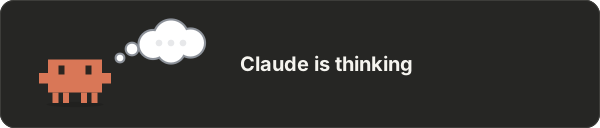
Claude가 하는 일을 연기하는 게를 프롬프트 위에 보여 주고, 컨텍스트 창과 속도 제한 사용량을 셸 미터로 표시하는 Claude Code mod입니다.
sTomerG/agent-kit/tree/main/plugins/crab-cam
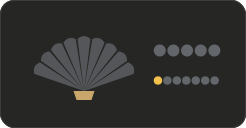
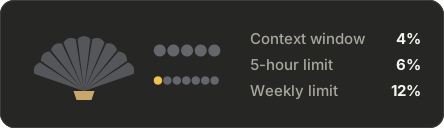
crab-cam은 Claude Code 플러그인입니다(sTomerG/agent-kit marketplace를 통해 배포)。터미널과 데스크톱 앱 모두에서 프롬프트 위에 작은 애니메이션 게를 표시해 Claude의 현재 활동을 나타냅니다. 장면에는 생각하기, 읽기, 코드 작성, 검색, 웹 탐색, 명령 실행, 테스트, git, 패키지 설치, 서브에이전트, 계획 모드, 스킬, 설계, 메모리 편집, 권한 프롬프트, 백그라운드 작업, 압축, 오류, 유휴 상태가 포함됩니다. 옆의 셸 미터는 컨텍스트 창 사용량(갈비뼈)、5시간 속도 제한(진주 5개)、주간 속도 제한(더 작은 진주 7개)을 보여 주며 85%를 넘으면 빨간색으로 강조합니다. 명령에는 게를 켜고 끄는 /crab-cam、/crab-cam demo、/crab-cam meter、/crab-cam details、/crab-cam commands가 있습니다. Claude Code v2.1.287+가 필요합니다. claude plugin marketplace add sTomerG/agent-kit 다음에 claude plugin install crab-cam@agent-kit을 실행해 설치합니다. 비공식 커뮤니티 프로젝트이며 Anthropic과 제휴하지 않습니다.
먼저 작성자의 README에서 marketplace와 플러그인 이름을 확인하세요. 저장소 구조에 따라 명령어가 달라질 수 있습니다.
claude plugin marketplace add sTomerG/agent-kit
claude plugin install crab-cam
A Claude Code mod: a small crab above the prompt acts out what Claude is doing, in the terminal and in the desktop app. Beside it, a shell shows how full the context window is and how much of your rate limits is used.
Optimised for the Claude Code desktop app.
claude plugin marketplace add sTomerG/agent-kit
claude plugin install crab-cam@agent-kit
Requires Claude Code v2.1.287 or later; tested with v2.1.288.
To get new versions, run claude plugin update crab-cam@agent-kit, or enable auto-update for the marketplace under /plugin → Marketplaces.
| Command | What it does |
| :- | :- |
| /crab-cam | Hide or show the crab |
| /crab-cam demo | Play every scene, three seconds each |
| /crab-cam meter | Hide or show the shell meter |
| /crab-cam details | Show or hide the meter's readings in figures beside the shell |
| /crab-cam commands | Show commands as typed, or go back to the description of what they do |
The scene follows the tool Claude calls. A shell command is read for what it does, so cat shows reading and cd repo && git status shows git.
| Scene | Shown when |
| :- | :- |
| thinking, writing a reply | Claude reasons or writes text |
| reading | Read, or cat, head, tail, sed -n, jq in a shell |
| writing code | Edit, Write, or sed -i, cat > file in a shell |
| searching | Grep, Glob, or grep, rg, find, ls in a shell |
| browsing the web | WebFetch, WebSearch, browser tools, curl, wget |
| running a command | any other shell command |
| running tests | pytest, vitest, jest, npm test, cargo test and the like |
| working with git | git and gh, also further on in a chain such as make build && git status |
| installing packages | npm install, pip install, uv add, brew install and the like |
| putting helpers to work | subagents and workflows, during the turn and while they run on after it; the line under it says how many are at work and what they are doing, such as 3 helpers: 2 reading, 1 running tests |
| making a plan | plan mode and task lists |
| loading a skill | Skill |
| writing text | an edit to a text file: .md, .txt, .rst, README, CHANGELOG and the like |
| designing | an edit to a stylesheet or an .svg, a design or Figma tool, a design or diagramming skill, the start of an artifact, and an edit to an .html page later in that same turn |
| remembering something | an edit to CLAUDE.md, MEMORY.md or a memory file |
| sharing something | artifacts and files sent to you |
| a question for you, waiting for permission | Claude asks, or a permission dialog is open |
| waiting on a background task | Claude polls a background command or timer, or the turn ended with a command still running |
| using a tool | any other tool |
| tidying up its memory | the conversation is compacted |
| oops | a tool call failed, or an API error or refusal ended the turn |
| done, resting | the turn ended |
Work inside a subagent is not shown; the crab stays on "putting helpers to work" until the helper returns.
The shell fills as things are used:
The last two units of a gauge turn red above 85%. The pearls are left out on accounts without rate-limit windows.
The meter comes in two forms, and /crab-cam meter hides it altogether:
| Default | With details (/crab-cam details) |
| :- | :- |
|  |
|  |
|
claude --plugin-dir ./plugins/crab-cam   # load from disk, reload on save
claude plugin test plugins/crab-cam      # run the tests
claude plugin validate plugins/crab-cam  # check the manifest and hooks
npx tsx plugins/crab-cam/scripts/make-demo.mts  # redraw the animations in assets/
The editor types under .claude-plugin/types/ are generated and not committed. Claude Code writes them for your version when it loads the mod with --plugin-dir.
An unofficial community project, not affiliated with or endorsed by Anthropic.

문서 생성, 드리프트 감지, API 문서 자동화 플러그인이며 비밀이 포함된 문서 쓰기나 worker 디스패치를 거부하는 function-hook 가드로도 동작합니다.

Claude 데스크톱 앱용 상태 표시줄입니다. 프롬프트 위에 나타나 세션 품질, 컨텍스트 사용량, 캐시 카운트다운, 5시간 및 주간 한도를 보여 주고 Clawd가 세션의 동작을 연출합니다.

databricks CLI를 따라 Databricks 작업 공간, Unity Catalog, 컴퓨팅, 작업, 파이프라인, 앱, 대시보드를 트리로 보여 주는 /databricks-pane을 제공하는 Claude Code 플러그인 mod입니다. 실시간 강조, 프로필 전환, CLI 인수 복사도 지원합니다.
