
redemptionnn@redemptionnn
redemptionnn/clawd-friend/tree/main/plugin
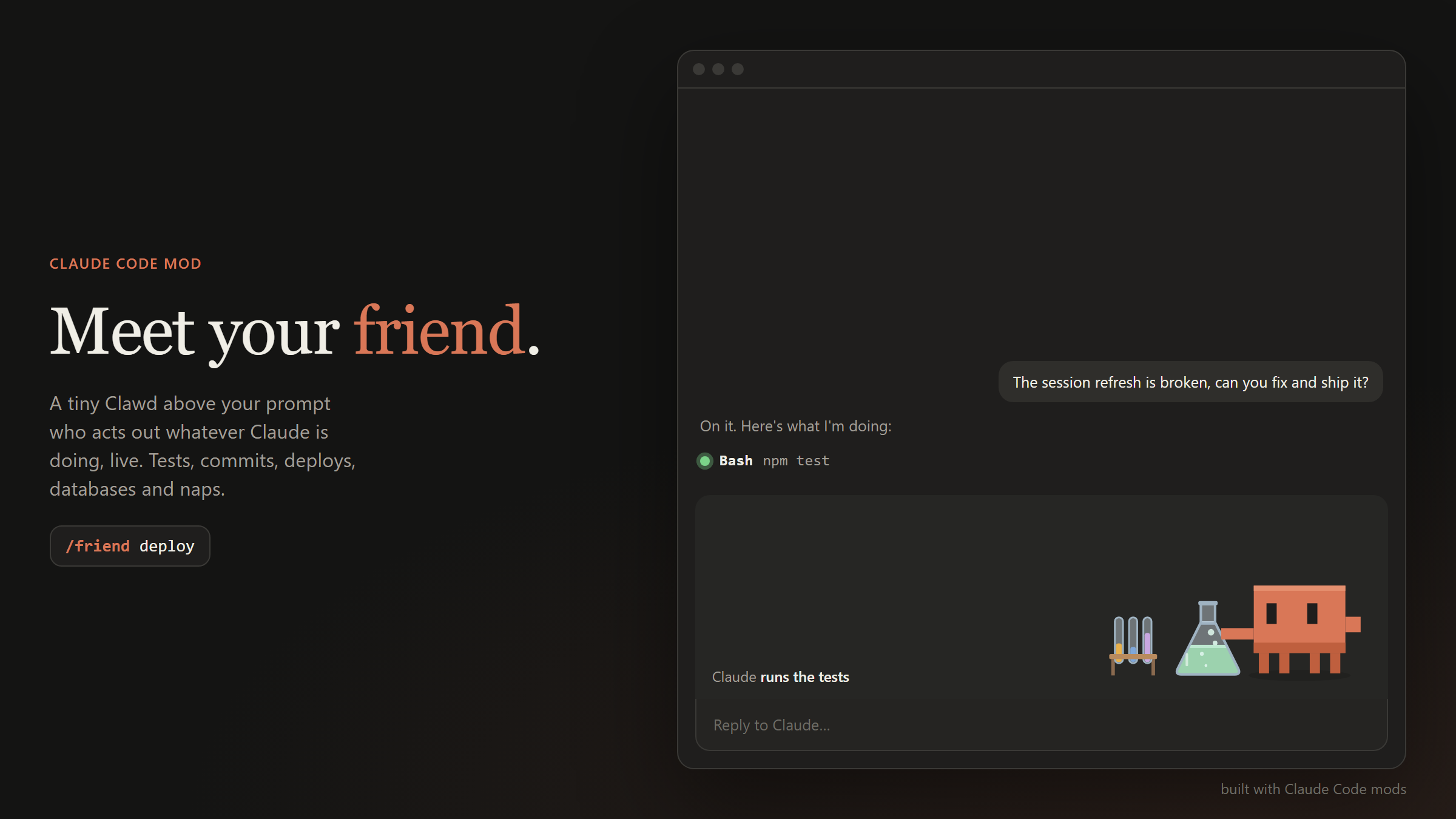
프롬프트 위에 작은 애니메이션 Clawd 캐릭터를 표시하고 Claude의 활동에 실시간으로 반응하게 하는 Claude Code mod입니다. 23가지 장면과 15가지 사용자 지정 스킨을 제공합니다.
redemptionnn/clawd-friend/tree/main/plugin
Claude Friend는 프롬프트 위에 사는 작은 애니메이션 캐릭터 Clawd가 Claude가 하는 일을 실시간으로 연기하는 Claude Code mod입니다. 도구 호출과 셸 명령으로 시작되는 23개 장면(코딩, 웹 검색, 테스트, 커밋, 배포, 빌드, 데이터베이스 작업, 디버깅, 디자인 작업, 메모리 쓰기, 서브에이전트, 계획, 브라우징, 쿼리, 권한 프롬프트, 완료, 오류, 휴식, 낮잠)과 세션을 넘어 유지되는 15개 스킨(모자와 손에 드는 물건)이 있습니다. 명령은 /friend, /friend menu, /friend skins, /friend name, /friend scenes, /friend pane, /friend stage, /friend stats입니다. turn.step hook으로 스트리밍 모델 출력을 지켜보고, tool.call hook으로 장면을 확인하며, ui.render hook으로 SVG 기반 애니메이션을 그립니다. Claude Code 2.1.286 이상이 필요하며 네트워크 호출, 토큰, 이미지 자산을 사용하지 않습니다.
먼저 작성자의 README에서 marketplace와 플러그인 이름을 확인하세요. 저장소 구조에 따라 명령어가 달라질 수 있습니다.
claude plugin marketplace add redemptionnn/clawd-friend
claude plugin install clawd-friend
A tiny Clawd who lives above your prompt in Claude Code and acts out whatever Claude is doing, live.
He taps away at a laptop while Claude codes, reads the newspaper during a web search, watches a flask bubble while your tests run, stamps a parcel on every commit, launches a rocket when you deploy, chases a bug with a net, and nods off when you go quiet.
In Claude Code, run:
/plugin marketplace add redemptionnn/clawd-friend
/plugin install clawd-friend
Then start a new session (or run /reload-plugins) and your friend shows up above the prompt.
Or from a shell:
claude plugin marketplace add redemptionnn/clawd-friend
claude plugin install clawd-friend
To update later:
claude plugin marketplace update clawd-friend
Requirements: Claude Code 2.1.286 or newer. Mods are an early-access Claude Code feature, so the API may change between releases. The full animated character is drawn in the Claude Code desktop app (and the VS Code extension); the terminal shows a compact text version.
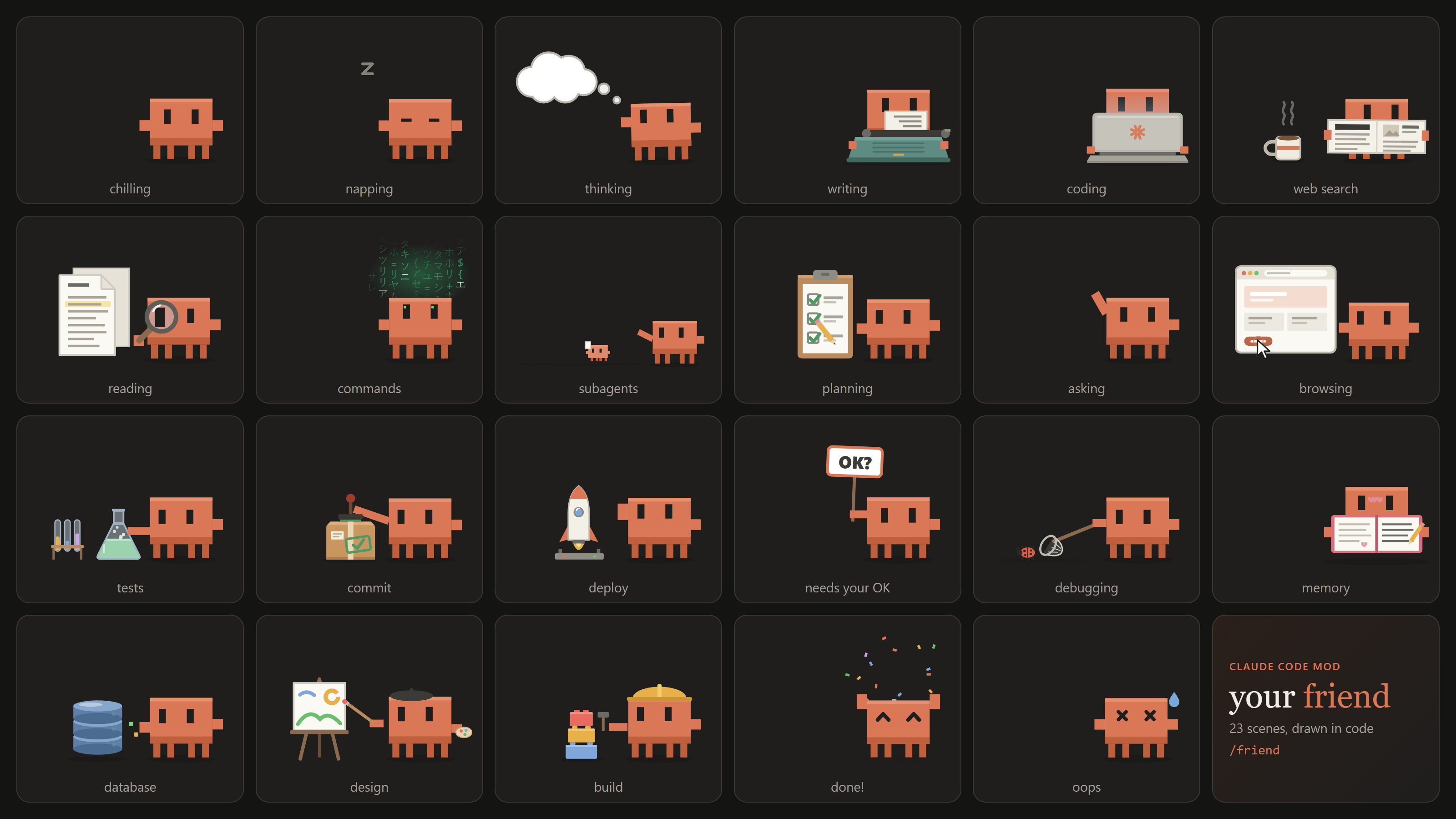
He picks a scene from what Claude is actually doing, as it happens:
| Scene | When |
| --- | --- |
| 💭 Thinking | Claude is thinking, or reading a tool's result before its next move |
| ⌨️ Writing | Claude is writing its reply, or editing .md / .txt docs (a typewriter that faces him) |
| 💻 Coding | Editing or writing code (a laptop, lid turned toward him) |
| 📰 Web search | WebSearch, WebFetch and search or docs MCP tools (he reads the paper with a coffee) |
| 🔍 Reading | Read, Grep, Glob (a magnifying glass over the docs) |
| ⚡ Commands | Any other shell command (green hacker glyphs rain above him) |
| 🧪 Tests | npm test, pytest, vitest, jest, go test, cargo test, ... |
| 📦 Commit | git commit |
| 🚀 Deploy | git push, vercel, npm publish, npm run deploy, deploy MCP tools |
| 🧱 Build | npm run build, tsc, cargo build, docker build, make, ... |
| 🗄️ Database | psql, prisma migrate, Supabase / SQL MCP tools, .sql files and migrations |
| 🐞 Debugging | node --inspect, pdb, gdb, debugging skills |
| 🎨 Design | .css / .svg / Tailwind config edits, Figma and design MCP tools |
| 📔 Memory | Writing CLAUDE.md or Claude's memory files |
| 🐾 Subagents | Claude sends out subagents (tiny Clawds march off with their tasks) |
| 📋 Planning | Todo and task list updates |
| 🌐 Browsing | Browser automation tools |
| 👋 Asking | Claude asks you a question |
| 🪧 Needs your OK | A tool call is waiting for your permission |
| 🎉 Done | A turn finished: he jumps, confetti flies |
| 💧 Oops | A turn ended on an error |
| 😌 Chilling | Nothing going on |
| 💤 Napping | Two quiet minutes in a row |
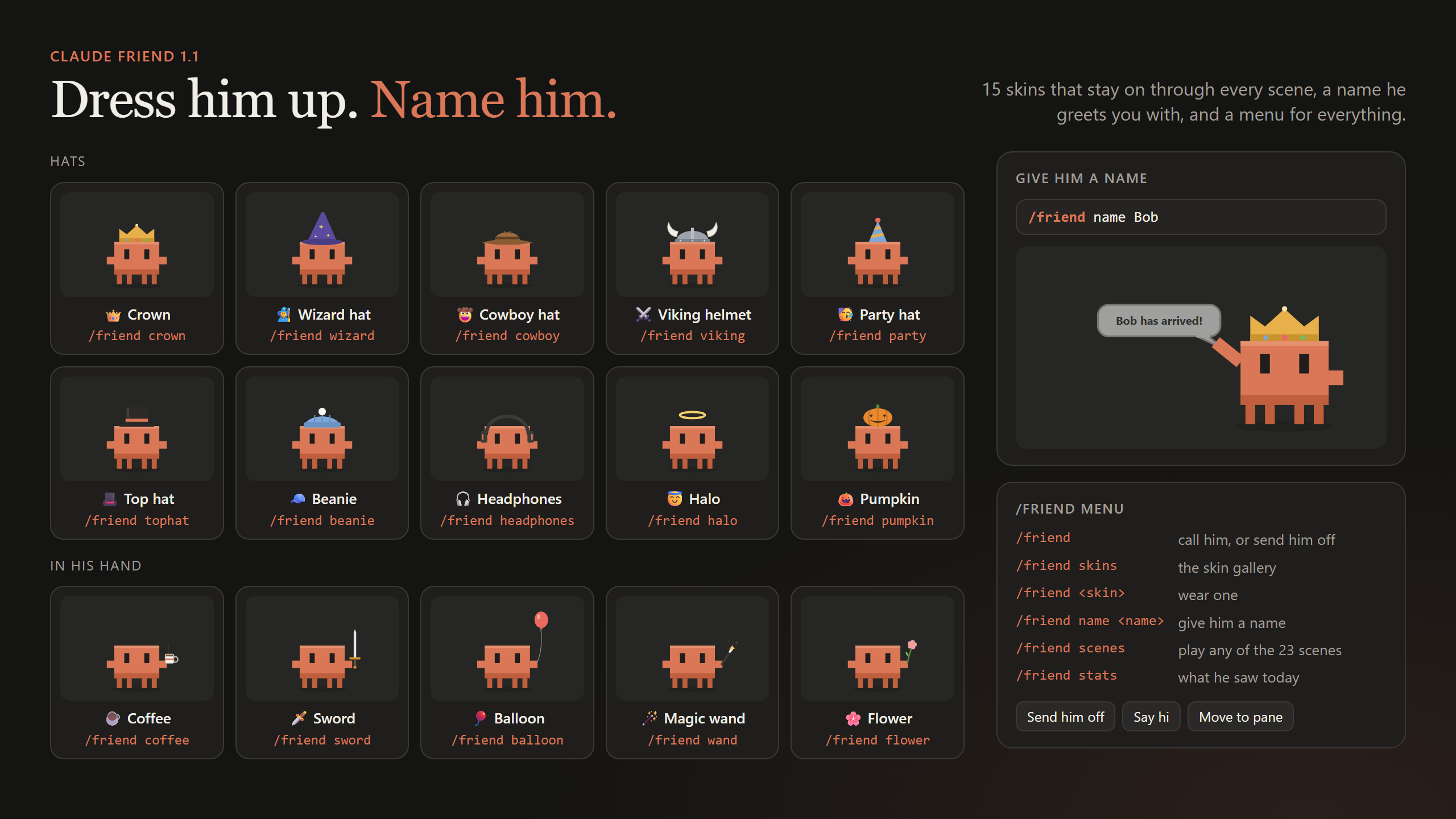
Dress him up. A skin stays on through every scene and is remembered across sessions. When a scene brings its own hat (the hard hat while building, the beret while designing) that one wins for a moment, and he only holds an item while his hand is free.
| Hats | | Items in hand | |
| --- | --- | --- | --- |
| 👑 /friend crown | 🎩 /friend tophat | ☕ /friend coffee | 🪄 /friend wand |
| 🧙 /friend wizard | 🧢 /friend beanie | 🗡️ /friend sword | 🌸 /friend flower |
| 🤠 /friend cowboy | 🎧 /friend headphones | 🎈 /friend balloon | |
| ⚔️ /friend viking | 😇 /friend halo | | |
| 🥳 /friend party | 🎃 /friend pumpkin | | |
/friend skins shows them all in a gallery (click one to put it on), and /friend noskin takes it off.
/friend name Bob
From then on he greets you with a little speech bubble, "Bob has arrived!", whenever you call him or start a session.
Not sure what's there? /friend menu lists everything, with buttons in the desktop app.
| Command | What it does |
| --- | --- |
| /friend | Call your friend, or send him off if he's already here (remembered across sessions) |
| /friend menu | Every command, with buttons |
| /friend skins | The skin gallery; click one to wear it |
| /friend <skin> | Wear a skin, e.g. /friend crown or /friend sword |
| /friend noskin | Take the skin off |
| /friend name <name> | Give him a name (up to 16 characters) |
| /friend scenes | Every scene, with buttons to play them |
| /friend <scene> | Play any scene for a few seconds, e.g. /friend deploy or /friend build |
| /friend pane | Move him into a side pane |
| /friend stage | Put him back above the prompt |
| /friend stats | What he saw today: file edits, reads, commands, web lookups, helpers, finished turns |
Claude Friend is a Claude Code mod: a plugin whose behaviour is a TypeScript module of function hooks.
turn.step hook watches the model's response as it streams: thinking, visible text, and the start of each tool call, whose arguments it reads as they arrive, so the scene changes before the tool even runs. A tool.call hook confirms the scene while the tool runs, and a tool.check hook notices when a call needs your permission.plugin/hooks/classify.ts maps tool names, shell commands and file paths to scenes: git commit is a commit, npm test is tests, a .css edit is design, an MCP tool named execute_sql is the database.ui.render hook draws the band above the prompt. Every scene is an SVG built in code in plugin/hooks/scenes.ts, animated with CSS. There are no image files.Clone the repo and load the plugin straight from disk; saving a file hot-reloads it.
git clone https://github.com/redemptionnn/clawd-friend.git
claude --plugin-dir ./clawd-friend/plugin
In the desktop app, where you can't pass flags, add the folder to the env block of ~/.claude/settings.json:
{
  "env": {
    "CLAUDE_CODE_PLUGIN_DIRS": "/absolute/path/to/clawd-friend/plugin"
  }
}
If you also installed it with /plugin install, disable that copy (claude plugin disable clawd-friend) so it doesn't load twice.
Check and test it against the engine:
claude plugin validate ./plugin
claude plugin test ./plugin
The tests in plugin/tests/scenes.test.ts run real tool calls through Claude Code's engine, draw the band while each call is in flight, and check that the right scene shows. plugin/tests/skins.test.ts covers skins, names and the menu cards.
.claude-plugin/marketplace.json   lets /plugin find and install the plugin
plugin/
  .claude-plugin/plugin.json      name, version, metadata
  hooks/hooks.json                points at the hooks module
  hooks/register.tsx              the hooks: what Claude is doing, commands, drawing
  hooks/classify.ts               tool calls to scenes
  hooks/scenes.ts                 the 23 scenes, drawn as SVG in code
  hooks/skins.ts                  hats and items in hand
  types/index.d.ts                the plugin's state contract
  tests/                          claude plugin test
media/                            the demo GIF and screenshots

문서 생성, 드리프트 감지, API 문서 자동화 플러그인이며 비밀이 포함된 문서 쓰기나 worker 디스패치를 거부하는 function-hook 가드로도 동작합니다.

Claude 데스크톱 앱용 상태 표시줄입니다. 프롬프트 위에 나타나 세션 품질, 컨텍스트 사용량, 캐시 카운트다운, 5시간 및 주간 한도를 보여 주고 Clawd가 세션의 동작을 연출합니다.

databricks CLI를 따라 Databricks 작업 공간, Unity Catalog, 컴퓨팅, 작업, 파이프라인, 앱, 대시보드를 트리로 보여 주는 /databricks-pane을 제공하는 Claude Code 플러그인 mod입니다. 실시간 강조, 프로필 전환, CLI 인수 복사도 지원합니다.
