
anantraghunath@anantraghunath
anantraghunath/claude-code-usage-quota-mod
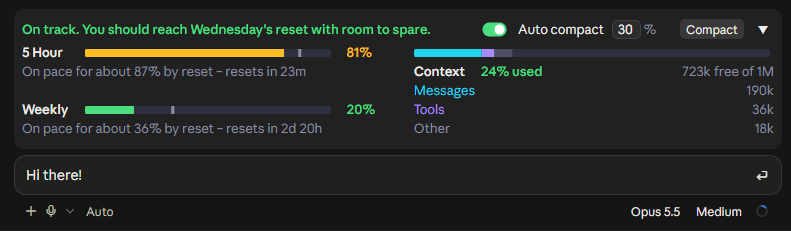
프롬프트 위의 실시간 밴드에 플랜 한도, 재설정 시간과 컨텍스트 창 사용량을 표시하고, 한 번의 클릭과 자동 압축을 지원하는 Claude Code mod입니다.
anantraghunath/claude-code-usage-quota-mod
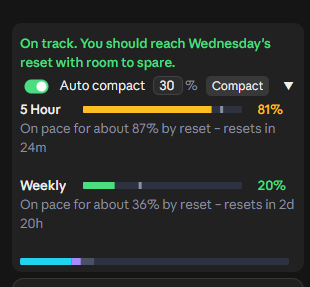
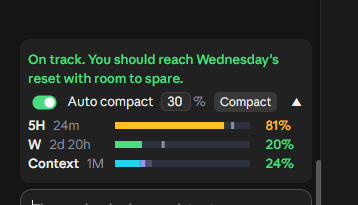
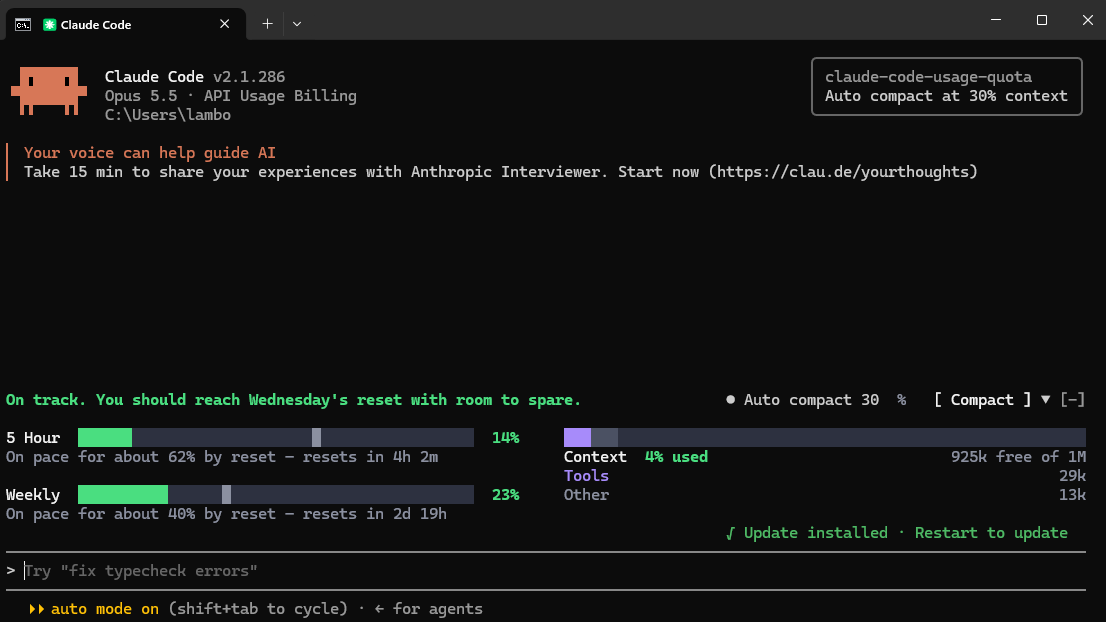
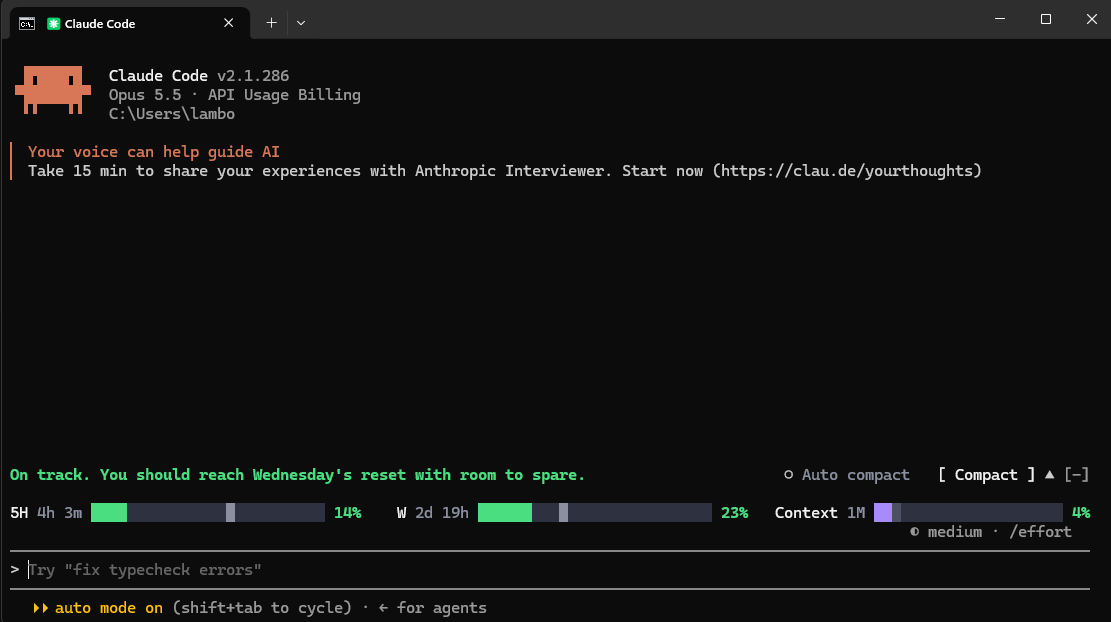
Claude Code 플러그인(v0.1.3, MIT)으로, 데스크톱 Code 탭과 터미널의 프롬프트 위에 밴드를 표시합니다. 5시간 및 주간 플랜 한도, 재설정 시점의 예측, Messages·Tools·Other로 나눈 컨텍스트 창 사용량을 보여 줍니다. 막대는 75%에서 황색, 90%에서 빨간색으로 바뀌며, 소진될 속도라면 더 일찍 바뀔 수 있습니다. 한 번에 누르는 Compact 버튼과 세션별 임계값을 설정하는 Auto compact 모드를 제공하며(기본 30%, 범위 15-99), 답변을 중단하지 않습니다. /quota로 전환합니다. GitHub marketplace를 사용한 /plugin install 또는 claude plugin marketplace add로 설치할 수 있습니다. 기존 Claude 로그인을 사용해 약 2분마다 Anthropic 사용량 서비스에 요청하는 것 외에는 모두 로컬에서 실행됩니다. 자격 증명을 보거나 다른 곳으로 보내지 않습니다. Pro 또는 Max 플랜을 사용하는 최신 Claude Code가 필요합니다.
먼저 작성자의 README에서 marketplace와 플러그인 이름을 확인하세요. 저장소 구조에 따라 명령어가 달라질 수 있습니다.
claude plugin marketplace add anantraghunath/claude-code-usage-quota-mod
claude plugin install claude-code-usage-quota







Know your Claude limits before they hit you. A live band above the Claude Code prompt that shows your plan limits, forecasts whether you'll run out before they reset, and shows how full your context window is. Compact in one click, or let it compact automatically.
The 5 Hour and Weekly limits are your whole Claude account's, including what you use in Claude chat and Cowork. The band itself shows in Claude Code: the desktop app and the terminal.
Type /quota to turn the band off and on.
One row that still shows the time left until each limit resets:

[!TIP] Never hit a full context again: Auto compact, on by one click. With Auto compact on, the band compacts your session once the context reaches 30% (the default; set 15 to 99). A long context costs more on every reply, so compacting early keeps replies cheaper and your limits lasting longer. Auto compact never interrupts a reply. Want to compact right now? The Compact button runs
/compactin one click.Each session keeps its own Auto compact setting, even after a restart, so you can run them differently side by side:
- Building something big? Set Auto compact higher (say 70%) or turn it off, so Claude keeps the whole picture. Press Compact yourself at a good stopping point. (With it off, Claude Code's built-in compaction still steps in when the context is nearly full.)
- Everyday sessions? One click turns Auto compact on at 30%. They stay lean, and your 5 Hour and Weekly limits last longer.
5 Hour and Weekly limits
On course to run out, it warns you and says when you'll hit the limit:


Context window
/context counts it, split into Messages, Tools and Other.Compacting
/compact in one click.If the session is already past your % when you turn it on, it asks first:
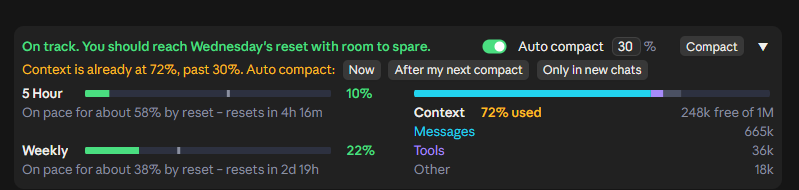

/compact, or Claude Code's own), then takes over.Works in light and dark themes and at every width down to the narrowest. Collapsed or expanded is shared across all sessions.
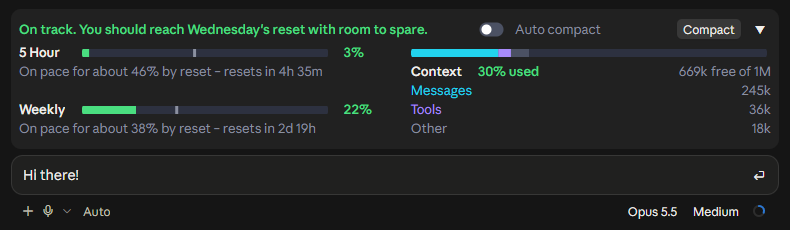
<details> <summary><b>MORE SCREENSHOTS</b></summary>Early in a 5 hour window:

Running out on the Weekly limit:


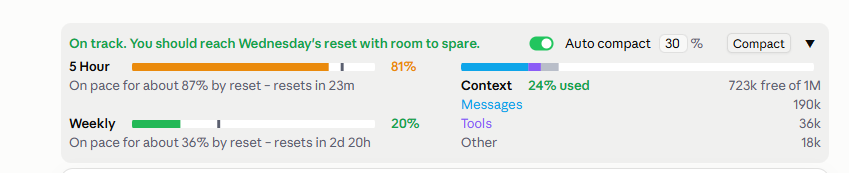
| Light theme | Narrowest window |
| --- | --- |
|  |
|  |
|
|
|  |
|  |
|
[!NOTE] In the desktop app, the band appears once a session has started. The brand-new Welcome back screen has no session yet, so no mod can draw there. Send your first message and it appears.
In the terminal, ▲/▼ expands and collapses it. The [-] next to it is Claude Code's own control and hides the band; ctrl+x ctrl+a brings it back.
Needs a recent Claude Code, signed in with a Pro or Max plan.
Desktop app: in the Code tab, send this as a message, allow the claude plugin command if asked, then quit and reopen the app:
Install the claude-code-usage-quota plugin from the GitHub marketplace anantraghunath/claude-code-usage-quota-mod
Terminal: inside claude, run:
/plugin install claude-code-usage-quota --marketplace anantraghunath/claude-code-usage-quota-mod
Either way installs it for both the desktop app and the terminal.
Update: ask Claude, then restart:
Update the claude-code-usage-quota plugin from its marketplace
Uninstall: in the desktop app, ask Claude:
Remove the claude-code-usage-quota-mod plugin marketplace
or in the terminal:
/plugin marketplace remove claude-code-usage-quota-mod
then restart. This removes it from both. Just want it out of sight? /quota hides it without uninstalling.
claude plugin marketplace add anantraghunath/claude-code-usage-quota-mod; claude plugin install claude-code-usage-quota@claude-code-usage-quota-mod
To update:
claude plugin marketplace update claude-code-usage-quota-mod; claude plugin update claude-code-usage-quota@claude-code-usage-quota-mod
To uninstall:
claude plugin marketplace remove claude-code-usage-quota-mod
Everything runs on your machine. It reads what Claude Code already has (your context and the limits each reply carries), and about every 2 minutes asks Anthropic's usage service for your limits through your existing Claude login. It never sees your credentials and sends nothing anywhere else. In the desktop app it reads the app's theme setting to match light or dark.
First release: I'd love to hear how it works for you. Open an issue for bugs or ideas. Pull requests welcome.
To work on it, clone the repo, then load it from the folder, or run its tests:
claude --plugin-dir ./claude-code-usage-quota-mod
claude plugin test ./claude-code-usage-quota-mod
If you find it useful, a ⭐ helps others find it.
Inspired by I'm liking the new mods feature on r/ClaudeCode. Thanks to u/itsxzy for sharing the original prompt that started this project.
MIT © 2026 Anant Raghunath

문서 생성, 드리프트 감지, API 문서 자동화 플러그인이며 비밀이 포함된 문서 쓰기나 worker 디스패치를 거부하는 function-hook 가드로도 동작합니다.

Claude 데스크톱 앱용 상태 표시줄입니다. 프롬프트 위에 나타나 세션 품질, 컨텍스트 사용량, 캐시 카운트다운, 5시간 및 주간 한도를 보여 주고 Clawd가 세션의 동작을 연출합니다.

databricks CLI를 따라 Databricks 작업 공간, Unity Catalog, 컴퓨팅, 작업, 파이프라인, 앱, 대시보드를 트리로 보여 주는 /databricks-pane을 제공하는 Claude Code 플러그인 mod입니다. 실시간 강조, 프로필 전환, CLI 인수 복사도 지원합니다.
