
iamomiid@iamomiid
iamomiid/cache-countdown
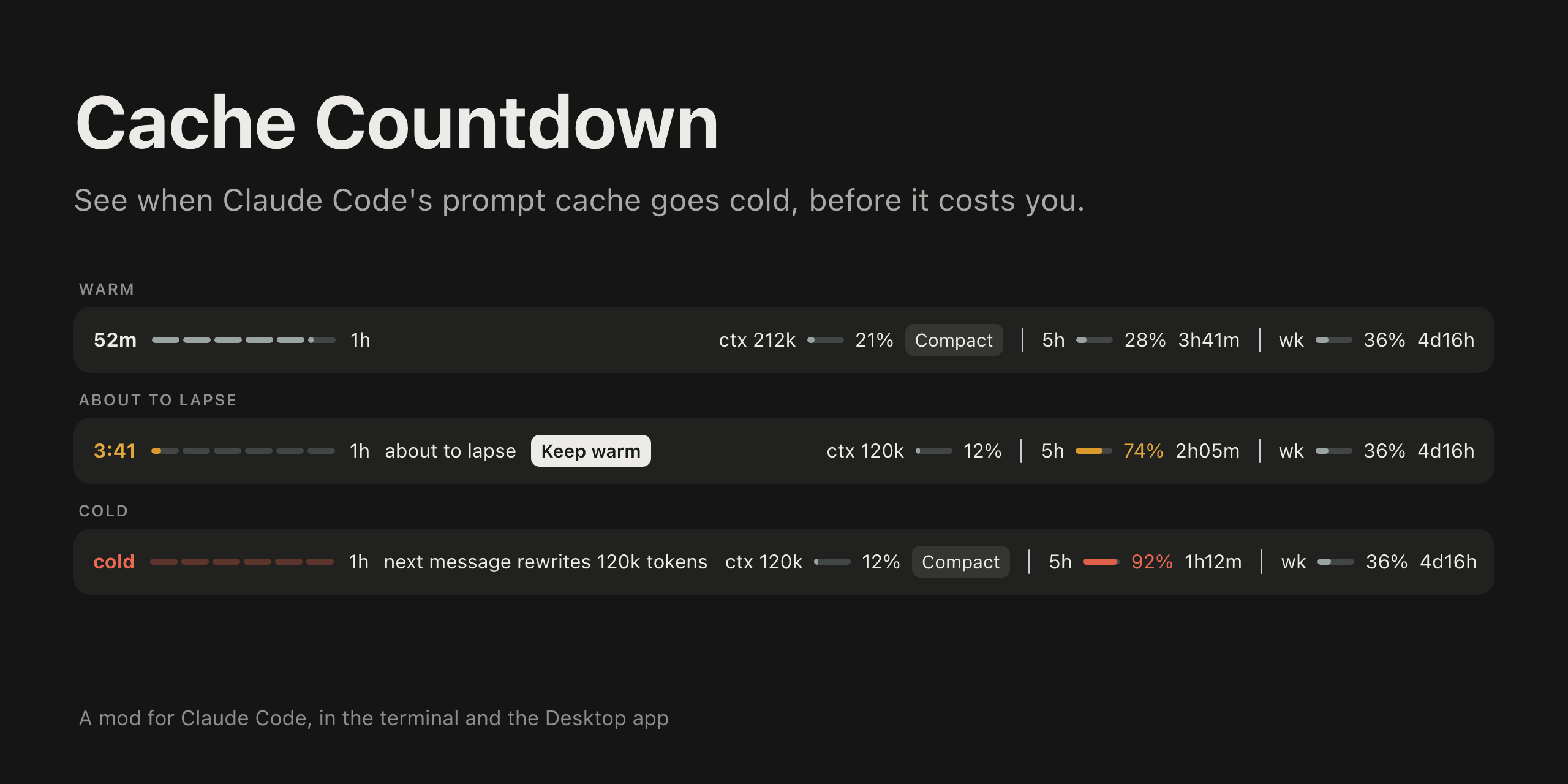
프롬프트 위에 프롬프트 캐시가 따뜻한 상태로 유지되는 시간을 심지처럼 보여 주는 Claude Code mod입니다. 터미널과 Claude Desktop 앱의 Code 탭에 표시됩니다.
iamomiid/cache-countdown
프롬프트 위에 프롬프트 캐시가 따뜻한 상태로 유지되는 시간을 심지처럼 보여 주는 Claude Code mod입니다. 터미널과 Claude Desktop 앱의 Code 탭에 표시됩니다.
Anthropic의 프롬프트 캐시에는 5분과 1시간이라는 두 가지 수명이 있으며 가격도 다릅니다. 기본 대화의 각 요청이 항목을 새로 고칩니다. 수명이 끝나면 다음 요청에서 전체 컨텍스트를 캐시에 다시 쓰는 비용을 지불해야 합니다. 이 mod는 남은 시간과 시간이 끝났을 때 발생하는 비용을 보여 줍니다.
Claude Code v2.1.287 이상이 필요합니다. /plugin marketplace add iamomiid/cache-countdown 및 /plugin install cache-countdown@cache-countdown으로 설치하거나 claude --plugin-dir ./cache-countdown으로 폴더를 불러옵니다.
프롬프트 위 한 줄에 표시됩니다. 타는 심지로 남은 시간을 보여 주고, 적용 중인 수명(5m 또는 1h), about to lapse나 next message rewrites 212k tokens 같은 경고, 컨텍스트 및 속도 제한 미터를 표시합니다. 만료 직전과 만료 시 알림이 나타나며, /cache-countdown은 밴드가 없는 화면에서 사용할 수 있도록 수치를 텍스트로 출력합니다.
Keep warm은 짧은 질문 하나를 실행해 캐시 항목을 읽고 새로 고칩니다. 대화가 200k tokens를 넘거나 캐시가 차가운 상태이면 Compact가 컨텍스트 미터 옆에서 /compact를 실행합니다.
ttl(auto, 5m, 1h)과 toast(true, false)는 /plugin configure 또는 /config 패널에서 설정합니다. MIT 라이선스입니다.
먼저 작성자의 README에서 marketplace와 플러그인 이름을 확인하세요. 저장소 구조에 따라 명령어가 달라질 수 있습니다.
claude plugin marketplace add iamomiid/cache-countdown
claude plugin install cache-countdown
A Claude Code mod that shows how long the prompt cache stays warm, as a fuse above the prompt. It draws in the terminal and in the Code tab of the Claude Desktop app.
Anthropic's prompt cache has two lifetimes, 5 minutes and 1 hour, priced differently. Every request of the main conversation refreshes the entry. Once it lapses, the next request pays to write the whole context to the cache again. This mod shows how long you have left, and what it costs when the time runs out.
Requires Claude Code v2.1.287 or later.
In a Claude Code session:
/plugin marketplace add iamomiid/cache-countdown
/plugin install cache-countdown@cache-countdown
Or from your shell:
claude plugin marketplace add iamomiid/cache-countdown
claude plugin install cache-countdown@cache-countdown
To try it for one session without installing, clone the repository and load the folder:
claude --plugin-dir ./cache-countdown
The band appears after the first reply of a conversation.
A mod runs with your permissions. To see what this one hooks and calls before loading it, run claude plugin validate on the cloned folder. It reads the session transcript, runs tail on it, and makes a model request only when you press Keep warm.
One row above the prompt. In the Desktop app:

In a terminal:
52m ━━━━━━━━━━━━━━━━━━━━━─── 1h ctx 212k 21% │ 5h 28% 3h41m │ wk 36% 4d16h
Both images on this page are illustrations drawn to match the app, with example figures.
The row holds:
5m or 1h.about to lapse in the last five minutes (1h) or last minute (5m), next message rewrites 212k tokens once the cache is cold, and last request rewrote 203k tokens after a request that missed the cache.5h, wk, and any other) with the share used and the time until it resets.Nothing is colored while all is well. The time and fuse take the warning color when the cache is about to lapse and the error color when it is cold. A meter takes the warning color at 70% and the error color at 90%.
It also shows a toast shortly before the cache lapses and when it does, for conversations of 20k tokens or more. /cache-countdown prints the figures as text, for surfaces that draw no band (VS Code, claude -p).
If another mod draws above the prompt too, its row stays, under this one.
/compact, as if you had typed it, with no confirmation step. Pressed while a turn is running, it waits for the turn to end. Compacting a cold conversation still reads the whole context once, as any next message would; what it saves is carrying that context into every message after.Set them with /plugin configure cache-countdown@cache-countdown, or in the /config panel.
| Option | Values | Default | What it does |
| :- | :- | :- | :- |
| ttl | auto, 5m, 1h | auto | Which lifetime to count down. auto reads it from the transcript. |
| toast | true, false | true | Toasts before and at expiry. |
ephemeral_5m_input_tokens and ephemeral_1h_input_tokens. Until that is known, the fuse counts the 5 minute lifetime first and the 1 hour lifetime after it, and says so.tail. Where tail is missing, as on Windows, the whole file is read, which works up to 4 MiB. Past that, the lifetime stays unconfirmed unless ttl is set./resume and /branch the countdown starts from the resumed conversation's last response.Load the folder with --plugin-dir, or name it in CLAUDE_CODE_PLUGIN_DIRS under env in ~/.claude/settings.json for sessions the Desktop app starts. Claude Code reloads the mod when a file changes.
claude plugin validate .
claude plugin test .
MIT. See LICENSE.

문서 생성, 드리프트 감지, API 문서 자동화 플러그인이며 비밀이 포함된 문서 쓰기나 worker 디스패치를 거부하는 function-hook 가드로도 동작합니다.

Claude 데스크톱 앱용 상태 표시줄입니다. 프롬프트 위에 나타나 세션 품질, 컨텍스트 사용량, 캐시 카운트다운, 5시간 및 주간 한도를 보여 주고 Clawd가 세션의 동작을 연출합니다.

databricks CLI를 따라 Databricks 작업 공간, Unity Catalog, 컴퓨팅, 작업, 파이프라인, 앱, 대시보드를 트리로 보여 주는 /databricks-pane을 제공하는 Claude Code 플러그인 mod입니다. 실시간 강조, 프로필 전환, CLI 인수 복사도 지원합니다.
