
Digital-Threads@Digital-Threads
Digital-Threads/aimux/tree/master/mod
각 aimux 구독의 5시간 및 주간 사용량을 프롬프트 위에 표시하고, 현재 한도가 소진되기 전에 경고한 뒤 Enter 한 번으로 계속합니다
Digital-Threads/aimux/tree/master/mod




여러 Claude Code / Codex / Gemini 구독을 나란히 실행합니다. skills, agents, memory, settings는 하나의 공유 두뇌로 쓰고 로그인은 분리하며, 모든 구독의 실시간 5h/7d 한도를 한 화면에서 봅니다.

개인용, 업무용, 고객용 등 여러 Claude Code 구독을 각각 다른 ~/.claude-* 디렉터리에서 사용합니다. 심볼릭 링크를 직접 관리하고 설정을 복제하며 bash 함수로 구독 사이를 전환해야 합니다.
aimux는 tmux가 터미널을 다루는 방식처럼 AI CLI 설정을 다룹니다. 공유 두뇌 하나와 서로 격리된 세션 여러 개를 제공합니다.
npm install -g @digital-threads/aimux
~/.claude와 추가 디렉터리(~/.claude-work 등)가 있는 경우npm install -g aimux
aimux init # auto-detects all ~/.claude* dirs
aimux status # verify profiles, auth, symlinks
aimux run w # launch work profile (prefix matching)
~/.claude만 있는 경우(구독 1개)npm install -g aimux
aimux init # creates config with main profile
aimux profile add work # add a new profile
aimux auth login work # OAuth for the new account
aimux profile update w -m 'opus[1m]'
aimux run w
aimux profile add myapi --api
# Configure API endpoint (leave blank to use default):
#   Base URL:                          https://api.your-provider.com/v1
#   Auth token:                        [hidden]
#   Default model [claude-sonnet-5-5]:
#   Opus model    [claude-opus-5-5]:
#   Sonnet model  [claude-sonnet-5-5]:
#   Haiku model   [claude-haiku-4-5]:
# ✓ Credentials saved to ~/.aimux/profiles/myapi/.env (chmod 600)
aimux run myapi
선언형 대안(.env 파일 또는 env: 블록)을 사용하는 고급 사용자와 CI는 프로필별 환경 변수를 참조하세요.
# Install Claude CLI first, then:
claude auth login       # creates ~/.claude
npm install -g @digital-threads/aimux
aimux init
aimux profile add work
aimux auth login work
aimux run               # interactive picker (↑↓ + Enter)
aimux run w             # prefix match → work
aimux run o -m claude-sonnet-5-5  # one-time model override
aimux run w --resume    # flags pass through to Claude CLI
aimux run --auto        # launch whichever subscription has the most headroom left
aimux status            # dashboard
aimux usage             # token usage by profile for the last 7 days
aimux usage --all       # all known transcript usage

# Set a default model per profile. Prefer a family alias: `opus[1m]` always means the
# newest Opus, so a new release is picked up without touching aimux. A full id such
# as `claude-opus-5-5` pins that exact version until you change it. Quote names with
# brackets, or the shell will try to expand them.
aimux profile update w -m 'opus[1m]'
aimux profile update w -m claude-opus-5-5   # pin one version
aimux profile update w --unset-model        # let the CLI choose its own default

# Set a fallback model, tried automatically when the primary is overloaded/unavailable
aimux profile update w --fallback-model claude-sonnet-5-5
aimux profile update w --unset-fallback-model   # remove it
aimux use)aimux run은 일회성 세션을 시작합니다. nvm use나 pyenv shell처럼 profile을 활성화해
일반 claude / codex가 그것을 사용하게 하려면 shell integration을 한 번 활성화합니다.
# add to ~/.zshrc or ~/.bashrc (fish: ~/.config/fish/config.fish)
eval "$(aimux shell-init)"
그런 다음:
aimux use work     # activate 'work' in this shell (persistent until you switch)
claude             # runs under 'work', on its model — no `aimux run` needed
codex              # same; the CLI adapter sets CODEX_HOME for you
aimux use api      # switch profiles — stale ANTHROPIC_*/tokens are cleaned up
aimux use          # no name → interactive picker
각 shell은 독립적이므로 서로 다른 터미널에서 서로 다른 active profile을 동시에 사용할 수 있습니다. 전환은
현재 shell로 환경 변수만 내보내며 전역 상태는 바꾸지 않습니다. aimux run은 일회성 실행에도 계속 사용할 수 있고,
현재 shell에서 어떤 profile이 active인지와 관계없이 지정한 profile을 실행합니다.
aimux split)aimux split # one tmux pane per logged-in claude subscription, in this directory
aimux split work client # just these two
각 창은 완전한 aimux run <profile>을 실행하고 창 테두리에 profile을 표시합니다. 실행에 실패한 창은 오류와
함께 열린 상태로 남습니다. 창을 닫으면 일반 터미널과 마찬가지로 창들이 종료되지만 대화는 저장됩니다.
aimux run <profile> --resume으로 다시 이어갈 수 있습니다. tmux 안에서는 tmux를 중첩하지 않고 새 창을 열며,
그 창은 계속 사용하거나 닫으면 됩니다. tmux가 필요합니다(sudo apt install tmux 또는 brew install tmux).
대화 기록은 공유되므로 다른 구독에서 세션을 계속할 수 있고 로그인만 바뀝니다. aimux run으로 시작한 claude 세션이
현재 창을 모두 사용해 중지되면 aimux는 남은 여유가 가장 큰 곳에서 계속할지 묻습니다.
⚠ work hit its 5-hour limit (resets 23:10).
Continue this session on personal (5h 10%, 7d 16%)? [Y/n]
Enter를 누르면 같은 세션이 시작할 때 사용한 flags와 함께 그곳에서 재개됩니다. aimux는 세션 자체의 대화 기록에서 한도
도달을 읽으므로 일반 종료에는 비용이 들지 않습니다. 실제로 한도에 도달했을 때만 다른 구독을 확인합니다.
aimux split 창 안에서도 작동합니다.
aimux run으로 시작한 claude 세션 또는 aimux split 창의 세션은 프롬프트 위의 밴드에 모든 구독을 표시하며,
현재 세션이 사용하는 구독이 맨 앞에 옵니다.

/exit가 이미 프롬프트에 들어 있습니다. Enter를 누르면 다시 묻지 않고 대화를 해당 구독으로 넘깁니다./aimux**는 전체 표와 각 창의 재설정 시각을 출력합니다.이것은 Claude Code mod(Claude Code 2.1.287 이상)이며 aimux가 시작한 세션에만 로드됩니다. AIMUX_NO_MOD=1로 끌 수 있고,
같은 수치는 스크립트에서 aimux status --json으로도 사용할 수 있습니다.
| Command | Description |
|---------|-------------|
| aimux init | Claude 디렉터리를 자동으로 감지하고 설정을 만들며 profile을 마이그레이션 |
| aimux init --source <path> | 명시한 source directory로 초기화 |
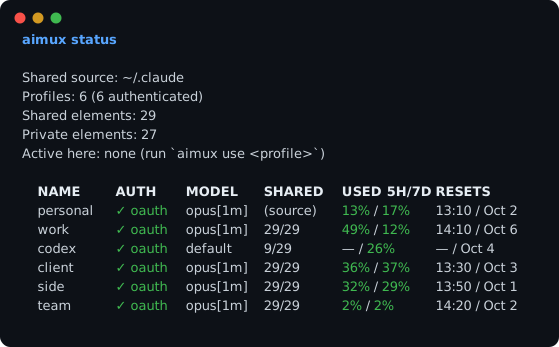
| aimux status | TUI 대시보드—profiles, 인증, 실시간 5h/7d 한도 사용량과 재설정 시각(claude + codex), 어느 항목이든 설정된 경우의 auto-mode 규칙, 심볼릭 링크 상태를 표시합니다. --watch [s]는 화면에 유지하며 한도를 다시 읽고, --json은 스크립트용으로 출력하며, --max-age <s>는 최근 읽기를 재사용합니다 |
| aimux status --no-limits | 속도 제한 probe를 실행하지 않는 동일한 대시보드(오프라인/빠름) |
| aimux usage | profile별 token 사용량(Claude 대화 기록 + codex rollouts)을 표시하며 aimux 밖에서 시작한 세션도 포함 |
| aimux usage --profile work --since 24h | 하나의 profile에서 최근 기간 동안의 사용량을 표시 |
| aimux run [profile] | 올바른 환경과 모델로 AI CLI 실행 |
| aimux run | 대화형 선택기—기록에서 마지막으로 사용한 profile을 미리 선택 |
| aimux run w | 접두사 일치—모호하지 않으면 work를 실행 |
| aimux run work -m claude-sonnet-5-5 | 모델을 덮어써서 실행 |
| aimux run --auto | 모든 구독의 실시간 한도를 확인하고 여유가 가장 큰 구독을 실행(같은 CLI 안에서 유지) |
| aimux split [profiles...] | 여러 구독을 나란히 열고 각각 tmux 창을 하나씩 사용(기본값: 로그인된 모든 claude 구독) |
| aimux use [profile] | 현재 shell을 profile로 전환(지속됨)—이후 일반 claude/codex가 이를 사용합니다. rc에서 eval "$(aimux shell-init)"을 실행해야 합니다 |
| aimux shell-init | aimux use를 활성화하는 shell 함수를 출력(~/.zshrc/~/.bashrc/fish 설정에 추가) |
| aimux agents | 여러 profile의 agent 화면—모든 profile의 claude 백그라운드 세션을 한 TUI에서 확인하고 관리 |
| aimux profile add <name> | 심볼릭 링크가 있는 새 profile 생성 |
| aimux profile add <name> --api | 서드파티 API profile 생성(대화형 endpoint + token 프롬프트) |
| aimux profile add <name> --cli codex | 다른 AI CLI(예: Codex)용 profile 생성 |
| aimux handoff <sessionId> --to <profile> | 요약 handoff로 다른 profile/CLI에서 세션 계속하기 |
| aimux profile update <name> | model/cli 설정 업데이트 |
| aimux profile update <name> --fallback-model <model> | 기본 모델이 과부하 또는 사용 불가일 때 사용할 fallback model 설정 |
| aimux profile update <name> --unset-model | 기본 모델을 제거해 CLI가 자체 최신 기본값을 사용하게 함 |
| aimux profile update <name> --unset-fallback-model | fallback model 제거 |
| aimux profile update <name> -e KEY=VALUE | profile .env 파일에 환경 변수 설정 |
| aimux profile update <name> --unset-env KEY | profile .env 파일에서 환경 변수 제거 |
| aimux profile list | 모든 profile 나열(aimux status와 같은 표이며 --no-limits는 probe를 건너뜀) |
| aimux profile remove <name> | profile 제거 및 정리 |
| aimux profile clone <src> <name> | 개인 파일과 함께 profile 복제 |
| aimux rebuild [profile] | 심볼릭 링크를 동기화하고 로컬 공유 파일 충돌 표시 |
| aimux doctor | 상태 점검—깨진 심볼릭 링크, 누락된 공유 항목, 충돌 |
| aimux auth login <profile> | profile의 OAuth 흐름 시작 |
| aimux auth status | profile별 인증 파일 상태 표시 |
| aimux setup-shell | shell 자동 완성 설치(bash/zsh/fish) |
| aimux migrate isolate | 일회성 마이그레이션: 각 profile의 jobs/, daemon/, projects/ 심볼릭 링크를 실제 개인 디렉터리로 바꿔 각 profile이 자체 supervisor와 세션을 갖게 합니다. 안전하며 데이터는 삭제되지 않습니다. --dry-run을 추가하면 미리 볼 수 있습니다. |
모든 profile 명령은 접두사 일치를 지원합니다. aimux run w → work, aimux profile update o → own.
~/.claude/          ← source of truth (your main profile)
  agents/
  skills/
  commands/
  memory/
  settings.json
  .credentials.json  ← private, stays here

~/.aimux/
  config.yaml        ← aimux config
  profiles/
    work/
      agents/ → ~/.claude/agents      ← symlink (shared)
      skills/ → ~/.claude/skills      ← symlink (shared)
      memory/ → ~/.
먼저 작성자의 README에서 marketplace와 플러그인 이름을 확인하세요. 저장소 구조에 따라 명령어가 달라질 수 있습니다.
claude plugin marketplace add Digital-Threads/aimux
claude plugin install aimux
Run multiple Claude Code / Codex / Gemini subscriptions side by side: one shared brain — skills, agents, memory, settings — separate logins, and every subscription's live 5h/7d limits in a single view.
You have multiple Claude Code subscriptions (personal, work, client) each in separate ~/.claude-* directories. You maintain symlinks manually, duplicate settings, and juggle bash functions to switch between them.
aimux treats your AI CLI configs like tmux treats terminals: one shared brain, multiple isolated sessions.
npm install -g @digital-threads/aimux
~/.claude + extra directories (~/.claude-work, etc.)npm install -g aimux
aimux init # auto-detects all ~/.claude* dirs
aimux status # verify profiles, auth, symlinks
aimux run w # launch work profile (prefix matching)
~/.claude (one subscription)npm install -g aimux
aimux init # creates config with main profile
aimux profile add work # add a new profile
aimux auth login work # OAuth for the new account
aimux profile update w -m 'opus[1m]'
aimux run w
aimux profile add myapi --api
# Configure API endpoint (leave blank to use default):
#   Base URL:                          https://api.your-provider.com/v1
#   Auth token:                        [hidden]
#   Default model [claude-sonnet-5-5]:
#   Opus model    [claude-opus-5-5]:
#   Sonnet model  [claude-sonnet-5-5]:
#   Haiku model   [claude-haiku-4-5]:
# ✓ Credentials saved to ~/.aimux/profiles/myapi/.env (chmod 600)
aimux run myapi
See Per-profile environment variables for the declarative alternative (.env file / env: block) used by power users and CI.
# Install Claude CLI first, then:
claude auth login       # creates ~/.claude
npm install -g @digital-threads/aimux
aimux init
aimux profile add work
aimux auth login work
aimux run               # interactive picker (↑↓ + Enter)
aimux run w             # prefix match → work
aimux run o -m claude-sonnet-5-5  # one-time model override
aimux run w --resume    # flags pass through to Claude CLI
aimux run --auto        # launch whichever subscription has the most headroom left
aimux status            # dashboard
aimux usage             # token usage by profile for the last 7 days
aimux usage --all       # all known transcript usage

# Set a default model per profile. Prefer a family alias: `opus[1m]` always means the
# newest Opus, so a new release is picked up without touching aimux. A full id such
# as `claude-opus-5-5` pins that exact version until you change it. Quote names with
# brackets, or the shell will try to expand them.
aimux profile update w -m 'opus[1m]'
aimux profile update w -m claude-opus-5-5   # pin one version
aimux profile update w --unset-model        # let the CLI choose its own default

# Set a fallback model, tried automatically when the primary is overloaded/unavailable
aimux profile update w --fallback-model claude-sonnet-5-5
aimux profile update w --unset-fallback-model   # remove it
aimux use)aimux run launches a one-off session. If you'd rather activate a profile so
plain claude / codex use it — like nvm use or pyenv shell — enable the
shell integration once:
# add to ~/.zshrc or ~/.bashrc (fish: ~/.config/fish/config.fish)
eval "$(aimux shell-init)"
Then:
aimux use work     # activate 'work' in this shell (persistent until you switch)
claude             # runs under 'work', on its model — no `aimux run` needed
codex              # same; the CLI adapter sets CODEX_HOME for you
aimux use api      # switch profiles — stale ANTHROPIC_*/tokens are cleaned up
aimux use          # no name → interactive picker
Each shell is independent, so different terminals can hold different active
profiles at once. The switch only exports env vars into the current shell — it
never changes global state. aimux run still works for one-off launches, and it
always runs the profile you name, whichever one the shell has active.
aimux split)aimux split # one tmux pane per logged-in claude subscription, in this directory
aimux split work client # just these two
Each pane runs a full aimux run <profile>, labelled with its profile on the pane
border; a pane whose run fails stays open with its error. Closing the window ends the
panes, as in any terminal — the conversations are saved, and aimux run <profile> --resume picks one up again. Inside tmux it opens a new window instead of nesting
tmux, and that window is yours to keep or close. Needs tmux (sudo apt install tmux,
or brew install tmux).
Transcripts are shared, so a session can carry on under another subscription — only
the login changes. When a claude session started with aimux run stops because its
window is spent, aimux offers to continue it where there is the most room left:
⚠ work hit its 5-hour limit (resets 23:10).
Continue this session on personal (5h 10%, 7d 16%)? [Y/n]
Press Enter and the same session resumes there, with the flags you started it with.
aimux reads the hit from the session's own transcript, so an ordinary exit costs
nothing; the other subscriptions are only checked when a limit was actually reached. It
works inside aimux split panes too.
A claude session started with aimux run — or in an aimux split pane — shows every
subscription in a band above the prompt, the one it runs on first:
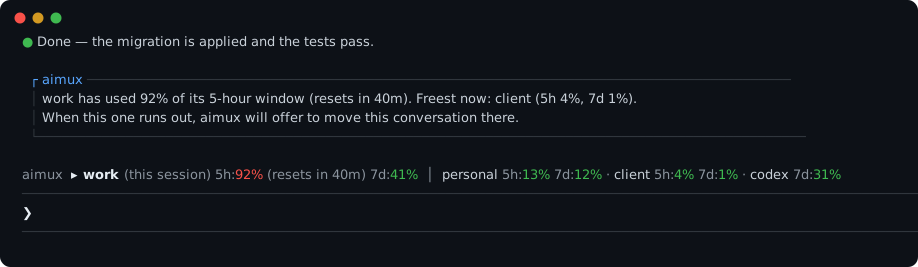
/exit is already in the prompt:
press Enter and aimux carries the conversation over to that subscription without
asking again./aimux prints the whole table, each window with its reset time.It is a Claude Code mod (Claude Code 2.1.287 or newer), loaded only into the sessions
aimux starts; AIMUX_NO_MOD=1 turns it off. The same figures are available to scripts
as aimux status --json.
| Command | Description |
|---------|-------------|
| aimux init | Auto-detect Claude dirs, create config, migrate profiles |
| aimux init --source <path> | Initialize with explicit source directory |
| aimux status | TUI dashboard — profiles, auth, live 5h/7d limit usage and reset times (claude + codex), auto-mode rules when any are set, symlink health. --watch [s] keeps it on screen and re-reads the limits; --json prints them for scripts; --max-age <s> reuses a reading that recent |
| aimux status --no-limits | Same dashboard without the rate-limit probe (offline / faster) |
| aimux usage | Show token usage by profile (Claude transcripts + codex rollouts), including sessions started outside aimux |
| aimux usage --profile work --since 24h | Show usage for one profile over a recent window |
| aimux run [profile] | Launch AI CLI with correct env and model |
| aimux run | Interactive picker — history pre-selects last used profile |
| aimux run w | Prefix matching — launches work if unambiguous |
| aimux run work -m claude-sonnet-5-5 | Launch with model override |
| aimux run --auto | Probe every subscription's live limits and launch the one with the most headroom (stays within the same CLI) |
| aimux split [profiles...] | Open several subscriptions side by side, one tmux pane each (default: every logged-in claude subscription) |
| aimux use [profile] | Switch the current shell to a profile (persistent) — plain claude/codex then use it. Requires eval "$(aimux shell-init)" in your rc |
| aimux shell-init | Print the shell function that enables aimux use (add to ~/.zshrc/~/.bashrc/fish config) |
| aimux agents | Multi-profile agent view — see and manage claude background sessions across all profiles in one TUI |
| aimux profile add <name> | Create new profile with symlinks |
| aimux profile add <name> --api | Create a 3rd-party API profile (interactive endpoint + token prompt) |
| aimux profile add <name> --cli codex | Create a profile for another AI CLI (e.g. Codex) |
| aimux handoff <sessionId> --to <profile> | Continue a session under another profile/CLI via summary handoff |
| aimux profile update <name> | Update model/cli settings |
| aimux profile update <name> --fallback-model <model> | Set a fallback model, used when the primary is overloaded/unavailable |
| aimux profile update <name> --unset-model | Remove the default model, so the CLI uses its own (newest) default |
| aimux profile update <name> --unset-fallback-model | Remove the fallback model |
| aimux profile update <name> -e KEY=VALUE | Set an env var in the profile .env file |
| aimux profile update <name> --unset-env KEY | Remove an env var from the profile .env file |
| aimux profile list | List all profiles (same table as aimux status; --no-limits skips the probe) |
| aimux profile remove <name> | Remove profile and clean up |
| aimux profile clone <src> <name> | Clone profile with private files |
| aimux rebuild [profile] | Sync symlinks and surface local shared-file conflicts |
| aimux doctor | Health check — broken symlinks, missing shared entries, conflicts |
| aimux auth login <profile> | Launch OAuth flow for a profile |
| aimux auth status | Show auth file status per profile |
| aimux setup-shell | Auto-install shell completions (bash/zsh/fish) |
| aimux migrate isolate | One-time migration: convert per-profile jobs/, daemon/, projects/ symlinks into real private dirs so each profile gets its own supervisor and sessions. Safe — no data is deleted. Add --dry-run to preview. |
All profile commands support prefix matching: aimux run w → work, aimux profile update o → own.
~/.claude/          ← source of truth (your main profile)
  agents/
  skills/
  commands/
  memory/
  settings.json
  .credentials.json  ← private, stays here

~/.aimux/
  config.yaml        ← aimux config
  profiles/
    work/
      agents/ → ~/.claude/agents      ← symlink (shared)
      skills/ → ~/.claude/skills      ← symlink (shared)
      memory/ → ~/.claude/memory      ← symlink (shared)
      plugins/                        ← real dir (shared content, per-profile metadata)
        marketplaces/ → ~/.claude/plugins/marketplaces   ← symlink (shared)
        cache/        → ~/.claude/plugins/cache           ← symlink (shared)
        known_marketplaces.json       ← real file (paths point inside this profile)
        installed_plugins.json        ← real file (paths point inside this profile)
      .credentials.json               ← real file (private)
      .claude.json                    ← real file (private)
    own/
      ...same pattern...
When you run aimux run work, it sets CLAUDE_CONFIG_DIR=~/.aimux/profiles/work and launches the CLI. Claude sees a complete config directory — shared content via symlinks, private auth locally.
Plugins are shared too, but Claude validates that a marketplace's installLocation
lives inside the active config directory. So each profile gets a real plugins/
directory: the heavy content (marketplaces/, cache/) is symlinked to the shared
~/.claude/plugins, while known_marketplaces.json and installed_plugins.json are
real, path-rewritten copies. ~/.claude stays the source of truth — install or update
plugins from your main profile (or with CLAUDE_CONFIG_DIR=~/.claude claude plugin …)
and every profile picks them up on its next run. A plugin installed from inside a
profile is merged back into the shared source automatically.
aimux isn't claude-only. A profile's cli field selects which AI CLI it runs, so you
can keep claude, Codex, and Gemini subscriptions side by side — same shared brain,
isolated auth — and even hand a live conversation from one to the other when a limit hits.
aimux profile add codework --cli codex   # a Codex profile
aimux profile add gem --cli gemini       # a Gemini profile (~/.gemini)
aimux auth login codework                # runs `codex login` under an isolated CODEX_HOME
aimux run codework                        # launches Codex with the right model flag
aimux agents                              # claude + codex sessions in one view (CLI-badged)
CLAUDE_CONFIG_DIR /
CODEX_HOME / GEMINI_CLI_HOME), so subscriptions never collide.shared_sources maps each CLI to its source
(claude → ~/.claude, codex → ~/.codex); the legacy shared_source stays as the
claude alias.private; Codex shares a
knowledge allowlist (skills, rules, memories) and keeps auth.json /
config.toml / sessions/ private; Gemini shares GEMINI.md / skills / commands
/ extensions / memories and keeps auth + settings.json + history private.GEMINI_CLI_HOME at the profile's parent and the profile dir IS gemini's .gemini.
Gemini resumes by per-project index (-r latest), not by session id, so cross-Gemini
native resume isn't wired into the session list yet.Hit a subscription limit mid-session? Continue it under another CLI:
aimux handoff <sessionId> --to codework
The two CLIs' transcripts are mutually unreadable, so this is a summary handoff, not
a native resume: aimux reads the source transcript, summarizes it with the target
profile (self-contained — the target CLI does the summarizing), then launches the target
seeded with that summary. Same-CLI continuation (claude↔claude, codex↔codex) still uses
native resume (aimux run <profile> --resume <id>). Note: the conversation context
carries over, not the model — the target continues with its own model.
Many providers expose an Anthropic-compatible endpoint, so they run on the claude CLI
itself — just a different base URL + token. A provider profile is therefore a claude
profile: it shares the full claude brain (skills, plugins, settings, memory, transcripts)
and you can even --resume a claude session under it natively (same CLI, same model swap).
One command, prompts only for the token:
aimux profile add ds --provider deepseek   # fills base URL + model mapping
aimux run ds
Built-in presets: deepseek, kimi, glm, qwen, minimax, mimo. Base URLs are verified;
model names drift — update with aimux profile update <name> -e ANTHROPIC_MODEL=….
For anything else (local models via Ollama/LM Studio, a proxy, Bedrock/Vertex), use the
generic aimux profile add <name> --api and point ANTHROPIC_BASE_URL at it (see below).
Costs shown by aimux usage are list-price estimates (Claude, codex/gpt-5, and the
Anthropic-compatible providers) and will drift as prices change.
Some Claude Code modes (3rd-party proxies, self-hosted gateways, Bedrock, Vertex) are activated by environment variables rather than OAuth. aimux injects per-profile env into the spawned claude process (and into aimux auth login <profile>) from two sources, merged in this order:
<profile>/.env — a dotenv file inside the profile directory. Best for secrets. Written with chmod 600 when aimux creates it; aimux run warns if it becomes group/other-readable.env: block under the profile in config.yaml — best for non-secret toggles you want versioned. Overrides .env on key conflict.The fastest way to set up an API profile is the interactive prompt:
aimux profile add myapi --api      # prompts for Base URL, hidden token, models
aimux profile update myapi -e ANTHROPIC_MODEL=claude-opus-5-5   # edit later
…which writes something like:
# ~/.aimux/profiles/myapi/.env — do not commit
ANTHROPIC_BASE_URL=https://api.your-provider.com/v1
ANTHROPIC_AUTH_TOKEN=sk-your-token...
ANTHROPIC_MODEL=claude-sonnet-5-5
ANTHROPIC_DEFAULT_OPUS_MODEL=claude-opus-5-5
ANTHROPIC_DEFAULT_SONNET_MODEL=claude-sonnet-5-5
ANTHROPIC_DEFAULT_HAIKU_MODEL=claude-haiku-4-5
The .env parser supports KEY=value, export KEY=value, comments, and single/double-quoted values (with \n/\t escapes inside double quotes). It does not do ${VAR} interpolation or multi-line values — it's a secrets loader, not a full dotenv-expand. .env is always private (never symlinked to the shared source).
# ~/.aimux/config.yaml
version: 1
shared_source: /home/user/.claude

profiles:
  main:
    cli: claude
    path: /home/user/.claude
    is_source: true
  work:
    cli: claude
    model: opus[1m]            # follows the newest Opus
    path: /home/user/.aimux/profiles/work
  myapi:
    cli: claude
    model: claude-sonnet-5-5
    path: /home/user/.aimux/profiles/myapi   # secrets live in this dir's .env
    # Optional non-secret env injected into the spawned CLI (overrides .env).
    # env:
    #   ANTHROPIC_DEFAULT_OPUS_MODEL: claude-opus-5-5

private:
  - .credentials.json
  - .env                  # API credentials — never symlinked, never committed
  - .claude.json
  - policy-limits.json
  - mcp-needs-auth-cache.json
  - remote-settings.json
  - settings.local.json
  - stats-cache.json
  - statsig
  - telemetry
  - state                 # MCP protocol verdicts, per install
  - session-env           # per-session environment
  - backups               # copies of the private .claude.json
  - remote                # Remote Control daemon + its binaries
  - security              # Agent SDK venv and logs
  - shell-snapshots
  - cache                 # fetched model catalog, per account
The defaults above are always applied — listing extra entries adds to them. Claude
Code keeps growing new runtime directories, so if aimux doctor reports a conflict
on one, add it here and run aimux rebuild.
MIT

Ruflo 메모리 기반용 플러그인입니다. AgentDB 컨트롤러 브리지(15개 agentdb_* MCP 도구), RuVector ONNX 임베딩(RaBitQ 32x 양자화를 포함한 10개 embeddings_* 도구), WASM HNSW 패턴 라우터(3개 ruvllm_hnsw_* 도구)를 제공합니다. mod(ADR-445)로서 프롬프트에 안전한 선택적 회수를 넣고, 비밀이 메모리에 들어가지 않도록 쓰기 가드를 두며, /agentdb와 콘솔이 보여 주는 상태 파일을 제공합니다.

pbir CLI를 따르는 리포트 패널에서 Claude가 읽고 변경하는 내용을 보여 주면서 대화형 Power BI 리포트를 만들고, 형식을 지정하고, 최적화하고, 검토합니다.


프롬프트 위, 상태 줄과 toast에 읽지 않은 AMP 메시지를 표시하고 유휴 Claude Code 세션을 깨워 읽게 합니다. Claude Code 2.1.287 이상이 필요합니다.

