
sebi75@sebi75
sebi75/agent-canvas
sebi75/agent-canvas
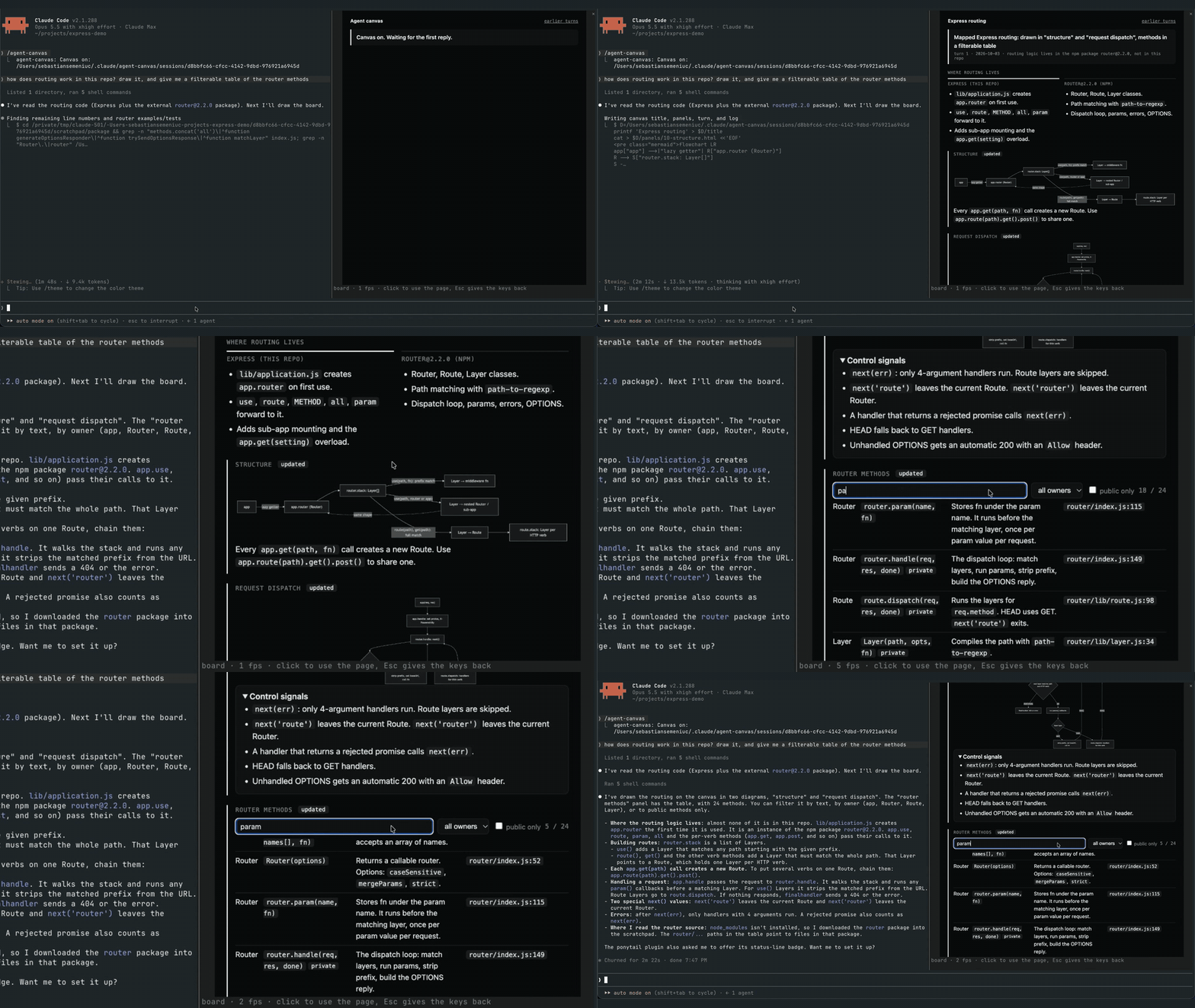
agent-canvas는 모든 세션에 트랜스크립트 옆 창의 실시간 보드를 제공하는 Claude Code mod입니다. 에이전트는 매 응답마다 turn.html을 다시 쓰고, panels/<name>.html을 편집하며, ~/.claude/agent-canvas/sessions/<session id>/ 아래 log.txt에 추가해 보드를 최신으로 유지합니다. 에이전트가 turn.html을 쓰지 않고 턴을 끝내면 훅이 Stop 이벤트를 차단합니다. 브리지(bridge/bridge.mjs)는 board.html을 만들고 열린 포트 없이 파이프를 통해 헤드리스 Chrome을 실행하며, mod가 Image 요소로 그린 뒤 $.ui.blit으로 교체할 PNG 프레임을 내보냅니다. Client 영역은 클릭, 키, 창 크기를 Chrome으로 전달하고 휠은 스크롤합니다. Claude Code 2.1.287+, 이미지 가능한 터미널(Ghostty, kitty 또는 WezTerm), Chrome/Chromium, Node.js 18+가 필요합니다. /plugin marketplace add sebi75/agent-canvas로 설치합니다. 알려진 제한: 페이지의 텍스트를 선택할 수 없고 Desktop 앱과 VS Code 확장에는 Image 요소가 없습니다.
먼저 작성자의 README에서 marketplace와 플러그인 이름을 확인하세요. 저장소 구조에 따라 명령어가 달라질 수 있습니다.
claude plugin marketplace add sebi75/agent-canvas
claude plugin install agent-canvas
A live board for each Claude Code session, in a pane beside the transcript. The agent keeps it current every reply, with diagrams, tables, charts and the state of the work. The board is a real web page drawn by headless Chrome, so you can click, type, hover and scroll in it. Nothing opens in a browser tab, and the board belongs to the session that made it.
It is a Claude Code mod: a plugin whose hooks run inside Claude Code.
turn.html (this reply's news), edits the panels that changed (panels/<name>.html, kept across turns) and appends a line to log.txt. The files live in ~/.claude/agent-canvas/sessions/<session id>/.turn.html after its last tool call, the mod blocks the Stop event and tells it why.bridge/bridge.mjs builds board.html from those files, runs headless Chrome on it over a pipe (no open port), and writes each frame as a PNG. Panels written this turn come first, marked "updated". Every turn keeps a snapshot, linked from "earlier turns".Image element and swaps each new one in with $.ui.blit. A Client region laid over the picture sends clicks, keys and the pane size back to Chrome, and the mouse wheel scrolls the page.From a Claude Code session:
/plugin marketplace add sebi75/agent-canvas
/plugin install agent-canvas@agent-canvas
Or clone the repository and load the folder in every session by adding CLAUDE_CODE_PLUGIN_DIRS with the clone's path to the env block of ~/.claude/settings.json.
| command | what it does |
|---|---|
| /agent-canvas | turns the board on and opens its pane; when it shows another page, goes back to the board |
| /agent-canvas off | turns the board off and closes the pane |
| /agent-canvas <url or path> | shows that page instead, for example a local dev server |
Click the page to type into it. Esc gives the keyboard back to Claude Code. The board stays on across a plugin reload, and AGENT_CANVAS_OPEN=1 turns it on when a session starts.
Claude Code turns images off when the terminal reports itself as "libghostty", which Herdr does. Its own switch turns them back on: set CLAUDE_CODE_FORCE_TERMINAL_IMAGES=1 in the shell that starts claude inside Herdr, for example in ~/.zshrc when HERDR_ENV is set.
Use Herdr 0.9 or later. On Herdr 0.9.3 an animated page measured about 42 frames per second on screen, against about 53 in plain Ghostty. Herdr 0.7 drew about 3; there, set AGENT_CANVAS_FPS=4 so frames do not queue up.
| variable | default |
|---|---|
| AGENT_CANVAS_FPS | 60 |
| AGENT_CANVAS_SCALE | 2 device pixels per CSS pixel |
| AGENT_CANVAS_CHROME | the first Chrome or Chromium found |
| AGENT_CANVAS_OPEN | unset; 1 turns the board on at session start |
Image element. The pane says so there.agent-canvas started as herdr-canvas, which rendered the same kind of board to a static image in a Herdr pane next to the agent. Claude Code mods made it possible to put a live, clickable page inside Claude Code itself.
node test/board.test.mjs
MIT

문서 생성, 드리프트 감지, API 문서 자동화 플러그인이며 비밀이 포함된 문서 쓰기나 worker 디스패치를 거부하는 function-hook 가드로도 동작합니다.

Claude 데스크톱 앱용 상태 표시줄입니다. 프롬프트 위에 나타나 세션 품질, 컨텍스트 사용량, 캐시 카운트다운, 5시간 및 주간 한도를 보여 주고 Clawd가 세션의 동작을 연출합니다.

databricks CLI를 따라 Databricks 작업 공간, Unity Catalog, 컴퓨팅, 작업, 파이프라인, 앱, 대시보드를 트리로 보여 주는 /databricks-pane을 제공하는 Claude Code 플러그인 mod입니다. 실시간 강조, 프로필 전환, CLI 인수 복사도 지원합니다.
