
LorcanChinnock@LorcanChinnock
LorcanChinnock/claude-desk-neighbours/tree/main/plugins/your-serve
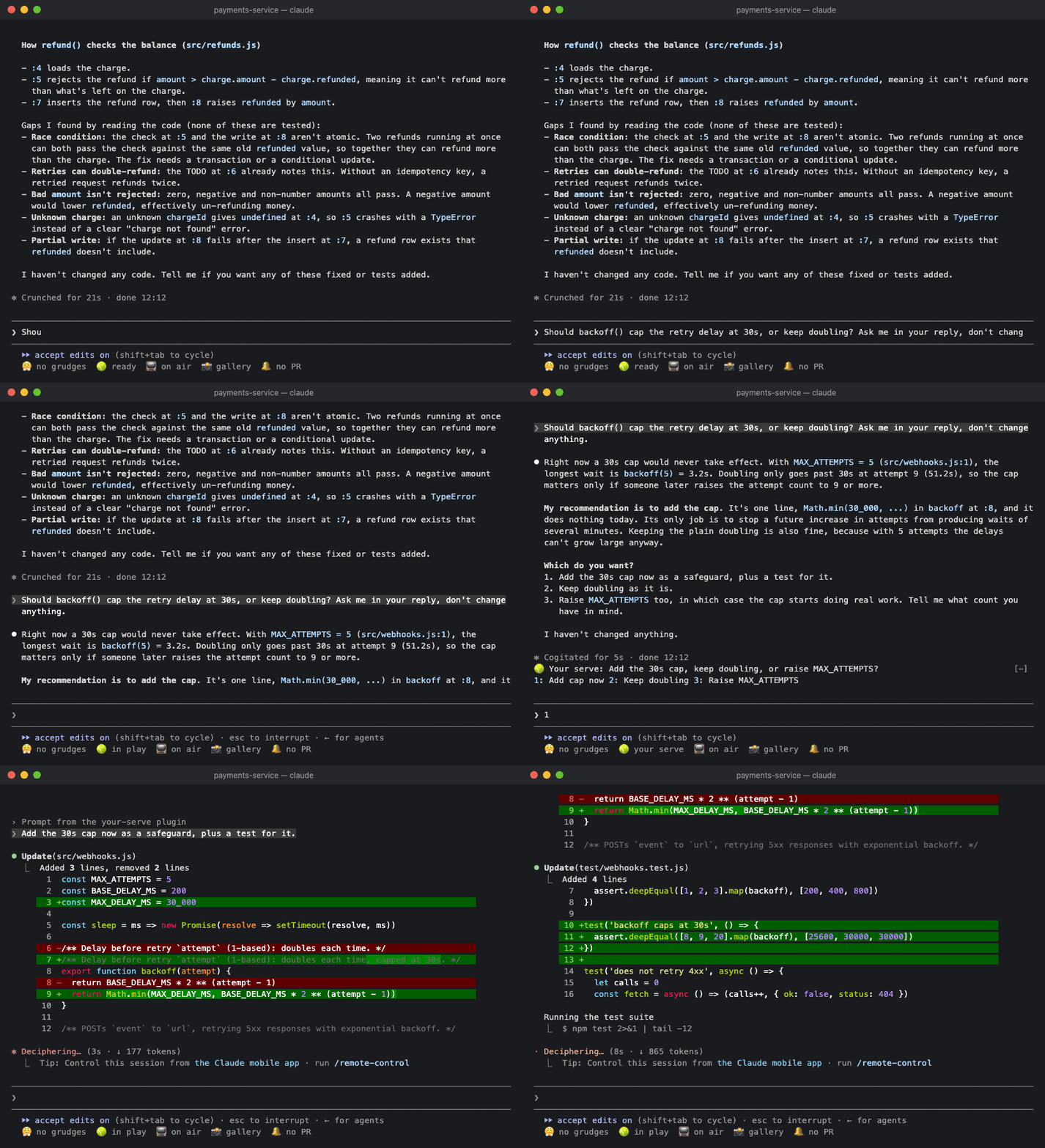
🎾 Claude があなたを必要としているときに知らせます。最後に出された質問を1行で表示し、回答をボタンにします。
LorcanChinnock/claude-desk-neighbours/tree/main/plugins/your-serve
Claude があなたの返事を待っているときに知らせるので、長い回答の末尾にある質問を見落としません。

/plugin install your-serve@claude-desk-neighbours
ターンが質問、選択肢、または「should I also…」で終わると、その内容がバンドの最上段に表示されます。
🎾 Your serve: 古いキャッシュを残す? それとも削除する? 1: 残す 2: 削除 3: その他
回答を押すと、自然な文面の返答(「Drop the old cache.」)がそのまま Claude に送られます。空のプロンプトに数字を入力しても、クリックしても構いません。入力を始めていた場合は返答が下書きの末尾に追加されるので、続きを入力して送信できます。明確な選択肢がなければ、質問だけが表示されます。どちらの場合も、プロンプトを送るまで表示は残ります。質問を含まない回答からは何も作られず、サブエージェントのターンは無視されます。
Claude が複数のことを一度に尋ねた場合は、数にかかわらず1つずつ表示します。
🎾 Your serve (2/3): 新しいタイムアウトは何秒にしますか? 1: 30s 2: 60s other skip
回答すると次の質問に進みます。最後の質問まで答えると、すべてが1つの返答として Claude に送られます。
1. 古いキャッシュを残す? それとも削除する?Drop the old cache.
2. 新しいタイムアウトは何秒にしますか?Make it 30 seconds.
3. リトライを追加しますか?Yes, add a retry.
どの回答も合わない場合は other をクリックして自分で入力します。Enter を押すと入力した内容で質問に答えて先へ進み、回答ボタンを押した場合と同じ動きになります。質問をスキップした場合や、空の other で Enter を押した場合は未回答のまま残り、返答は送信されずプロンプトに入ります。送信前に答えを入力できます。other と skip はクリックするか Tab で移動してください。3以降の数字はほかの Desk Neighbours に割り当てられているためです。モバイルアプリではテキスト欄を表示できないので、使えるのは skip だけです。
内容が途中で切れることはありません。質問と回答が1行に収まらない場合、回答は次の行に折り返されます。ボタンになるのは 3 件までです。それ以外は other を使い、質問が1つだけならプロンプトに直接入力してください。
Your Serve は Claude の回答テキストを読み取るため、Claude が独自の質問ピッカーで尋ねた質問は表示しません。質問ピッカーはすでに目の前にあるからです。
ターンが 1 分を超えると、席を外していた場合に備えて 🎾 Claude needs a decision トーストも表示されます。
ステータス行の 🎾 ready をクリックするか /your-serve を実行すると、待機中の質問と回答、さらにこのセッションで Claude が先に尋ねた質問を確認できます。

| 設定 | デフォルト | |---|---| | あなたを必要とするターンが何秒を超えたらトーストを表示するか | 60 | | 音声でも知らせる(macOS) | off |
Haiku は、疑問符で終わる回答、選択肢の一覧、または質問の形になっている内容だけを回答として認識します。すべての質問と、それぞれ最大 3 件の回答を拾い出します。
まず作者の README で marketplace とプラグイン名を確認してください。コマンドはリポジトリの構成によって変わる場合があります。
claude plugin marketplace add LorcanChinnock/claude-desk-neighbours
claude plugin install your-serve
Lets you know when Claude is waiting on you, so you don't miss the question at the bottom of a long answer.
/plugin install your-serve@claude-desk-neighbours
When a turn ends with a question, a choice between options, or a "should I also…", it shows up on the top line of the band:
🎾 Your serve: Keep the old cache or drop it? 1: Keep 2: Drop 3: Something else
Press an answer and a natural-sounding reply ("Drop the old cache.") goes straight to Claude. You can type its digit into an empty prompt or click it. If you've already started typing, the reply goes on the end of your draft instead, for you to finish and send. If there aren't any clear options, you just get the question. Either way it stays put until you send a prompt. Answers that don't ask anything produce nothing, and subagent turns are ignored.
If Claude asks several things at once, you get them one at a time, however many there are:
🎾 Your serve (2/3): What should the new timeout be? 1: 30s 2: 60s other skip
Each answer takes you to the next question. After the last one, they all go to Claude as a single reply:
1. Keep the old cache or drop it? Drop the old cache.
2. What should the new timeout be? Make it 30 seconds.
3. Add a retry? Yes, add a retry.
If none of the answers fit, click other and type your own. Enter answers the question with what you typed and
moves on, the same as pressing an answer. If you skip a question, or press Enter on an empty other, it's left
unanswered, and the replies go into your prompt instead of being sent, so you can type that answer before
sending. You have to click other and
skip (or reach them with Tab) because the digits after 3 belong to the other Desk Neighbours. The mobile app
can't show a text field, so there you only get skip.
Nothing gets cut off. If the question and its answers don't fit on one line, the answers wrap onto the next one.
Only three answers get buttons. For anything else, use other, or with a single question just type it in the
prompt.
Your Serve reads the text of Claude's answer, so it won't show questions Claude asks through its own question picker. You've already got the picker in front of you anyway.
If the turn took longer than a minute, you'll also get a 🎾 Claude needs a decision toast in case you'd
wandered off.
Click 🎾 ready in the status row, or run /your-serve, to see the question waiting on you with its answers,
plus the questions Claude asked earlier in the session.
| Setting | Default | |---|---| | Toast when a turn that needs you took longer than (seconds) | 60 | | Also say it out loud (macOS) | off |
Haiku only sees answers that end with a question mark, a list of options or something phrased as a question. It picks out every question and up to three answers for each one.

Ruflo メモリ基盤のプラグイン。AgentDB コントローラーブリッジ(15 個の agentdb_* MCP ツール)、RuVector ONNX 埋め込み(RaBitQ 32x 量子化を含む 10 個の embeddings_* ツール)、WASM HNSW パターンルーター(3 個の ruvllm_hnsw_* ツール)を提供します。mod(ADR-445)として、プロンプトへの安全な任意リコール、秘密をメモリから遠ざける書き込みガード、/agentdb、コンソールが表示するステータスファイルを備えます。

pbir CLI に従うレポートペインで Claude が読み取り、変更する内容を表示しながら、インタラクティブな Power BI レポートの作成、整形、最適化、レビューを行います。


プロンプトの上、ステータス行、トーストに未読 AMP メッセージを表示し、アイドル状態の Claude Code セッションを起こして読ませます。Claude Code 2.1.287 以降が必要です。
