23blocks-OS@23blocks-OS
23blocks-OS/ai-maestro/tree/main/mods/amp-inbox-band

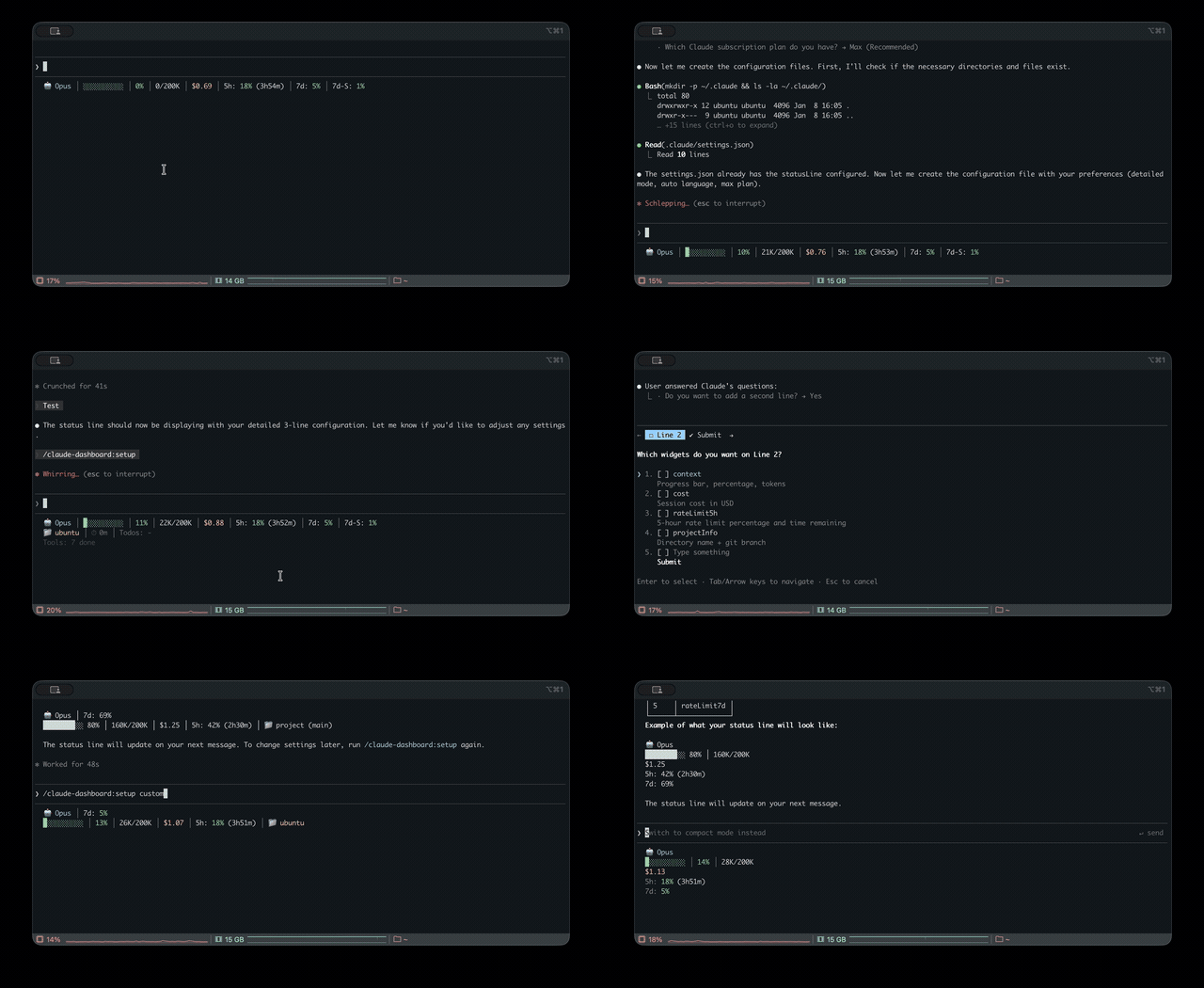
プロンプトの上、ステータス行、トーストに未読 AMP メッセージを表示し、アイドル状態の Claude Code セッションを起こして読ませます。Claude Code 2.1.287 以降が必要です。
23blocks-OS/ai-maestro/tree/main/mods/amp-inbox-band
複数のターミナルで 35 個の AI エージェントを動かし、私はその間をつなぐ人間の郵便配達員になっていました。そこで AI Maestro を作りました。
AI ファーストな組織のための OS —— 永続メモリ、エージェント間メッセージング、マルチマシン対応で、あらゆる AI エージェントをオーケストレーションします。

-lightgrey)


クイックスタート · 機能 · ドキュメント · コントリビュート
</div>AI エージェントに本物のタスクを渡しました。自動補完ではなく、現実のエンジニアリング問題です。コードを調べ、ログを読み、データベースに問い合わせ、答えを持って戻ってきました。その瞬間に思いました。これは本当に動く。
1 週間も経たないうちに、ターミナルで 35 個のエージェントを動かしていました。生産的でしたが、互いに話せません。私は人間のメッセージバスになり、あるターミナルからコンテキストをコピーして別のターミナルに貼り付けていました。自分の AI チームのボトルネックです。
そこで AI Maestro を作りました。 あらゆるマシンのエージェントを 1 つのダッシュボードで見渡し、永続メモリとエージェント間の直接通信を提供します。今では複数のコンピューターで 80+ 個のエージェントを動かし、毎日それらと本物の会社を作っています。
違いはここです。
AI Maestro は AI ファースト企業のオペレーティングシステムです。 タスクランナーではなく、常設チームが働く場所です。
ここでのエージェントはジョブよりも従業員に近い存在です。名前、顔、セッションを越えて残るメモリ、受信トレイを持ち、製品、リポジトリ、プロセス、顧客の何かを所有します。所有するものに対してメモリとコードグラフがインデックスされるので、毎朝まっさらな状態から始めず、数か月かけてその仕事が上手になります。
所有するものがあるため、エージェントは作業コピーを共有しません。 同じリポジトリが必要な 2 つのエージェントはそれぞれ clone し、自分のブランチで作業して、git —— push、pull request、review、merge —— で統合します。チームの 2 人のエンジニアと同じです。
これは意図的な設計で、製品を定義する 1 つの事実から導かれます。エージェントは別々のマシンで動く。 共有 checkout には共有ファイルシステムが必要です。Git worktree —— 単一マシンのエージェント IDE が使う分離プリミティブ —— は、1 つのディスク上の 1 つの .git ストアに対する複数の作業ディレクトリです。バックエンドエージェントが Linux に、iOS エージェントが Mac に移った瞬間に機能しなくなります。移動に耐える唯一のプリミティブが clone です。そのためエージェントを別ホストへ移すと、リポジトリを移動先に clone します。エージェントのリポジトリはエージェントと一緒に移動します。
curl -fsSL https://raw.githubusercontent.com/23blocks-OS/ai-maestro/main/scripts/remote-install.sh | sh
必要なものをすべてインストールします。
時間: 5-10 分 · 必要: Node.js 18+、tmux · オプション: inbox mod 用の Claude Code 2.1.287+
<details> <summary>Windows(WSL2)/ Linux の注意</summary>Windows: まず WSL2 をインストールします(管理者として PowerShell を開いてから再起動)。次にスタートメニューから Ubuntu を開き、そこで curl コマンドを実行します。
wsl --install
WSL が初めてなら?WSL は専用ディスクを持つ Linux システムなので、home フォルダーは空の状態で始まります。エージェントはそこ(デフォルトの ~/agents/<name>)に置き、WSL からアクセスすると遅い C:\ フォルダーには置かないでください。Windows からは \\wsl.localhost\Ubuntu\home\<you>\agents でファイルを開けます。Windows を 5 分で · Windows 完全ガイド
Linux: ビルドツールをインストールします:sudo apt install tmux build-essential
git clone https://github.com/23blocks-OS/ai-maestro.git
cd ai-maestro
yarn install
yarn dev
詳しいセットアップは QUICKSTART.md を参照してください。
</details>ダッシュボードは http://localhost:23000 で開きます。
すべての機能は、AI ファーストの組織を実際に運用した経験から生まれています。必要になった順に構築しました。
ターミナルが 35 個もあり、どれがどれか分かりませんでした。
すべての AI エージェントを 1 か所で確認・管理できます。ガイド付きウィザードで UI からエージェントを作成し、スマートな名前付けで整理できます(project-backend-api は自動配色された 3 階層のツリーになります)。クリックでエージェントを切り替えられます。デプロイモードは tmux(ローカル)、Docker(コンテナ化)、AWS EC2(専用インスタンス)、AWS ECS Fargate(サーバーレス)の 4 つです。tmux セッション、Docker コンテナ、クラウドデプロイ、スタンドアロンエージェントを自動検出します。
Mac Mini がアイドル状態でした。そこでもエージェントを動かしたら?
すべてのマシンが対等なピアメッシュネットワークです。コンピューターを追加するとメッシュに参加します。どのマシンのどのエージェントも 1 つのダッシュボードから見えます。Mac は iOS ビルド、Linux は Docker、クラウドは重い計算というように、得意な用途に使えます。中央サーバーは不要です。
ワーカーマシンはヘッドレス(yarn headless)で動かせます。UI のない完全な API とエージェントランタイムを、約 100MB のメモリで実行します。座る場所ではダッシュボードを動かし、計算資源のある場所ではエージェントを動かします。
私は郵便配達員でした。エージェント同士が話せないので、メッセージを間に立ってコピーしていました。
Agent Messaging Protocol(AMP) はエージェントにメールのような通信を提供します。優先度、メッセージタイプ、暗号署名、プッシュ通知に対応します。エージェントに 「send a message to backend about the deployment」 と言えば動きます。あなたが全体を管理している間に、エージェント同士が直接連携します。
AMP 前: 1 つのターミナルから調査結果をコピーして別のターミナルに貼り、1 日 50 回繰り返します。 AMP 後: 「Research agent, send your findings to the writing agent.」 これで完了です。
シンガポールの友人が自分のエージェントと私のエージェントを話させたがっていましたが、ネットワークへのアクセスは許可したくありませんでした。
組織ゲートウェイを通じて、AI エージェントを Slack、Discord、Email、WhatsApp に接続できます。スマートルーティング(@AIM:agent-name)、スレッドを認識した応答、コンテンツセキュリティを備えています。ゲートウェイでは 34 個のプロンプトインジェクションパターンを検出し、エージェントがメッセージを見る前に止めます。
毎朝、エージェントは記憶喪失のように目を覚ましました。
長期メモリはエージェントごとにオンにする skill です。毎晩、各エージェントの会話はメモリになります。学んだ内容の短い記述を、元になった文章の抜粋で裏付け、さらに扱うものと関係を表すエンティティグラフ(runs on、depends on、stores data in、deploys to)を最新に保ち、終了した関係は印を付けます。Claude Code は 30 日後にトランスクリプトを削除しますが、AI Maestro はエージェント自身のメッセージインデックスから履歴を再構築します。数か月分の仕事が消えずにメモリになります。プロンプトに何かが出ると、エージェントは行動前にそれと関係するものを知らされ、変更の影響を把握できます。複数のセッションで出る知識ほど重みが増し、秘密は伏せられて保存されません。仕組み →
さらに Code Graph(コードベース全体を差分インデックス付きで対話的に可視化)と Documentation(コードから自動生成する検索可能なドキュメント)もあります。あなたと長く作業するほどエージェントは賢くなります。
話すだけでは進みません。実際の成果物を調整するエージェントが必要でした。
エージェントをチームにまとめ、分割ペインの war room で会議を開き、ドラッグ&ドロップ対応の完全な Kanban ボードでタスクを追跡します。依存関係と 5 つのステータス列があり、マシンをまたぐチームもスムーズに動きます。AI ワークフォース向けのプロジェクト管理です。
覚えて頼むまで待つべきでない仕事もあります。
エージェント自身のスケジュールを設定します。朝のトリアージ、毎晩の依存関係チェック、月曜のレポートなどです。タイマーはマシンではなくエージェントに属するため、ホストを移すとスケジュールも移り、タスクの途中で割り込まず、そのエージェントがアイドルになったときに発火します。
80 個のエージェントがいると、全部同じに見えました。
エージェントごとにカスタムアバター、性格プロファイル、役割を設定できます。顔と役職があると、まるで本物のチームのように適切な仕事を直感的に割り当てられます。
エージェントは話すことも、見られることもできます。好きな TTS プロバイダーを使う音声パイプラインと、エージェントが話す間に動くライブアニメーションの顔があります。エージェントと通話を開くと、向こうもこちらを見ます。散歩中に計画を聞いてレビューすると、ターミナルが格下に感じるほどです。
はっきり述べる注意点が 1 つあります。本当のリップシンク —— 実際の音声に合わせた口の動き —— には OpenAI または ElevenLabs の音声と API key が必要です。 デフォルトのブラウザ音声(web-speech)はスピーカーへ直接出力し、測定できる音声ストリームを公開しません。そのため顔は合成エンベロープでアニメーションします。生きているように見えても、言葉を追跡しているわけではありません。これは Web Speech API の制限であり、回避を予定しているものではありません。
ノート PC に 1 つ、EC2 に 1 つ、Fargate に 1 つのエージェント。すべて同じダッシュボードにあります。
エージェントを実行する方法は 4 つです。
| モード | 内容 | 向いている用途 | |------|------|----------| | tmux | マシン上の直接ターミナルセッション | ローカル開発、設定ゼロ | | Docker | リソース制限付きのコンテナエージェント | 分離、再現性、複数プロジェクト | | AWS EC2 | ネイティブインストール、Nginx + SSL の専用 Graviton インスタンス | 常時稼働、SSH アクセス、永続持続的な処理 | | AWS ECS Fargate | Docker イメージを自動構築するサーバーレスコンテナ | バーストスケール、保守ゼロ、従量課金 |
クラウドエージェントは Terraform で管理します。EC2 は ARM64 ハードウェアに Node.js、tmux、AI CLI を直接インストールします(Docker のオーバーヘッドはありません)。ECS は Docker イメージを自動構築して ECR に push し、Fargate で実行します。どちらもダッシュボードまたは CLI から 1 コマンドでデプロイできます。
# EC2: dedicated instance with SSL
aimaestro-agent.sh create my-api --ec2 \
  --domain api.example.com --ssl-email [email protected] --key-name my-key

# ECS Fargate: serverless (auto-builds image)
aimaestro-agent.sh create worker --ecs
AI ファーストの組織はすべて 1 体のエージェントから始まります。Lola は AI Maestro 用に作られた、必要なものが揃った Chief of Staff フレームワークです。メールのトリアージ、セマンティックメモリ、タスク管理、コンテンツセキュリティをすぐに処理します。プラットフォームをインストールして Lola をデプロイすれば、初日から最初の従業員を持てます。
# Clone and deploy Lola on AI Maestro
git clone https://github.com/23blocks-OS/lolabot.git
cd lolabot && ./setu
まず作者の README で marketplace とプラグイン名を確認してください。コマンドはリポジトリの構成によって変わる場合があります。
claude plugin marketplace add 23blocks-OS/ai-maestro
claude plugin install amp-inbox-band
I was running 35 AI agents across multiple terminals and became the human mailman between them. So I built AI Maestro.
The OS for AI-first organizations — orchestrate any AI agent with persistent memory, agent-to-agent messaging, and multi-machine support.
Quick Start · Features · Documentation · Contributing
</div>I gave an AI agent a real task — not autocomplete, a real engineering problem. It checked the code, read the logs, queried the database, and came back with the answer. That was the moment. This thing can actually work.
Within a week I was running 35 agents across terminals. They were productive, but they couldn't talk to each other. I became the human message bus — copying context from one terminal, pasting into another. I was the bottleneck in my own AI team.
So I built AI Maestro — one dashboard to see every agent, on every machine, with persistent memory and direct agent-to-agent communication. Today I run 80+ agents across multiple computers, building real companies with them every day.
What makes this different:
AI Maestro is an operating system for an AI-first company. Not a task runner — a place where a standing team works.
An agent here is closer to an employee than to a job. It has a name, a face, a memory that survives the session, an inbox — and it owns something: a product, a repository, a process, a customer. Its memory and code graph are indexed against what it owns, which is why it gets better at that thing over months rather than starting cold every morning.
Because agents own things, they don't share a working copy. Two agents that need the same repository each clone it, work on their own branch, and integrate through git — push, pull request, review, merge — exactly like two engineers on a team.
That's deliberate, and it follows from the one thing that defines this product: your agents run on different machines. A shared checkout needs a shared filesystem. Git worktrees — the isolation primitive the single-machine agent IDEs are built on — are several working directories over one .git store on one disk, so they stop working the moment your backend agent is on a Linux box and your iOS agent is on a Mac. A clone is the only primitive that survives the move. It's why transferring an agent to another host clones its repos to the destination: an agent's repositories travel with the agent.
curl -fsSL https://raw.githubusercontent.com/23blocks-OS/ai-maestro/main/scripts/remote-install.sh | sh
This installs everything you need:
Time: 5-10 minutes · Requires: Node.js 18+, tmux · Optional: Claude Code 2.1.287+ for the inbox mod
<details> <summary>Windows (WSL2) / Linux notes</summary>Windows: Install WSL2 first (PowerShell as Administrator, then restart), then open Ubuntu from the Start menu and run the curl command there:
wsl --install
New to WSL? WSL is a Linux system with its own disk, so its home folder starts empty. Keep agents there (~/agents/<name>, the default), not in C:\ folders, which are much slower from WSL. Open their files from Windows at \\wsl.localhost\Ubuntu\home\<you>\agents. Windows in 5 minutes · Full Windows guide
Linux: Ensure build tools are installed: sudo apt install tmux build-essential
git clone https://github.com/23blocks-OS/ai-maestro.git
cd ai-maestro
yarn install
yarn dev
See QUICKSTART.md for detailed setup options.
</details>Dashboard opens at http://localhost:23000
Every feature was born from running a real AI-first organization. We built them in the order we needed them.
I had 35 terminals and couldn't tell which was which.
See and manage all your AI agents in one place. Create agents from the UI with a guided wizard, organize them with smart naming (project-backend-api becomes a 3-level tree with auto-coloring), and switch between any agent with a click. Four deployment modes: tmux (local), Docker (containerized), AWS EC2 (dedicated instance), and AWS ECS Fargate (serverless). Auto-discovers tmux sessions, Docker containers, cloud deployments, and standalone agents.
My Mac Mini was sitting there idle. What if I ran agents on that too?
A peer mesh network where every machine is equal. Add a computer, it joins the mesh. Every agent on every machine, visible from one dashboard. Use each machine for what it's best at — Mac for iOS builds, Linux for Docker, cloud for heavy compute. No central server required.
Worker machines can run headless (yarn headless) — the full API and agent runtime with no UI, in about 100MB of RAM. Run the dashboard where you sit; run agents wherever the compute is.
I was the mailman — copying messages between agents because they couldn't talk to each other.
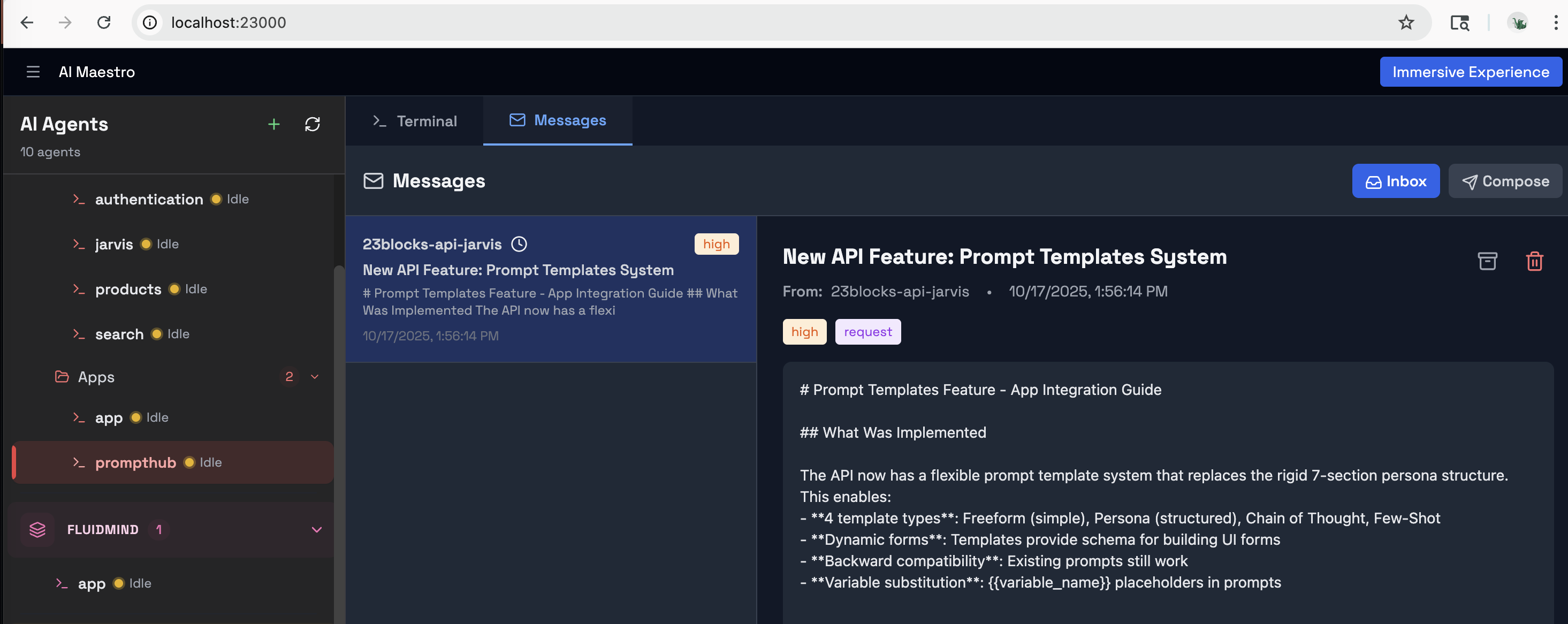
The Agent Messaging Protocol (AMP) gives your agents email-like communication. Priority levels, message types, cryptographic signatures, and push notifications. Tell your agent "send a message to backend about the deployment" — it just works. Agents coordinate directly while you manage the big picture.
Before AMP: You copy research from one terminal, paste into another, repeat 50 times a day. With AMP: "Research agent, send your findings to the writing agent." Done.
A friend in Singapore wanted his agents to talk to mine. But I didn't want to give him access to my network.
Connect your AI agents to Slack, Discord, Email, and WhatsApp through organizational gateways. Smart routing (@AIM:agent-name), thread-aware responses, and content security with 34 prompt injection patterns detected at the gateway — before any agent sees the message.
Every morning, my agents woke up with amnesia.
Long-term memory is a skill you switch on per agent. Every night each agent's conversations become memory: short statements of what it learned, each backed by the passages it came from, and an entity graph of the things it works with and how they relate (runs on, depends on, stores data in, deploys to), kept current, with ended relations marked. Claude Code deletes transcripts after 30 days; AI Maestro rebuilds that history from the agent's own message index, so months of work become memory instead of disappearing. When a prompt names something, the agent is told what it relates to before it acts, so it can see what a change affects. Knowledge that comes up in more sessions weighs more; secrets are redacted and never stored. How it works →
Alongside it: Code Graph (interactive visualization of your entire codebase with delta indexing) and Documentation (auto-generated, searchable docs from your code). Agents get smarter the longer they work with you.
Talking isn't working. I needed agents to coordinate on actual deliverables.
Assemble agents into teams, run meetings in split-pane war rooms, and track tasks on a full Kanban board with drag-and-drop, dependencies, and 5 status columns. Cross-machine teams work seamlessly. This is project management for your AI workforce.
Some jobs shouldn't wait for me to remember to ask.
Give an agent its own schedule — morning triage, a nightly dependency check, a Monday report. The timer belongs to the agent, not the machine, so a schedule travels with the agent when it moves hosts, and fires when that agent goes idle instead of interrupting it mid-task.
At 80 agents, they all looked the same.
Custom avatars, personality profiles, and roles for every agent. When an agent has a face and a job title, you instinctively assign it the right work — just like a real team.
Agents can also speak and be seen: a voice pipeline with your choice of TTS provider, and live animated faces that move while the agent talks. Open a call with an agent and it looks back at you. Nobody else is doing this, and once you've reviewed a plan by listening to it on a walk, the terminal feels like a downgrade.
One caveat worth stating plainly: true lip-sync — mouth movement driven by the actual audio — needs the OpenAI or ElevenLabs voice and an API key. The default browser voice (web-speech) renders straight to your speakers and exposes no audio stream to measure, so the face animates from a synthetic envelope instead. It looks alive; it is not tracking the words. That is a limit of the Web Speech API, not something we plan to work around.
One agent on my laptop. Another on EC2. A third on Fargate. All in the same dashboard.
Four ways to run agents, each for a different need:
| Mode | What | Best For | |------|------|----------| | tmux | Direct terminal sessions on your machine | Local development, zero setup | | Docker | Containerized agents with resource limits | Isolation, reproducibility, multi-project | | AWS EC2 | Dedicated Graviton instance with native install, Nginx + SSL | Always-on agents, SSH access, persistent workloads | | AWS ECS Fargate | Serverless containers, auto-built Docker image | Burst scaling, zero maintenance, pay-per-use |
Cloud agents are Terraform-managed. EC2 installs Node.js, tmux, and AI CLIs directly on ARM64 hardware (no Docker overhead). ECS auto-builds your Docker image, pushes to ECR, and runs on Fargate. Both deploy with one command from the dashboard or CLI.
# EC2: dedicated instance with SSL
aimaestro-agent.sh create my-api --ec2 \
  --domain api.example.com --ssl-email [email protected] --key-name my-key

# ECS Fargate: serverless (auto-builds image)
aimaestro-agent.sh create worker --ecs
Every AI-first organization starts with one agent. Lola is yours — a batteries-included Chief of Staff framework built for AI Maestro. She handles email triage, semantic memory, task management, and content security out of the box. Install the platform, deploy Lola, and you have your first employee on day one.
# Clone and deploy Lola on AI Maestro
git clone https://github.com/23blocks-OS/lolabot.git
cd lolabot && ./setup.sh
The LolaBot Ecosystem:
Every agent is built from five dimensions:
| | Dimension | What | Where | |-|-----------|------|-------| | WHO | Personality | Domain expertise, workflows, deliverables | Agent Library (150+) | | HOW | Capabilities | Skills, scripts, CLI tools, Canvas | Plugin Builder | | TRUST | Identity | Cryptographic keys, OAuth tokens | AID | | TALK | Communication | Agent-to-agent messaging | AMP | | ACT | Actions | Tool execution, API calls, workflows | AAP |
Open Protocols — AI Maestro is built on three open standards:
AI Maestro is the stage. Pick personalities, give them skills, and run them from one dashboard.
Read the full ecosystem guide →
Founders building AI-first organizations. You're the CEO, your agents are the team. Solo operators, agency owners, and anyone running a business where AI agents do the work and you drive the strategy. Start with Lola, add specialists, scale your AI workforce.
Developers running multiple AI agents. If you have 3+ agents and you're switching between terminals, losing context, and playing messenger — this is for you. Works with Claude Code, Codex, Aider, Cursor, or any terminal-based AI.
Teams coordinating AI-assisted work. Multiple developers, multiple agents, multiple machines. One dashboard. Agent-to-agent messaging replaces you as the bottleneck.
Creators and operators who want to connect AI agents to the outside world through Slack, Discord, or Email — without exposing their infrastructure.
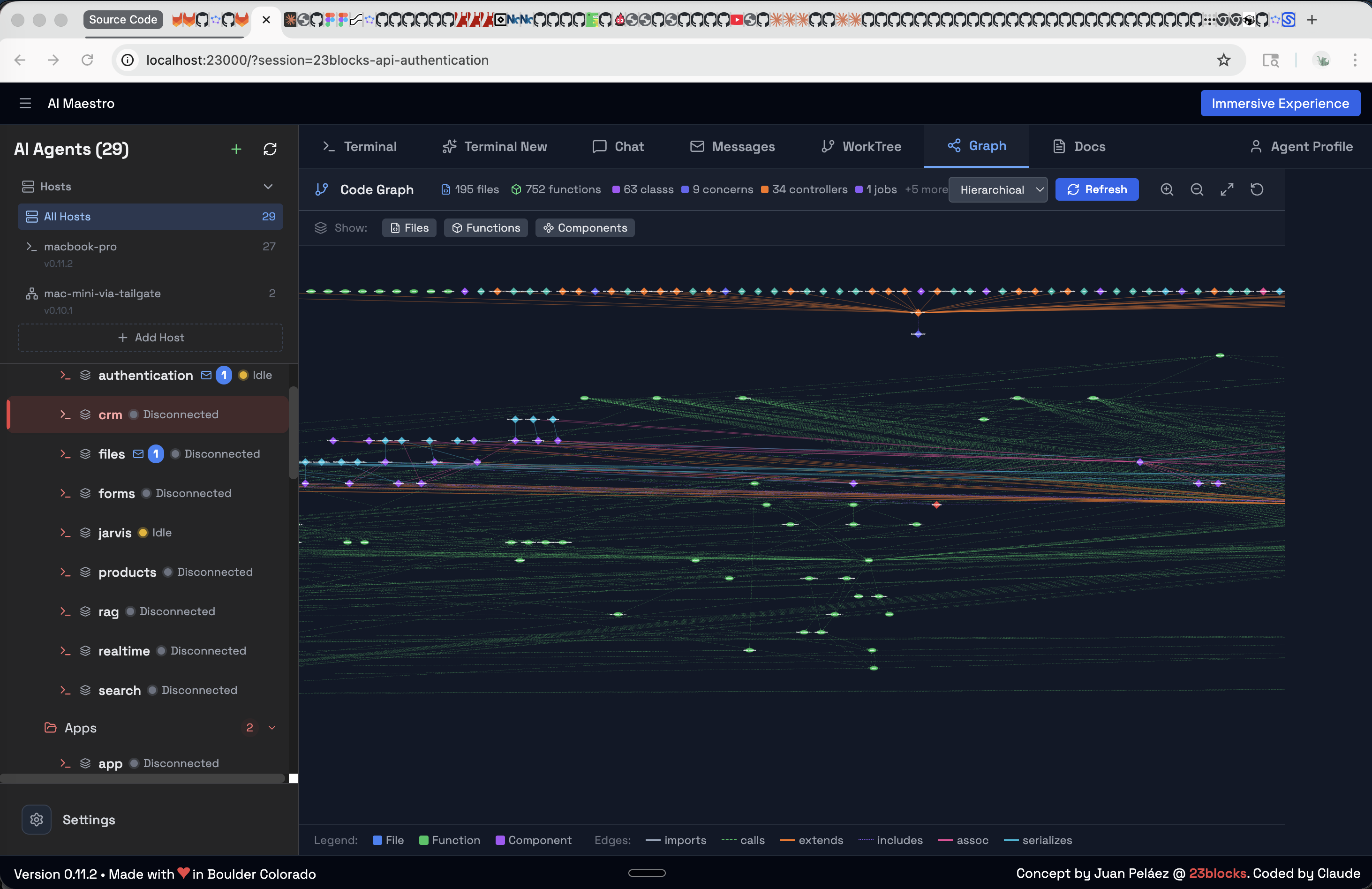
Code Graph — Interactive codebase visualization
Agent Inbox — Direct agent-to-agent messaging
New here?
Going deeper:
Troubleshooting:
Open Protocols:
Extending:
See the full roadmap and join the discussion.
We love contributions. See CONTRIBUTING.md for guidelines.
AI Maestro is better because of people outside the team who hit something, read the source, and sent a fix. In order of arrival:
C-m instead of Enter for tmux
send-keys, which is still how every message reaches an agent today, and a fix
stopping undefined values from overwriting task fields on update.ecosystem.config.js.We built this because one of us was running 35 agents across terminals and had become the human message bus between them. It solved our problem. That it solves yours too is the best thing that has happened to this project — and a patch from someone who hit a rough edge and read the source is the most useful thing we can receive. Open a PR.
<details> <summary><b>Acknowledgments</b></summary>Built with Next.js, xterm.js, CozoDB, ts-morph, tmux, and Claude Code.
</details>MIT — see LICENSE. Free for any purpose, including commercial.
Made with love in Boulder (USA), Roma (Italy), and many other cool places
Built by AI Agents with Humans in the driver seat — for AI-first organizations, AI-enabled humans, and autonomous agents
</div>Do I need to use Claude Code? No. AI Maestro works with any terminal-based AI agent — Claude Code, Codex, Aider, Cursor, OpenClaw, Hermes, Droid, or your own scripts. We're agent-agnostic.
Does it work on Linux / Windows? Yes. macOS and Linux natively. Windows via WSL2 — see the Windows guide.
Can agents on different machines talk to each other? Yes. The Agent Messaging Protocol (AMP) handles cross-machine messaging with cryptographic signatures and push notifications. No central server required.
What are AID and AAP? AID (Agent Identity) gives each agent a portable cryptographic identity. AAP (Agent Actions Protocol) standardizes how agents execute tools and trigger workflows. Together with AMP, they form the open protocol stack that AI Maestro is built on.
What is the Canvas skill? Canvas lets agents generate visual artifacts — diagrams, charts, and interactive documents — directly from conversations. It's part of the plugin system and available to any agent.
How is this different from just using tmux? tmux gives you terminals. AI Maestro gives you an organization — persistent memory, agent-to-agent messaging, team coordination, Kanban boards, multi-machine mesh, cloud deployment, and gateway integrations. tmux is the foundation; AI Maestro is the building.
What is LolaBot? LolaBot is an open-source agent framework — a batteries-included Chief of Staff that handles email, memory, tasks, and security. The LolaBot Factory offers pre-built agent templates for one-click deployment.
What does it cost? Nothing. MIT licensed, free for any purpose including commercial — no seats, no usage fees, no paid tier. You bring your own agent subscriptions (Claude Code, Codex, whatever you already pay for) and AI Maestro just runs them. Note that some tools in this space are source-available rather than open source, under licenses that forbid offering them as a service; MIT has no such restriction.
Do you collect telemetry?
No. No analytics SDK, no account, no login, no phone-home. The only telemetry in the product is the agent metrics shown on your own dashboard, and those post to localhost:23000 — your machine. Point them at a central collector only if you choose to run one.
How does this compare to the parallel-agent IDEs? Different job, and deliberately so. Tools like Orca, Paseo, Superset and Conductor run several agents on one repository on one machine, each in an isolated git worktree, then diff the results so you can merge the best one. It's a disposable fan-out: five attempts at the same task, keep one, throw away four. They're good at it. If that's the workflow you want today, use one of them.
AI Maestro is built for the case after that one — a standing team of agents that own things, remember their work, message each other, and run across every machine you have. We don't use worktrees because worktrees can't leave the machine they're on: they're several working directories over one .git store on one disk. Our agents each clone what they own and integrate through pull requests, like a human team, which is the only model that works when the backend agent is on Linux and the iOS agent is on a Mac. See the mental model.
Can I run several agents on the same repository?
Yes — give each one its own clone. Backend owns the API, frontend owns the web app, infra owns the Terraform, even inside a monorepo. They coordinate over AMP and merge through git. For a large repo, git clone --filter=blob:none or --reference to a local mirror keeps the disk cost down. And an individual agent is free to use git worktree inside its own clone — worktrees are a fine tool within an agent, just not how we isolate agents from each other.
Is there a hosted / cloud version? Not yet. AI Maestro runs on your machines. You own your data, your agents, and your infrastructure.
How do I add more agents?
Create them from the dashboard UI, the CLI (aimaestro-agent.sh create), or just start a new tmux session — AI Maestro auto-discovers it.

Ruflo メモリ基盤のプラグイン。AgentDB コントローラーブリッジ(15 個の agentdb_* MCP ツール)、RuVector ONNX 埋め込み(RaBitQ 32x 量子化を含む 10 個の embeddings_* ツール)、WASM HNSW パターンルーター(3 個の ruvllm_hnsw_* ツール)を提供します。mod(ADR-445)として、プロンプトへの安全な任意リコール、秘密をメモリから遠ざける書き込みガード、/agentdb、コンソールが表示するステータスファイルを備えます。

pbir CLI に従うレポートペインで Claude が読み取り、変更する内容を表示しながら、インタラクティブな Power BI レポートの作成、整形、最適化、レビューを行います。


Claude Code の統合ステータスライン。複数 CLI(Claude、Codex、Gemini、Antigravity、z.ai)の使用量、コンテキスト、レート制限、コストを監視します。