
uppinote20@uppinote20
uppinote20/claude-dashboard
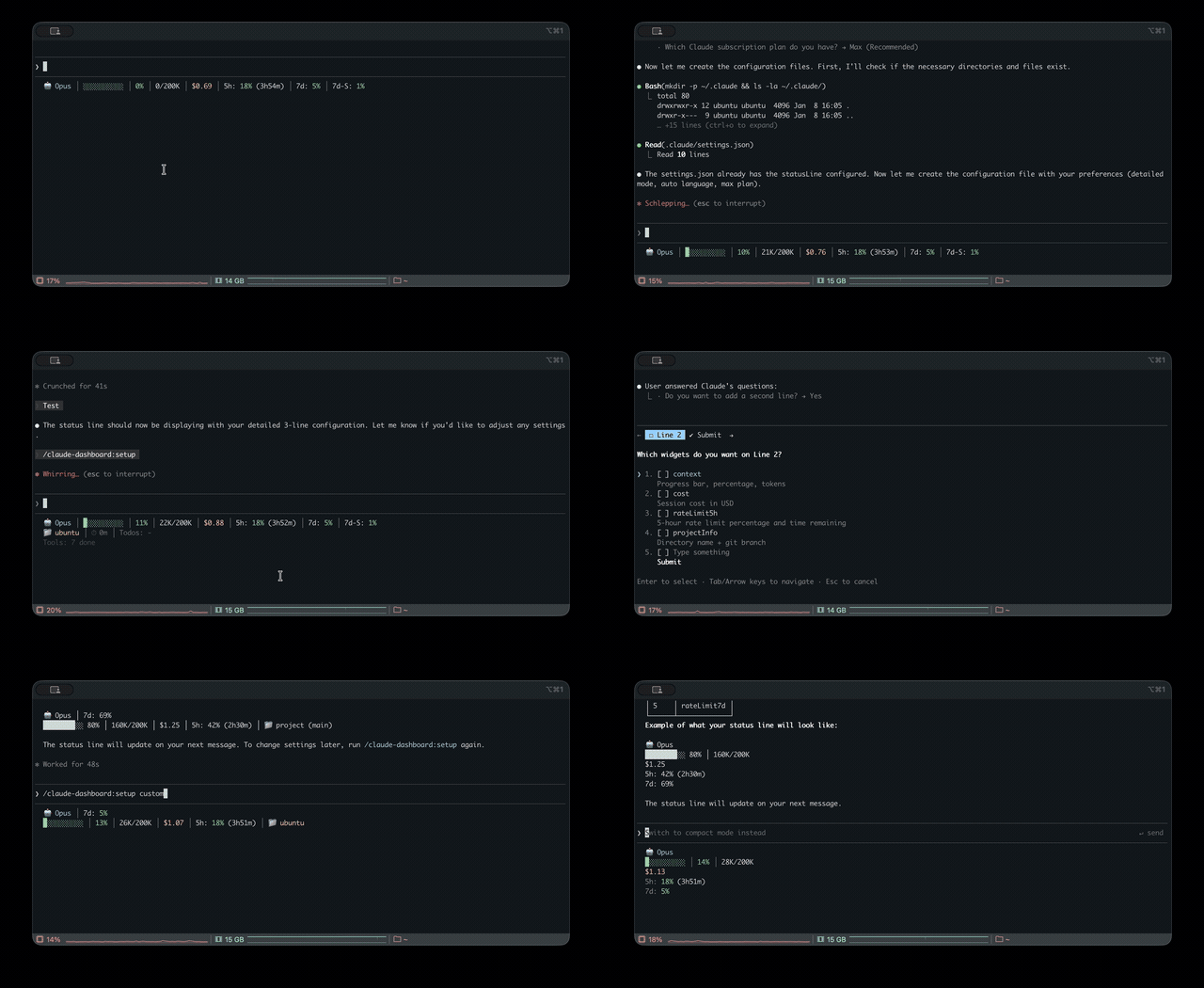
Claude Code の統合ステータスライン。複数 CLI(Claude、Codex、Gemini、Antigravity、z.ai)の使用量、コンテキスト、レート制限、コストを監視します。
uppinote20/claude-dashboard

Claude Code 用の包括的なステータスラインプラグインです。Claude、Codex、Gemini、Antigravity、z.ai の CLI を横断して使用量を監視し、コンテキスト、レート制限、コスト追跡、モジュール式ウィジェットを提供します。

要件: Claude Code v1.0.80+ / Node.js 18+
/plugin marketplace add uppinote20/claude-dashboard
/plugin install claude-dashboard
/claude-dashboard:setup
git clone https://github.com/uppinote20/claude-dashboard.git "${CLAUDE_CONFIG_DIR:-$HOME/.claude}/plugins/claude-dashboard"
/claude-dashboard:setup
/claude-dashboard:setupはplugins/cache/claude-dashboard/claude-dashboard/の下でプラグインを探します。 手動でplugins/claude-dashboard/に clone してもこのパスには一致しないため、setup コマンドの shim 検索でコピー対象が見つかりません。statusLine.commandをsettings.jsonの中で clone 先にあるdist/index.jsへ直接向けてください(例:node "${CLAUDE_CONFIG_DIR:-$HOME/.claude}/plugins/claude-dashboard/dist/index.js")。 手動インストールではバージョンを自動取得できないため、リリースごとにgit pullを実行してパスも自分で更新してください。
コンパクト(1 行)- デフォルト:

モデル、コンテキストの進行バー、コスト、レート制限(5h/7d)または z.ai の使用量(プロバイダーごとに排他的)
標準(2 行):

プロジェクト情報、セッション ID、セッション時間、消費速度、todo の進捗を追加
詳細(6 行):

枯渇までの時間、設定数、ツール/エージェントの状態、キャッシュヒット、パフォーマンスバッジ、token の内訳、予測、予算、Codex/Gemini/Antigravity の使用量を追加
マルチプロバイダー対応:インストール済みなら z.ai/ZHIPU、Codex、Gemini、Antigravity を自動検出します。
| カテゴリ | ウィジェット | 説明 |
|----------|--------|-------------|
| コア | model | emoji 付きのモデル名とバージョン(例:Opus 5.5)、Opus/Sonnet/Fable の effort レベル(MAX/X/H/M/L)、Opus の高速モード(↯)。stdin から現在の effort.level / fast_mode を読み取り、古い Claude Code では settings.json にフォールバック |
| | context | 進行バー、割合、token(🟢 0-50% / 🟡 51-80% / 🔴 81-100%) |
| | contextBar | 進行バーだけを表示(context のサブウィジェット) |
| | contextPercentage | 割合だけを表示(context のサブウィジェット) |
| | contextUsage | token 数だけを表示。例:42K/200K(context のサブウィジェット) |
| | cost | セッションコスト(USD) |
| | projectInfo | ディレクトリ + git ブランチ(クリックできる OSC8 リンク)+ ahead/behind(↑↓)、project_dir からのサブパス、worktree インジケーター(🌳) |
| レート制限 | rateLimit5h | 5 時間のレート制限とリセットまでのカウントダウン |
| | rateLimit7d | 7 日間のレート制限(Pro と Max) |
| | rateLimit7dSonnet | 7 日間の Sonnet 制限(Max のみ)——非推奨 ~2026-06:Anthropic は Sonnet 5 の開始時に統合された週間バケットへ統合したため、API は null を返し、フィールドが戻るまでウィジェットは非表示 |
| | rateLimit7dFable | 7 日間の Fable 制限(Max のみ) |
| セッション | sessionId | セッション ID(短い 8-char) |
| | sessionIdFull | セッション ID(完全な UUID) |
| | sessionName | /rename コマンドから取得したセッション名 |
| | sessionDuration | セッション時間 |
| | lastPrompt | タイムスタンプ付きの最後のユーザープロンプト |
| | configCounts | CLAUDE.md、AGENTS.md、rules、MCPs、hooks、+Dirs |
| アクティビティ | toolActivity | 対象付きの実行中/完了済みツール(例:Read(app.ts)) |
| | agentStatus | 解決済みモデルを含むサブエージェントの進捗。例:Explore(Opus)(Agent ツールの model パラメーターまたは CLAUDE_CODE_SUBAGENT_MODEL から取得) |
| | todoProgress | todo 完了率 |
| 分析 | burnRate | 1 分あたりの token 消費量、セッション平均(入力 + キャッシュ書き込み + 出力) |
| | cacheHit | キャッシュヒット率(直前のリクエスト) |
| | promptCache | セッションのプロンプトキャッシュ状態:♨️ 温かい状態で冷えるまでの残り時間 / ❄️ 冷たい状態、ヒット率、ミス数。例:♨️ 4m 91% miss 2(prompt_cache、Claude Code ≥ 2.1.251 から)。温→冷の切り替えは自動で行われます。アイドル中も分単位のカウントダウンを進めるには statusLine.refreshInterval(例:60)を設定します |
| | promptCacheState | 温/冷アイコンと残り時間だけを表示。例:♨️ 4m(promptCache のサブウィジェット) |
| | promptCacheHit | セッションのキャッシュヒット率だけを表示(promptCache のサブウィジェット) |
| | promptCacheMisses | ミス数だけを表示。例:miss 2。0 では非表示(promptCache のサブウィジェット) |
| | depletionTime | レート制限までの推定時間(概算)¹ |
| マルチ CLI | codexUsage | OpenAI Codex CLI の使用量(未インストールなら自動非表示)² |
| | geminiUsage | Google Gemini CLI - 現在のモデル(未インストールなら自動非表示)³ |
| | geminiUsageAll | Google Gemini CLI - すべてのモデル(未インストールなら自動非表示)³ |
| | antigravityUsage | Google Antigravity CLI - モデルファミリー別の週間クォータ(未インストールなら自動非表示)⁸ |
| | antigravityUsageAll | Google Antigravity CLI - モデル別クォータ(未インストールなら自動非表示)⁸ |
| | zaiUsage | z.ai/ZHIPU の使用量(z.ai を使っていなければ自動非表示)⁴ |
| インサイト | tokenBreakdown | 入力/出力/キャッシュ書き込み/読み取り token の内訳 |
| | performance | 総合効率バッジ(キャッシュヒット + 出力比率) |
| | forecast | セッションの速度に基づく推定時間コスト |
| | budget | 1 日の支出と設定済み予算上限の比較⁵ |
| | tokenSpeed | 出力 token の生成速度(tok/s)、セッション平均 |
| | tokenSpeedLast | 直近のレスポンスだけの出力 token 生成速度 |
| | todayCost | 今日の全セッションの合計支出 |
| ステータス | peakHours | カウントダウン付きのピーク時間インジケーター(PeakClaude ベース)⁶ |
| | tagStatus | マッチした git タグに対する先行コミット数(デフォルトパターン v*、tagPatterns で変更可能)⁷ |
| | slashCommand | 現在のターンで有効な slash コマンド(🎯)。次の通常テキストメッセージで消去 |
| | agentMode | セッションエージェントの識別:👤 カスタムエージェント(/agent <name> 経由)または 🤖 サブエージェント種別 |
| 情報 | linesChanged | 未コミットの追加/削除行数(未追跡ファイルを含む)(+N -N) |
| | outputStyle | 現在の出力スタイル("default" では非表示) |
| | version | Claude Code のバージョン表示 |
| | vimMode | Vim モード(NORMAL/INSERT)。Vim 無効時は自動非表示 |
| | apiDuration | セッション全体の時間に占める API 時間の割合 |
¹ すべての利用量がこのセッションによるものと仮定しています。セッションが長くなるほど精度が上がります。 ²
~/.codex/auth.jsonが見つからない場合は自動非表示。 ³~/.gemini/oauth_creds.jsonが見つからない場合は自動非表示——Gemini CLI の個人向けティアは 2026-06-18 に終了し、Antigravity CLI に移行しました(エンタープライズは引き続き対応)。 ⁴ANTHROPIC_BASE_URLから検出できない場合は自動非表示。 ⁵ 設定に"dailyBudget"が必要です。 ⁶ Peak = 平日の 5-11 AM PT。次の切り替えまでのカウントダウンを表示します。 ⁷tagPatterns設定を使用(デフォルトは["v*"])。到達可能なタグに一致するパターンがない場合は自動非表示。 ⁸~/.gemini/antigravity-cli/antigravity-oauth-tokenが見つからない場合は自動非表示。
i18n:英語と韓国語に対応(自動検出、または setup で指定)。
# Preset modes
/claude-dashboard:setup compact             # 1 line (default)
/claude-dashboard:setup normal en pro       # 2 lines, English, Pro plan
/claude-dashboard:setup detailed ko max     # 6 lines, Korean, Max plan

# Custom mode: control widget order and line composition
# Format: "widget1,widget2,...|widget3,widget4,..." (| separates lines)
/claude-dashboard:setup custom auto max "model,context,cost|projectInfo,todoProgress"
プランの違い:
| 機能 | Max | Pro | |---------|--------|-----| | 5h レート制限 + カウントダウン | ✅ | ✅ | | 7d 全モデル | ✅ | ❌ |
<details> <summary><strong>高度な設定</strong></summary>インタラクティブモード: 引数なしで /claude-dashboard:setup を実行します。プリセット選択に向いています。ウィジェットを細かく制御する場合はダイレクトモードを使うか、JSON ファイルを直接編集します。
表示モードのプリセット(zaiUsage と rateLimit* はプロバイダーに応じて排他的):
| モード | 行数 | ウィジェット |
|---------|-------|---------|
| compact | 1 | model, context, cost, rateLimit5h/7d/7dSonnet, zaiUsage |
| normal | 2 | + projectInfo, sessionId, sessionDuration, burnRate, todoProgress |
| detailed | 6 | + depletionTime, configCounts, toolActivity, agentStatus, cacheHit, promptCache, performance, tokenBreakdown, forecast, budget, codexUsage, geminiUsage, antigravityUsage, linesChanged, outputStyle, version, peakHours, lastPrompt, vimMode, apiDuration, tagStatus |
設定ファイル(~/.claude/claude-dashboard.local.json):
{
  "language": "auto",
  "plan": "max",
  "displayMode": "custom",
  "lines": [
    ["model", "context", "cost", "rateLimit5h"],
    ["projectInfo", "todoProgress"]
  ],
  "theme": "default",
  "separator": "pipe",
  "dailyBudget": 15,
  "disabledWidgets": [],
  "modPane": "detailed",
  "modBand": "MC$R|BDO",
  "modBandDefault": false,
  "cache": { "ttlSeconds": 60 }
}
またはプリセットの短縮形で素早く設定します。
{
  "preset": "MC$R|BDO",
  "theme": "tokyoNight",
  "separator": "dot"
}
テーマ: default(pastel)/ minimal(monochrome)/ catppuccin / catppuccinLatte(light-mode)/ dracula / gruvbox / nord / tokyoNight / solarized
区切り: pipe(│、デフォルト)/ space / dot(·)/ arrow(›)
プリセットショートカット: 1 文字のクイックレイアウト——"preset": "MC$R|BDO"(M=model、C=context、$=cost、R=rateLimit5h など)
予算追跡: "dailyBudget": 15 を設定して 1 日の支出を追跡します。80% で ⚠️、95% で 🚨 を表示します。
タグ状態: "tagPatterns": ["v*", "release-*"] で tagStatus パターンを変更できます。デフォルトは ["v*"] です。到達可能なタグに一致するパターンがない場合、ウィジェットは自動的に非表示になります。
ウィジェットの切り替え: ウィジェット ID を disabledWidgets に追加すると、どの表示モードからも非表示にできます。
Mod レイアウト: modPane(/claude-dashboard-pane ペイン、デフォルト detailed)と modBand(/claude-dashboard-band バンド、デフォルトはステータスラインのレイアウト)は、表示モード名(compact / normal / detailed)または "MC$R|BDO" のようなプリセット文字列を受け取ります。"modBandDefault": true にするとセッション開始時にバンドが有効になります。Mods を参照してください。
色の凡例: 🟢 0-50% 安全 / 🟡 51-80% 注意 / 🔴 81-100% 重大
</details>/claude-dashboard:setupステータスラインの表示モード、言語、プランを設定します。設定 を参照してください。
/claude-dashboard:check-usageすべての AI CLI(Claude、Codex、Gemini、Antigravity、z.ai)の使用制限を一度に確認し、最も余裕のある CLI を推薦します。
/claude-dashboard:check-usage              # Interactive output with colors
/claude-dashboard:check-usage --json       # JSON output for scripting
/claude-dashboard:check-usage --lang ko    # Specify language

/claude-dashboard:setup-aliasターミナルからすべての AI CLI の使用量を素早く確認できる check-ai shell alias を追加します。macOS/Linux(zsh/bash)と Windows(PowerShell)に対応します。
/claude-dashboard:setup-alias
セットアップ後:
check-ai          # Pretty output
check-ai --json   # JSON output for scripting
/claude-dashboard:updatestatusLine shim を修復または検証します。通常は不要です。/plugin update の後はステータスラインが自動で新しいバージョンを使うためです。hooks を無効にしている場合や、ステータスラインの更新が止まった場合に使います。
/claude-dashboard:update
claude-dashboard には Claude Code mod(function-hook プラグイン、早期アクセス、Claude Code 2.1.289 でテスト済み)も同梱されています。同じプラグイン(hooks/hooks.json → "modules": ["../dist/mod.js"])に含まれるため、追加インストールは不要です。Mods は描画を
まず作者の README で marketplace とプラグイン名を確認してください。コマンドはリポジトリの構成によって変わる場合があります。
claude plugin marketplace add uppinote20/claude-dashboard
claude plugin install claude-dashboard
Comprehensive status line plugin for Claude Code — unified usage monitoring across Claude, Codex, Gemini, Antigravity, and z.ai CLIs, with context, rate limits, cost tracking, and a modular widget system.
Requirements: Claude Code v1.0.80+ / Node.js 18+
/plugin marketplace add uppinote20/claude-dashboard
/plugin install claude-dashboard
/claude-dashboard:setup
git clone https://github.com/uppinote20/claude-dashboard.git "${CLAUDE_CONFIG_DIR:-$HOME/.claude}/plugins/claude-dashboard"
/claude-dashboard:setup
/claude-dashboard:setuplooks for the plugin underplugins/cache/claude-dashboard/claude-dashboard/, which a manual clone intoplugins/claude-dashboard/does not match — the setup command's shim lookup will find nothing to copy. PointstatusLine.commandinsettings.jsondirectly at your clone'sdist/index.jsinstead (e.g.node "${CLAUDE_CONFIG_DIR:-$HOME/.claude}/plugins/claude-dashboard/dist/index.js"), and note that manual installs do not get automatic version pickup —git pulland update the path yourself after each release.
Compact (1 line) - Default:

Model, context progress bar, cost, rate limits (5h/7d) or z.ai usage (mutually exclusive by provider)
Normal (2 lines):

Adds project info, session ID, session duration, burn rate, todo progress
Detailed (6 lines):

Adds depletion time, config counts, tool/agent status, cache hit, performance badge, token breakdown, forecast, budget, Codex/Gemini/Antigravity usage
Multi-provider support: z.ai/ZHIPU, Codex, Gemini, Antigravity auto-detected when installed.
| Category | Widget | Description |
|----------|--------|-------------|
| Core | model | Model name and version with emoji (e.g. Opus 5.5), effort level for Opus/Sonnet/Fable (MAX/X/H/M/L), fast mode for Opus (↯). Reads the live effort.level / fast_mode from stdin, falling back to settings.json on older Claude Code |
| | context | Progress bar, percentage, tokens (🟢 0-50% / 🟡 51-80% / 🔴 81-100%) |
| | contextBar | Progress bar only (sub-widget of context) |
| | contextPercentage | Percentage only (sub-widget of context) |
| | contextUsage | Token count only, e.g. 42K/200K (sub-widget of context) |
| | cost | Session cost in USD |
| | projectInfo | Directory + git branch (clickable OSC8 link) + ahead/behind (↑↓), subpath from project_dir, worktree indicator (🌳) |
| Rate Limits | rateLimit5h | 5-hour rate limit with reset countdown |
| | rateLimit7d | 7-day rate limit (Pro and Max) |
| | rateLimit7dSonnet | 7-day Sonnet limit (Max only) — deprecated ~2026-06: Anthropic merged it into the unified weekly bucket at the Sonnet 5 launch, so the API returns null and the widget stays hidden until/unless the field returns |
| | rateLimit7dFable | 7-day Fable limit (Max only) |
| Session | sessionId | Session ID (short 8-char) |
| | sessionIdFull | Session ID (full UUID) |
| | sessionName | Session name from /rename command |
| | sessionDuration | Session duration |
| | lastPrompt | Last user prompt with timestamp |
| | configCounts | CLAUDE.md, AGENTS.md, rules, MCPs, hooks, +Dirs |
| Activity | toolActivity | Running/completed tools with targets (e.g., Read(app.ts)) |
| | agentStatus | Subagent progress with resolved model, e.g. Explore(Opus) (from the Agent tool's model param or CLAUDE_CODE_SUBAGENT_MODEL) |
| | todoProgress | Todo completion rate |
| Analytics | burnRate | Token consumption per minute, session average (input + cache write + output) |
| | cacheHit | Cache hit rate percentage (last request) |
| | promptCache | Session prompt-cache health: ♨️ warm with time left before it goes cold / ❄️ cold, hit ratio, miss count, e.g. ♨️ 4m 91% miss 2 (from prompt_cache, Claude Code ≥ 2.1.251). The warm→cold switch happens on its own; set statusLine.refreshInterval (e.g. 60) to keep the minute countdown ticking while idle |
| | promptCacheState | Warm/cold icon + time left only, e.g. ♨️ 4m (sub-widget of promptCache) |
| | promptCacheHit | Session cache hit ratio only, e.g. 91% (sub-widget of promptCache) |
| | promptCacheMisses | Miss count only, e.g. miss 2; hidden at 0 (sub-widget of promptCache) |
| | depletionTime | Estimated time to rate limit (approx)¹ |
| Multi-CLI | codexUsage | OpenAI Codex CLI usage (auto-hide if not installed)² |
| | geminiUsage | Google Gemini CLI - current model (auto-hide if not installed)³ |
| | geminiUsageAll | Google Gemini CLI - all models (auto-hide if not installed)³ |
| | antigravityUsage | Google Antigravity CLI - weekly quota by model family (auto-hide if not installed)⁸ |
| | antigravityUsageAll | Google Antigravity CLI - per-model quota (auto-hide if not installed)⁸ |
| | zaiUsage | z.ai/ZHIPU usage (auto-hide if not using z.ai)⁴ |
| Insights | tokenBreakdown | Input/output/cache write/read token breakdown |
| | performance | Composite efficiency badge (cache hit + output ratio) |
| | forecast | Estimated hourly cost based on session rate |
| | budget | Daily spending vs configured budget limit⁵ |
| | tokenSpeed | Output token generation speed (tok/s), session average |
| | tokenSpeedLast | Output token generation speed of the most recent response only |
| | todayCost | Total spending across all sessions today |
| Status | peakHours | Peak hours indicator with countdown (based on PeakClaude)⁶ |
| | tagStatus | Commits ahead of matched git tags (default pattern v*, customize via tagPatterns)⁷ |
| | slashCommand | Active slash command for the current turn (🎯), cleared by next plain-text message |
| | agentMode | Session agent identity: 👤 custom agent (via /agent <name>) or 🤖 subagent type |
| Info | linesChanged | Uncommitted lines added/removed, including untracked files (+N -N) |
| | outputStyle | Current output style (hidden when "default") |
| | version | Claude Code version display |
| | vimMode | Vim mode (NORMAL/INSERT), auto-hides when vim disabled |
| | apiDuration | API time as % of total session time |
¹ Assumes all utilization came from this session; improves as session runs longer. ² Auto-hides if
~/.codex/auth.jsonnot found. ³ Auto-hides if~/.gemini/oauth_creds.jsonnot found — Gemini CLI personal tiers were retired 2026-06-18 in favor of Antigravity CLI (enterprise still supported). ⁴ Auto-hides if not detected viaANTHROPIC_BASE_URL. ⁵ Requires"dailyBudget"in config. ⁶ Peak = weekdays 5-11 AM PT; shows countdown to next transition. ⁷ UsestagPatternsconfig (default["v*"]); auto-hides when no pattern matches a reachable tag. ⁸ Auto-hides if~/.gemini/antigravity-cli/antigravity-oauth-tokennot found.
i18n: English and Korean supported (auto-detect or set via setup).
# Preset modes
/claude-dashboard:setup compact             # 1 line (default)
/claude-dashboard:setup normal en pro       # 2 lines, English, Pro plan
/claude-dashboard:setup detailed ko max     # 6 lines, Korean, Max plan

# Custom mode: control widget order and line composition
# Format: "widget1,widget2,...|widget3,widget4,..." (| separates lines)
/claude-dashboard:setup custom auto max "model,context,cost|projectInfo,todoProgress"
Plan differences:
| Feature | Max | Pro | |---------|-----|-----| | 5h rate limit + countdown | ✅ | ✅ | | 7d all models | ✅ | ❌ |
<details> <summary><strong>Advanced Configuration</strong></summary>Interactive Mode: Run /claude-dashboard:setup without arguments. Best for preset selection; for full widget control, use Direct Mode or edit the JSON file directly.
Display Mode Presets (zaiUsage and rateLimit* are mutually exclusive based on provider):
| Mode | Lines | Widgets |
|------|-------|---------|
| compact | 1 | model, context, cost, rateLimit5h/7d/7dSonnet, zaiUsage |
| normal | 2 | + projectInfo, sessionId, sessionDuration, burnRate, todoProgress |
| detailed | 6 | + depletionTime, configCounts, toolActivity, agentStatus, cacheHit, promptCache, performance, tokenBreakdown, forecast, budget, codexUsage, geminiUsage, antigravityUsage, linesChanged, outputStyle, version, peakHours, lastPrompt, vimMode, apiDuration, tagStatus |
Configuration file (~/.claude/claude-dashboard.local.json):
{
  "language": "auto",
  "plan": "max",
  "displayMode": "custom",
  "lines": [
    ["model", "context", "cost", "rateLimit5h"],
    ["projectInfo", "todoProgress"]
  ],
  "theme": "default",
  "separator": "pipe",
  "dailyBudget": 15,
  "disabledWidgets": [],
  "modPane": "detailed",
  "modBand": "MC$R|BDO",
  "modBandDefault": false,
  "cache": { "ttlSeconds": 60 }
}
Or use preset shorthand for quick configuration:
{
  "preset": "MC$R|BDO",
  "theme": "tokyoNight",
  "separator": "dot"
}
Themes: default (pastel) / minimal (monochrome) / catppuccin / catppuccinLatte (light-mode) / dracula / gruvbox / nord / tokyoNight / solarized
Separators: pipe (│, default) / space / dot (·) / arrow (›)
Preset Shortcuts: Quick layout with single characters — "preset": "MC$R|BDO" (M=model, C=context, $=cost, R=rateLimit5h, etc.)
Budget Tracking: Set "dailyBudget": 15 to track daily spending. Shows ⚠️ at 80% and 🚨 at 95%.
Tag Status: Customize tagStatus patterns via "tagPatterns": ["v*", "release-*"]. Default is ["v*"]. The widget auto-hides when no pattern matches a reachable tag.
Widget Toggle: Add widget IDs to disabledWidgets to hide them from any display mode.
Mod Layouts: modPane (the /claude-dashboard-pane pane, default detailed) and modBand (the /claude-dashboard-band band, default = your status line layout) take a display mode name (compact / normal / detailed) or a preset string like "MC$R|BDO". Set "modBandDefault": true to turn the band on at session start. See Mods.
Color Legend: 🟢 0-50% Safe / 🟡 51-80% Warning / 🔴 81-100% Critical
</details>/claude-dashboard:setupConfigure the status line display mode, language, and plan. See Configuration.
/claude-dashboard:check-usageCheck usage limits for all AI CLIs (Claude, Codex, Gemini, Antigravity, z.ai) at once and get a recommendation for which CLI has the most available capacity.
/claude-dashboard:check-usage              # Interactive output with colors
/claude-dashboard:check-usage --json       # JSON output for scripting
/claude-dashboard:check-usage --lang ko    # Specify language
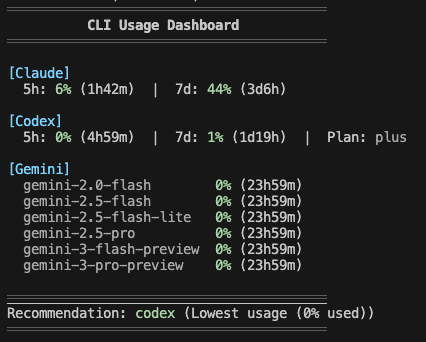
/claude-dashboard:setup-aliasAdd a check-ai shell alias to quickly check all AI CLI usage from your terminal. Supports macOS/Linux (zsh/bash) and Windows (PowerShell).
/claude-dashboard:setup-alias
After setup:
check-ai          # Pretty output
check-ai --json   # JSON output for scripting
/claude-dashboard:updateRepair or verify the statusLine shim. Usually unnecessary — after /plugin update, the
status line picks up the new version on its own. Use this if you have hooks disabled or the
status line stops updating.
/claude-dashboard:update
claude-dashboard also ships as a Claude Code mod (function-hook plugin, early access, tested on Claude Code 2.1.289). It is bundled in the same plugin (hooks/hooks.json → "modules": ["../dist/mod.js"]), so there is nothing extra to install. Mods are drawn only in the terminal and the desktop Code tab (not the VS Code panel, not claude -p).
| Command | What it does |
|---------|--------------|
| /claude-dashboard-pane [on\|off] | Open or close a dashboard pane beside the transcript (no argument flips it). Layout from modPane (default detailed). |
| /claude-dashboard-band [on\|off] | Draw the dashboard above the prompt and hide the status line for this session only (settings.json is untouched). Layout from modBand (default = your status line layout). |
{
  "modPane": "detailed",
  "modBand": "MC$R|BDO",
  "modBandDefault": true
}
modPane / modBand accept a display mode name (compact / normal / detailed) or a preset string. modBandDefault: true turns the band on at session start./claude-dashboard:setup asks how you want to use the mod dashboard (status line only, peek with pane, replace with band, or both) and writes these keys; rerunning setup keeps keys it does not ask about.~/.cache/claude-dashboard/band-<sessionId>), refreshed on every render (at most every 60s) and ignored after 180s. It is deleted on off and at session end, so if the mod stops the status line comes back by itself within 3 minutes.disabledWidgets follow your normal config. cacheHit, tokenBreakdown, and performance are hidden in the pane and band (the mod API has no per-request cache usage).dist/index.js, run as a subprocess./plugin listsettings.json has a statusLine entry pointing at
plugins/data/claude-dashboard-claude-dashboard/statusline.mjscache.ttlSeconds, default 300 seconds)Claude Code relocates its whole config directory — credentials, settings, and history — when CLAUDE_CONFIG_DIR is set. That is how two accounts run side by side:
# Personal Max account, kept separate from the default ~/.claude
CLAUDE_CONFIG_DIR=~/.claude-max claude
The status line follows the same variable, so each session reports the account that is actually rendering it. Leave it unset and the default ~/.claude is used, as before.
Notes:
CLAUDE_CONFIG_DIR separates settings.json and history.jsonl reads, but rate-limit API calls use whichever OAuth token the Keychain holds./claude-dashboard:setup and /claude-dashboard:update register the status line into the session's config dir ($CLAUDE_CONFIG_DIR if set, ~/.claude otherwise) — run them once per account. The dashboard's own display config ~/.claude/claude-dashboard.local.json is intentionally shared across accounts.Run setup with explicit language:
/claude-dashboard:setup normal ko  # Korean
/claude-dashboard:setup normal en  # English
API response cache is stored in ~/.cache/claude-dashboard/. To clear:
rm -rf ~/.cache/claude-dashboard/
Cache files are automatically cleaned up after 1 hour.
</details>npm install && npm run build
See CONTRIBUTING.md for details.
If you find this plugin useful, support development:
<div style="display: flex; gap: 20px; align-items: center;"> <a href="https://ko-fi.com/uppinote" target="_blank"> <img src="https://storage.ko-fi.com/cdn/kofi5.png" alt="Buy Me a Coffee at ko-fi.com" style="height:60px; width:217px;"> </a> <a href="https://www.buymeacoffee.com/uppinote" target="_blank"> <img src="https://cdn.buymeacoffee.com/buttons/v2/default-yellow.png" alt="Buy Me A Coffee" style="height:60px; width:217px;"> </a> </div>MIT

Ruflo メモリ基盤のプラグイン。AgentDB コントローラーブリッジ(15 個の agentdb_* MCP ツール)、RuVector ONNX 埋め込み(RaBitQ 32x 量子化を含む 10 個の embeddings_* ツール)、WASM HNSW パターンルーター(3 個の ruvllm_hnsw_* ツール)を提供します。mod(ADR-445)として、プロンプトへの安全な任意リコール、秘密をメモリから遠ざける書き込みガード、/agentdb、コンソールが表示するステータスファイルを備えます。

pbir CLI に従うレポートペインで Claude が読み取り、変更する内容を表示しながら、インタラクティブな Power BI レポートの作成、整形、最適化、レビューを行います。


プロンプトの上、ステータス行、トーストに未読 AMP メッセージを表示し、アイドル状態の Claude Code セッションを起こして読ませます。Claude Code 2.1.287 以降が必要です。

