
Vortitron@Vortitron
Vortitron/home-assistant-mcp/tree/main/claude-plugin/vome-health
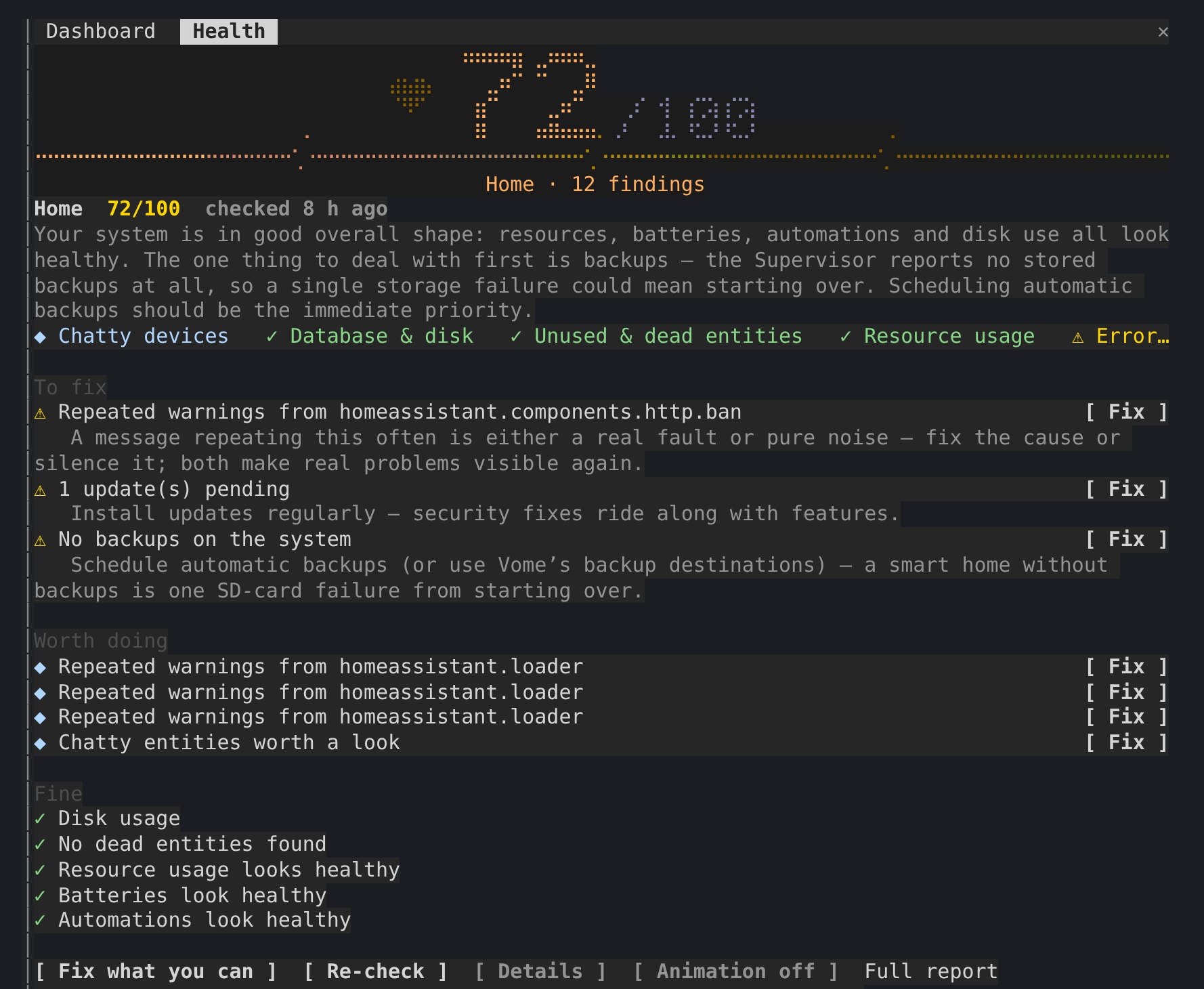
Home Assistant の健康スコアを 100 点満点で表示し、チェックで見つかったすべてを Claude が作業する会話の横に置くサイドペインです。
Vortitron/home-assistant-mcp/tree/main/claude-plugin/vome-health
Home Assistant の健康スコアを 100 点満点で表示するサイドペインです。 Claude が作業している間、チェックで見つかった内容も会話の横に置きます。
/plugin install vome-health --marketplace Vortitron/home-assistant-mcp でインストールします。
まず作者の README で marketplace とプラグイン名を確認してください。コマンドはリポジトリの構成によって変わる場合があります。
claude plugin marketplace add Vortitron/home-assistant-mcp
claude plugin install vome-health
A side pane with Vome's health score for your Home Assistant, out of 100, and everything its check found, kept beside the conversation while Claude works through it.
The pane never fixes anything itself: Claude does, with its own tool calls, which you approve as usual. r only asks Vome for a fresh check.
1. Add the Vome app to Home Assistant, then get a key from it. No sign-up needed.

The button opens your own Home Assistant and adds the app's repository. Pick Vome and Install, open it, and on the Agent tab create a key.
2. Paste these into Claude Code, in a terminal (version 2.1.275 or newer):
/plugin install vome-connect --marketplace Vortitron/home-assistant-mcp
It asks for the key from step 1. Then:
/plugin install vome-health --marketplace Vortitron/home-assistant-mcp
/reload-plugins
Or all four Vome panes at once (automations, ESPHome, health and a working dashboard):
/plugin install vome-panes --marketplace Vortitron/home-assistant-mcp.
3. Ask Claude "How healthy is my Home Assistant? Fix what you can." The pane opens with the score. No score yet? Claude runs the first check, which takes a couple of minutes.
The pane reads the report in the background while a check runs, with the
MCP's read-only vome_health_report; r calls vome_health_check. In auto
mode, Claude Code refuses background calls that no request of yours is behind
unless they're allowed by name, and the pane then shows the exact line. With
vome-connect:
{ "permissions": { "allow": ["mcp__plugin_vome-connect_vome__vome_health_report"] } }
| | |
| --- | --- |
| /health | open the pane and read the latest report |
| r | run a fresh check |
| d | each finding's evidence, not just its title |
| b | the animation off or on (remembered) |
The report is Vome's health check of your own Home Assistant, read from the
sensor the Vome integration keeps it on (sensor.vome_health_score or
similar). The pane reads it through the connection Claude Code already has;
nothing is sent anywhere else.

ドキュメント生成、ドリフト検出、API ドキュメント自動化プラグイン。秘密情報を含むドキュメント書き込みやワーカーのディスパッチを拒否する function-hook ガードとしても動作します。

Claude デスクトップアプリ用のステータスバー。プロンプト上に表示され、セッション品質、コンテキストの充填量、キャッシュのカウントダウン、5 時間および週間制限を示し、Clawd がセッションの動作を演じます。

databricks CLI に沿って Databricks のワークスペース、Unity Catalog、コンピュート、ジョブ、パイプライン、アプリ、ダッシュボードをツリー表示する /databricks-pane を提供する Claude Code プラグイン mod。ライブハイライト、プロファイル切り替え、CLI 引数のコピーにも対応します。
