
omeraltinova@omeraltinova
omeraltinova/claude-usage-footer/tree/main/plugins/usage-footer
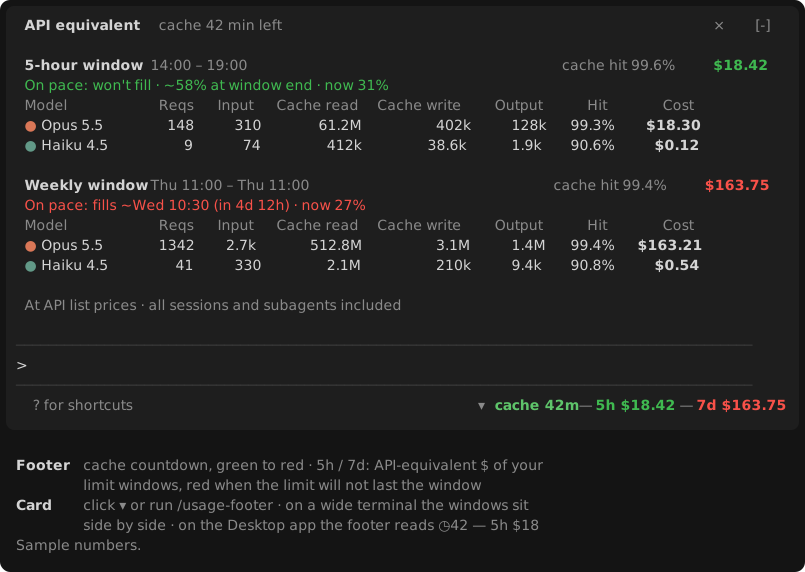
プロンプト下のフッターに、プロンプト キャッシュのカウントダウンと 5 時間・週次の制限ウィンドウにおける API 相当コストを表示し、モデル別のトークンとコスト内訳カードをクリックで開ける Claude Code mod。
omeraltinova/claude-usage-footer/tree/main/plugins/usage-footer
usage-footer は、プロンプト下のモデル名の横に使用状況を置く Claude Code プラグインです。フッターにはプロンプト キャッシュのカウントダウン(緑から赤への色分け)と、現在の 5 時間および週次の制限ウィンドウでのリクエスト料金を API 公開価格で表示します。ペースに応じて色が変わり、リセット前に制限へ達するペースなら赤、85–100% なら黄、それ以外は緑です。▾ をクリックするか /usage-footer を実行すると、プロンプトの上にカードが開きます。各ウィンドウには、現在のペースで制限に達する時刻または終了時点、合計コスト、キャッシュ ヒット率、モデルごとのリクエスト、入力、キャッシュ読み取り、キャッシュ書き込み、出力、ヒット率、コストの行が表示されます。
アカウント固有のウィンドウで動きます(報告されたリセット時刻の1ウィンドウ分前から開始)。コストは ~/.claude/projects にあるローカル トランスクリプトから計算し、サブエージェントを含むマシン上の全セッションを対象にします。リクエストごとに重複排除し、API 公開価格で算出します(サブスクリプション料金ではありません)。小さな Node.js スクリプトが各ターンの終わりと 5 分ごとにトランスクリプトを増分スキャンします。数十ミリ秒で終わり、モデルのリクエスト ストリーム内では何も実行しません。
要件:Claude Code v2.1.287 以降(ターミナルまたは Desktop Code タブ)と、macOS、Linux、Windows の PATH または標準インストール場所にある Node.js。
インストール: claude plugin marketplace add omeraltinova/claude-usage-footer claude plugin install usage-footer@claude-usage-footer
新しいセッションを開始するか /reload-plugins を実行します。MIT ライセンスです。
まず作者の README で marketplace とプラグイン名を確認してください。コマンドはリポジトリの構成によって変わる場合があります。
claude plugin marketplace add omeraltinova/claude-usage-footer
claude plugin install usage-footer
A Claude Code mod that puts your usage where you look anyway: beside the model name under the prompt.
▾ ◷42 — 5h $82 — 7d $115
F $…).The 5h and 7d values are colored by pace: red if, at the pace so far, the limit fills before the window resets; yellow if it ends the window at 85–100%; green otherwise.
Click ▾ (or run /usage-footer) for a card above the prompt with, per window:
~/.claude/projects, including subagents), across every session on this machine, deduplicated per request and priced at API list prices. It is not what a subscription charges.node on PATH, then in the usual install locations on macOS (Homebrew), Linux and Windows.claude plugin marketplace add omeraltinova/claude-usage-footer
claude plugin install usage-footer@claude-usage-footer
Then start a new session, or run /reload-plugins in an open one.
plugins/usage-footer/scripts/usage-scan.mjs, PRICES) and need updating when Anthropic's prices change.MIT

ドキュメント生成、ドリフト検出、API ドキュメント自動化プラグイン。秘密情報を含むドキュメント書き込みやワーカーのディスパッチを拒否する function-hook ガードとしても動作します。

Claude デスクトップアプリ用のステータスバー。プロンプト上に表示され、セッション品質、コンテキストの充填量、キャッシュのカウントダウン、5 時間および週間制限を示し、Clawd がセッションの動作を演じます。

databricks CLI に沿って Databricks のワークスペース、Unity Catalog、コンピュート、ジョブ、パイプライン、アプリ、ダッシュボードをツリー表示する /databricks-pane を提供する Claude Code プラグイン mod。ライブハイライト、プロファイル切り替え、CLI 引数のコピーにも対応します。
