
andrej-kolic@andrej-kolic
andrej-kolic/claude-mods/tree/main/plugins/usage-bar
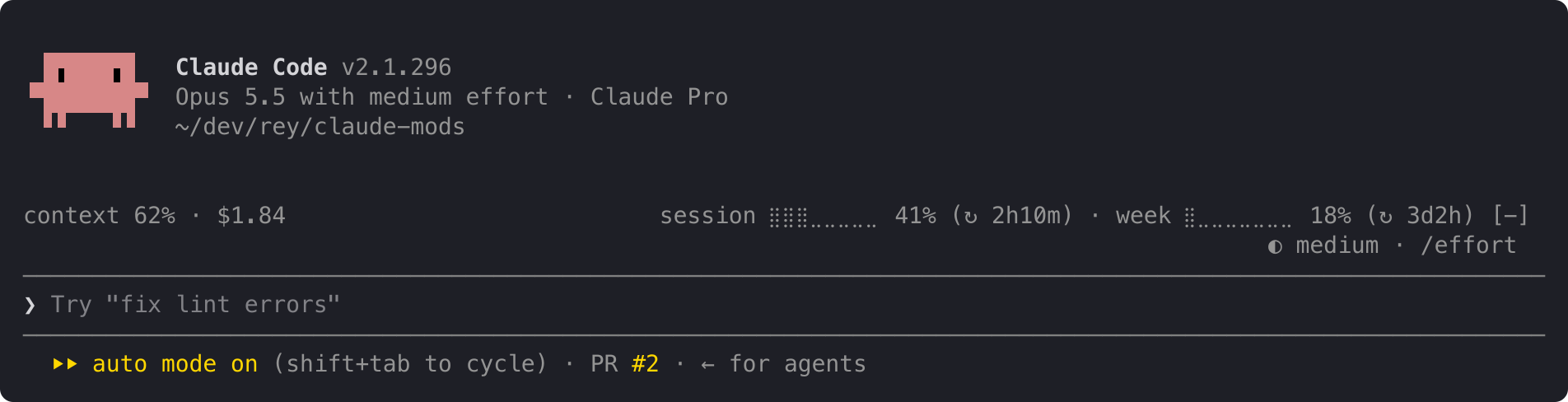
Claude Code プラグイン。プロンプトの上にある静かな一行に、プランの使用量制限、コンテキストの充填率、セッションコストを表示し、50%、80%、95% のしきい値で黄色/赤のアラートを出し、各制限期間ごとにリセットされます。
andrej-kolic/claude-mods/tree/main/plugins/usage-bar
usage-bar は Claude Code のプロンプトの上にコンパクトな情報行を追加し、ステータス行を置き換えるのではなく補完します。左側には現在の会話のコンテキストウィンドウの充填率とセッションコストを表示し、右側にはアカウントの 5 時間セッションと週間制限の使用量、およびリセットまでの時間を表示します。制限のパーセンテージは 50% で黄色、95% で赤色になり、50%、80%、95% のしきい値でアラートが表示され、各制限期間ごとに一度だけ表示され、再起動やプロジェクトをまたいで保持されます。スペースが足りないときは行が折り返されるのではなく段階的に短くなり、最初の読み取り前やログアウト中は "usage: no data yet" と表示されます。
Claude Code がすでに提供している数値のみを読み取り、どこにも何も送信せず、ネットワークリクエストも行わず、表示済みアラートの小さなローカル記録を保存します。/plugin install usage-bar --marketplace andrej-kolic/claude-mods でインストールします。Claude Code 2.1.275 以降が必要で、コンテキストは約 0 トークンしか増えません。使用量制限には Claude のサブスクリプションが必要です。API キーの場合はコンテキストとコストのみが表示されます。ターミナルとデスクトップアプリの Code タブで動作し、claude.ai や Cowork では動作しません。
まず作者の README で marketplace とプラグイン名を確認してください。コマンドはリポジトリの構成によって変わる場合があります。
claude plugin marketplace add andrej-kolic/claude-mods
claude plugin install usage-bar@claude-mods
Your plan's usage limits, context and cost on one quiet line above the prompt, with an alert before you run out. It doesn't replace your status line: it sits above the prompt, so the two work side by side.
On the left, this conversation:
context: how full the context window is.$: what this session has cost.On the right, your account's limits:
session and week: how much of your 5-hour and weekly limits you've used, and after ↻, how long until each resets: 2h10m, 3d2h, or now once it has reset.A limit's percent turns yellow at 50% and red at 95%; the rest of the line stays grey. An alert with the limit and its percent appears at the top right at 50%, 80% and 95%:
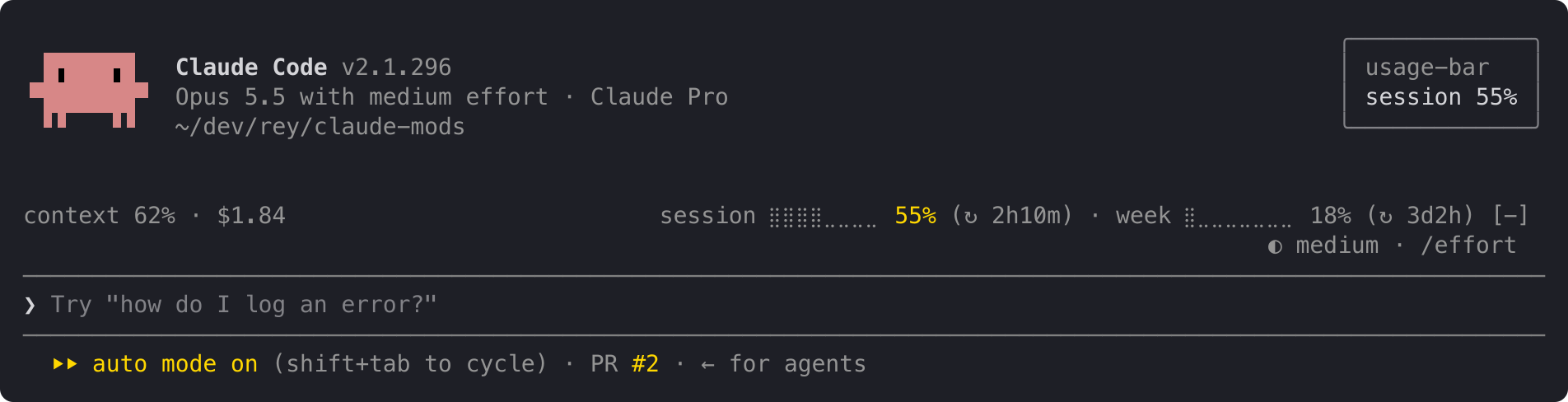
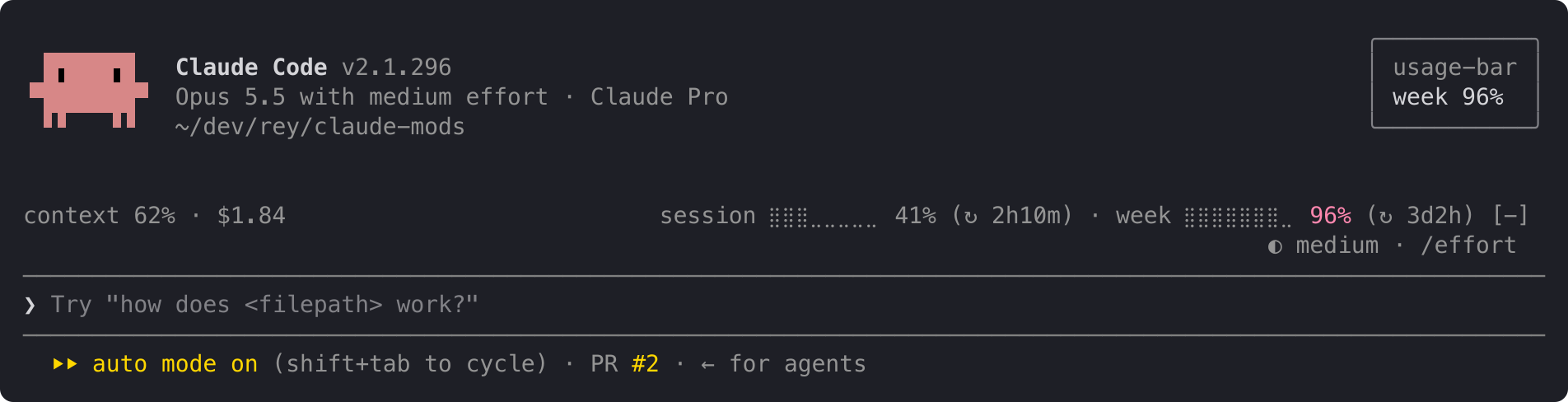
When both limits cross at once, one alert names both: session 62% · week 97%. Each alert shows once per limit period, even across restarts and projects. When a limit resets, its alerts start over.
The line at the top is the full layout. When it doesn't fit, it shortens instead of wrapping, one step at a time:
ctx 62% · $1.84 s ⣿⣿⣿⣀⣀⣀⣀⣀ 41% (↻ 2h10m) · w ⣿⣀⣀⣀⣀⣀⣀⣀ 18% (↻ 3d2h)
ctx 62% · $1.84 s 41% (↻ 2h10m) · w 18% (↻ 3d2h)
ctx 62% · $1.84 s 41% · w 18%
For a few seconds after startup, and for as long as you're not logged in, the line reads:
usage: no data yet
The context shows – until your first reply, because Claude Code measures the context only when it answers.
usage-bar reads only figures Claude Code already has: context fill, session cost and your plan's limits. It sends nothing anywhere and makes no network requests. It stores one small record per limit on your machine, listing the alerts already shown in the current period, so a restart doesn't repeat them.
In Claude Code:
/plugin install usage-bar --marketplace andrej-kolic/claude-mods
The desktop app's Code tab doesn't offer /plugin install: run it once in a terminal, at the user scope, and the line shows in the desktop app's local sessions too.
$, and no alerts.The screenshots use sample readings. The yellow and red follow your Claude Code theme.
The spec has every rule: rounding, colours, widths, and when alerts repeat.

ドキュメント生成、ドリフト検出、API ドキュメント自動化プラグイン。秘密情報を含むドキュメント書き込みやワーカーのディスパッチを拒否する function-hook ガードとしても動作します。
Repowise の Lens は、インデックス化したコードベースをリアルタイムで可視化する Claude Code mod です。Claude が検索・読み取り・編集したファイルが点灯し、インポーターと逆向きの依存関係も強調表示します。影響を受けるファイルとカバレッジテストを示す Flow タブ、健全性の変化と推奨テストを実行するボタン付きのレビュー行も含みます。


Claude デスクトップアプリ用のステータスバー。プロンプト上に表示され、セッション品質、コンテキストの充填量、キャッシュのカウントダウン、5 時間および週間制限を示し、Clawd がセッションの動作を演じます。