
victor-falcon@victor-falcon
victor-falcon/claude-status-bar

プロンプトの下に色付きのステータス行を追加し、エンジン本来のヒント行(`? for shortcuts`、`esc to interrupt`……)も残す Claude Code 用モッドです。
victor-falcon/claude-status-bar
Claude Code のプロンプト下に色付きのステータス行を追加し、エンジン本来のヒント行(? for shortcuts、esc to interrupt……)も残します。

| セグメント | 表示内容 | 色 |
| --- | --- | --- |
| ブランチ | 現在のブランチ。detached HEAD の場合は短縮 SHA | ブランチアイコンの色 |
| 差分 | デフォルトブランチとのマージベースに対する追加行と削除行。未コミットの変更も含みます | +N は緑、-N は赤 |
| プルリクエスト | ブランチの PR 番号と状態を #42 (Open) の形式で表示し、PR にリンクします。状態は Merged、Closed、Draft、Open のいずれかです | 紫、赤、灰、緑 |
| CI | 全チェック数に対する成功数。すべて成功、失敗あり、実行中のそれぞれにアイコンを表示します | すべて成功なら成功数は緑、1 つでも失敗すれば赤 |
| 使用量 | プランの 5 時間セッション使用量と週間使用量 | 65% からオレンジ、75% から赤(より多く埋まっている時間枠を基準) |
表示するものがないセグメントは省略します。git リポジトリ外では git 部分がなく、PR がなければ PR と CI 部分がなく、Claude サブスクリプション外では使用量部分がありません。
git と、ログイン済みの GitHub CLI(gh)。claude plugin marketplace add victor-falcon/claude-status-bar
claude plugin install status-bar@claude-status-bar
新しいセッションを開始するか、実行中のセッションで /reload-plugins を実行します。
設定に statusLine コマンドがある場合は削除できます。このモッドが置き換えます。
gh pr、git push、git checkout、git switch のいずれかを実行した直後にも更新します。各セクションは /config から無効にでき、各アイコンも変更できます。オプションはそれぞれ 1 行で表示されます。Claude Code は settings.json の pluginConfigs に保存し、どれかが変わるとモッドをすぐに再読み込みます。

| オプション | デフォルト | 動作 |
| --- | --- | --- |
| showBranch | true | ブランチを表示 |
| showDiff | true | 追加行と削除行を表示(オフの場合、モッドは git diff を実行しません) |
| showPullRequest | true | リンク付きのプルリクエスト番号と状態を表示 |
| showChecks | true | CI チェックを表示(プルリクエストもオフなら、モッドは gh を呼び出しません) |
| showUsage | true | プラン使用量を表示 |
| iconBranch | Nerd Font branch | ブランチ名の前に描画 |
| iconDiff | なし | 追加行と削除行の前に描画 |
| iconPullRequest | Nerd Font GitHub | プルリクエスト番号の前に描画 |
| iconChecksPassed | Nerd Font check | すべて成功したときチェックの前に描画 |
| iconChecksFailed | Nerd Font cross | 1 つでも失敗したときチェックの前に描画 |
| iconChecksPending | Nerd Font hourglass | 実行中のチェックがある間、チェックの前に描画 |
| iconUsage | なし | プラン使用量の前に描画 |
アイコンはスペースも含めて入力どおりに使われます。空欄にするとデフォルトになり、none と書くとアイコンを描画しません。インストール時に Claude Code が開くダイアログでは、デフォルト値をテキストフィールドに自動入力しないため、すべてのアイコン欄が空欄です。そのまま保存すればデフォルトのアイコンが使われます。
デフォルトのアイコン、色、しきい値は hooks/format.ts 上部の定数(DEFAULT_ICONS、COLOR_*、PULL_REQUEST_COLORS、USAGE_WARNING_PERCENT、USAGE_CRITICAL_PERCENT)です。色には Claude Code のテーマキー、または生の色(green、#ff8700)を指定できます。
自分のコピーを実行するには、このリポジトリをクローンし、インストールせずディスクから読み込みます。
claude --plugin-dir /path/to/claude-status-bar
または、すべてのセッションで使うには ~/.claude/settings.json の env ブロックで CLAUDE_CODE_PLUGIN_DIRS をそのパスに設定します。フォルダーは監視されるため、ファイルを保存するとモッドが再読み込みされます。
claude plugin validate .
claude plugin test .
まず作者の README で marketplace とプラグイン名を確認してください。コマンドはリポジトリの構成によって変わる場合があります。
claude plugin marketplace add victor-falcon/claude-status-bar
claude plugin install status-bar
A Claude Code mod that adds a colored status line under the prompt, with the
engine's own hint line (? for shortcuts, esc to interrupt…):
| Segment | What it shows | Color |
| --- | --- | --- |
| Branch | Current branch, or the short SHA on a detached HEAD | Branch icon colored |
| Diff | Lines added and removed against the merge base with the default branch, uncommitted work included | +N green, -N red |
| Pull request | The branch's PR number and state, as #42 (Open), linked to the PR. The state is Merged, Closed, Draft or Open | Purple, red, gray, green |
| CI | Passed checks out of the total, with an icon for all passed, any failed, or still running | Passed count green when all passed, red when any failed |
| Usage | Your plan's 5-hour session usage and weekly usage | Orange from 65%, red from 75% (whichever window is fuller) |
Segments with nothing to show are left out: outside a git repository there is no git part, without a PR there is no PR or CI part, and off a Claude subscription there is no usage part.
git, and the GitHub CLI (gh) logged in for the PR and CI segments.claude plugin marketplace add victor-falcon/claude-status-bar
claude plugin install status-bar@claude-status-bar
Start a new session, or run /reload-plugins in a running one.
If you had a statusLine command in your settings, you can remove it: this mod replaces it.
gh pr, git push, git checkout or git switch run by
Claude.Every section can be switched off and every icon changed from /config, where each option is a row. Claude Code
stores them in settings.json under pluginConfigs, and the mod reloads as soon as one changes.
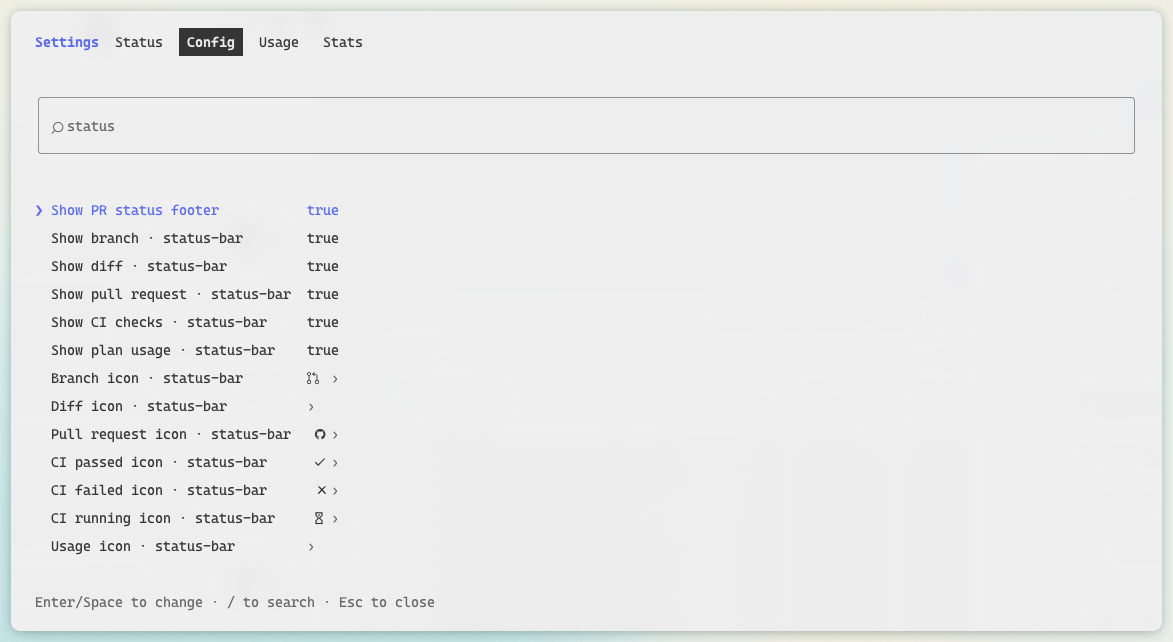
| Option | Default | What it does |
| --- | --- | --- |
| showBranch | true | Show the branch |
| showDiff | true | Show the lines added and removed (off, the mod skips git diff) |
| showPullRequest | true | Show the pull request number, linked, and its state |
| showChecks | true | Show the CI checks (with the pull request off too, the mod never calls gh) |
| showUsage | true | Show the plan usage |
| iconBranch | Nerd Font branch | Drawn before the branch name |
| iconDiff | none | Drawn before the added and removed lines |
| iconPullRequest | Nerd Font GitHub | Drawn before the pull request number |
| iconChecksPassed | Nerd Font check | Drawn before the checks when every one passed |
| iconChecksFailed | Nerd Font cross | Drawn before the checks when any failed |
| iconChecksPending | Nerd Font hourglass | Drawn before the checks while some are still running |
| iconUsage | none | Drawn before the plan usage |
Icons are used as written, spaces included. Leave one empty for its default, or write none to draw no icon. The
dialog Claude Code opens on install shows every icon field empty, as it never fills a text field with its default:
save it as it is to keep the default icons.
Default icons, colors and thresholds are constants at the top of hooks/format.ts (DEFAULT_ICONS,
COLOR_*, PULL_REQUEST_COLORS, USAGE_WARNING_PERCENT, USAGE_CRITICAL_PERCENT). Colors are a Claude Code theme
key or a raw color (green, #ff8700).
To run your own copy, clone this repository and load it from disk instead of installing it:
claude --plugin-dir /path/to/claude-status-bar
or, for every session, set CLAUDE_CODE_PLUGIN_DIRS to that path in the env block of ~/.claude/settings.json. The
folder is watched, so saving a file reloads the mod.
claude plugin validate .
claude plugin test .

ドキュメント生成、ドリフト検出、API ドキュメント自動化プラグイン。秘密情報を含むドキュメント書き込みやワーカーのディスパッチを拒否する function-hook ガードとしても動作します。

Claude デスクトップアプリ用のステータスバー。プロンプト上に表示され、セッション品質、コンテキストの充填量、キャッシュのカウントダウン、5 時間および週間制限を示し、Clawd がセッションの動作を演じます。

databricks CLI に沿って Databricks のワークスペース、Unity Catalog、コンピュート、ジョブ、パイプライン、アプリ、ダッシュボードをツリー表示する /databricks-pane を提供する Claude Code プラグイン mod。ライブハイライト、プロファイル切り替え、CLI 引数のコピーにも対応します。
