
LorcanChinnock@LorcanChinnock
LorcanChinnock/claude-desk-neighbours/tree/main/plugins/show-and-tell
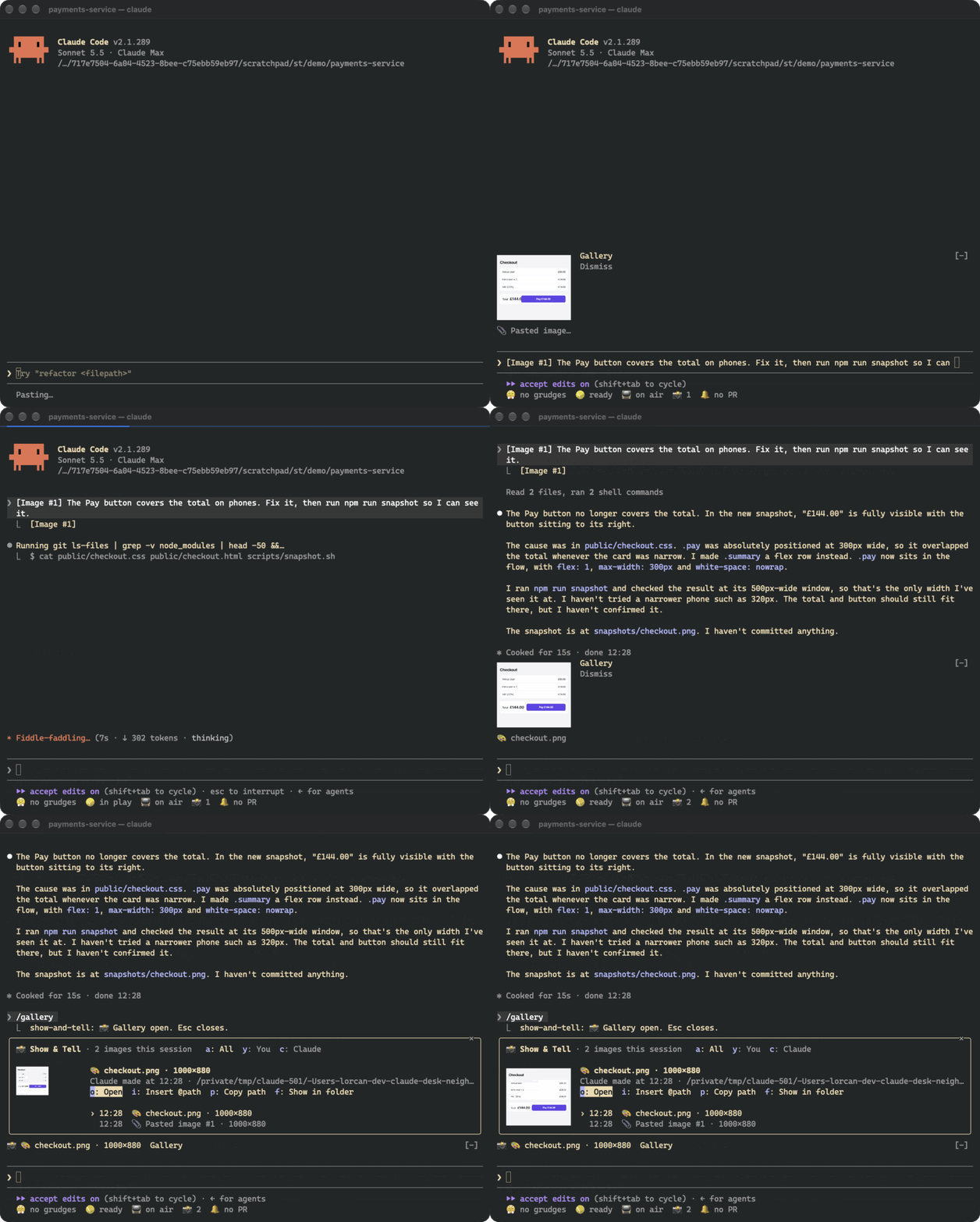
スクリーンショットを貼るとすぐサムネイルを表示し、あなたと Claude がやり取りしたすべての画像をセッションギャラリーに残します。
LorcanChinnock/claude-desk-neighbours/tree/main/plugins/show-and-tell
Show & Tell は下書きにある Claude Code の [Image #N] マーカーを監視して対応する画像をコピーします。貼り付けてから約 4 分の 1 秒以内、送信前にプロンプト上部へサムネイルが表示されます。Claude が読み取り、書き込み、編集した画像や、browser/MCP のスクリーンショット、shell command などが作業ディレクトリに作った画像も拾います。プロンプト上の band には新しいサムネイルと Gallery、Dismiss ボタンが表示され、/gallery(または status row の 📸 counter)でセッション内の全画像をプレビューできます。自分の画像と Claude の画像で絞り込み、開く、再アタッチ(@path)、パスをコピー、ファイルを表示する操作もできます。画像は kitty graphics protocol(Ghostty、kitty)で描画し、他の terminal では text placeholder にフォールバックします。PNG 以外は sips、ImageMagick、qlmanage のいずれかで 1 回変換します。model call は行いません。コピーは ~/.claude/show-and-tell/<session>/ にあり、manifest.json が /resume 後の gallery を復元します。7 日より古いコピーは session 開始時に削除します。インストール:/plugin install show-and-tell@claude-desk-neighbours
まず作者の README で marketplace とプラグイン名を確認してください。コマンドはリポジトリの構成によって変わる場合があります。
claude plugin marketplace add LorcanChinnock/claude-desk-neighbours
claude plugin install show-and-tell
Shows a thumbnail as soon as you paste a screenshot, and keeps a gallery of every image in the session.
/plugin install show-and-tell@claude-desk-neighbours
Hit ctrl+v with an image on your clipboard and a thumbnail appears above the prompt within about a quarter of a
second, before you've sent anything. Show & Tell watches your draft for Claude Code's [Image #1] and copies the
image Claude Code saved for it. If that file isn't where it expects, it reads the clipboard itself (osascript
on macOS, wl-paste or xclip on Linux, PowerShell on Windows). If that doesn't work either, it grabs the image
when you send the prompt.
Claude's pictures get picked up the same way. That covers images Claude opens with Read, screenshots returned by
browser or MCP tools, pictures Claude writes or edits, and images a shell command creates in the working
directory or one level down (playwright screenshot, a chart script).
The band above the prompt shows the newest thumbnails, with Gallery and Dismiss buttons. A pasted thumbnail goes
away when you send it. Everything else disappears after 20 seconds, which you can change in /config.
Click 📸 4 in the status row, or run /gallery, to see every image from this session, newest first, with a big
preview of whichever one you select. a, y and c filter to all images, yours, or Claude's. o opens the
image in your viewer, i puts @path in your prompt so Claude can look at it again, p copies the path, and
f shows it in its folder. Tab moves through the list. This is after Claude fixed the checkout and took a
snapshot:
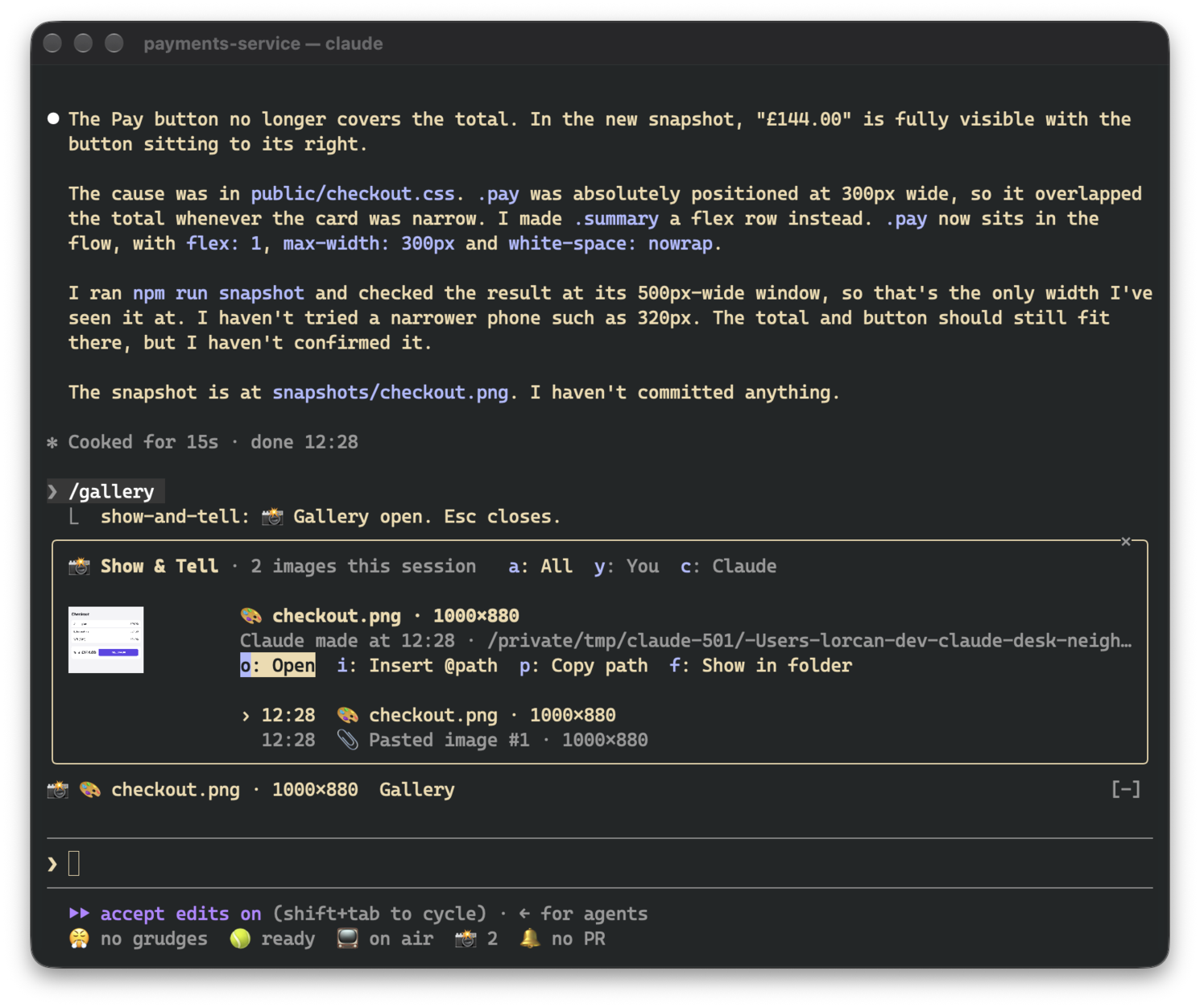
The gallery asks for enough room to show a picture. If it doesn't get it (say, an inline pane in a small terminal), the picture shrinks to fit and the footer is hidden so the header, actions and list stay visible.
Pictures only render in terminals that support the kitty graphics protocol, which means Ghostty and kitty. In
other terminals, in tmux and in the desktop app, the band and gallery show the same thing as text
(📎 Pasted image #1 · 200×120), and all the buttons still work.
Thumbnails have to be PNGs, so other formats get converted once: with sips on macOS and ImageMagick (magick or
convert) elsewhere. On macOS, qlmanage handles SVG and PDF. If there's no converter, the image is still
listed, just without a picture.
There are no model calls. Pasted images, and images that only exist inside a tool's result, are copied to
~/.claude/show-and-tell/<session>/ next to a manifest.json that restores the gallery after /resume. Files
Claude read or created stay where they are. Copies older than seven days are deleted when a session starts. The
cleanup uses find, so on Windows they stick around until you delete them yourself.
While a session is open, the draft is checked four times a second. That's just a read of the prompt box, and
nothing runs unless a new [Image #N] shows up. Where Claude Code saves pastes (/tmp/claude-<uid>/…/images/)
isn't part of the plugin API, so a future version of Claude Code might move it. If that happens, Show & Tell
falls back to reading the clipboard.

ドキュメント生成、ドリフト検出、API ドキュメント自動化プラグイン。秘密情報を含むドキュメント書き込みやワーカーのディスパッチを拒否する function-hook ガードとしても動作します。

Claude デスクトップアプリ用のステータスバー。プロンプト上に表示され、セッション品質、コンテキストの充填量、キャッシュのカウントダウン、5 時間および週間制限を示し、Clawd がセッションの動作を演じます。

databricks CLI に沿って Databricks のワークスペース、Unity Catalog、コンピュート、ジョブ、パイプライン、アプリ、ダッシュボードをツリー表示する /databricks-pane を提供する Claude Code プラグイン mod。ライブハイライト、プロファイル切り替え、CLI 引数のコピーにも対応します。
