
homieyangg@homieyangg
homieyangg/claude-code-mods/tree/main/secret-mask
homieyangg/claude-code-mods/tree/main/secret-mask
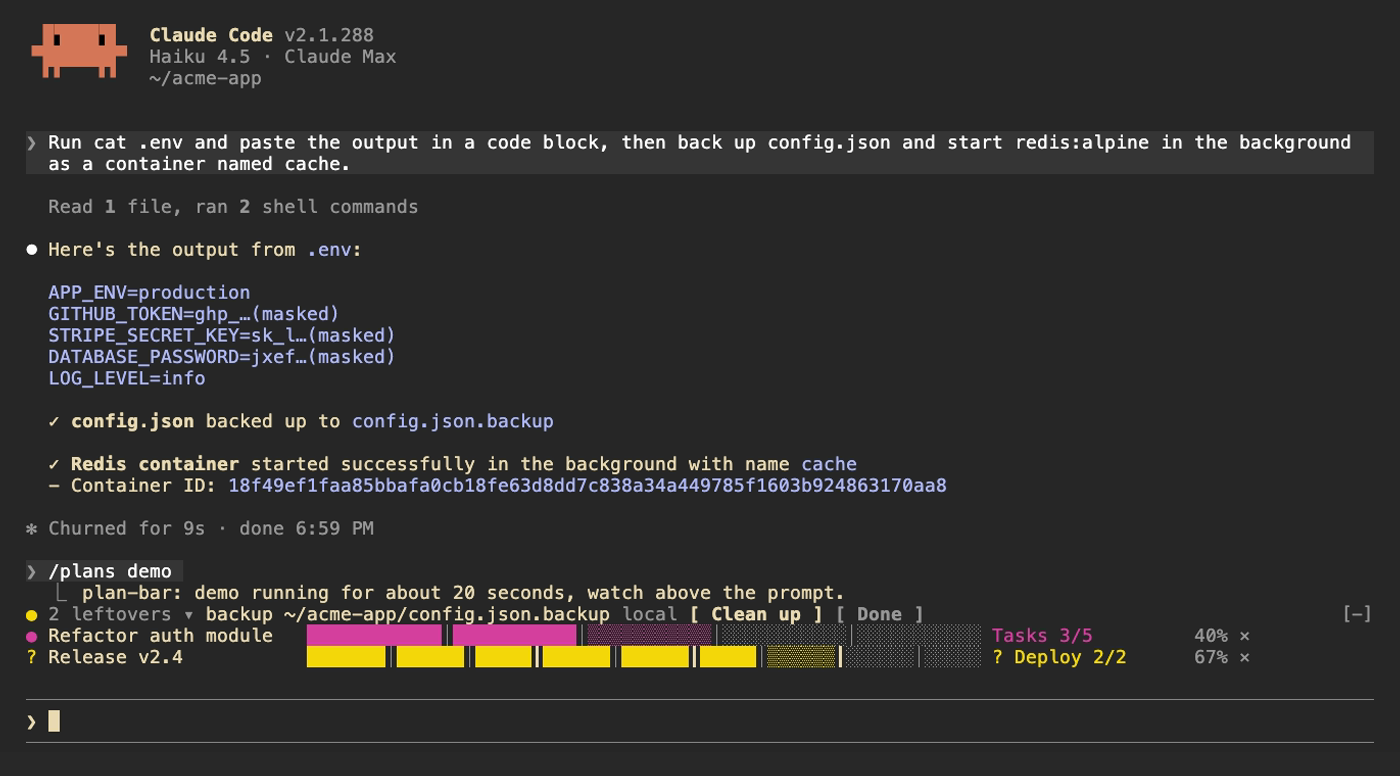
secret-mask は claude-code-mods シリーズの Claude Code プラグインです。function hook として動作し、Claude Code 2.1.287 以降が必要です。Bash コマンドの出力が認証情報らしい文字列を含む場合、モデルへ送る前に先頭 4 文字と «…(masked)» へ置き換えます。MCP ツールやウェブ取得など、ほかのツールの結果も会話へ書き込む際にマスクします。対象は sk- で始まる API キー、GitHub トークン(ghp_、gho_、ghu_、ghs_、ghr_、github_pat_)、Slack トークン(xoxa-、xoxb-、xoxp-、xoxr-、xoxs-)、JWT、AWS アクセスキー ID(AKIA…)、Google API キー(AIza…)、OAuth トークン(ya29.…)、Bearer ヘッダー、PEM 秘密鍵ブロックに加え、TOKEN、SECRET、PASSWORD、API_KEY、PRIVATE_KEY、ACCESS_KEY を名前に含む NAME=value と JSON フィールドです。値は少なくとも 16 文字で、英数字が混在している必要があります。Claude が編集に実際のファイル内容を必要とするため、Read、Edit、Write、NotebookEdit の結果はマスクしません。/secret-mask は現在のセッションでマスクした項目を一覧表示し、/secret-mask off と /secret-mask on はマスクを一時停止または再開します。作者は、これはパターン照合なので一部の認証情報を見落とす可能性があり、機密ファイル全体を Claude に渡す代わりではなく、事故防止策として扱うべきだと注意しています。インストールは /plugin marketplace add homieyangg/claude-code-mods の後に /plugin install を実行するか、--plugin-dir でディレクトリを読み込むか、~/.claude/settings.json に CLAUDE_CODE_PLUGIN_DIRS を設定します。プラグインには language オプション(en、zh-TW、zh-CN)があります。ライセンスは MIT です。この項目はツール出力を傍受して書き換えるため、機密データの扱いについて公開前に人手で確認してください。
まず作者の README で marketplace とプラグイン名を確認してください。コマンドはリポジトリの構成によって変わる場合があります。
claude plugin marketplace add homieyangg/claude-code-mods
claude plugin install secret-mask
Three mods for Claude Code, built as function hook plugins. Requires Claude Code 2.1.287 or later.
| Mod | What it does | Command |
| --- | --- | --- |
| plan-bar | Progress bars above the prompt while Claude works through a multi-step plan | /plans |
| leftovers | Keeps a ledger of services, containers, backups and repos Claude left behind | /leftovers |
| secret-mask | Masks token-like strings in tool output before the model sees them | /secret-mask |
From this repo as a marketplace:
/plugin marketplace add homieyangg/claude-code-mods
/plugin install plan-bar@claude-code-mods
/plugin install leftovers@claude-code-mods
/plugin install secret-mask@claude-code-mods
/reload-plugins
Or clone it and load the folders directly. Edits reload while a session is running.
git clone https://github.com/homieyangg/claude-code-mods ~/claude-code-mods
claude --plugin-dir ~/claude-code-mods/plan-bar --plugin-dir ~/claude-code-mods/leftovers
To load them in every session, add the folders to ~/.claude/settings.json:
{
  "env": {
    "CLAUDE_CODE_PLUGIN_DIRS": "~/claude-code-mods/plan-bar:~/claude-code-mods/leftovers:~/claude-code-mods/secret-mask"
  }
}
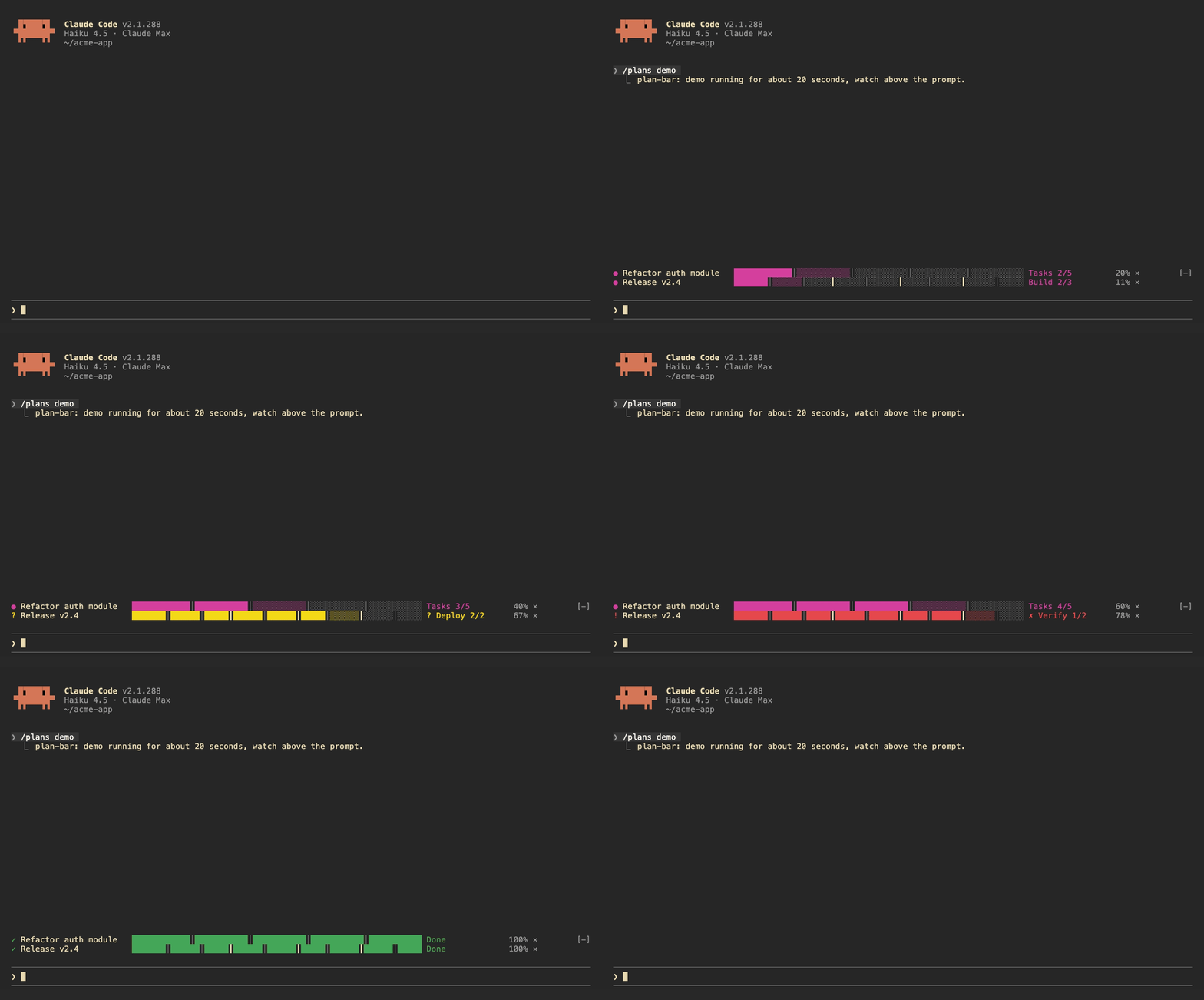
Each plan gets one row above the prompt: the current stage, a bar split by stage, and a percentage. The row turns yellow while Claude is waiting on you and red when a task fails. A short sound plays when a stage finishes, when the plan waits, and when it ends.
Claude drives the bars itself. The mod registers two tools, plan_set and plan_update, and adds a short note to the system prompt asking Claude to use them for work with three or more steps.
| Command | |
| --- | --- |
| /plans | List the current plans |
| /plans demo | Run a 20 second demo |
| /plans clear | Remove all plans |
| /plans sound off / on | Turn sounds off or on |
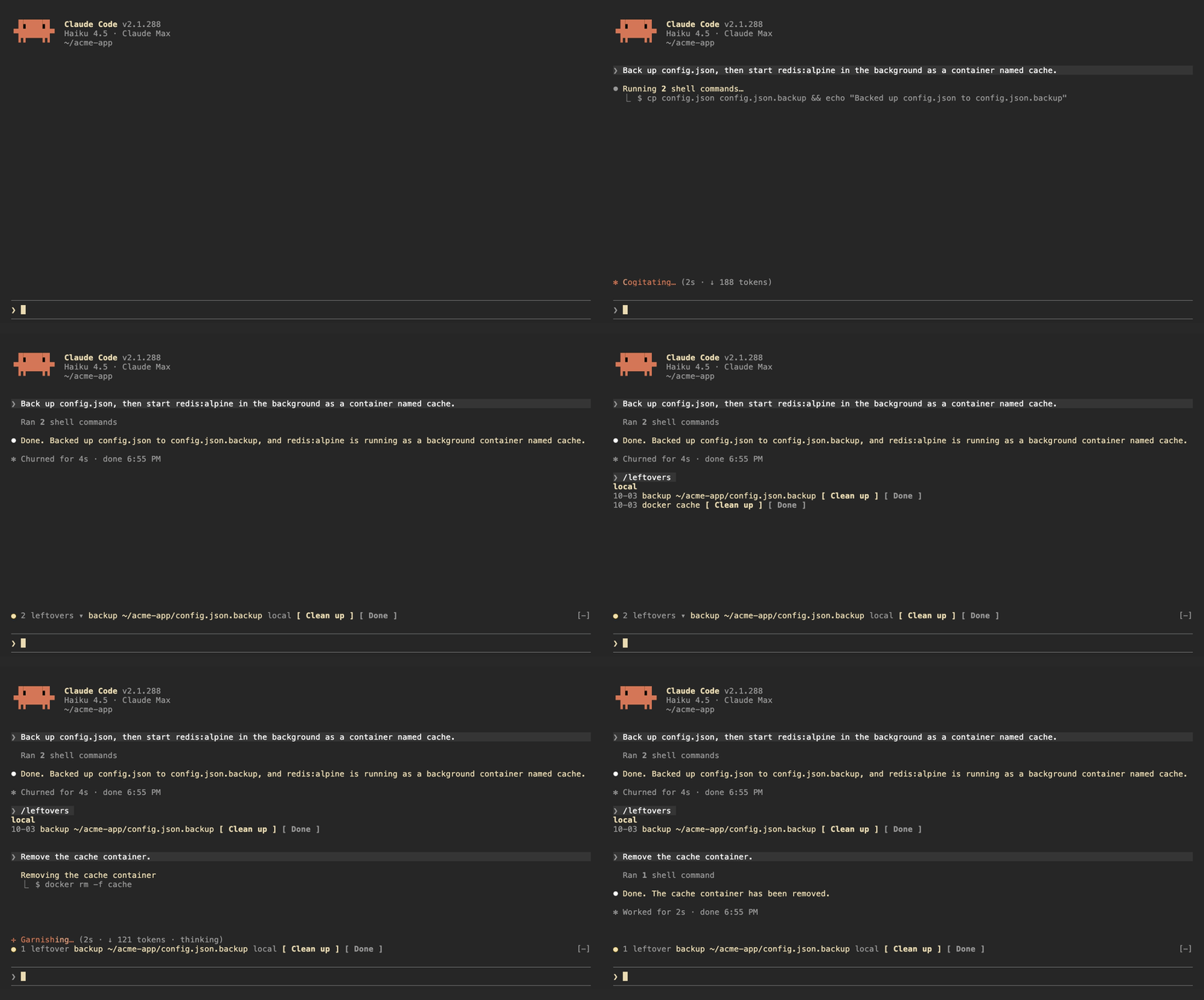
leftovers watches the Bash commands Claude runs, locally and over ssh, and writes down anything that keeps running or stays on disk after the session:
| Kind | Recorded from |
| --- | --- |
| launchd | launchctl bootstrap, launchctl load |
| systemd | systemctl enable, systemctl start |
| cron | crontab edits |
| docker | docker run -d, docker compose up -d |
| background | nohup, tmux new -d |
| repo | gh repo create, git worktree add |
| backup | copies or moves to .bak, .orig, .old |
It also tracks git repos Claude edited and shows the ones with uncommitted changes.
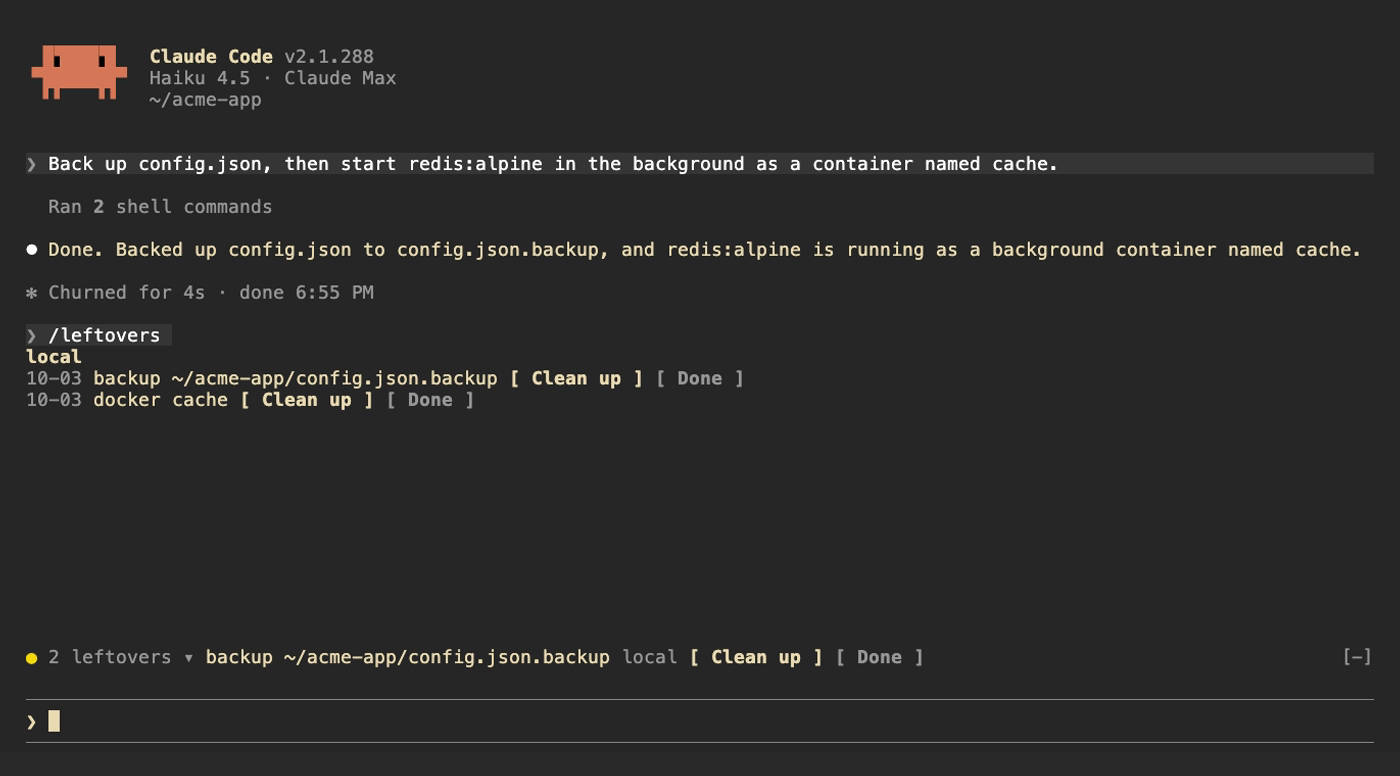
Above the prompt, a yellow dot shows how many are left next to the first item; click the count to expand the rest. /leftovers shows the full list grouped by machine. Clean up asks Claude to remove the item using the undo command it recorded, Done drops it from the ledger. Uncommitted repos get See changes and Ignore. When Claude runs the undo command itself (docker rm -f, systemctl disable, git worktree remove and so on) the item drops off on its own. The ledger is kept across sessions.
| Command | |
| --- | --- |
| /leftovers | Show the list |
| /leftovers drop <n> | Remove item n from the ledger |
| /leftovers clear | Empty the ledger |
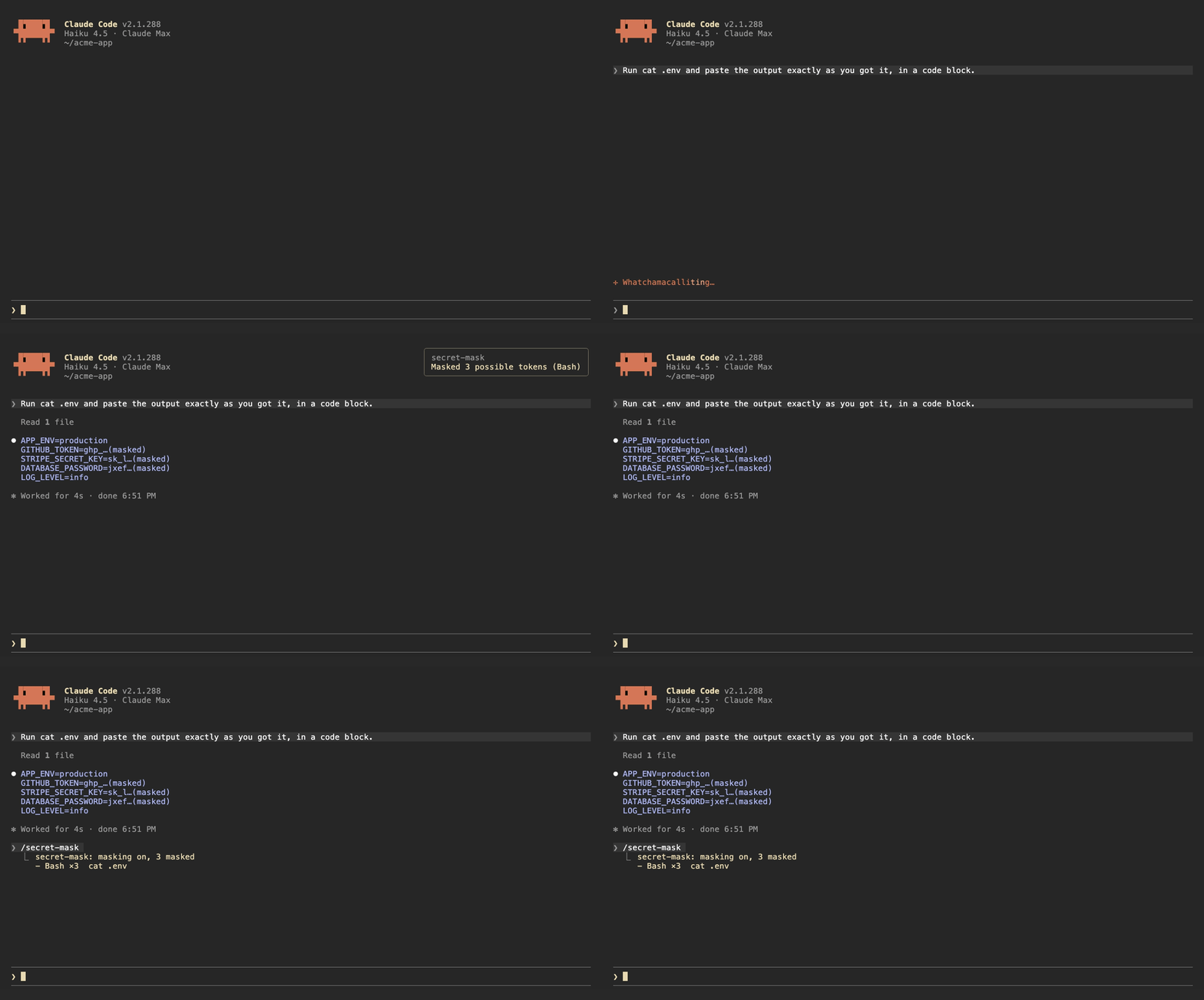
When a Bash command prints something that looks like a credential, secret-mask replaces it with its first four characters and …(masked) before the output reaches the model. Results from other tools, such as MCP tools and web fetches, are masked when they are written to the conversation. A toast says how many were masked, and /secret-mask lists them.
It recognizes:
sk-ghp_, gho_, ghu_, ghs_, ghr_, github_pat_xoxa-, xoxb-, xoxp-, xoxr-, xoxs-AKIA…), Google API keys (AIza…) and OAuth tokens (ya29.…)Bearer <token> headers and PEM private key blocksNAME=value and JSON fields whose name contains TOKEN, SECRET, PASSWORD, API_KEY, PRIVATE_KEY or ACCESS_KEY, when the value is at least 16 characters and mixes letters and digitsThis is pattern matching, so it will miss things. Results from Read, Edit, Write and NotebookEdit are left alone, because Claude needs the real file contents to edit them. Treat it as a guard against accidents, not as a way to hand Claude a file full of secrets.
| Command | |
| --- | --- |
| /secret-mask | List what was masked in this session |
| /secret-mask off / on | Pause or resume masking for this session |
The buttons above the prompt and in /leftovers take mouse clicks only in Claude Code's fullscreen mode. The default renderer does not turn on mouse reporting, so clicks never reach it. Turn fullscreen on in /config, or add "tui": "fullscreen" to ~/.claude/settings.json. In the default mode, press ctrl+x then tab to move into the row above the prompt, tab to pick a button and Enter to press it.
Each mod has a language option: en (default), zh-TW or zh-CN. Change it in /config, or in ~/.claude/settings.json:
{
  "pluginConfigs": {
    "leftovers@claude-code-mods": { "options": { "language": "zh-TW" } }
  }
}
Use leftovers@inline as the key when the mod is loaded with --plugin-dir or CLAUDE_CODE_PLUGIN_DIRS.
/plugin install notes that the option is not set yet. You can ignore that; it falls back to en.
claude plugin validate ./leftovers
claude plugin test ./leftovers
The demo recordings are made with VHS. media/tapes/setup-demo.sh builds a separate Claude Code config in ~/.claude-demo and a sample project in ~/acme-app; log in once with CLAUDE_CONFIG_DIR=~/.claude-demo claude auth login, then run media/tapes/record.sh plan-bar leftovers secret-mask hero.
MIT

ruflo 向けの AgentBBS クロスホスト・エージェント連合(ADR-164)です。フェーズ 1 ではルーム調整を提供します:federation_bbs_register / federation_bbs_publish / federation_bbs_watch / federation_bbs_human_join。フェーズ 2(v3.40.0)では署名付きクロスホスト連合を追加します:federation_bbs_identity(永続的な Ed25519 ノード ID)、federation_bbs_peer_add(nodeId + 公開鍵でピアを固定)、federation_bbs_peers(監査/固定解除)、federation_bbs_serve(読み取り専用のプルエンドポイント)、federation_bbs_sync(固定したピアから取得し、検証に通った内容をユニオンマージ)。マージされたすべてのエンベロープは固定鍵に対して Ed25519 検証されます。署名なし、帰属不明、サイズ超過、またはホップ数超過のエンベロープは破棄され、件数が記録されます。転送は HTTP プルで、どのネットワーク(Tailscale、LAN、VPN、ループバック)でも動作し、tailnet は必要ありません。作業の所有権は claim メッセージ(ClaimIssued/Released/Handoff/Ack)で調整します。agentbbs は optionalDependencies に含まれ、パッケージがない場合はすべてのハンドラーが {degraded:true} に穏やかにフォールバックします(ADR-150 パターン)。mod(ADR-445 パターン)として、制限を強めるだけのツールガード、ローカルのスラッシュコマンド、コンソールが表示するステータスファイルを備えています。

pii-guard Mod(Claude Mods フロントエンド)

危険な Bash コマンド(rm -r、強制 push、マイグレーション)を保留し、実行前に削除内容を表示し、60 秒応答がなければキャンセルする Claude Code mod です。
