
simplecore-inc@simplecore-inc
simplecore-inc/claude-mods/tree/main/mods/workspace
Claude Code用のワークスペースペイン:エージェント、ワークツリー、チェックポイント、ノート、変更を1つのタブペインで統合管理
simplecore-inc/claude-mods/tree/main/mods/workspace




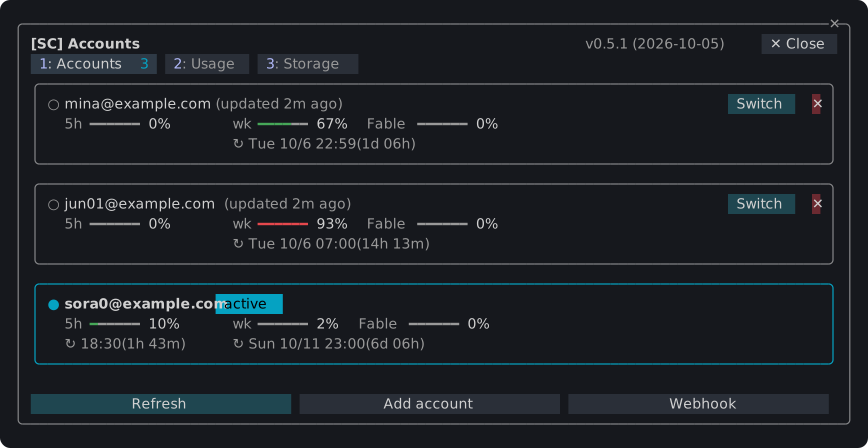
Claude Code 用のプラグイン。ターミナルに複数のペイン、ステータスバンド、スラッシュコマンドを追加します。複数のClaudeアカウント間の切り替え、使用限度とトークン使用量の監視、Claude Codeがマシンに保存しているコンテンツの表示と削除、エージェント、ワークツリー、チェックポイント、diff、メモリファイルを1つのペインで管理できます。プラグイン sc 1つをインストールするだけで全機能が利用できます。
/sc:accounts

~/.claude が種類別、プロジェクト別に保有するデータ容量と、入力検証語で確認したアイドルセッションのクリーンアップ。/sc:workspace
取り消せない操作は、まずダイアログで確認を求めます。Escでキャンセルできます。
claude plugin marketplace add simplecore-inc/claude-mods
claude plugin install sc@simplecore-mods
sc は sc-accounts と sc-workspace をインストールします。プラグインはユーザー単位でインストールされ、すべてのセッションで実行されます。既に開いているセッションで /reload-plugins を実行してください。
ローカルクローンを使用するには、そのフォルダをマーケットプレイスとして追加します。
git clone https://github.com/simplecore-inc/claude-mods.git
claude plugin marketplace add ./claude-mods
claude plugin install sc@simplecore-mods
claude plugin marketplace update simplecore-mods
claude plugin update sc@simplecore-mods
claude plugin update sc-accounts@simplecore-mods
claude plugin update sc-workspace@simplecore-mods
各セッションで /reload-plugins を実行してください。ローカルクローンの場合、クローンで git pull を実行し /reload-plugins を実行するだけです。フォルダマーケットプレイスのプラグインはそのフォルダから読み込まれます。
claude plugin uninstall sc@simplecore-mods
claude plugin prune
claude plugin marketplace remove simplecore-mods
prune は sc-accounts と sc-workspace を削除します。これらは sc の依存関係としてインストールされました。自分でインストールした場合は、名前で指定してアンインストールしてください。marketplace remove は、そのマーケットプレイスから再度インストールしない場合のみ必要です。
これらのmodは一部データを残します。手動で削除できます。
| 内容 | 場所 |
| --- | --- |
| 保存されたログイン | macOS:サービス account-switch のキーチェーン項目。その他:~/.claude/account-switch/ |
| Webhookトークン | macOS:サービス sc-webhook のキーチェーン項目。その他:~/.claude/sc-accounts/webhook-token |
| Webhookテンプレート | ~/.claude/sc-accounts/ |
| 設定、アカウントインデックス、ノート、チェックポイントリスト | ~/.claude/plugins/store/sc-*.json |
| チェックポイント | 各リポジトリで:refs/sc/ 下の参照とファイル .git/sc-snapshot-*.index |
~/.claude は CLAUDE_CONFIG_DIR が設定されている場合その値です。リポジトリのチェックポイントを削除するには。
git for-each-ref --format='%(refname)' refs/sc/ | xargs -n 1 git update-ref -d
rm -f "$(git rev-parse --git-dir)"/sc-snapshot-*.index
現在ログインしているアカウントはログインしたままです。保存されたコピーのみが削除されます。
modは英語を表示し、Claude Codeの language 設定が韓国語の場合は韓国語を表示します。その他の言語は英語にフォールバックします。その設定がない場合、LC_ALL、LC_MESSAGES、LANG の順で判定されます。
modの開発 ではレイアウト、エンジンが強制するルール、チェック、リリース方法について説明しています。
まず作者の README で marketplace とプラグイン名を確認してください。コマンドはリポジトリの構成によって変わる場合があります。
claude plugin marketplace add simplecore-inc/claude-mods
claude plugin install sc-workspace
Plugins for Claude Code that add panes, a status band and slash commands to the terminal: switch between several Claude accounts, watch their usage limits and token use, see and clean up what Claude Code keeps on the machine, and keep agents, worktrees, checkpoints, diffs and memory files in one pane. Install one plugin, sc, and you get them all.
/sc:accounts

~/.claude holds by kind and project, and a cleanup of idle sessions confirmed by typing a word./sc:workspace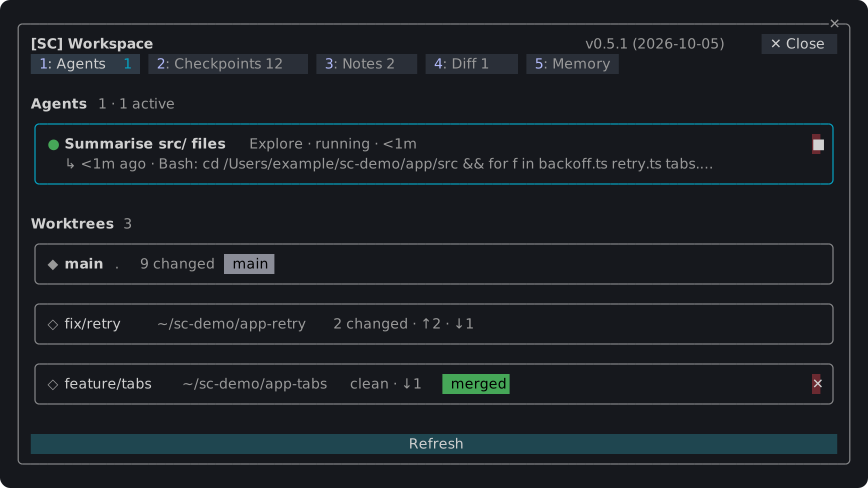
Anything that cannot be taken back asks in a dialog first; Esc cancels.
claude plugin marketplace add simplecore-inc/claude-mods
claude plugin install sc@simplecore-mods
sc installs sc-accounts and sc-workspace with it. The plugins are installed for your user, so they run in every session. Run /reload-plugins in a session that was already open.
To use a local clone instead, add its folder as the marketplace:
git clone https://github.com/simplecore-inc/claude-mods.git
claude plugin marketplace add ./claude-mods
claude plugin install sc@simplecore-mods
claude plugin marketplace update simplecore-mods
claude plugin update sc@simplecore-mods
claude plugin update sc-accounts@simplecore-mods
claude plugin update sc-workspace@simplecore-mods
Then run /reload-plugins in each open session. With a local clone, git pull in the clone and /reload-plugins are enough: a plugin from a folder marketplace is read from that folder.
claude plugin uninstall sc@simplecore-mods
claude plugin prune
claude plugin marketplace remove simplecore-mods
prune removes sc-accounts and sc-workspace, which were installed as dependencies of sc; uninstall them by name instead if you installed them yourself. marketplace remove is only needed when you will not install from it again.
The mods leave some data behind, which you can delete by hand:
| What | Where |
| --- | --- |
| Saved logins | macOS: keychain items of the service account-switch. Elsewhere: ~/.claude/account-switch/ |
| Webhook token | macOS: the keychain item of the service sc-webhook. Elsewhere: ~/.claude/sc-accounts/webhook-token |
| Webhook template | ~/.claude/sc-accounts/ |
| Settings, account index, notes, checkpoint lists | ~/.claude/plugins/store/sc-*.json |
| Checkpoints | in each repository: the refs under refs/sc/ and the files .git/sc-snapshot-*.index |
~/.claude is CLAUDE_CONFIG_DIR when that is set. To delete a repository's checkpoints:
git for-each-ref --format='%(refname)' refs/sc/ | xargs -n 1 git update-ref -d
rm -f "$(git rev-parse --git-dir)"/sc-snapshot-*.index
The account you are logged in with stays logged in; only the saved copies go.
The mods show English, and Korean where Claude Code's language setting is Korean; any other language falls back to English. Without that setting, LC_ALL, LC_MESSAGES and LANG decide, in that order.
Developing a mod covers the layout, the rules the engine enforces, the checks and how to release.

Ruflo メモリ基盤のプラグイン。AgentDB コントローラーブリッジ(15 個の agentdb_* MCP ツール)、RuVector ONNX 埋め込み(RaBitQ 32x 量子化を含む 10 個の embeddings_* ツール)、WASM HNSW パターンルーター(3 個の ruvllm_hnsw_* ツール)を提供します。mod(ADR-445)として、プロンプトへの安全な任意リコール、秘密をメモリから遠ざける書き込みガード、/agentdb、コンソールが表示するステータスファイルを備えます。

pbir CLI に従うレポートペインで Claude が読み取り、変更する内容を表示しながら、インタラクティブな Power BI レポートの作成、整形、最適化、レビューを行います。


プロンプトの上、ステータス行、トーストに未読 AMP メッセージを表示し、アイドル状態の Claude Code セッションを起こして読ませます。Claude Code 2.1.287 以降が必要です。

