
Telefaxnix@Telefaxnix
Telefaxnix/ROQAM/tree/main/roqam
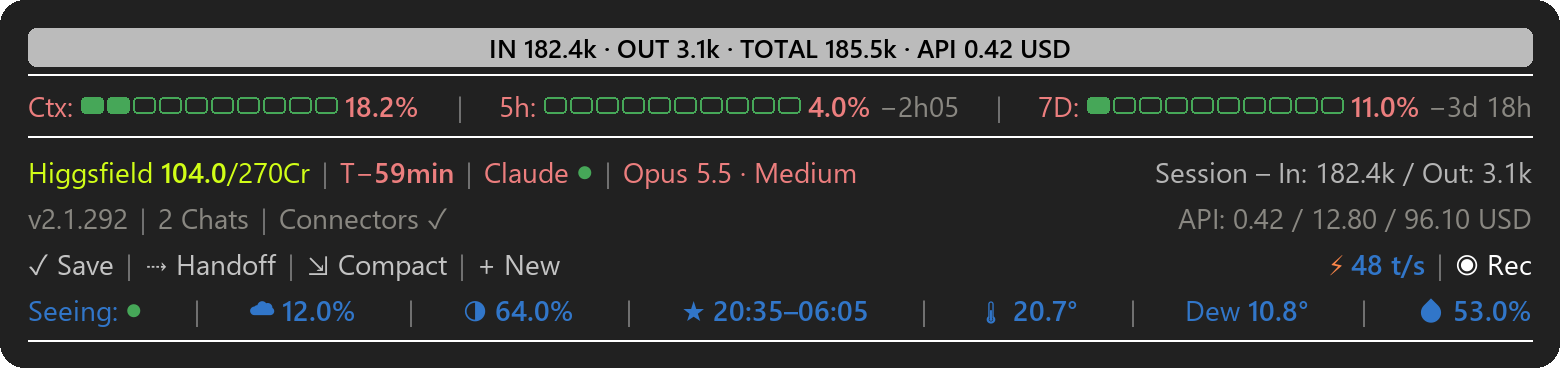
Claude Code 用のステータスバー。ターミナルとデスクトップアプリ(Windows 11)のプロンプトの上に表示され、コンテキストがどれだけ埋まっているか、プラン制限をどれだけ使用したか、プロンプトキャッシュがいつ期限切れになるか、Anthropic のサービスが稼働しているかを一目で示します。いくつかのボタンで日々の手順をワンクリックで処理でき、最下行には今夜の空とあなたの場所の天気が表示されます。
Telefaxnix/ROQAM/tree/main/roqam
Claude Code 用のステータスバー。ターミナルとデスクトップアプリ(Windows 11)のプロンプトの上に表示され、 コンテキストがどれだけ埋まっているか、プラン制限をどれだけ使用したか、プロンプトキャッシュが いつ期限切れになるか、Anthropic のサービスが稼働しているかを一目で示します。いくつかのボタンで日々の手順をワンクリックで処理でき、 最下行には今夜の空とあなたの場所の天気が表示されます。

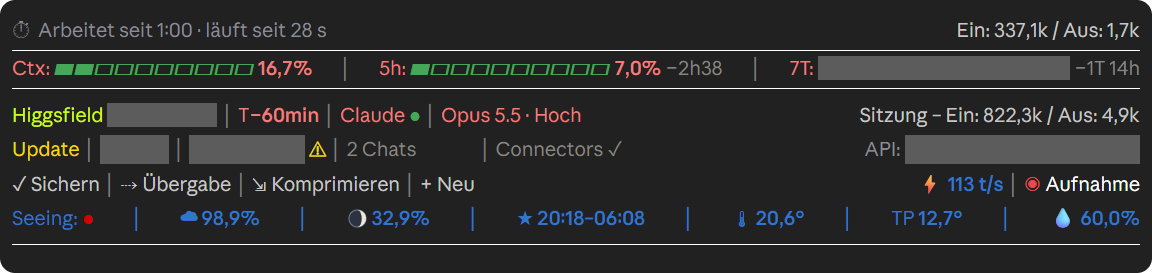
Claude が作業しているときのデスクトップアプリ(ドイツ語版)。録画モードがオンなので、プライベートな値はグレー表示になります。

2 つのバージョンがあります。英語ラベルの roqam とドイツ語ラベルの roqam-de です。動作は同じですが、
ドイツ語版はドイツ語の設定名を使用し、API コストを CHF で表示します(Settings を参照)。ドイツ語ガイドは ANLEITUNG.md です。
ROQAM は独立したプロジェクトです。Anthropic は制作しておらず、推奨もしていません。
3 つの方法があります。いずれか 1 つだけを使用し、1 つのバージョンだけをインストールしてください。そうしないと 2 つのバーが実行されます。
このページで Code → Download ZIP をクリックし、ファイルを解凍して Install.bat をダブルクリックします。インストーラーは
ラベルの言語(Windows の言語を提案します)と、あなたの場所(空と天気に使用する町)を尋ねます。
mod を C:\Users\YOURNAME\.claude\mods\ にコピーし、settings.json に追加します。その前に、
settings.json のコピー、mod の古いコピー、およびもう一方の言語バージョンを
C:\Users\YOURNAME\.claude\backups\ に置きます。何も削除されません。その後、Claude Code を完全に終了し、再度起動します。
Windows SmartScreen が警告する場合は、「詳細情報」を選択してから「実行」を選択します。
ターミナルで:
claude plugin marketplace add Telefaxnix/ROQAM
claude plugin install roqam@roqam --config location=London
London の代わりに自分の町を使ってください。空と天気が不要なら --config location=London を省略してください。
ドイツ語ラベルが必要なら、代わりに roqam-de@roqam --config ort=Bern をインストールしてください。ドイツ語版ではこの設定を
ort と呼びます。その後、Claude Code を完全に終了して再度起動してください。デスクトップアプリは同じ settings.json を読み込むので、そこにもバーが表示されます。
更新は claude plugin marketplace update roqam、続いて claude plugin update roqam@roqam で行います。削除は
claude plugin uninstall roqam@roqam で行います。
上記の説明に従って ZIP をダウンロードして展開します。
フォルダ roqam を C:\Users\YOURNAME\.claude\mods\roqam にコピーします(必要なら mods フォルダを作成します)。
C:\Users\YOURNAME\.claude\settings.json を開き(必要なら作成し)、次の 2 つのブロックを追加します。YOURNAME と
London を置き換えてください。空と天気が不要なら location は空のままにします。
{
  "env": {
    "CLAUDE_CODE_PLUGIN_DIRS": "C:\\Users\\YOURNAME\\.claude\\mods\\roqam"
  },
  "pluginConfigs": {
    "roqam": {
      "options": {
        "location": "London",
        "apiCost": true,
        "higgsfield": true,
        "promotions": true
      }
    }
  }
}
ファイルにすでに内容がある場合は、ブロックをマージし、カンマに注意してください。CLAUDE_CODE_PLUGIN_DIRS
にすでに他のフォルダがリストされている場合は、新しいパスを末尾に ; で区切って追加します。
Claude Code を完全に終了し、再度起動します。
プラグインマネージャーを使う場合は上記を参照してください。それ以外の場合は、settings.json の CLAUDE_CODE_PLUGIN_DIRS からこの mod のパスを削除し、Claude Code を再起動します。
| 項目 | 意味 |
|---|---|
| Top band | Claude の作業中:リクエストの短い要約と、Claude がタスクリストを保持している場合はその進捗(▰▰▰▱▱ 3/5)。/goal … を使うと、代わりにあなたの目標を表示します。Claude の完了時:最後のメッセージ以降の入力と出力のトークン数、およびその作業が API 価格でいくらかかったか(IN 182.4k · OUT 3.1k · TOTAL 185.5k · API 0.42 USD)。 |
| ⏱ Working for … | Claude の作業中:実行時間、最後のステップ、これまでのトークン数。ステップに 4 分以上かかる場合、または Claude が同じ呼び出しを 3 回繰り返す場合、続行するか確認します。 |
| Ctx | チャットのコンテキストがどれだけ埋まっているか。75% とさらに 90% で、/compact を提案するヒントが表示されます。 |
| 5h / 7D | プランの 5 時間制限と 7 日間制限をどれだけ使用したか、およびそれぞれがいつリセットされるか。 |
| Higgsfield 104.0/270Cr | あなたの Higgsfield クレジット。claude.ai コネクタ "Higgsfield" を接続すると自動的に表示され、後から接続しても表示されます。 |
| T− | プロンプトキャッシュが期限切れになるまでの分数。Claude の最後のリクエストから 60 分の寿命でカウント(T−55min;グレーの T−0 は期限切れ)。その後、次のメッセージはチャット全体を再読み込みする必要があり、制限をより多く消費します。 |
| Claude ● | Anthropic のステータス:緑は使用中のサービスが稼働中、黄は低下、赤は停止、グレーはステータスページに接続できません。詳細は "Claude" をクリック;各インシデント(↗)は status.claude.com のページを開きます。 |
| Opus 5.5 · Medium | このチャットのモデルとエフォートレベル。 |
| Session – In / Out | このチャットがこれまでに読み書きしたトークン。 |
| v2.1.292 / Update | あなたの Claude Code バージョン。黄色の "Update" は新しいバージョンが出ていることを意味し、クリックするとどれか確認できます。 |
| 2 Chats | この PC で実行中の Claude セッション。クリックでリストを表示;アプリのチャット(↗)はクリックで開きます。 |
| Connectors | このチャットの MCP サーバー、claude.ai コネクタ、ローカルのもの;いずれかが落ちると黄色になります。 |
| ⚑ New promotion | Anthropic がプロモーション(クラウドクレジット、ゲストパス、割引、使用制限の通知など)を変更したときにのみ表示されます。クリックすると変更内容を確認できます。 |
| API: | このチャット、このプロジェクト、現在のプラン月が API 定価でいくらかかったか。 |
| ✓ Save | リクエストをプロンプトボックスに入れます:Claude はチャットを確認し、不足しているものを確認せずにプロジェクトノートとそのメモリに追加し、変更されたプロジェクトファイルをコミットし、プロジェクトにオンラインコピーがあればプッシュします。送信はあなた自身が行います。 |
| ⇢ Handoff | /handoff スキルがあれば実行します。なければ、短い引き継ぎのリクエストをプロンプトボックスに入れます。 |
| ⇲ Compact | 確認後、チャットを圧縮します(/compact)。 |
| + New | 同じフォルダで新しいチャットを開きます(デスクトップアプリ:新しいチャット;ターミナル:新しいウィンドウ)。 |
| ⚡ … t/s | 最後の回答がストリーミングされた速度(トークン毎秒)。 |
| ◉ Rec | 録画モード:開いているすべてのチャットでパス、コスト、アカウント、7 日間の割合、リクエストの要約、ステップテキストを隠し、画面録画用にします。白はオフ、赤はオン。OBS、Streamlabs、Bandicam、Camtasia の実行中は自動的にオンになります。 |
| Seeing: ● | あなたの場所の今夜の空を、緑から赤への 11 段階で。緑:晴れて安定、外で見る価値あり。赤に近づく:雲、不安定な空気、明るい月、湿った空気。グレー:データなし。 |
| ☁ / moon / ★ | 日没後の雲量、月相、天文薄明の開始と終了。 |
| 🌡 / Dew / 💧 | 気温、露点、湿度。10 分ごとに更新。 |
チャット自体では、ROQAM は各回答の終わりを灰色の「CLAUDE READY」バンドで示します。Claude がタスクの途中で 何かを尋ねてきたとき、質問の上にある金色のバンドは、あなたの回答が現在の タスクを継続することを示します。
Claude ●、バージョン、Chats、Connectors、⚑、API: または ⚡ をクリックすると詳細が表示されます。もう一度クリックするか、30 秒待つと カードが閉じます。
/stars は空と天気を非表示にし、天気リクエストを停止します。もう一度実行すると元に戻ります。この設定は
すべてのチャットに適用され、再起動後も保持されます。プロモーション通知をクリックできない場所では、/promo-seen でそれを閉じます
(ドイツ語版:/aktion-gesehen)。
Claude Code はクラウドクレジットや無料リセットを mod に伝えません。それでも表示したい場合は、
~\.claude\statusleiste-guthaben.json というファイルに、次のようなエントリのリストを保持してください
[{"name": "Cloud credits", "kurz": "Cloud $", "rest": 40, "total": 50, "einheit": "USD", "ablauf": "2026-12-31"}]。
バーは各エントリを残り日数とともに表示し、残りが 7 日未満のときは ⚠ を表示します。"verbraucht": true は 1 つを非表示にします。
「⚠ GitHub」警告は、あなた自身の同期スクリプトが ~\.claude\github-abgleich.json を書き込む場合にのみ表示されます。これらの
ファイルがなければ、何も表示されません。
設定は settings.json の pluginConfigs → roqam → options にあります。プラグインマネージャーを使用した場合、
それらは pluginConfigs → roqam@roqam → options にあり、claude plugin configure roqam@roqam で表示されます。
変更後は Claude Code を再起動してください。
| 設定 | ドイツ語版 | デフォルト | 動作 |
|---|---|---|---|
| location | ort | 空 | 空と天気のための町、例:"London"。空:空と天気なし。 |
| apiCost | apiKosten | true | このチャット、このプロジェクト、プラン月が API 経由でいくらかかったかを USD で表示します(ドイツ語版:CHF)。 |
| higgsfield | higgsfield | true | claude.ai コネクタ「Higgsfield」が接続されているときは常に、あなたの Higgsfield クレジットを表示します。false はそれらを非表示にします。 |
| higgsfieldMax | higgsfieldMax | 270 | あなたの Higgsfield プランの月あたりのクレジット。 |
| promotions | aktionen | true | Anthropic がプロモーションを変更したときに「⚑ New promotion」を表示します。 |
| weatherUrl | wetterUrl | 空 | あなた自身の気象ステーションの API のアドレス。location と一緒にのみ機能します。空:温度、露点、湿度は Open-Meteo から取得します。 |
| newChatFolder | neuOrdner | 空 | 「+ New」が新しいチャットを開くフォルダー。空:現在のチャットのフォルダー。 |
バーが保存するものはすべてあなたの PC 上に留まります。接続するのは、アカウントが不要な公開サービスのみです:
| サービス | 用途 |
|---|---|
| Open-Meteo(api.open-meteo.com、geocoding-api.open-meteo.com) | 天気、雲量、あなたの町の検索 |
| 7Timer(www.7timer.info) | シーイング予報 |
| status.claude.com | インシデント |
| npm レジストリ(registry.npmjs.org) | 最新の Claude Code バージョン |
| あなた自身の気象観測所(weatherUrl) | 設定した場合のみ |
| Frankfurter(api.frankfurter.app) | 米ドルからスイスフランへのレート(ドイツ語版のみ、API コストをオンにした場合) |
あなたの PC 上では、Claude Code 自身のファイルを読み取ります:~\.claude.json(プロモーションとプランの開始日)、
~\.claude\sessions(実行中のチャット)、および現在のチャットのトランスクリプト(T− 用)。API コストについては、
他のトランスクリプトも読み取り、~\.claude\ にバックアップコピー付きのコストログを保持します。tasklist、
PowerShell、rundll32、wt.exe を実行します。上部バンドのサマリーについては、あなた自身の Claude
Code セッションを通じて Claude Haiku に問い合わせます。これはプランのごく一部を使用します。詳細:PRIVACY.md。
claude --debug で Claude Code を起動してください。roqam を含む行が、何が問題なのかを示します。settings.json の
"permissions": { "allow": [ … ] } でコネクターの balance ツールを許可してください。/compact 直後のコンテキスト数値は
次の更新まで遅れることがあります。天気と雲のデータは Open-Meteo.com より(CC BY 4.0、非商用利用は無料)。 シーイング予報は 7Timer より(非商用利用は無料)。
Copyright 2026 Dominik Sieber。MIT ライセンス(LICENSE-MIT)または Apache ライセンス 2.0(LICENSE-APACHE)のいずれか、あなたの選択によりライセンスされます。
まず作者の README で marketplace とプラグイン名を確認してください。コマンドはリポジトリの構成によって変わる場合があります。
claude plugin marketplace add Telefaxnix/ROQAM
claude plugin install roqam@roqam
A status bar for Claude Code. It sits above the prompt in the terminal and in the desktop app (Windows 11) and shows at a glance how full your context is, how much of your plan limits you have used, when the prompt cache expires and whether Anthropic's services are up. A few buttons handle everyday steps with one click, and the bottom line shows tonight's sky and the weather where you are.
In the desktop app while Claude is working (German version). Recording mode is on, so private values are greyed out.
There are two versions: roqam with English labels and roqam-de with German labels. They work the same way,
but the German version uses German setting names and shows API costs in CHF (see Settings). The German guide is ANLEITUNG.md.
ROQAM is an independent project. Anthropic did not make it and does not endorse it.
There are three ways. Use only one of them and install only one version, otherwise two bars will run.
On this page, click Code → Download ZIP, unzip the file and double-click Install.bat. The installer asks
for the language of the labels (it suggests the language of Windows) and for your location, the town used for sky
and weather. It copies the mod to C:\Users\YOURNAME\.claude\mods\ and adds it to settings.json. Before that it
puts a copy of your settings.json, an older copy of the mod and the other language version into
C:\Users\YOURNAME\.claude\backups\; nothing is deleted. Then quit Claude Code completely and start it again. If
Windows SmartScreen warns you, choose "More info" and then "Run anyway".
In a terminal:
claude plugin marketplace add Telefaxnix/ROQAM
claude plugin install roqam@roqam --config location=London
Use your own town instead of London, or leave out --config location=London if you don't want sky and weather.
For German labels, install roqam-de@roqam --config ort=Bern instead; the German version calls the setting
ort. Then quit Claude Code completely and start it again. The desktop app reads
the same settings.json, so the bar shows up there too.
Update with claude plugin marketplace update roqam and then claude plugin update roqam@roqam. Remove it with
claude plugin uninstall roqam@roqam.
Download the ZIP as described above and unzip it.
Copy the folder roqam to C:\Users\YOURNAME\.claude\mods\roqam (create the mods folder if needed).
Open C:\Users\YOURNAME\.claude\settings.json (create it if needed) and add these two blocks. Replace
YOURNAME and London; leave location empty if you don't want sky and weather.
{
  "env": {
    "CLAUDE_CODE_PLUGIN_DIRS": "C:\\Users\\YOURNAME\\.claude\\mods\\roqam"
  },
  "pluginConfigs": {
    "roqam": {
      "options": {
        "location": "London",
        "apiCost": true,
        "higgsfield": true,
        "promotions": true
      }
    }
  }
}
If the file already has content, merge the blocks into it and mind the commas. If CLAUDE_CODE_PLUGIN_DIRS
already lists other folders, add the new path at the end, separated by ;.
Quit Claude Code completely and start it again.
With the plugin manager, see above. Otherwise remove the mod's path from CLAUDE_CODE_PLUGIN_DIRS in
settings.json and restart Claude Code.
| Item | Meaning |
|---|---|
| Top band | While Claude works: a short summary of your request and, if Claude keeps a task list, its progress (▰▰▰▱▱ 3/5). With /goal … it shows your goal instead. When Claude is done: tokens in and out since your last message and what that work would have cost at API prices (IN 182.4k · OUT 3.1k · TOTAL 185.5k · API 0.42 USD). |
| ⏱ Working for … | While Claude works: how long it has been running, the last step, and the tokens so far. If a step takes more than 4 minutes, or Claude repeats the same call three times, it asks whether to continue. |
| Ctx | How full the chat's context is. At 75% and again at 90% a hint suggests /compact. |
| 5h / 7D | How much of your plan's five-hour and seven-day limits you have used, and when each resets. |
| Higgsfield 104.0/270Cr | Your Higgsfield credits. They appear by themselves once the claude.ai connector "Higgsfield" is connected, even if you connect it later. |
| T− | Minutes until the prompt cache expires, counted from Claude's last request with a lifetime of 60 minutes (T−55min; grey T−0 means expired). After that, your next message has to read the whole chat again, which costs more of your limit. |
| Claude ● | Anthropic status: green means the services you use are up, yellow degraded, red down, grey no connection to the status page. Click "Claude" for details; each incident (↗) opens its page on status.claude.com. |
| Opus 5.5 · Medium | Model and effort level of this chat. |
| Session – In / Out | Tokens this chat has read and written so far. |
| v2.1.292 / Update | Your Claude Code version. A yellow "Update" means a newer version is out; click it to see which. |
| 2 Chats | Claude sessions running on this PC. Click for the list; app chats (↗) open on click. |
| Connectors | The MCP servers of this chat, claude.ai connectors and local ones; turns yellow when one drops. |
| ⚑ New promotion | Shows up only when Anthropic changes a promotion, such as cloud credits, guest passes, discounts or usage-limit notices. Click it to see what changed. |
| API: | What this chat, this project and the current plan month would have cost at API list prices. |
| ✓ Save | Puts a request into the prompt box: Claude goes through the chat, adds what is missing to the project notes and its memory without asking, commits the changed project files and pushes them if the project has an online copy. You send it yourself. |
| ⇢ Handoff | Runs your /handoff skill if you have one. Otherwise it puts a request for a short handoff into the prompt box. |
| ⇲ Compact | Compacts the chat (/compact) after asking. |
| + New | Opens a new chat in the same folder (desktop app: new chat; terminal: new window). |
| ⚡ … t/s | How fast the last answer streamed, in tokens per second. |
| ◉ Rec | Recording mode: hides paths, costs, accounts, the seven-day percentage, the summary of your request and the step text in all open chats, for screen recordings. White is off, red is on. It turns on by itself while OBS, Streamlabs, Bandicam or Camtasia runs. |
| Seeing: ● | Tonight's sky where you are, in eleven steps from green to red. Green: clear and steady, worth a look outside. Towards red: clouds, unsteady air, bright moon or damp air. Grey: no data. |
| ☁ / moon / ★ | Cloud cover after dark, moon phase, and the start and end of astronomical darkness. |
| 🌡 / Dew / 💧 | Temperature, dew point and humidity, updated every 10 minutes. |
In the chat itself, ROQAM marks the end of each answer with a grey "CLAUDE READY" band. When Claude asks you something in the middle of a task, a gold band above the question says that your answer continues the current task.
Click Claude ●, the version, Chats, Connectors, ⚑, API: or ⚡ for details. Click again, or wait 30 seconds, to close the card.
/stars hides sky and weather and stops the weather requests; run it again to bring them back. The setting
applies to all chats and survives restarts. Where the promotion notice can't be clicked, /promo-seen dismisses
it (German version: /aktion-gesehen).
Claude Code doesn't tell mods about cloud credits or free resets. If you want to see them anyway, keep a file
~\.claude\statusleiste-guthaben.json with a list of entries such as
[{"name": "Cloud credits", "kurz": "Cloud $", "rest": 40, "total": 50, "einheit": "USD", "ablauf": "2026-12-31"}].
The bar shows each entry with the days left and a ⚠ when fewer than 7 remain; "verbraucht": true hides one.
A "⚠ GitHub" warning appears only if a sync script of your own writes ~\.claude\github-abgleich.json. Without
these files, nothing appears.
The settings live in settings.json under pluginConfigs → roqam → options. If you used the plugin manager,
they are under pluginConfigs → roqam@roqam → options, and claude plugin configure roqam@roqam shows them.
Restart Claude Code after a change.
| Setting | German version | Default | What it does |
|---|---|---|---|
| location | ort | empty | Town for sky and weather, e.g. "London". Empty: no sky and weather. |
| apiCost | apiKosten | true | Shows what this chat, this project and the plan month would have cost via the API, in USD (German version: CHF). |
| higgsfield | higgsfield | true | Shows your Higgsfield credits whenever the claude.ai connector "Higgsfield" is connected. false hides them. |
| higgsfieldMax | higgsfieldMax | 270 | Credits per month in your Higgsfield plan. |
| promotions | aktionen | true | Shows "⚑ New promotion" when Anthropic changes a promotion. |
| weatherUrl | wetterUrl | empty | Address of your own weather station's API. Works only together with location. Empty: temperature, dew point and humidity come from Open-Meteo. |
| newChatFolder | neuOrdner | empty | Folder in which "+ New" opens the new chat. Empty: the folder of the current chat. |
Everything the bar stores stays on your PC. It only contacts public services that need no account:
| Service | What for |
|---|---|
| Open-Meteo (api.open-meteo.com, geocoding-api.open-meteo.com) | Weather, cloud cover, finding your town |
| 7Timer (www.7timer.info) | Seeing forecast |
| status.claude.com | Incidents |
| npm registry (registry.npmjs.org) | Latest Claude Code version |
| Your own weather station (weatherUrl) | Only if you set it |
| Frankfurter (api.frankfurter.app) | USD to CHF rate (German version only, with API costs on) |
On your PC it reads Claude Code's own files: ~\.claude.json (promotions and the start date of your plan),
~\.claude\sessions (running chats) and the transcript of the current chat (for T−). For the API costs it also
reads your other transcripts and keeps a cost log with a backup copy in ~\.claude\. It runs tasklist,
PowerShell, rundll32 and wt.exe. For the summary in the top band it asks Claude Haiku through your own Claude
Code session, which uses a small part of your plan. Details: PRIVACY.md.
claude --debug; lines with roqam show what goes wrong.balance tool under
"permissions": { "allow": [ … ] } in settings.json./compact may lag until
the next update.Weather and cloud data from Open-Meteo.com (CC BY 4.0; free for non-commercial use). Seeing forecasts from 7Timer (free for non-commercial use).
Copyright 2026 Dominik Sieber. Licensed under either the MIT License (LICENSE-MIT) or the Apache License 2.0 (LICENSE-APACHE), at your option.

ドキュメント生成、ドリフト検出、API ドキュメント自動化プラグイン。秘密情報を含むドキュメント書き込みやワーカーのディスパッチを拒否する function-hook ガードとしても動作します。
Repowise の Lens は、インデックス化したコードベースをリアルタイムで可視化する Claude Code mod です。Claude が検索・読み取り・編集したファイルが点灯し、インポーターと逆向きの依存関係も強調表示します。影響を受けるファイルとカバレッジテストを示す Flow タブ、健全性の変化と推奨テストを実行するボタン付きのレビュー行も含みます。


Claude デスクトップアプリ用のステータスバー。プロンプト上に表示され、セッション品質、コンテキストの充填量、キャッシュのカウントダウン、5 時間および週間制限を示し、Clawd がセッションの動作を演じます。