
blackpaw-studio@blackpaw-studio
blackpaw-studio/claude-plugins/tree/main/plugins/rich-statusline
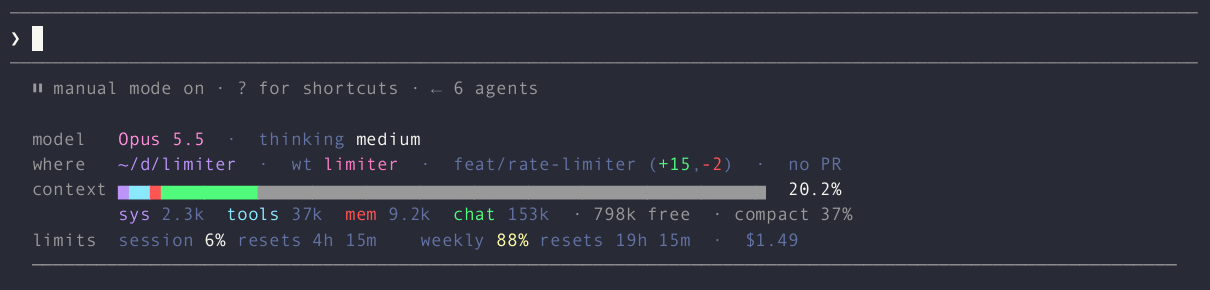
Multi-row status dashboard under the prompt: model, location, git, context breakdown, usage limits and cost, in three layouts with a settings menu above the prompt.
blackpaw-studio/claude-plugins/tree/main/plugins/rich-statusline
A Claude Code mod (function-hook plugin) that draws a multi-row status dashboard under the prompt: model and effort, where you are (path, git branch, linked worktree, uncommitted diff stats, PR), the context window broken down by category, the 5-hour and weekly usage limits with reset countdowns, and the session's cost.
Three layouts, switchable live (the short names 1a, 1b and 1c below refer to them):
model / where / context /
limits rows, a category legend ending in · N free · compact N%.Every layout ends in a full-width ─ rule.


Claude Code's own permission-mode line and its hint text (? for shortcuts,
esc to interrupt, task pills) stay exactly as the engine draws them.
From this marketplace:
/plugin marketplace add blackpaw-studio/claude-plugins
/plugin install rich-statusline@blackpaw-plugins
Then remove any statusLine entry from your settings.json. A mod cannot
hide the settings status line, so leaving it in place draws both.
Run /rich-statusline (or /rich-statusline settings) to open the settings
menu in the band above the prompt; run it again to close it. Press
ctrl+x tab to focus the menu, then Tab or the arrow keys move between
controls and Enter changes one. Done (d) closes the menu, Reset to
defaults (r) restores the defaults. Changes apply immediately and are
saved in the plugin's store.
The menu lives in the band rather than a side pane because panes do not draw in some terminal setups (Claude Code inside tmux, for one).
| Setting | Default | |
|---|---|---|
| Layout | Labeled grid | Grouped rows, Labeled grid or Compact |
| Show cost | on | 1a: end of the first row; 1b: limits row; 1c: before 5h |
| Show PR | on | #123 from gh pr view; no PR when there is none or gh is missing |
| Show diff stats | on | (+12,-3) from git diff HEAD --shortstat, after the branch |
| Show worktree | on | wt <name> before the branch inside a linked git worktree |
| Show legend | on | the category legend of 1a and 1b |
| Amber at | 70% | context and each limit turn amber from here |
| Red at | 90% | ...and red from here |
| Git refresh | 10 s | branch, worktree and diff stats |
| PR refresh | 60 s | also refreshed at once when the branch changes |
There is no keyboard shortcut: this build of the plugin API lets a Button bind only the engine's own keybinding actions, not a plugin-defined one.
· compact N%
note, then · N free; 1a: the ┊ compact N% note) and hiding only when
even the bare legend overflows; under 80 columns of row the reset countdowns
and the PR go; under 60 the compact layout is used whatever is chosen.— replaces the context percentage, over an
empty bar.summary estimate of /context (no
token-count requests), refreshed two seconds after the context last changed.git and gh run through the host with a timeout; a render never waits on
them. Outside a repository the row reads no git and gh is not asked.The rows use your terminal theme's own palette (its normal colour slots, plus gray), so they follow light and dark themes alike.
28k/200k figure, which is the last API response's.claude plugin validate plugins/rich-statusline
claude plugin test plugins/rich-statusline
Type-checking needs the declarations the engine lays into
.claude-plugin/types/ when it loads the mod from a folder you own (a
--plugin-dir or the session's mods folder); tsc -p that folder.
まず作者の README で marketplace とプラグイン名を確認してください。コマンドはリポジトリの構成によって変わる場合があります。
claude plugin marketplace add blackpaw-studio/claude-plugins
claude plugin install rich-statusline
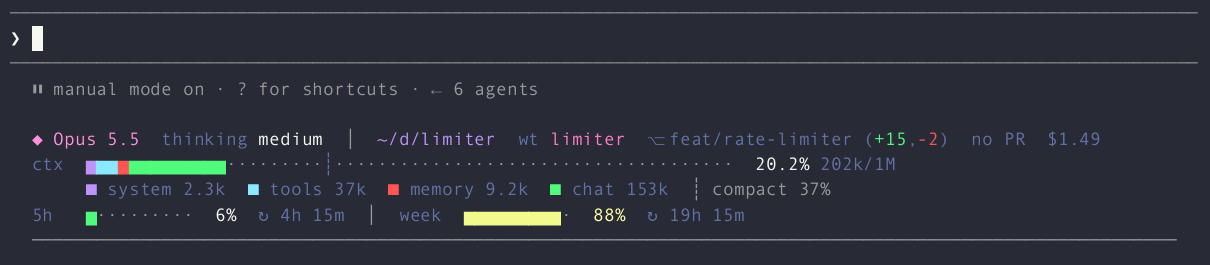
A Claude Code mod (function-hook plugin) that draws a multi-row status dashboard under the prompt: model and effort, where you are (path, git branch, linked worktree, uncommitted diff stats, PR), the context window broken down by category, the 5-hour and weekly usage limits with reset countdowns, and the session's cost.
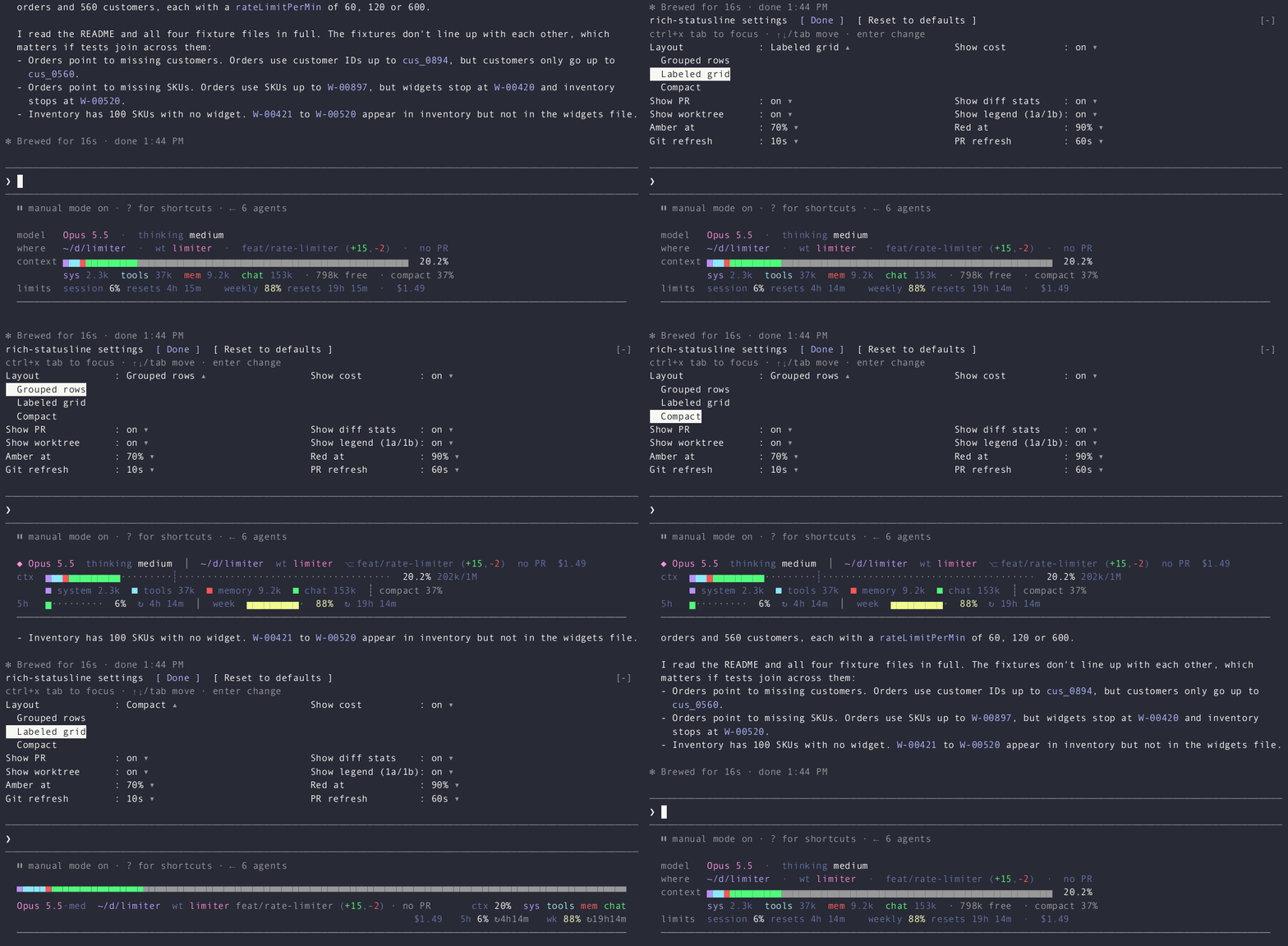
Three layouts, switchable live (the short names 1a, 1b and 1c below refer to them):
model / where / context /
limits rows, a category legend ending in · N free · compact N%.Every layout ends in a full-width ─ rule.

Claude Code's own permission-mode line and its hint text (? for shortcuts,
esc to interrupt, task pills) stay exactly as the engine draws them.
From this marketplace:
/plugin marketplace add blackpaw-studio/claude-plugins
/plugin install rich-statusline@blackpaw-plugins
Then remove any statusLine entry from your settings.json. A mod cannot
hide the settings status line, so leaving it in place draws both.
Run /rich-statusline (or /rich-statusline settings) to open the settings
menu in the band above the prompt; run it again to close it. Press
ctrl+x tab to focus the menu, then Tab or the arrow keys move between
controls and Enter changes one. Done (d) closes the menu, Reset to
defaults (r) restores the defaults. Changes apply immediately and are
saved in the plugin's store.
The menu lives in the band rather than a side pane because panes do not draw in some terminal setups (Claude Code inside tmux, for one).
| Setting | Default | |
|---|---|---|
| Layout | Labeled grid | Grouped rows, Labeled grid or Compact |
| Show cost | on | 1a: end of the first row; 1b: limits row; 1c: before 5h |
| Show PR | on | #123 from gh pr view; no PR when there is none or gh is missing |
| Show diff stats | on | (+12,-3) from git diff HEAD --shortstat, after the branch |
| Show worktree | on | wt <name> before the branch inside a linked git worktree |
| Show legend | on | the category legend of 1a and 1b |
| Amber at | 70% | context and each limit turn amber from here |
| Red at | 90% | ...and red from here |
| Git refresh | 10 s | branch, worktree and diff stats |
| PR refresh | 60 s | also refreshed at once when the branch changes |
There is no keyboard shortcut: this build of the plugin API lets a Button bind only the engine's own keybinding actions, not a plugin-defined one.
· compact N%
note, then · N free; 1a: the ┊ compact N% note) and hiding only when
even the bare legend overflows; under 80 columns of row the reset countdowns
and the PR go; under 60 the compact layout is used whatever is chosen.— replaces the context percentage, over an
empty bar.summary estimate of /context (no
token-count requests), refreshed two seconds after the context last changed.git and gh run through the host with a timeout; a render never waits on
them. Outside a repository the row reads no git and gh is not asked.The rows use your terminal theme's own palette (its normal colour slots, plus gray), so they follow light and dark themes alike.
28k/200k figure, which is the last API response's.claude plugin validate plugins/rich-statusline
claude plugin test plugins/rich-statusline
Type-checking needs the declarations the engine lays into
.claude-plugin/types/ when it loads the mod from a folder you own (a
--plugin-dir or the session's mods folder); tsc -p that folder.

Cognitum Seed ハードウェアの IoT デバイスライフサイクル、テレメトリ異常検出、フリート管理、証跡チェーン検証

pbir CLI に従うレポートペインで Claude が読み取り、変更する内容を表示しながら、インタラクティブな Power BI レポートの作成、整形、最適化、レビューを行います。


プロンプトの上、ステータス行、トーストに未読 AMP メッセージを表示し、アイドル状態の Claude Code セッションを起こして読ませます。Claude Code 2.1.287 以降が必要です。
