
jkhaynes@jkhaynes
jkhaynes/ai-agent-skills/tree/master/mods/job-progress
長時間実行される Claude Code ジョブ(テストスイート、評価、バッチ実行)向けのライブ Progress ペイン。花開く/しおれるバー、開発サーバー行、停止/開花通知を備えています。 バックグラウンドジョブと開発サーバーを追跡し、出力から進捗を解析して ui.render hook 経由でペインを描画するプラグインです。
jkhaynes/ai-agent-skills/tree/master/mods/job-progress
job-progress は、ユニット、統合、e2e テストスイート、シナリオ/評価の実行、バッチ実行など、長時間動くバックグラウンドジョブ用のライブ Progress ペインを追加する Claude Code mod です。
各ジョブには、緑の成長する先端が付いたピンクのバー、実行中に育つ植物、成功/失敗数、経過時間、ETA、最新の出力行が表示されます。完了するとジョブは開花 🌸 またはしおれ 🥀、トーストを表示します。/progress でペインを切り替え、/progress clear で完了したジョブを削除し、/progress stop [n] で開発サーバーを停止します(プロセスツリー全体を終了します)。
この mod は tool.call、session.append、tool.describe、1500ms クロック、ui.render にフックし、ランナーの出力または明示的な PROGRESS n/m 行から進捗を解析し、既知のテストランナーを自動的にバックグラウンド化します。作者自身のリポジトリ向けに調整されており、4 MiB の出力上限、tail/head パイプによる進捗の非表示、Python のバッファリングなどの制限も記載しています。
インストール:claude --plugin-dir <path> で読み込むか、フォルダーを ~/.claude/settings.json の CLAUDE_CODE_PLUGIN_DIRS に追加します。
注意:自動スキャンは未完了です(コマンド実行とツールインターセプトに関する未解決の検出結果があり、外部依存関係も 1 つ未スキャンです)。そのため公開前に人手で確認してください。
まず作者の README で marketplace とプラグイン名を確認してください。コマンドはリポジトリの構成によって変わる場合があります。
claude plugin marketplace add jkhaynes/ai-agent-skills
claude plugin install job-progress
A Claude Code mod that shows a live Progress pane for long-running jobs Claude runs: unit, integration and e2e test suites, scenario/eval runs, batch runs such as test images through a capture pipeline.
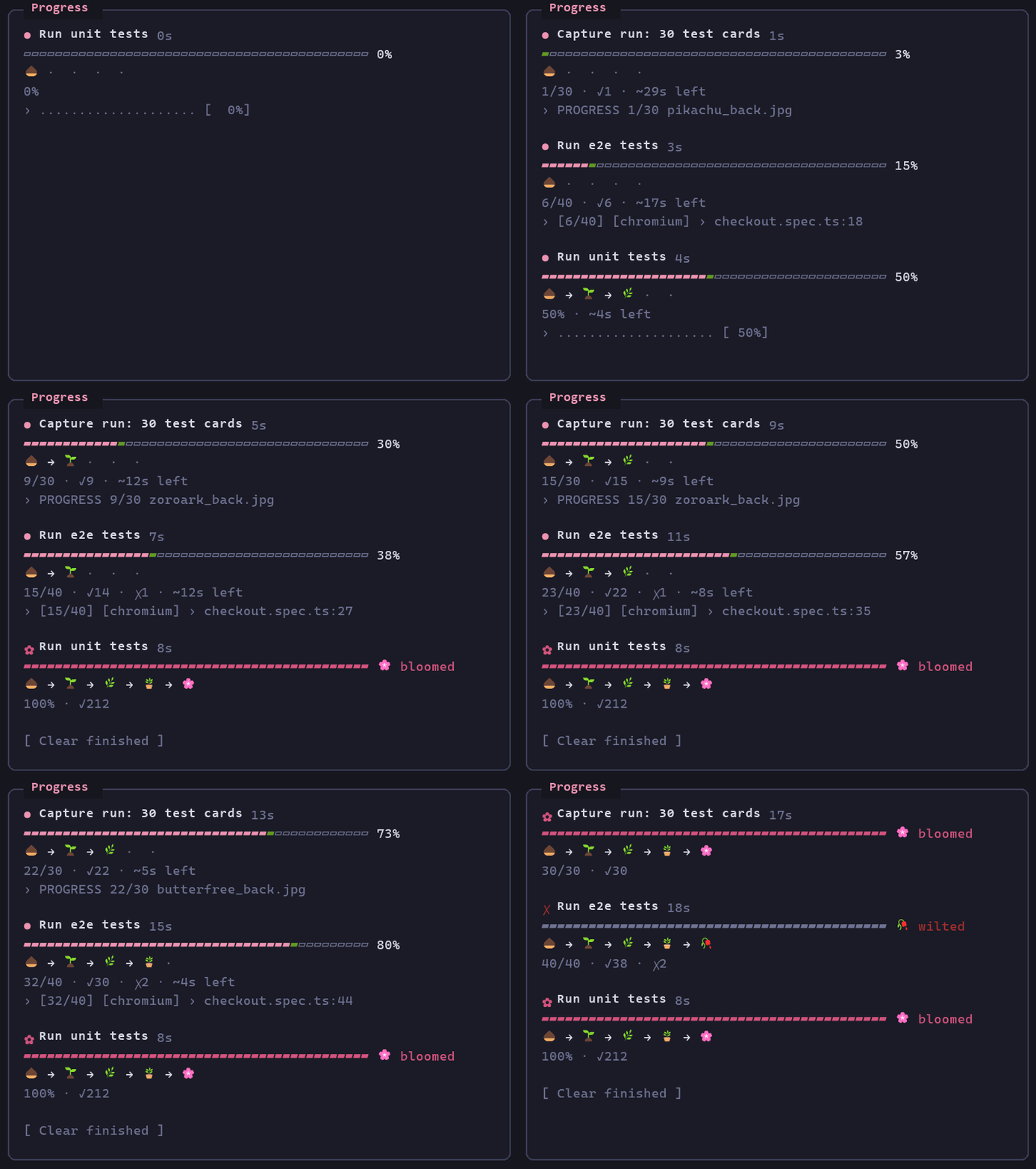
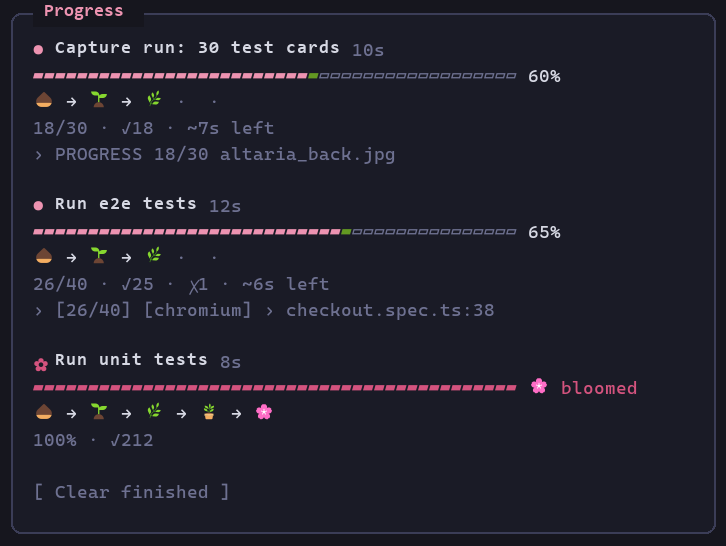
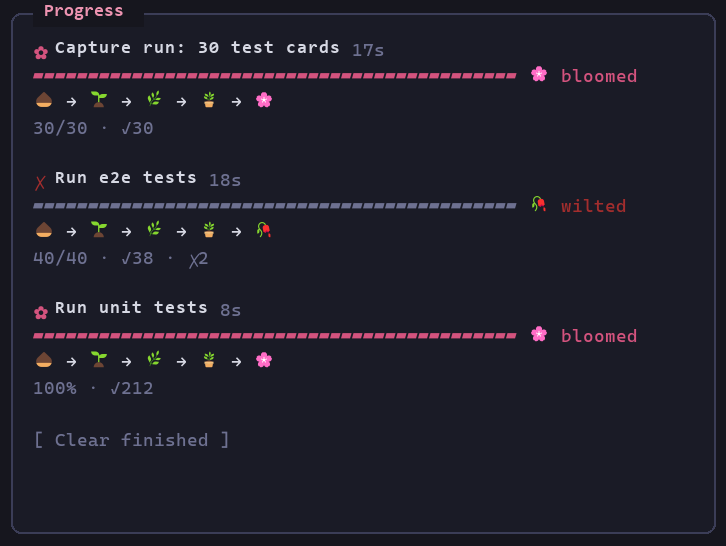
Each job gets a soft pink bar with a green growing tip, a plant that grows as the job runs, pass/fail counts, elapsed time, an ETA and the latest output line. When the job ends it either blooms or wilts:
<sub>Three demo jobs over 20 seconds: the unit tests bloom, the e2e suite wilts after two failures, and a capture run of 30 test cards blooms. The frames come from the mod's own render hook on the terminal surface, mounted with claude plugin test and fed demo job states, then painted in Cascadia Mono. They show what the pane draws, but they aren't a screen recording.</sub>
| Running | Finished |
| --- | --- |
|  |
|  |
|
A toast says "🌸 … bloomed" or "🥀 … wilted" when a job finishes. To remove finished jobs, run /progress clear, which works everywhere. Clicking Clear finished works in the desktop app and the fullscreen terminal. In the regular terminal, the button only responds to the c key while the pane has focus.
/progress toggles the pane. To close it you can also:
/progress closex while the pane has focusThe pane opens again on its own when the next background job starts.
Dev servers (npm run dev:e2e, bench:serve, vite, wrangler dev, uvicorn) get their own rows at the top: 🌿, the port when the command or output names one, and uptime. They have no bar and never bloom or wilt. To stop them from any terminal, run /progress stop (all servers) or /progress stop 2 (the second row). Each row also has a Stop button, which in the regular terminal answers 1, 2, … while the pane has focus.
Stopping a server kills its whole process tree, not just its task. On Windows, TaskStop alone leaves an npm-launched server running. Git Bash starts each program through a helper process that exits, so no Windows parent link reaches the server, and the stop only kills the outer shell. The mod marks each background server's command with JOB_PROGRESS_TAG. To stop a server, it finds the marked shell, kills every process in that shell's Git Bash process group with taskkill /T /F, and only then calls TaskStop. It reports a stop only when none of the group is left. A server started before this marking existed gets a warning instead of "Stopped". This happens on every TaskStop, including when you just ask Claude to stop a server. The mod handles TaskStop itself, kills the marked tree first, then updates the pane. A TaskStop raises no task notification, so without this the pane would never hear about the stop. Stopping a job that isn't a server marks its row as stopped, with no bloom or wilt.
A runner only counts when it's the program a step of the command runs. Quoted text is ignored, and the start of each &&, ;, | or loop step is checked. A command that only mentions one (-notmatch 'playwright|vitest', cat vitest.config.ts) is left alone.
Every running job shows a bar from the start, at 0% until its output gives a count or percentage. A job that finishes without ever giving a count, percentage or pass/fail numbers gets one line with ✓ or ✗ instead of a full bar and a bloom. If it finishes in under 30 seconds, it's removed without a toast. Bars are at most 40 columns wide.
This copy is set up for my own repos rather than general use:
dotnet run … evaluate, ten-or-not attacks.py / tuning_report.py / make_e2e_fixtures.py / click_measure.py, gh run watch, gh pr checks --watch and timeout N … wrangler tail.sleep of 60 seconds or more is refused. The refusal tells Claude it will be notified when the job ends. Claude is also told not to redirect a background job into a log file of its own, since the pane can't see that file.Result: 13/20 scenarios fully passed counts as 13 passed and 7 failed. ten-or-not 165 cases 2 WRONG lines count as passed/failed. Card numbers (096/182) and centering ratios (42/58) aren't progress. 0.85 failed (a reading) and attempt 1 failed (a retry) aren't failures.| Piece | What it does |
| --- | --- |
| tool.call (Bash, PowerShell) | Remembers each shell call's description as the job's label. Moves known test runners (vitest, jest, Playwright, pytest, dotnet test, go test, cargo test, npm/pnpm/yarn/bun test·e2e·bench) and my project runs to the background when the call didn't choose. Refuses a long sleep while a job runs. The rules live in hooks/classify.ts. |
| session.append | Picks up a job from the shell result row ("running in background with ID: X. Output is being written to: P") and marks it finished from its <task-notification> row. |
| $.clock.every(1500) | Re-reads each running job's output file when it grows and parses progress from it. |
| tool.describe | Adds a line to the Bash/PowerShell tool descriptions asking Claude to background long jobs and to print PROGRESS <done>/<total> <item> lines from scripts it writes. |
| ui.render (Pane) | Draws the pane. /progress opens or closes it on demand. |
Only background jobs are tracked: a foreground command's output isn't visible until it ends.
hooks/parse.ts)In order of preference:
PROGRESS 3/10 label lines: the convention for custom scripts.[12/40] counters (Playwright list reporter).n/m.Running 40 tests / collected 40 items.Pass/fail counts come from runner summaries (88 passed, 3 failed, Passed: 41, Failed: 1), or from per-test marks (✓ ✗ PASS FAIL ok / not ok) while a run is still going.
The mod is a plugin folder. Load it in any session with:
claude --plugin-dir <path-to>/ai-agent-skills/mods/job-progress
To load it in every session (including the desktop app), add the folder to CLAUDE_CODE_PLUGIN_DIRS in the env block of ~/.claude/settings.json:
{
  "env": {
    "CLAUDE_CODE_PLUGIN_DIRS": "<path-to>/ai-agent-skills/mods/job-progress"
  }
}
claude plugin validate mods/job-progress
node mods/job-progress/hooks/parse.check.mts
node mods/job-progress/hooks/classify.check.mts
node mods/job-progress/hooks/followed.check.mts
claude plugin test mods/job-progress
parse.check.mts, classify.check.mts and followed.check.mts are plain Node self-checks for the parser and the command rules (Node 22+ runs the TypeScript import directly). The parser checks use real output lines from my projects. hooks/tool-call.test.ts and hooks/my-runs.test.ts check the shell-call rewrite (backgrounding, dropping tail/head pipes, PYTHONUNBUFFERED), and hooks/pane.test.ts checks /progress opening and closing the pane, all under claude plugin test.
Gotcha found while building it: inside a Text, use arrays of Text children, not fragments (<>…</>). A fragment there is refused as "Box inside an inline element", and the engine draws an empty pane instead.
$.fs.read cap); the pane keeps the last reading.RUNNER rewrite in hooks/register.tsx if that gets in the way.| tail -N or | head -N shows no progress until it ends. The mod drops a trailing tail/head pipe from commands it backgrounds and asks Claude not to add one, but other filters (| grep …) still hide progress.python -u (or flush) for live PROGRESS lines.
ドキュメント生成、ドリフト検出、API ドキュメント自動化プラグイン。秘密情報を含むドキュメント書き込みやワーカーのディスパッチを拒否する function-hook ガードとしても動作します。

Claude デスクトップアプリ用のステータスバー。プロンプト上に表示され、セッション品質、コンテキストの充填量、キャッシュのカウントダウン、5 時間および週間制限を示し、Clawd がセッションの動作を演じます。

databricks CLI に沿って Databricks のワークスペース、Unity Catalog、コンピュート、ジョブ、パイプライン、アプリ、ダッシュボードをツリー表示する /databricks-pane を提供する Claude Code プラグイン mod。ライブハイライト、プロファイル切り替え、CLI 引数のコピーにも対応します。
