karanb192@karanb192
karanb192/claude-code-mods/tree/main/plugins/image-peek
macOS でプロンプトのマーカーに貼り付けた画像をプレビューします。Ghostty に対応し、起動時のオーバーライドで iTerm2 と Herdr も試験的にサポートします。Claude Code 2.1.287+。
karanb192/claude-code-mods/tree/main/plugins/image-peek
テキストカーソルを貼り付けた [Image #1] マーカー上に移動すると画像が表示され、離れると隠れます。幅の広いウィンドウでは画像を暗いキャンバスの中央に置いた大きなプレビューペインを使い、狭いウィンドウではプロンプト上部の領域を使います。キーボードフォーカスはプロンプトに残ります。
この初版は macOS と Ghostty を対象とし、Claude Code 2.1.287 以降が必要です。実際の Claude CLI でカーソル選択、ネイティブ貼り付け、リロード、クリーンアップを確認しました。ユーザーが提供した Ghostty のスクリーンショットで、大きな画像と暗いプレビューキャンバスも確認しています。
iTerm2 とローカルの Herdr セッションも認識され、下記の起動時オーバーライドを利用できます。画像ピクセルについては、まだエンドツーエンドの目視確認が必要です。
シェルで実行してから、Ghostty で新しい Claude セッションを開始します。
claude plugin marketplace add karanb192/claude-code-mods
claude plugin install image-peek@claude-code-mods
マーケットプレイスをすでに追加している場合は、インストール前に claude plugin marketplace update claude-code-mods で更新します。この項目は Image Peek の変更がマーケットプレイスの main ブランチにマージされると利用可能になります。
ブラウザー、コンパイラー、別の Mac アプリ、API キーは不要です。Claude がモッドを読み込み、macOS がクリップボードリーダーを提供します。Claude Code 2.1.287+ ではモッドがデフォルトで有効です。
インストールせずにローカルチェックアウトを試す場合は、リポジトリのルートから実行します。
claude --plugin-dir ./plugins/image-peek
Ghostty 内で iTerm2 3.7.3+ または Herdr 0.9.1+ を使用します。画像レンダラーを有効にして、新しい Claude プロセスを開始します。
CLAUDE_CODE_FORCE_TERMINAL_IMAGES=1 claude
ローカルチェックアウトでは、リポジトリのルートから実行します。
CLAUDE_CODE_FORCE_TERMINAL_IMAGES=1 claude --plugin-dir ./plugins/image-peek
Claude Code 2.1.287 のレンダラーは、グラフィックスクエリへの応答を受け取った後でも、端末が報告した名前を Kitty と Ghostty と照合します。iTerm2 と Herdr はこの名前チェックに失敗することがあります。このプロセス単位のオーバーライドは名前チェックと画像ファイル機能の検査を迂回します。シェル設定を変更したり、別のアプリケーションをインストールしたりはしません。Claude はモッドの開始前にこれらの機能を初期化するため、モッドをリロードするだけでは不十分です。
iTerm2 3.7.3 は Claude が使用する Unicode 画像プレースホルダーの描画を修正します。Herdr 0.9.1 はファイルベースの Kitty 画像と Unicode 配置に対応します。terminal.kitty_graphics 設定のデフォルトは true です(設定の参照先:https://github.com/herdrdev/herdr/blob/v0.9.1/docs/next/website/src/data/config-reference.json)。無効にしていた場合は有効にし、Herdr の再起動/再接続手順に従います。このプレビュー経路にはローカルの Mac セッションと、グラフィックス対応の外側の端末が必要です。オーバーライドで互換性のない端末や転送方式にグラフィックス機能を追加することはできません。
これはマウスホバーではなく、テキストカーソルに追従します。会話はプレビューの横または上に表示されます。画像全体を利用可能な幅と高さに収め、ラベル用に 1 行を確保します。ペインはウィンドウ幅の最大約 72% を要求し、画像の比率に合わせて調整されます。Claude が以前に選んだ幅を保持している場合があります。ペインが狭すぎるときは仕切りをドラッグします。
インラインのフォールバックは、Claude がプロンプトや下部の他の内容を含むプロンプト上部の領域を端末高さのおよそ半分に制限するため、小さくなります。ズームやフローティングオーバーレイはありません。ペインを閉じると、カーソルがマーカーを離れるまで表示されません。
Claude は独自のテーマでペインの外枠を描画します。暗い端末で Light Claude テーマを使うと、暗いキャンバスの周囲に明るい帯が残ります。周囲のフレームも暗くするには、Claude の /theme メニューで Dark を選びます。これは Claude のすべての UI 色を変更します。Image Peek はテーマを変更しません。
/image-peek off は新しいキャプチャを停止してプレビューを隠します。/image-peek on は新しい貼り付けに対するキャプチャを再開します。/image-peek は現在の設定を報告します。これらのコマンドはモデルを呼び出しません。
Claude のプロンプト API はマーカーとカーソルを公開しますが、下書き添付ファイルのバイト列は提供しません。そのため Image Peek は、新しいネイティブ画像マーカーを検出すると Mac のクリップボードを読み取ります。下書きを 120 ms ごとに確認し、その時点のクリップボード画像を 1 回保存します。
リポジトリのルートから実行します。
claude plugin validate plugins/image-peek --strict
claude plugin test plugins/image-peek
Claude Code 2.1.287 の strict validator は次を報告しました。
  ❯ types ./types/index.d.ts declares on $: nothing (no EngineInterface member)
  ❯ types ./types/index.d.ts declares state: image-peek.session
  ❯ ./register.ts hooks: session.start, prompt.edit, prompt.fill, command.run{command=image-peek}, session.end, session.compact, ui.render{component=AbovePrompt}, ui.render{component=Pane, requestId=image-peek}, ui.close{id=image-peek}
  ❯ ./register.ts calls: $.clock.every, $.command.register, $.env.get, $.process.run, $.prompt.read, $.session.id, $.state.get, $.state.set (via save), $.ui.close, $.ui.invalidate, $.ui.log, $.ui.open (via update), $.ui.panes, $.ui.resolve
  ❯ ./register.ts env writes: nothing
  ❯ ./register.ts env reads: CLAUDE_CODE_FORCE_TERMINAL_IMAGES, GHOSTTY_RESOURCES_DIR, HERDR_ENV, TERM_PROGRAM
  ❯ ./register.ts state writes: image-peek.session
  ❯ ./register.ts state reads: image-peek.session
テストではカーソル境界、個別のキャプチャ、曖昧な貼り付け、入力したマーカーの代替、未対応端末、有効化/無効化、キャプチャ失敗、キャッシュ追い出し、クリーンアップ失敗を確認します。実際の CLI でもネイティブ画像の貼り付け、マーカーから離れて戻る操作、ホットリロード、通常終了時のクリーンアップを確認しました。その端末は Image 要素の代替テキストを描画したため、画像ピクセルは検証していません。これらの確認中にモデルターンは送信していません。
実際の CLI で行った制御レイアウトプローブでは、両方の表示面に同じ 180-column、48-row 端末を使いました。インライン領域は 15 rows に落ち着き、横長画像は 50 by 14 cells に収まりました。要求した 128-column ペインには 128 by 40 cell body が用意され、その画像は 126 by 34 cells に収まりました。これは利用可能なレイアウト領域を検証するもので、描画されたピクセルや色を検証するものではありません。
完全な操作確認では、Ghostty に異なる画像を 2 枚貼り付け、各マーカーを選択してウィンドウをリサイズします。大きな暗いプレビューが現れて消え、キーボードフォーカスが移動しないことを確認してください。プロンプトの上に会話出力がある状態でも繰り返します。リロード時には、プラグインが以前のレイアウトから残ったペインを閉じます。
L2 に到達:ローカルプロセスを開始し、一時画像ファイルを書き込みます。
実装では Claude のエンジンインターフェイスとネイティブインターフェイス要素を使います。生成されたエンジン宣言はローカル開発ファイルであり、出荷物には含まれません。
まず作者の README で marketplace とプラグイン名を確認してください。コマンドはリポジトリの構成によって変わる場合があります。
claude plugin marketplace add karanb192/claude-code-mods
claude plugin install image-peek
Move the text cursor onto a pasted [Image #1] marker to see its image. Move away to hide it. Wide windows get a large preview pane with the image centered on a dark canvas. Narrow windows use the area above the prompt. Keyboard focus stays in the prompt.
This first version targets macOS and Ghostty with Claude Code 2.1.287 or later. Cursor selection, native paste, reload and cleanup have been exercised in the actual Claude CLI. A user-provided Ghostty screenshot confirms the large image and dark preview canvas.
iTerm2 and local Herdr sessions are also recognized, with the startup override below. Their image pixels still need an end-to-end visual check.
Run in your shell, then start a new Claude session in Ghostty:
claude plugin marketplace add karanb192/claude-code-mods
claude plugin install image-peek@claude-code-mods
If you already added the marketplace, update it with claude plugin marketplace update claude-code-mods before installing. This entry becomes available when the Image Peek change is merged into the marketplace's main branch.
No browser, compiler, separate Mac app or API key is needed. Claude loads the mod and macOS supplies the clipboard reader. Mods are enabled by default in Claude Code 2.1.287+.
To try a local checkout without installing, run from the repository root:
claude --plugin-dir ./plugins/image-peek
Use iTerm2 3.7.3+ or Herdr 0.9.1+ inside Ghostty. Start a new Claude process with the image renderer enabled:
CLAUDE_CODE_FORCE_TERMINAL_IMAGES=1 claude
For a local checkout, from the repository root:
CLAUDE_CODE_FORCE_TERMINAL_IMAGES=1 claude --plugin-dir ./plugins/image-peek
Claude Code 2.1.287's renderer checks the terminal's reported name against Kitty and Ghostty even after a graphics query receives a reply. iTerm2 and Herdr can fail this name check. This per-process override bypasses that check and the image-file capability probe. It does not change your shell settings or install another application. A mod reload is insufficient because Claude initializes these capabilities before the mod starts.
iTerm2 3.7.3 fixes rendering of the Unicode image placeholders that Claude uses. Herdr 0.9.1 supports file-backed Kitty images and Unicode placements. Its terminal.kitty_graphics setting defaults to true; if you disabled it, enable it and follow Herdr's restart/reattach instructions. This preview route requires a local Mac session and a graphics-capable outer terminal. The override cannot add graphics support to an incompatible terminal or transport.
[Image #N] marker. The preview appears automatically.This follows the text cursor, not mouse hover. The conversation remains visible beside or above the preview. The whole image fits within the available width and height, reserving one row for its label. The pane requests up to about 72% of the window's width, adjusted for the image's proportions. Claude may retain a width you previously chose; drag the divider if that makes the pane too narrow.
The inline fallback is smaller because Claude limits the above-prompt area to roughly half the terminal height, including the prompt and other bottom content. There is no zoom or floating overlay. Closing the pane dismisses it until the cursor leaves the marker.
Claude draws the pane's outer frame using its own theme. A Light Claude theme in a dark terminal leaves bright strips around the dark canvas. Choose Dark in Claude's /theme menu to make the surrounding frame dark too; this changes all Claude UI colors. Image Peek does not change your theme.
/image-peek off stops new captures and hides the preview. /image-peek on resumes capture for new pastes. /image-peek reports the current setting. These commands do not call a model.
Claude's prompt API exposes the marker and cursor but does not provide the draft attachment bytes. Image Peek therefore reads the Mac clipboard when it detects a new native image marker. It checks the draft every 120 ms and saves that clipboard image once.
claude-image-peek/.Run from the repository root:
claude plugin validate plugins/image-peek --strict
claude plugin test plugins/image-peek
The strict validator on Claude Code 2.1.287 reported:
  ❯ types ./types/index.d.ts declares on $: nothing (no EngineInterface member)
  ❯ types ./types/index.d.ts declares state: image-peek.session
  ❯ ./register.ts hooks: session.start, prompt.edit, prompt.fill, command.run{command=image-peek}, session.end, session.compact, ui.render{component=AbovePrompt}, ui.render{component=Pane, requestId=image-peek}, ui.close{id=image-peek}
  ❯ ./register.ts calls: $.clock.every, $.command.register, $.env.get, $.process.run, $.prompt.read, $.session.id, $.state.get, $.state.set (via save), $.ui.close, $.ui.invalidate, $.ui.log, $.ui.open (via update), $.ui.panes, $.ui.resolve
  ❯ ./register.ts env writes: nothing
  ❯ ./register.ts env reads: CLAUDE_CODE_FORCE_TERMINAL_IMAGES, GHOSTTY_RESOURCES_DIR, HERDR_ENV, TERM_PROGRAM
  ❯ ./register.ts state writes: image-peek.session
  ❯ ./register.ts state reads: image-peek.session
Tests cover cursor boundaries, separate captures, ambiguous pastes, typed marker substitutes, unsupported terminals, enable/disable, failed capture, cache eviction and cleanup failure. A live CLI check also exercised native image paste, leaving and returning to the marker, hot reload and normal-exit cleanup. That terminal rendered the Image element's alternative text, so it did not verify image pixels. No model turn was submitted during these checks.
A controlled layout probe in the actual CLI used the same 180-column, 48-row terminal for both surfaces. The inline area settled at 15 rows and fitted a landscape image into 50 by 14 cells. A requested 128-column pane provided a 128 by 40 cell body and fitted that image into 126 by 34 cells. This verifies available layout space, not rendered pixels or colors.
For a full interaction check, paste two distinct images in Ghostty, select each marker, resize the window, and confirm the larger dark preview appears and disappears without moving keyboard focus. Repeat with conversation output above the prompt. On reload, the plugin closes any pane left from its earlier layout.
Reach L2: starts local processes and writes temporary image files.
/usr/bin/uname -s to check the platform and /usr/bin/osascript -l JavaScript with the bundled clipboard helper. Fixed argument arrays are used; prompt text never becomes a shell command.$.process.run, so review the helper as well as the hooks module.hooks/register.ts: detects marker selection, captures new images and draws the preview.hooks/clipboard.js: macOS clipboard capture and temporary-file cleanup.hooks/selection.ts: marker boundaries and image sizing.types/index.d.ts: the plugin's session-state shape.tests/register.test.ts: Claude's native mod tests.The implementation uses Claude's engine interface and native interface elements. Generated engine declarations are local development files and are not shipped.

入力中のプロンプトを文法チェックし、繁体字中国語で説明します。Enter を押す前に、修正内容がプロンプトボックスの上に表示されます。


localvoxtral がセッションに接続されているかを示し、ディクテーションした文字列をプロンプトボックスに入れ、プロンプト上にディクテーションを表示し、音声の停止フレーズでターンを終える Claude Code プラグインです。hooks モジュールをロードできる Claude Code ビルドが必要です。

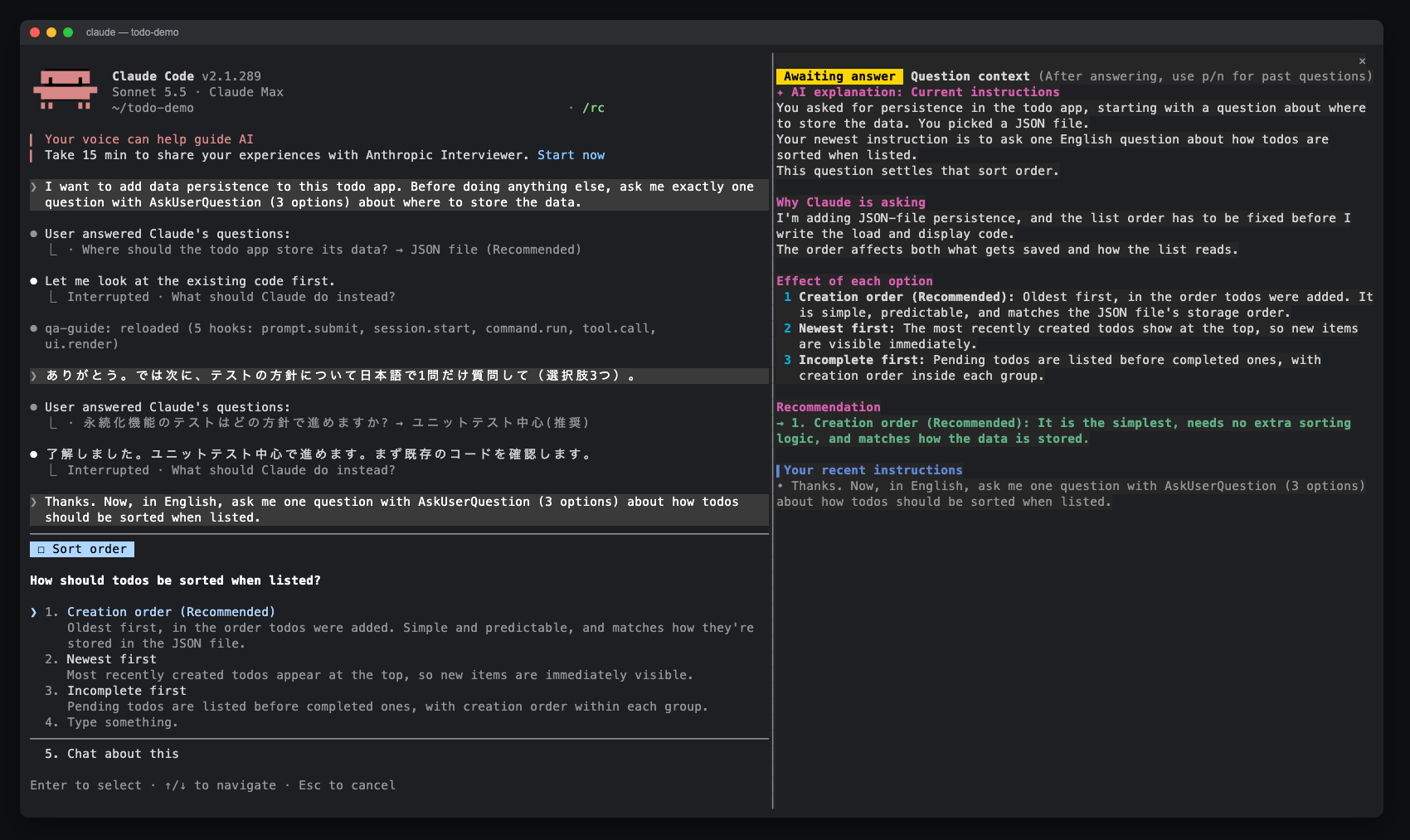
AskUserQuestion プロンプトのサイドペインを開き、AI の説明、オプションの効果、最近の指示、回答履歴を表示する Claude Code mod。claude-qamods マーケットプレイスからインストール可能。Claude Code 2.1.286 以降と、早期アクセス機能である function-hooks プラグイン API が必要です。