
BedirYilmaz@BedirYilmaz
BedirYilmaz/claude-crt-hud-mod/tree/main/mods/hud
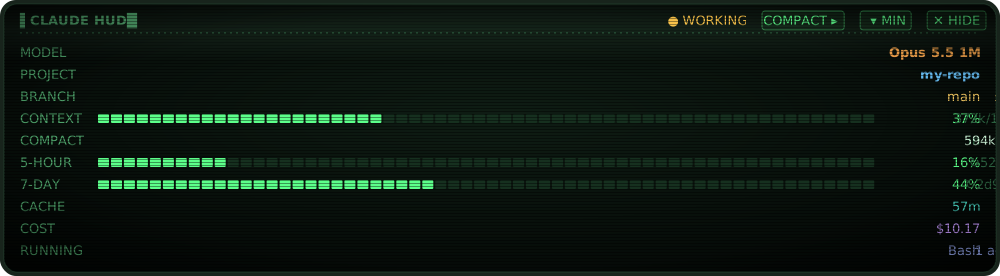
Claude Code 用の CRT スタイルのステータスパネル。プロンプトの上または下に表示され、モデル、プロジェクトと git ブランチ、コンテキスト使用量(コンパクトボタン付き)、プラン使用量、キャッシュ、コストを表示します。
BedirYilmaz/claude-crt-hud-mod/tree/main/mods/hud
Claude Code 用の CRT スタイルのステータスパネルで、ターミナルとデスクトップアプリの Code タブに表示されます。デスクトップでは、ダークグラスでリン光が輝く SVG スクリーンをスキャンラインと点滅カーソル付きで描画し、ターミナルでは丸枠のボックスを表示します。行には MODEL(effort 付き)、PROJECT、BRANCH(未コミット数付き)、CONTEXT(モデルウィンドウに対する表示)、確認ガード付きの COMPACT コントロール、5-HOUR と 7-DAY のプラン使用量(リセットまでのカウントダウン付き)、セッショントランスクリプトから導出される CACHE クロック、COST、RUNNING のツールとエージェントが含まれます。コマンドには /hud on|off|above|below|min|max、しきい値付きの /hud alerts、/hud debug があります。プラグインマーケットプレイスからインストールし、/hud で切り替えます。モデル呼び出し、ネットワーク、ファイル書き込みは一切ありません。
まず作者の README で marketplace とプラグイン名を確認してください。コマンドはリポジトリの構成によって変わる場合があります。
claude plugin marketplace add BedirYilmaz/claude-crt-hud-mod
claude plugin install hud@claude-mods
A CRT-style status panel for Claude Code, in the terminal and in the desktop app's Code tab. It is inspired by hoobnn's hud, a port of claude-hud. This is a separate, much smaller mod (about 60 KB of source in six files) with no Node shims.
Minimal, after a click on ▾ MIN: the context and the plan windows, with the cost and the branch in
the header.

The terminal draws the same parts as text:
▌CLAUDE HUD█       ● WORKING  [COMPACT ▸]  [▾ MIN]  [✕ HIDE]
MODEL                                      Opus 5.5 1M · xhigh
PROJECT                                                my-repo
BRANCH                                                 main ±3
CONTEXT   ▮▮▮▮▮▮▮▮▮▮▯▯▯▯▯▯▯▯▯▯▯▯▯▯▯▯▯▯▯▯▯▯▯▯   37% 372k/1M
COMPACT                                                in 594k
5-HOUR    ▮▮▮▮▮▮▯▯▯▯▯▯▯▯▯▯▯▯▯▯▯▯▯▯▯▯▯▯▯▯▯▯▯▯     16% ↻52m
7-DAY     ▮▮▮▮▮▮▮▮▮▮▮▮▮▮▮▯▯▯▯▯▯▯▯▯▯▯▯▯▯▯▯▯▯▯    44% ↻2d9h
CACHE                                                      57m
COST                                                    $10.17
RUNNING                                         Bash · 1 agent
One line per part: the label on the left, the value flush right, and the gauges in one column between them. The panel takes the full width of the band (or of the prompt, below it).
hooks/hit.tsx, a Client) lies over the screen's header, where COMPACT ▸, ▾ MIN and
✕ HIDE are drawn. The desktop reports exactly where across that layer a click lands, but its rows
don't map onto the image's pixels, so the controls share the header row and only the column decides
which one was clicked. The desktop sizes the layer to what it draws rather than to its height, so
it draws two empty rows to cover the whole header. It keeps one post per frame from the layer, so
every post carries a running count of presses: a quick click still counts when the post of its
up replaced the post of its down. If the engine reports that the layer failed, the HUD leaves
it out, draws native Compact, Minimal HUD and Hide HUD buttons under the screen instead, and says why in
the transcript. Nothing on the screen changes on hover.█░. COMPACT ▸, ▾ MIN and ✕ are buttons: click them, or reach them with
ctrl+x tab.The header shows ● WORKING (blinking amber) while a turn runs, ◌ COMPACTING or
◌ COMPACT QUEUED while a compaction runs or waits, and ○ IDLE otherwise.
claude plugin marketplace add BedirYilmaz/claude-crt-hud-mod
claude plugin install hud@claude-mods
It shows from the next session on; /hud turns it on or off. See the
repository's README for the other ways in.
COMPACT ▸ in the desktop screen's header, or the COMPACT ▸ label on the
terminal. A first press arms it for 5 seconds: the COMPACT line turns
amber and reads click again to compact, and the control turns amber (CONFIRM ▸ on the
terminal). A second press in that
time runs /compact, exactly as if you had typed it: it shows in the transcript and waits until
the session is idle. The two presses guard against a stray click, since a compaction cannot be
undone; a double-click (two presses within 0.4 s) counts as one./compact, auto-compaction), the compact
control rests dim and the COMPACT line reads queued · runs when idle or compacting…. A press
then only says so in a toast: it queues no second /compact. A summary computed ahead of time in
the background (precompute) changes nothing on screen./hud too, until the compaction
ends. ✕ HIDE still reaches the HUD then, since it is not a command.▾ MIN in the header shrinks the panel to the context and the plan windows (5-hour,
7-day), with the cost and the branch in the header, left of the status ($10.17 main ±3 ○ IDLE). The control then reads ▴ MAX, which
brings everything back. On the terminal COMPACT ▸ moves into the header, since its line is gone.
The choice is kept with the other settings, so the next session opens the same way; /hud min
and /hud max set it too. Where the header is short of room, a long branch name is shortened in
the middle (claude/camp…sign-b46746 ±1) so the cost still fits. Shorter still, the branch is
left out, then the cost, then the status; the controls always stay. The terminal header does the
same.✕ HIDE in the header (desktop) or ✕ (terminal) puts the panel away for this session. /hud
brings it back. A new session shows it again; /hud off hides it for good.The panel keeps its own dark glass whatever your theme, so its colors are fixed. They are all set in
one place, PALETTE in hooks/panel.ts:
| What | Color | | --- | --- | | Labels | phosphor green | | Model and effort | amber | | Project | cyan | | Branch | green when clean, yellow with uncommitted changes | | Gauges | green, then amber and red: context from 70% and 85%, a plan window from 80% and 95% | | Cache countdown | teal; amber once expired, if the rebuild costs 20k tokens or more | | Cost | violet | | Running tools and agents | periwinkle |
| Line | Source |
| --- | --- |
| MODEL | The last main-thread request (turn.step) as it goes out, with its own effort (none shown when it sends none). No event reports a switch, so one made while Claude is idle shows with the next request. Before the first request, $.session.model() and effortLevel from settings. |
| PROJECT, BRANCH with ± uncommitted paths | The project is the repository root's name (the main tree's name for a worktree), else the directory's. The branch and count come from git --no-optional-locks status --porcelain=v2 --branch. |
| CONTEXT | The last response's input side against the model's window, as the status line counts it: $.session.usage(), read after each main-thread response, and the session.measure pushes. Right after a compaction it has no figure until the next response. |
| COMPACT | The tokens left before auto-compaction (in 594k), counted from what the next request sends: the context plus the last response's output, as auto-compaction counts it. The engine's own threshold comes from usage({ breakdown: 'summary' }), a local estimate that sends no request, read at load and again only when the window changes. Right after a compaction, before the context is measured again, it shows the threshold (at 920k); with auto-compaction off, auto off. The line always shows, since it carries the compact control. |
| 5-HOUR, 7-DAY with the reset countdown | usage().rateLimits; absent off a subscription. Once a window's reset time passes it reads reset, since the old figure no longer holds; the next response brings the new one. |
| CACHE | Derived (see below). |
| COST | usage().cost: every priced response of this session, as /cost totals it, read after each main-thread response. On a subscription it is what the tokens would cost at API prices, not a bill. |
| RUNNING | The tools running now (tool.call), and $.agent.list() entries that are pending, running or waiting. Shown only while something runs. |
When the terminal band has too few rows, lines drop in this order: running, cost, 7-day, branch, cache, compact. A line that warns drops after every calm one. The model, the project, the context and the first plan window always stay.
~ before the countdown marks a guess.3d2h for 3 days 1 hour 45 minutes), so they
never read short.classic.SessionStart reports how long ago the session last answered and
whether that outlived the cache. The HUD therefore shows the expired cache at once, without reading
the transcript.expired a little early. The other way round, a change to the prompt's start
(a CLAUDE.md edit, an MCP server connecting) makes the next request miss the cache while the
clock still runs./hud waits during a compaction. Claude Code holds every slash command until a compaction
ends. ✕ HIDE on the screen still works then, since it is not a command.| Command | Effect |
| --- | --- |
| /hud | Turns it on or off. |
| /hud on, /hud off | Sets it on or off. |
| /hud above | Shows it as a band above the prompt (the default). Ctrl+X Ctrl+A or [-] folds the band away. |
| /hud below | Shows it under the prompt, above the hint line. |
| /hud min, /hud max | Only the context and plan usage, with the cost and the branch in the header; or everything. Kept across sessions, like ▾ MIN and ▴ MAX. |
| /hud alerts | Lists the toast thresholds. |
| /hud alerts context 80,90 usage 90 | Toasts once per threshold, again only after the gauge falls 5 points below it. usage covers the 5-hour and 7-day windows. |
| /hud alerts off | Turns all toasts off. Toasts are off by default. |
| /hud debug | What the click layer over the desktop's screen has reported: whether it runs and its size in cells, any failure the engine reported, and its last pointer events (where each click landed, and which control that hit). |
The settings live in the mod's own $.store, not in settings.json, so /hud works in the desktop
app too, where /config isn't available.
$.session (usage, model, cwd, repository root, attached surfaces), $.settings
(effortLevel only), $.agent.list(), and the session transcript (classic.Stop's
transcript_path), read for the cache tier as described above: at most every 5 minutes once the
tier is known.git --no-optional-locks status --porcelain=v2 --branch, in the session's
directory, with a 5-second timeout. --no-optional-locks keeps git from refreshing the index, so
the run writes nothing. It runs at session start, at the start of each turn, and after an Edit,
Write, MultiEdit, NotebookEdit or Bash call, at most once every 5 seconds. It never runs
while the HUD is off, or when no surface is attached (claude -p)./compact, through $.command.run, only after the second press of the
compact control, and never while a compaction is queued or running. ▾ MIN and ▴ MAX only
change the prefs key in its store. The click layer sends the
hooks module its size, the pointer's clicks, entries and exits with where they landed, and counts
of moves and presses; nothing else.$.state values (declared in types/index.d.ts) and keys in its own
$.store: prefs, ttl, and debug (what the click layer reported, which
/hud debug shows). It writes no files.$.fs.write, and no edits to settings. It refuses or
rewrites nothing: each hook at a gating site passes through, and a .catch passes the event on if
the HUD itself fails.The project's name lives in one place: the state value hud.project. Every row reads it, and no
toast, command reply or other part of the HUD names the project. The HUD writes it at session start
and at every git refresh. A mask mod rewrites it as the value passes:
on('state.set', { plugin: 'hud', key: 'project' }, ($, e, next) => next({ ...e, value: '▒▒▒' }))
A mask switched on mid-session applies at the next git refresh (the next turn, or /hud off then
/hud on). The branch name is a separate value, hud.repo.
hooks/register.tsx: the hooks, and every $ call.hooks/panel.ts: what each line says, its tones, the palette, and the drop order. Pure.hooks/crt.ts: the desktop's CRT screen as an SVG document, and where its controls are. Pure.hooks/hit.tsx: the click layer over the desktop's screen, a Client surface module.hooks/alerts.ts: the threshold toasts. Pure.hooks/parse.ts: git's porcelain output, the transcript's cache tier, and /hud's arguments. Pure.types/index.d.ts: the state contract.tests/hud.test.ts: claude plugin test .docs/hud.svg, docs/hud-min.svg: the full and minimal screens at the top, drawn by crtScreen from the demo values below.claude plugin validate .
claude plugin test .

ドキュメント生成、ドリフト検出、API ドキュメント自動化プラグイン。秘密情報を含むドキュメント書き込みやワーカーのディスパッチを拒否する function-hook ガードとしても動作します。
Repowise の Lens は、インデックス化したコードベースをリアルタイムで可視化する Claude Code mod です。Claude が検索・読み取り・編集したファイルが点灯し、インポーターと逆向きの依存関係も強調表示します。影響を受けるファイルとカバレッジテストを示す Flow タブ、健全性の変化と推奨テストを実行するボタン付きのレビュー行も含みます。


Claude デスクトップアプリ用のステータスバー。プロンプト上に表示され、セッション品質、コンテキストの充填量、キャッシュのカウントダウン、5 時間および週間制限を示し、Clawd がセッションの動作を演じます。