
JeongJaeSoon@JeongJaeSoon
JeongJaeSoon/hintvim/tree/main/plugin
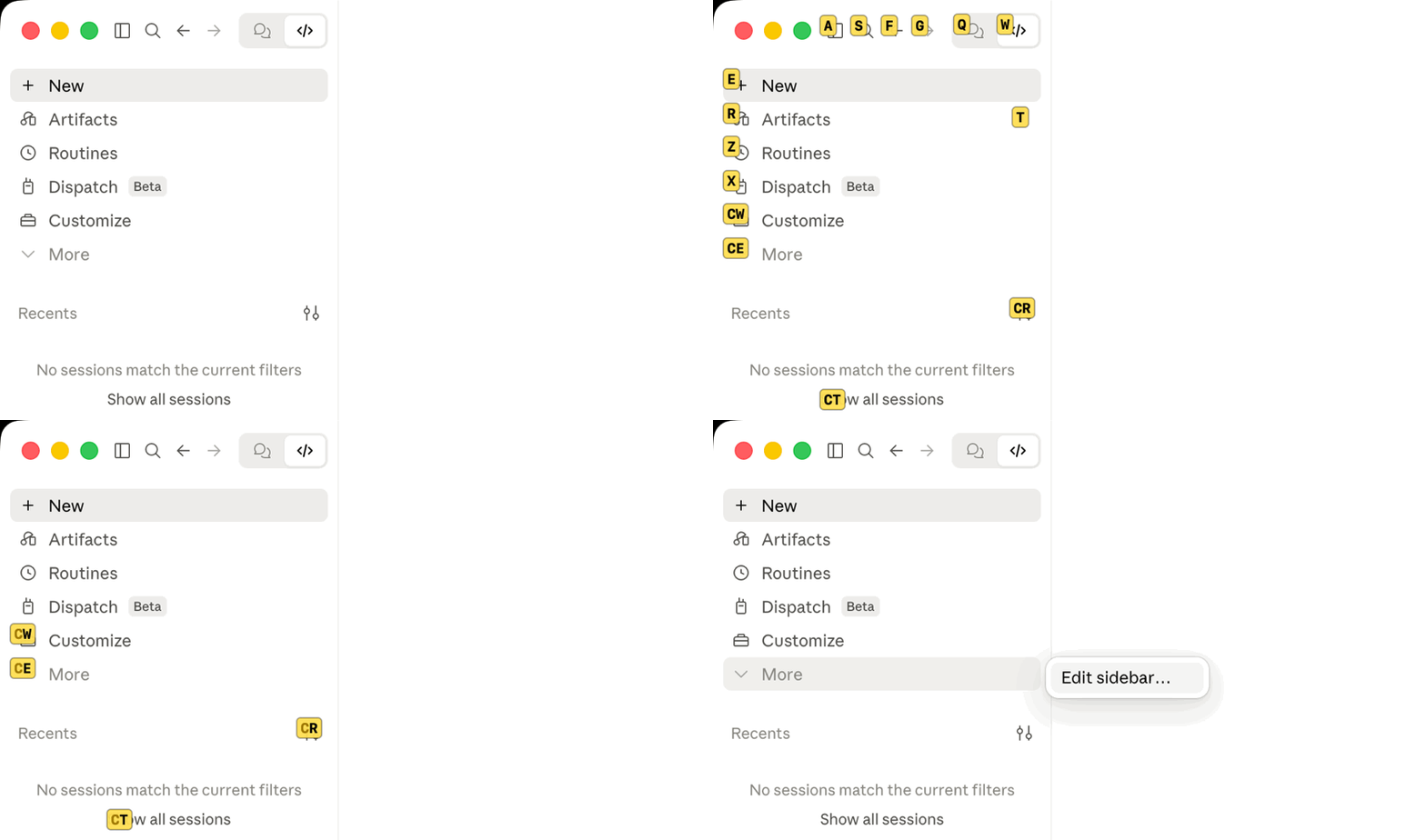
Claude Desktop アプリに Vimium 風のヒントを表示します:`/hintvim` または Ctrl+;。macOS 上の hintvim アプリが必要です。
JeongJaeSoon/hintvim/tree/main/plugin
Claude desktop app 向けの Vimium 風キーボードヒントです。
Ctrl+;を押してラベルを入力すると、そのボタンが押されます。
hintvim は小さな macOS メニューバーアプリです。Ctrl+; を押すと、Claude ウィンドウの Accessibility で公開されている最大 169 個の表示中コントロールにラベルを付けます。サイドバー、タイトルバー、モデルとモードのメニュー、各メッセージのボタンが対象です。ラベルを入力すると、その要素が押されます。マウスは不要です。

Ctrl+;            →  アクセス可能なボタン、リンク、入力欄にラベルを表示
type "sf"         →  その要素を押す
j / k / d / u     →  スクロール
Esc               →  終了
hintvim は非公式のコミュニティプロジェクトです。Anthropic とは関係がなく、承認やスポンサー提供も受けていません。「Claude」は Anthropic, PBC の商標です。
Claude Desktop には多くのショートカット(Cmd+K、Cmd+1…9、Cmd+Shift+F)がありますが、割り当てのないものにはマウスが必要です。作業ディレクトリのピル、モデルとモードのメニュー、メッセージごとの操作などです。ヒントモードなら、コントロールごとにショートカットを用意せずにラベルを付けられます。
macOS 13 以降と Claude Desktop が必要です。
brew install jeongjaesoon/tap/hintvim && hintvim setup
次に システム設定 → プライバシーとセキュリティ → アクセシビリティ で hintvim をオンにします。アプリの初回起動時に macOS が尋ねます。あとは Claude をクリックして Ctrl+; を押すだけです。
formula は Mac 上でソースからアプリをビルドするため Developer ID は不要で、Gatekeeper に止められません。Homebrew はこのビルドで使う Command Line Tools をすでに要求します。
hintvim setup の変更内容Setup は冪等で、各手順を ~/Library/Logs/hintvim/setup.log に記録します。hintvim uninstall はすべてを元に戻します。
~/Library/LaunchAgents/io.github.jeongjaesoon.hintvim.plist を追加してアプリを起動します。Ctrl+; に必要なのはこれだけです。claude plugin marketplace add JeongJaeSoon/hintvim と claude plugin install hintvim@hintvim。Desktop の Code タブに /hintvim コマンドを追加します。"CLAUDE_CODE_ENABLE_FUNCTION_HOOKS": "1" を ~/.claude/settings.json の env に追加します。古いリリースでは、このスイッチがある場合だけプラグイン mod を読み込みます。2.1.287 以降はデフォルトで読み込み、このスイッチを無視します。Setup はスイッチを追加したことを記録し、Desktop が 2.1.287 以降になると削除します。自分で設定したスイッチには触れません。~/.claude を変更したくない場合は hintvim setup --app-only を実行します。Ctrl+; とメニューバーアイコンは使えますが、プラグイン、スイッチ、/hintvim は追加されません。
Claude のプラグインマネージャーから始める場合は、marketplace を追加してプラグインをインストールします(ターミナルで実行するか、Desktop の Code タブで + → Plugins → Add plugin を選びます)。
claude plugin marketplace add JeongJaeSoon/hintvim
claude plugin install hintvim@hintvim
新しい Code セッションで /hintvim:setup を実行します。Claude がアプリをインストールし、Homebrew があればそれを使い、なければソースからビルドして hintvim setup を実行します。プラグインだけではヒントモードを実現できません。仕組みでアプリが必要な理由を説明します。
Claude ウィンドウをクリックして Ctrl+; を押します。
| キー | 操作 |
|---|---|
| Ctrl+; | ラベルを表示または非表示にします。Claude が最前面のアプリのときだけ取得するため、他のアプリはこの組み合わせを使えます。 |
| a s f g q w e r t z x c v | ラベルを入力します。要素が押され、テキストフィールドならフォーカスされます。 |
| j / k | 少し下/上にスクロールしてからラベルを付け直します |
| d / u | 半ページ下/上にスクロールしてからラベルを付け直します |
| Delete | 入力した文字を 1 つ取り消します。何も入力していなければ終了します |
| Esc | 終了 |
| Cmd + 何か | 終了しますが、ショートカットは機能します(Cmd+Tab、Cmd+W) |
ラベル表示中はキーが hintvim に渡り、Claude には届かないため、プロンプトに漏れません。別のアプリに切り替えるとヒントモードが終了します。ウィンドウを移動またはサイズ変更するとラベルも追従します。ウィンドウの閉じる、最小化、フルスクリーンのボタンにはラベルを付けないので、入力ミスでウィンドウを閉じることはありません。
文字は US(ANSI)配列の物理的な位置で読み取るため、韓国語や日本語の入力ソースをオンにしていてもラベルは機能します。Dvorak または AZERTY では QWERTY の位置のキーを入力してください。
メニューバーアイコン(キーボード)はヒントを表示し、Accessibility が許可されているかを示し、アプリを終了します。
Ctrl+; とメニューバーにはアプリだけが必要です。Desktop の Code タブの Local セッション(またはターミナルの claude)では、プラグインが次を追加します。
/hintvim:Ctrl+; と同じです。アプリがない場合はインストール方法を示します。/hintvim-palette:6 つの操作を含むペインです(最後の返信、最後のコードブロック、作業ディレクトリ、セッション id のコピー、コンテキスト使用量の表示、コンパクト)。Desktop ではクリックし、文字のホットキーはターミナルでのみ機能します。/hintvim:setup と /hintvim:doctor:アプリをインストールしたり、ヒントが表示されない理由を調べたりするスキルです。Desktop のプロンプトボックスは、どちらのコマンドの下にも /hintvim isn't a command here. と表示します。組み込みコマンドしか知らないためです。コマンド自体は実行されます。
brew upgrade hintvim && hintvim setup
hintvim は 1.0.0 より前は claude-vimium という名前でした。brew upgrade は claude-vimium のインストールを hintvim に移し、hintvim setup が claude-vimium のログイン項目、プラグイン、状態、Accessibility 項目を削除します。
Setup はアプリを再起動して新しいバージョンを実行します。アプリは Mac 上で(アドホックに)署名され、Developer ID では署名されていないため、macOS はアップグレードされた各ビルドを新しいアプリとして扱います。古い Accessibility 項目はオンのまま表示されますが、もう適用されません。Accessibility の一覧で − を使って hintvim を削除し、求められたらもう一度許可してください。アップグレード間で権限を保てる署名済み・公証済みビルドは #4 で追跡しています。
Claude Desktop を更新してもやり直す必要はありません。アプリは macOS 経由で Desktop のウィンドウを操作し、プラグインは ~/.claude に残り、ログイン項目は mod スイッチを再確認します。
hintvim uninstall && brew uninstall hintvim
uninstall はログイン項目、プラグインとその marketplace、Setup が追加した mod スイッチ、アプリの状態とログを削除します。アプリに対して tccutil reset Accessibility も試します。失敗した場合は、Accessibility の一覧から hintvim を自分で削除するよう案内します。
hintvim doctor を実行するか、Code セッションで /hintvim:doctor を実行します。Doctor はアプリ、ログイン項目、Accessibility 権限、Claude のウィンドウでヒントモードが認識できる要素数、プラグイン、mod スイッチを確認します。失敗した各行に修正方法が示されます。
| 症状 | 修正 |
|---|---|
| Ctrl+; に何も表示されない | Claude が最前面のアプリである必要があります。最後のウィンドウを閉じた場合は Ctrl+; で再び開きます。ウィンドウが戻らなければ Dock の Claude をクリックしてから hintvim doctor を実行します。 |
| Accessibility はオンなのに何も起きない | 古いビルドの項目です。− で削除し、hintvim stop && hintvim start を実行してから、もう一度許可します。 |
| brew untap jeongjaesoon/tap が拒否される | tap にはインストール済みの別の formula があります。tap は残してください。brew uninstall hintvim だけで十分です。 |
| /hintvim が不明 | mod は Setup 後に開始したセッションで、かつ Local セッションでのみ読み込まれます。新しいセッションを開始してください。まだない場合は hintvim doctor が mod を読み込めるか示します。Anthropic はインストール済み mod をリモートで無効にでき、その場合 /hintvim は再び有効になるまで消えます。アプリはプラグインに依存しないため Ctrl+; は動き続けます。 |
| | テスト結果 | |---|---| | macOS | 26.5(Apple silicon)。アプリは universal としてビルドされ、macOS 13 を対象にします。 | | Claude Desktop | 2.7032.0、Claude Code 2.1.280 を同梱(mod スイッチオン) | | Claude Code | 2.1.287(ターミナル、mod はデフォルトでオン) | | 入力ソース | US English、Korean |
ヒントモードは class 名ではなく Accessibility のロールで要素を見つけます(アプリの class 名はハッシュ化され、リリースごとに変わります)。そのため Claude Desktop の更新で影響を受けることはほとんどありません。ただし大規模な UI 再設計では影響する可能性があります。更新後にラベルが表示されなくなった場合は、hintvim doctor のバージョンを添えて issue を開いてください。
Claude Desktop ── Code session ──▶ hintvim plugin (a Claude Code mod)
                                      │ /hintvim → open hintvim://toggle
                                      ▼
Ctrl+; ──────────────────────────▶ hintvim app (menu bar, starts at login)
                                      │ macOS Accessibility API
                                      ▼
                         labels over the whole Claude window
プラグインだけではヒントモードを実現できません。Claude Code mod がフックするのはウィンドウではなく Claude Code エンジンです。描画できるのはエンジン内の場所(ペイン、プロンプト上のバンド、ツール行)だけなので、アプリのサイドバーとタイトルバーには届きません。mod はグローバルキーも登録できません。Button のホットキーは 1 文字だけで、mod 自身のペインにフォーカスがある間しか機能しません。また Desktop ではペインをクリックしてもプロンプトボックスからキーボードを奪えません。
macOS の Accessibility API はウィンドウを認識できます。AXManualAccessibility 経由で要求すると、Chromium はウェブコンテンツと chrome を含む Claude ウィンドウ全体のツリーを公開し、AXPress はクリックと同じハンドラーを発火します。そのため役割を分けます。
app/ はメニューバーアプリです。Ctrl+; 用の Carbon ホットキー、表示中のスクロール領域に切り取ったクリック可能なロールの Accessibility 走査、ラベルを描く透明パネル、表示中にキーを取得するイベントタップを持ちます。必要なのは Accessibility 権限だけで、Input Monitoring は不要です。plugin/ は任意の mod です。hintvim:// URL scheme でアプリに到達し、アプリが起動していなければ同時に起動します。bin/hintvim は周辺の設定、確認、削除を行います。最初の案は mod で、プラグインもその一部です。しかし mod にはこの仕事ができません。
Ctrl+; がありません。/hintvim が消えます。ウィンドウへのスクリプト注入もできません。ウィンドウはリモートの claude.ai を描画し、アプリはデバッガーと注入ライブラリを拒否する強化バイナリで、リモートデバッグのフラグを付けて起動すると終了します。Accessibility API はアプリの外部から動作するため、Desktop の更新や mod スイッチの無効化後も Ctrl+; は機能します。
DevTools スニペット は、ウィンドウ内のウェブページ(サイドバーやタイトルバーは対象外)で同じヒントモードを提供し、設定とヘルプのパネルも備えます。権限もインストールも不要ですが、アプリを再起動するたびにもう一度実行します。このページでは、スニペットを Claude Desktop に恒久的にインストールできない理由も説明します。
まず作者の README で marketplace とプラグイン名を確認してください。コマンドはリポジトリの構成によって変わる場合があります。
claude plugin marketplace add JeongJaeSoon/hintvim
claude plugin install hintvim
Vimium-style keyboard hints for the Claude desktop app.
Press
Ctrl+;, type a label, and that button is pressed.
hintvim is a small macOS menu bar app. Press Ctrl+; to label up to 169 visible controls exposed through Accessibility in the Claude window: the sidebar, the title bar, the model and mode menus, each message's buttons. Type the label and that element is pressed. No mouse.
Ctrl+;            →  labels appear on accessible buttons, links, and inputs
type "sf"         →  that element is pressed
j / k / d / u     →  scroll
Esc               →  leave
hintvim is an unofficial community project. It is not affiliated with, endorsed by, or sponsored by Anthropic. "Claude" is a trademark of Anthropic, PBC.
Claude Desktop ships plenty of shortcuts (Cmd+K, Cmd+1…9, Cmd+Shift+F), but anything without a binding needs the mouse: the working-directory pill, the model and mode menus, per-message actions. Hint mode labels these controls without a shortcut per control.
Requires macOS 13 or later and Claude Desktop.
brew install jeongjaesoon/tap/hintvim && hintvim setup
Then turn on hintvim in System Settings → Privacy & Security → Accessibility. macOS asks the first time the app starts. That's it: click into Claude and press Ctrl+;.
The formula builds the app from source on your Mac, so it needs no Developer ID and Gatekeeper does not stop it. Homebrew already requires the Command Line Tools this build uses.
hintvim setup changesSetup is idempotent, logs each step to ~/Library/Logs/hintvim/setup.log, and hintvim uninstall reverts all of it.
~/Library/LaunchAgents/io.github.jeongjaesoon.hintvim.plist, and starts the app. This is all Ctrl+; needs.claude plugin marketplace add JeongJaeSoon/hintvim and claude plugin install hintvim@hintvim. It gives Desktop's Code tab the /hintvim command."CLAUDE_CODE_ENABLE_FUNCTION_HOOKS": "1" to env in ~/.claude/settings.json, after a backup. Older releases load plugin mods only behind this switch; from 2.1.287 they load by default and ignore it. Setup records that it added the switch, removes it once Desktop is on 2.1.287 or later, and never touches a switch you set yourself.To keep ~/.claude untouched, run hintvim setup --app-only: you get Ctrl+; and the menu bar icon, without the plugin, the switch, or /hintvim.
If you start from Claude's plugin manager, add the marketplace and install the plugin (in a terminal, or + → Plugins → Add plugin in Desktop's Code tab):
claude plugin marketplace add JeongJaeSoon/hintvim
claude plugin install hintvim@hintvim
Then, in a new Code session, run /hintvim:setup. Claude installs the app for you, with Homebrew if you have it or by building from source if you don't, and runs hintvim setup. The plugin alone can't do hint mode: How it works explains why it needs the app.
Click into the Claude window and press Ctrl+;.
| Key | Action |
|---|---|
| Ctrl+; | Show or hide the labels. Claimed only while Claude is the frontmost app, so other apps keep the chord. |
| a s f g q w e r t z x c v | Type a label. The element is pressed, or focused if it's a text field. |
| j / k | Scroll down / up a little, then relabel |
| d / u | Scroll down / up half a page, then relabel |
| Delete | Undo one typed letter, or leave if nothing is typed |
| Esc | Leave |
| Cmd + anything | Leave, and the shortcut still works (Cmd+Tab, Cmd+W) |
While labels show, keys go to hintvim and never reach Claude, so nothing leaks into the prompt. Switching to another app ends hint mode. Labels follow the window when it moves or resizes. The window's close, minimize and full-screen buttons get no label, so a typo can't close the window.
Letters are read by physical position on a US (ANSI) layout, so labels work with a Korean or Japanese input source on. With Dvorak or AZERTY, type the key in the QWERTY position.
The menu bar icon (a keyboard) shows hints, shows whether Accessibility is allowed, and quits the app.
Ctrl+; and the menu bar need only the app. In a Local session of Desktop's Code tab (or in claude in a terminal), the plugin adds:
/hintvim: the same as Ctrl+;. If the app is missing, it says how to install it./hintvim-palette: a pane of six actions (copy the last reply, the last code block, the working directory or the session id; show context usage; compact). In Desktop you click them; their letter hotkeys only work in the terminal./hintvim:setup and /hintvim:doctor: skills that install the app or find out why hints don't appear.Desktop's prompt box prints /hintvim isn't a command here. under either command because it only knows built-in commands. The command still runs.
brew upgrade hintvim && hintvim setup
hintvim was called claude-vimium before 1.0.0. brew upgrade moves a claude-vimium install to hintvim, and hintvim setup then removes claude-vimium's login item, plugin, state and Accessibility entry.
Setup restarts the app so the new version runs. Because the app is signed on your Mac (ad hoc) rather than with a Developer ID, macOS treats each upgraded build as a new app: the old Accessibility entry still shows as on but no longer applies. Remove hintvim with − in the Accessibility list, then allow it again when asked. A signed and notarized build that keeps the permission across upgrades is tracked in #4.
When Claude Desktop updates, nothing needs redoing. The app works on Desktop's window through macOS, the plugin stays installed in ~/.claude, and the login item re-checks the mods switch.
hintvim uninstall && brew uninstall hintvim
uninstall removes the login item, the plugin and its marketplace, the mods switch if setup added it, and the app's state and logs. It also tries tccutil reset Accessibility for the app. If that fails, it tells you to remove hintvim from the Accessibility list yourself.
Run hintvim doctor, or /hintvim:doctor in a Code session. Doctor checks the app, the login item, the Accessibility permission, how many elements hint mode can see in Claude's window, the plugin, and the mods switch. Each failing line names its fix.
| Symptom | Fix |
|---|---|
| Ctrl+; shows nothing | Claude must be the frontmost app. If you closed its last window, Ctrl+; reopens it; if no window comes back, click Claude in the Dock. Then run hintvim doctor. |
| Accessibility is on but nothing happens | The entry belongs to an older build. Remove it with −, then hintvim stop && hintvim start and allow it again. |
| brew untap jeongjaesoon/tap refuses | The tap holds other formulae you have installed. Leave it tapped; brew uninstall hintvim is enough. |
| /hintvim is unknown | The mod loads only in a session started after setup, and only in Local sessions. Start a new one. Still missing: hintvim doctor says whether mods can load. Anthropic can turn installed mods off remotely, and then /hintvim is gone until they turn them back on; Ctrl+; keeps working, since the app does not depend on the plugin. |
| | Tested | |---|---| | macOS | 26.5 (Apple silicon). The app is built universal and targets macOS 13. | | Claude Desktop | 2.7032.0, bundling Claude Code 2.1.280 (mods switch on) | | Claude Code | 2.1.287 (terminal, mods on by default) | | Input sources | US English, Korean |
Hint mode finds elements by their Accessibility roles, not by class names (the app's are hashed and change every release), so a Claude Desktop update rarely affects it. A large UI redesign could. Please open an issue with the versions from hintvim doctor if labels stop appearing after an update.
Claude Desktop ── Code session ──▶ hintvim plugin (a Claude Code mod)
                                      │ /hintvim → open hintvim://toggle
                                      ▼
Ctrl+; ──────────────────────────▶ hintvim app (menu bar, starts at login)
                                      │ macOS Accessibility API
                                      ▼
                         labels over the whole Claude window
A plugin alone can't do hint mode. Claude Code mods hook the Claude Code engine, not the window: they draw only in the engine's own places (panes, the band above the prompt, tool rows), so the app's sidebar and title bar are out of reach. A mod can't register a global key either. A Button hotkey is one letter, and only while the mod's own pane has the focus, and in Desktop clicking a pane doesn't take the keyboard from the prompt box.
macOS's Accessibility API can see the window. Asked through AXManualAccessibility, Chromium exposes the full tree of Claude's window, web content and chrome alike, and AXPress fires the same handlers a click would. So the work splits:
app/ is the menu bar app: a Carbon hotkey for Ctrl+;, an Accessibility walk over clickable roles clipped to visible scroll areas, a transparent panel that draws the labels, and an event tap that takes the keys while they show. It needs only the Accessibility permission, not Input Monitoring.plugin/ is the optional mod. It reaches the app through the hintvim:// URL scheme, which also starts the app if it isn't running.bin/hintvim sets up, checks, and removes everything around them.Mods were the first plan, and the plugin is one. But a mod can't do this job:
Ctrl+;./hintvim disappears.Injecting a script into the window is closed too: the window renders remote claude.ai, the app is a hardened binary that refuses debuggers and injected libraries, and it quits when started with remote-debugging flags. The Accessibility API works from outside the app, so a Desktop update or a mods switch-off leaves Ctrl+; working.
A DevTools snippet gives the same hint mode over the web page inside the window (not its sidebar or title bar), with a settings and help panel. It needs no permissions and nothing installed, but you run it again after each app restart. The page also explains why the snippet can't be installed into Claude Desktop permanently.
make test                                  # Node, shell and Swift unit tests
make app                                   # build/Hintvim.app (universal)
claude plugin validate plugin              # what the mod hooks and calls
claude plugin test plugin                  # plugin/hooks/register.test.tsx
bin/hintvim run from the repository uses build/Hintvim.app, and HINTVIM_MARKETPLACE=$PWD bin/hintvim setup installs the plugin from your checkout. Every rebuild is a new app to macOS, so allow Accessibility again after each one.
See CONTRIBUTING.md for the manual checks a change to the app needs, and SECURITY.md to report a vulnerability. docs/superpowers/ holds the original design spec, plan, and research notes.
If hintvim saves you some clicks, you can sponsor its development.

Ruflo メモリ基盤のプラグイン。AgentDB コントローラーブリッジ(15 個の agentdb_* MCP ツール)、RuVector ONNX 埋め込み(RaBitQ 32x 量子化を含む 10 個の embeddings_* ツール)、WASM HNSW パターンルーター(3 個の ruvllm_hnsw_* ツール)を提供します。mod(ADR-445)として、プロンプトへの安全な任意リコール、秘密をメモリから遠ざける書き込みガード、/agentdb、コンソールが表示するステータスファイルを備えます。

pbir CLI に従うレポートペインで Claude が読み取り、変更する内容を表示しながら、インタラクティブな Power BI レポートの作成、整形、最適化、レビューを行います。


プロンプトの上、ステータス行、トーストに未読 AMP メッセージを表示し、アイドル状態の Claude Code セッションを起こして読ませます。Claude Code 2.1.287 以降が必要です。
