
mpolatcan@mpolatcan
mpolatcan/flowpane
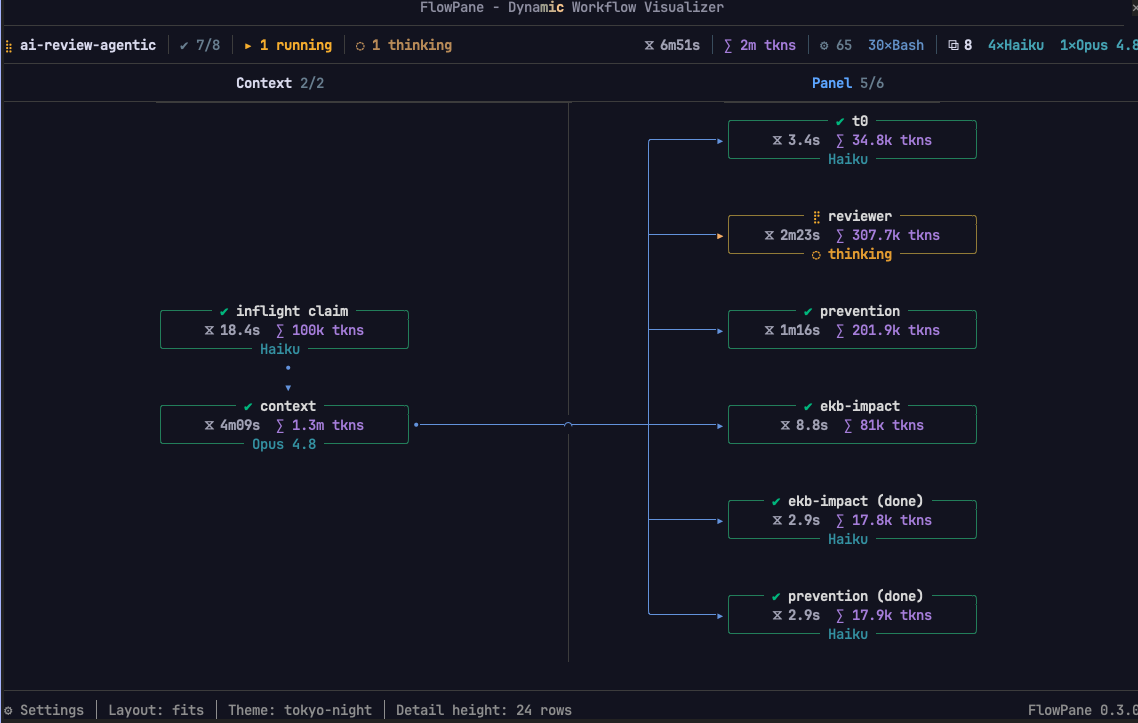
Claude Code 用のライブワークフローペイン。デフォルトの Workflow 進捗リストをフェーズごとのグラフまたはタイムラインに置き換え、各エージェントの状態、タイミング、トークン消費、ツール呼び出し、プロンプトを表示します。
mpolatcan/flowpane
Claude Code の関数フック(アーリーアクセスプラグイン API)上に構築された flowpane は、ワークフロー実行をグラフとして描画します。フェーズごとに 1 列、エージェントはノード、バリアとキャリーはエッジとして表現され、実行中は 1 秒に約 8 回再描画されます。状態(完了/実行中/失敗/切断)で枠付けされたエージェントを、名前、所要時間、消費、モデルとともに表示します。ファンアウト、ループ、早期停止したチェーン、スキップされたフェーズを含む実行の形状。アクティブなワイヤー上を移動する光、エージェントが呼び出しているツール、トークン、ツール呼び出し、モデルの累計などのライブアクティビティ。ノードを押すと、そのプロンプト、すべてのツール呼び出しと入力、およびその結果を含むダイアログが開きます。実行メニューによるセッション内の他の実行のサポート、ネストされたワークフローを独自のエージェントに展開、4 つのレイアウト(横、縦、タイムライン、リスト)と 12 のパレット。インストールは /plugin marketplace add mpolatcan/cc-plugins の後に /plugin install flowpane。関数フックには CLAUDE_CODE_ENABLE_FUNCTION_HOOKS=1 と、ドッキングペイン用に /tui fullscreen が必要です。開発用のデモ監査ワークフローが dev/ に含まれています。Claude Code 2.1.272 が必要です。ペインが読み取る内容はマシンから出ません。
まず作者の README で marketplace とプラグイン名を確認してください。コマンドはリポジトリの構成によって変わる場合があります。
claude plugin marketplace add mpolatcan/flowpane
claude plugin install flowpane@flowpane
Claude Code runs a workflow as a list of agents ticking over. flowpane draws it instead: one column per phase, an agent as a node, the barriers and carries between them as edges, repainted about eight times a second while the run is live.
Built on Claude Code function hooks (Claude Mods), the early-access plugin API from anthropics/claude-code#91870.
| Phases across | Phases down |
| --- | --- |
| | 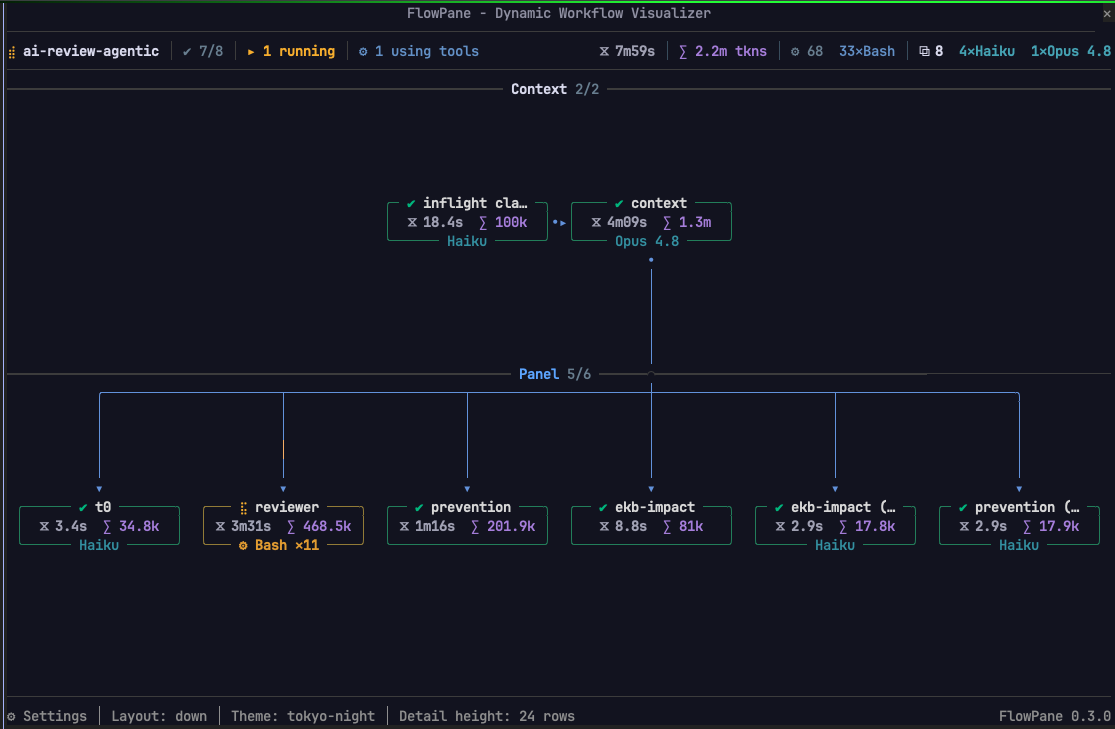 |
|
| Timeline | A node's detail |
| --- | --- |
| 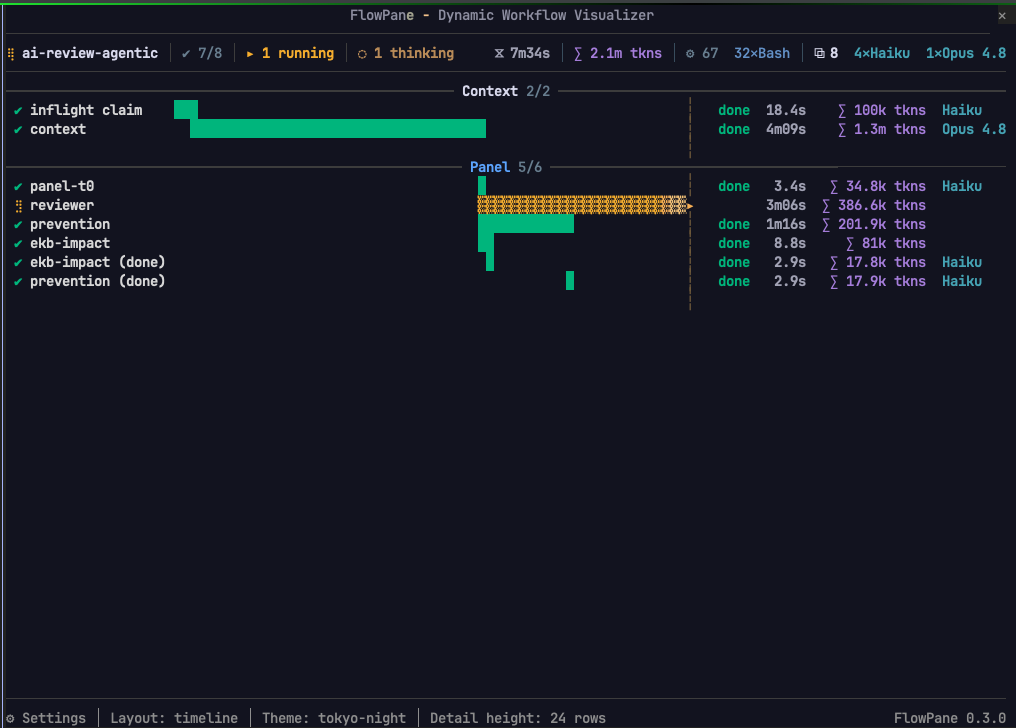 |
| 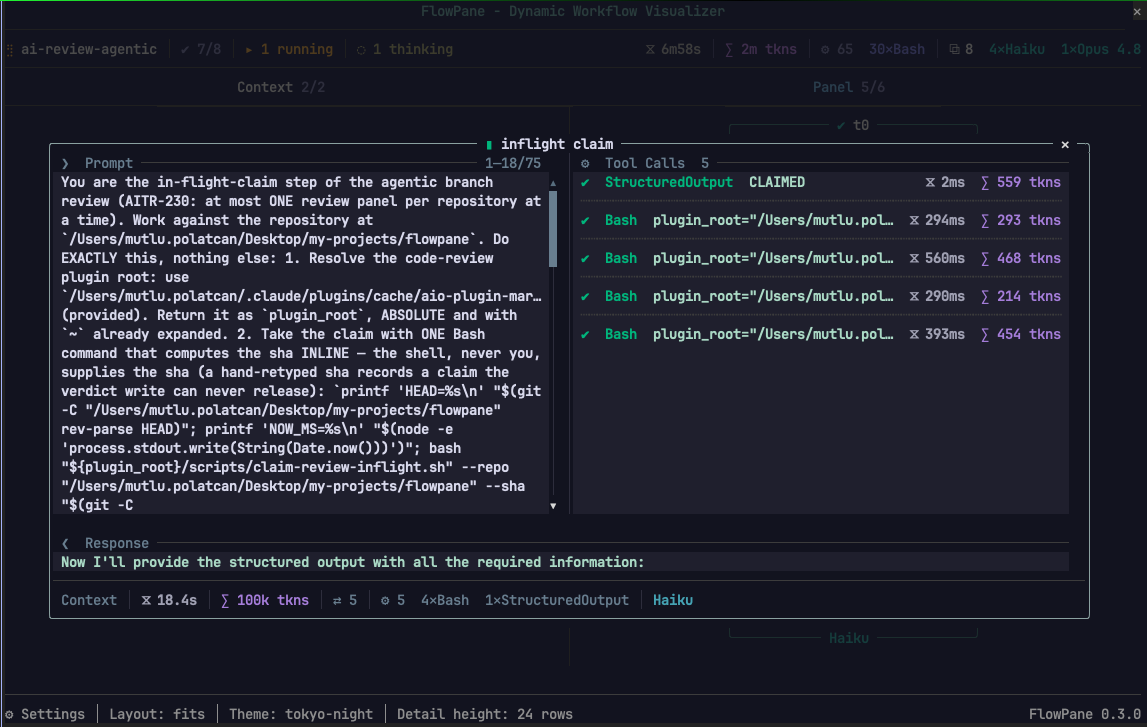 |
|
From the marketplace, inside Claude Code:
/plugin marketplace add mpolatcan/cc-plugins
/plugin install flowpane
Or from a clone, which is also how you work on it:
git clone https://github.com/mpolatcan/flowpane.git
CLAUDE_CODE_ENABLE_FUNCTION_HOOKS=1 claude --plugin-dir ./flowpane
Then run any workflow. The pane opens on launch; /flowpane toggles it
afterwards.
Two things to know before it draws anything:
CLAUDE_CODE_ENABLE_FUNCTION_HOOKS=1 is
required./tui default a pane never draws. Run /tui fullscreen, which docks
the pane beside the transcript from 110 columns; below that it sits inline
above the prompt.Everything sits under the drawing. Click a button, or Tab to it and press Enter.
| Control | What it does |
| --- | --- |
| A node's label | opens that agent's detail dialog; click again to close |
| ⚙ Settings | opens the settings dialog over the drawing |
| flowpane 0.10.0 | the name at the right-hand end of the bottom row: opens what the pane is, what presses it, and where it reads from |
| A setting's value | unrolls that setting's list where it stands; press it again to roll the list up |
| The graph, with any dialog open | takes no presses — it is pushed back behind the dialog until the dialog shuts |
| Layout | across, down, timeline, list, or fits the shape — picked by name |
| Detail height − + | rows the detail dialog takes, 5 to 32; grey at either end of the range |
| Theme | twelve palettes, nine dark and three light — each listed beside three cells of its own |
| ✕ (in a dialog) | closes it, from the dialog's own top corner |
| A tab in the detail dialog | shows that pane across the dialog's whole width; which tab is open is kept from node to node |
| A pass number on a node's row | opens that attempt's detail: ✔ 1 ✔ 2 ✖ 3 is one row and three presses |
| The ▸ on a nested run's name, or its ▸ 23 agents | unfolds that run into its own agents, each one pressable — in any layout. The count on the run's own card takes the same press as the mark on its band. The mark turns ▾ while it is open |
| ▴ / ▾ (in a dialog) | scrolls the open pane three lines. Grey at either end |
| ▴ / ▾ ◂ / ▸ (at the pane's edges) | scrolls the drawing, where it is larger than the pane. A live run is drawn with the window on the phase it is working in, so scrolling away is a peek: it goes back when the run enters a new phase |
| The wheel, over the pane | moves the drawing, or the open dialog while one is open |
| The wheel, over the rail along the foot | moves the drawing sideways — as does the wheel anywhere over a drawing that only goes that way |
| The run's name | opens the session's other runs as a menu under it, once there is more than one; grouped by state, most recent first, each with the second it started on, and opening on the run the pane is drawing. Picking one moves the drawing to it, live or finished |
| ▴ / ▾ (down a run list) | scrolls the runs three rows, in the menu or on the idle pane, with a thumb saying whereabouts in the list they are. The wheel over an open list moves it too |
| A run on the idle pane | draws it. With nothing running the pane lists the session's runs in place of the graph, grouped and timed the same way |
/plugin configure flowpane, or pluginConfigs in settings.json:
| Field | Values | What it does |
| --- | --- | --- |
| orientation | horizontal, vertical, timeline, list, or auto (default) — the last spelled fits in /flowpane and in the settings | horizontal runs the phases across the pane, vertical runs them down it, auto follows the pane's proportions. A node is the same size in every one of them at every size of pane: the drawing is laid out whole and the pane is a window on it, so what it cannot hold it scrolls to and the rails say which way. list draws a row per agent under each phase with no edges between them, which is the compact reading of a long run. timeline swaps the graph for a trace view: a ruled time axis, one bar per agent on it, grouped by phase and indented under the nested runs they belong to, with a marker where now is. |
| detailRows | 5–32 (default 24) | Rows the detail dialog takes when a node is selected, capped at what the pane can inset. |
| paneRows | 6–80 (0 = let the surface decide) | Rows the pane asks for. A dock beside the transcript usually picks its own height. |
| theme | tokyo-night (default), catppuccin, gruvbox, nord, dracula, solarized, monokai, vscode-dark, insider-one, github-light, solarized-light, insider-one-light | The palette everything is drawn in, its ground included. The pane always paints on that ground, footer and all, so the drawing reads the same in every terminal rather than against whatever the terminal happens to be; the ground stops at the drawing's own right edge — see the note under the tree below. |
The repository keeps one run, dev/audit.workflow.js, so there is something to
watch while working on the pane. It is a development tool rather than part of
the plugin: it is not installed with flowpane and it is not offered as a
skill. Run it from a checkout with bun dev/dryrun.ts for the stubbed pass, or
hand the script to the Workflow tool for the real one.
It is a read-only audit of the repository it is run in: two to five minutes, twenty to thirty agents, nothing written to disk. It is shaped to put every case the pane can draw in front of it at once — a branch, a loop, a chain that stops early, a phase never entered, a fan-out, three models, four kinds of tool call and an edge too long to thread between the bands. See docs/demo-workflow.md.
claude plugin test .                  # the test suite
bunx tsc --noEmit                     # typecheck
bun dev/preview.ts                    # the pane, drawn to the terminal, no session needed
bun dev/shot.ts --journal <dir>       # the pane, working, in a browser
bun dev/lines.ts                      # every line of every run at every size
bun dev/audit.ts                      # every run, layout and size: nothing throws, every cell legible
docs/development.md has the rest of the tools and what
each test measures. CLAUDE.md has the constraints and conventions a change
has to keep.
The drawing is a long argument with itself, and the reasoning is kept where the decision is. Each of these says what the pane does, what it did before, and why it changed:
| Document | What it covers | | --- | --- | | docs/pane.md | Which seat the pane takes, and the idle pane | | docs/controls.md | Every control, the bottom row, and the dialogs | | docs/settings.md | The four settings, and how a theme becomes a palette | | docs/header.md | The run line, the phase names, and what moves | | docs/nodes.md | What a node says, and the four states | | docs/graph.md | What the files state, what the pane infers, and how each is drawn | | docs/detail.md | The dialog a node opens | | docs/data.md | The files a run writes, and recovering a run already going | | docs/demo-workflow.md | The audit run under dev/ | | docs/engine.md | What the function-hooks API allows, and what it does not | | docs/development.md | The dev tools, and what the tests measure |
Loads and runs on Claude Code 2.1.272: hooks register, /flowpane lists, the launch
hook fires and reads the journal. 361 tests run over the engine with claude plugin test .; dev/lines.ts checks every line of every run on disk at twelve
widths and ten heights. Nothing the pane reads leaves the machine.
MIT. See LICENSE.

ドキュメント生成、ドリフト検出、API ドキュメント自動化プラグイン。秘密情報を含むドキュメント書き込みやワーカーのディスパッチを拒否する function-hook ガードとしても動作します。
Repowise の Lens は、インデックス化したコードベースをリアルタイムで可視化する Claude Code mod です。Claude が検索・読み取り・編集したファイルが点灯し、インポーターと逆向きの依存関係も強調表示します。影響を受けるファイルとカバレッジテストを示す Flow タブ、健全性の変化と推奨テストを実行するボタン付きのレビュー行も含みます。


Claude デスクトップアプリ用のステータスバー。プロンプト上に表示され、セッション品質、コンテキストの充填量、キャッシュのカウントダウン、5 時間および週間制限を示し、Clawd がセッションの動作を演じます。