
floheissler@floheissler
floheissler/cc-file-explorer
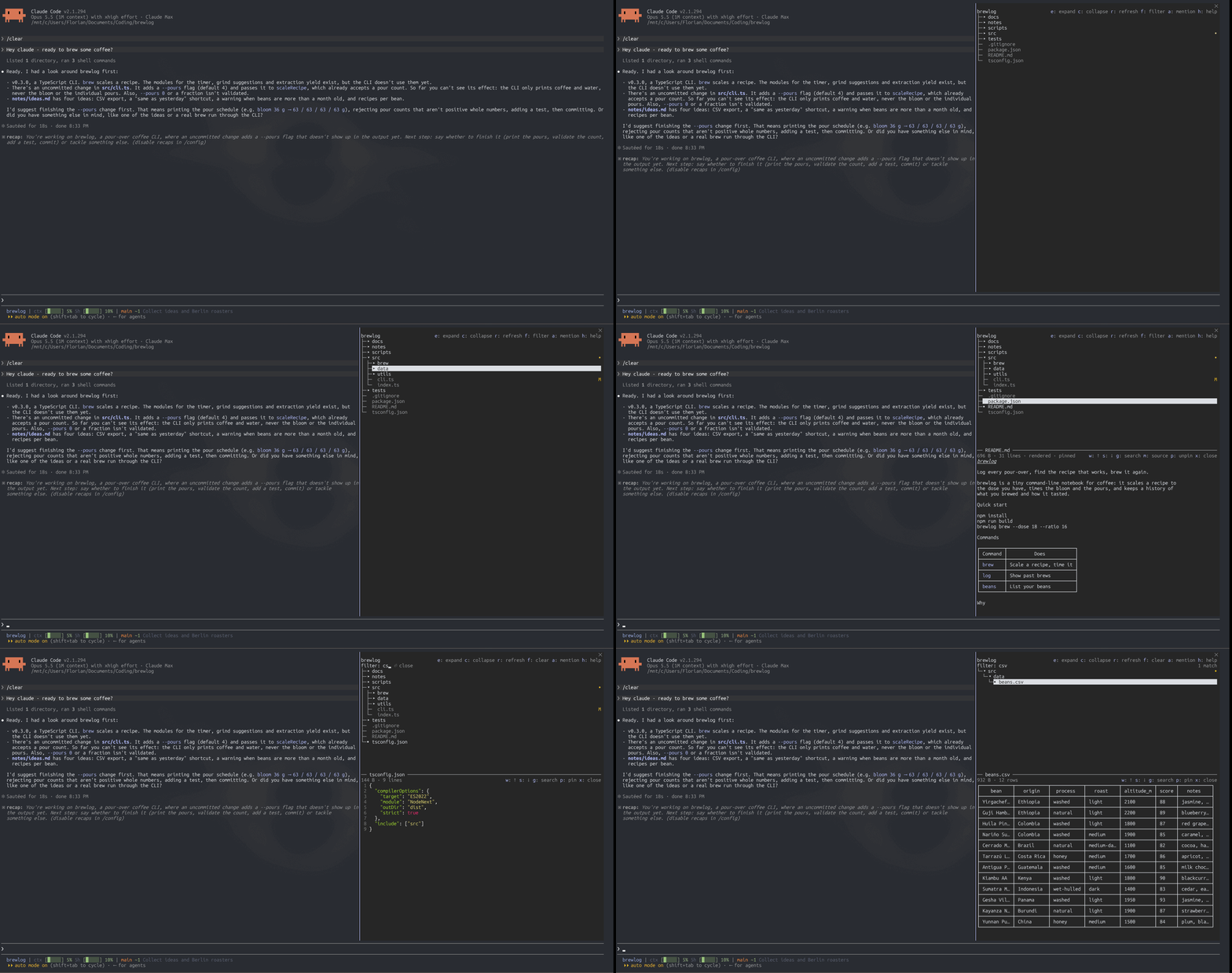
Claude Code 向けのファイルエクスプローラーペインです。`/tree` で会話の横にプロジェクトを開き、セッションを離れることなく閲覧、ファイルのプレビュー、Claude への受け渡しができます。
floheissler/cc-file-explorer
file-explorer は Claude Code の Mod(関数フックのプラグイン)で、Claude Code 自身のインターフェース内、ターミナルおよびデスクトップアプリの Code タブにファイルエクスプローラーのペインを描画します。/tree で、プロジェクトを会話の横にツリーとして開きます。フォルダの展開と折りたたみ、ファイルのプレビュー(レンダリング済み Markdown、CSV/TSV の表、行番号付きで構文色分けされたソースコード)、git のステータスマーカー、このセッションで Claude が書き込んだファイルの表示、名前によるフィルター、プレビュー中のファイル内検索、そしてプロンプトでフォーカス中のファイルを Claude にメンションする機能(a)があります。全画面ドッキングとプロンプト上方への描画に対応し、各プロジェクトで開いたフォルダとプレビューを記憶します。ディスクの変更と git のステータスに追従し、ネットワークリクエストは一切行いません。Claude Code v2.1.287 以降が必要で、PATH 上の git は任意です。インストール:/plugin install file-explorer --marketplace floheissler/cc-file-explorer
まず作者の README で marketplace とプラグイン名を確認してください。コマンドはリポジトリの構成によって変わる場合があります。
claude plugin marketplace add floheissler/cc-file-explorer
claude plugin install file-explorer@cc-file-explorer

A file explorer pane for Claude Code. /tree opens your project beside the
conversation, so you can browse it, preview files and hand them to Claude
without leaving the session.
p).f), or jump to any path with
/tree <path>.g), and step from match to
match with Enter, n and b.a).It is a mod: a plugin of function hooks that draws in Claude Code's own interface, in the terminal and in the Desktop app's Code tab.
/tui fullscreen), the pane
docks beside the conversation and the mouse works; without it, the pane
opens above the prompt and works from the keys. See Use.git on the PATH for the status markers. Without it, the tree, the
preview and the filter still work.claude -p.At the Claude Code prompt in a terminal (v2.1.275 or later for this one-step form):
/plugin install file-explorer --marketplace floheissler/cc-file-explorer
Claude Code asks you to confirm adding the marketplace, then shows the plugin's details: review what it adds and pick a scope. Or, in two steps from your shell:
claude plugin marketplace add floheissler/cc-file-explorer
claude plugin install file-explorer@cc-file-explorer
A user-scope install from the terminal also shows in the Desktop app's Code tab. Like every mod, it runs with your permissions: Privacy lists what it touches, and you can check that yourself before installing.
This repository is its own marketplace, named cc-file-explorer. Marketplaces
other than Anthropic's don't update on their own: run
claude plugin update file-explorer@cc-file-explorer for a new release, or
turn on auto-update for cc-file-explorer in /plugin under
Marketplaces.
To run it from a local checkout for one session instead:
claude --plugin-dir /path/to/cc-file-explorer
Run /tree to open the pane, and again to close it. Where it opens depends
on how Claude Code draws:
/tui fullscreen) on a terminal at least 110 columns wide. The tree and
the picked file's preview show together, the preview following the focus
(see Follow or pin the preview), and the
mouse works.x, Esc or the close mark step back to the tree, and the file's row
keeps the focus. On the tree, Esc or the close mark closes the pane./tree <path> opens the pane onto one entry, or shows it in a pane already
open (it never closes the pane):
The path counts from the project root, or is absolute; under Windows either
separator works, and names match as Windows matches them (readme.md finds
README.md). It takes what you would mention to Claude, too: @src/a.ts,
@"my notes.md" and @a.ts#L10 work, and a name that starts with @
(@types) is tried as typed. A path outside the project, or one the tree does
not list (.git included), is said in a toast, and the pane opens as usual.
The first time /tree opens under the classic renderer, it leaves a one-line
tip about /tui fullscreen, and never again. On a fullscreen terminal too
narrow to dock the pane, it says once a session how wide the terminal must be.
The header shows the tree's keys,
e: expand c: collapse r: refresh f: filter a: mention h: help, and a
previewed file's row its own,
w: ↑ s: ↓ g: search m: source p: pin x: close (a: mention x: back
above the prompt); h opens a help view with all of them.
In a narrow pane (the dock opens 40 columns wide on a 110-column terminal)
the rows shorten to fit. The header's keys become e c r f a h: help, then
h: help alone; the project's name keeps at least 8 columns. A previewed
file's facts shorten from size, lines, mode and pinned to its size, and its
keys step down the same way. Every key keeps working, and the help view's
descriptions wrap to the width.
| Do this | To |
| --- | --- |
| Click a folder, or focus it and press Enter | Expand or collapse it |
| Click a file, or focus it and press Enter | Preview it under the tree (docked), or in the tree's place (above the prompt) |
| Move the focus onto a file, docked, with the preview open | Preview that file; a pinned preview stays where it is |
| p | Pin the preview to its file, or let it follow the focus again (docked) |
| e | Open every folder in view one level deeper; repeat for more |
| c | Close the deepest open folders, one level; repeat for more |
| 1 – 9 | Open folders exactly that many levels deep |
| 0 | Close every folder |
| r | Re-read the tree, the previewed file and git's status at once |
| f | Filter the tree by name: shows the filter's field over the tree, the keyboard in it; again to close the filter |
| g | Search the previewed file: shows the search's field over the preview, the keyboard in it; again to close the search |
| n / b, or Enter on next | Go to the next matching line, or back to the one before, while the search has matches |
| a | Mention the focused row to Claude at the prompt's cursor (@src/, @README.md), or the previewed file when no row has the focus |
| h | Show or hide the help view |
| x, or click a pinned preview's file again (docked) | Close the preview |
| m | Switch a Markdown preview between rendered and source |
| Wheel over the tree or the preview (fullscreen only) | Scroll that part alone, as far per notch as the conversation scrolls (/scroll-speed); the header stays put |
| w / s, Page Up / Page Down | Scroll the preview |
| Tab, Up, Down | Walk the tree; the focus comes in at its first row, Up from there reaches the header's controls, the tree scrolls with the focus, and Down stops at its last row |
| Ctrl+X then an arrow | Resize the pane |
| Esc | Docked, return the keyboard to the prompt; above the prompt under the classic renderer, step back (from a search to its file, from the file to the tree), then close |
e and the digits open at most 200 folders per press and say so when they
stop early; press again to go further.
Keys work while the pane has the keyboard: click it, or press Ctrl+X then Tab.
Docked, an open preview follows the focus: as Tab, the arrows or a click land on a file, the preview shows it from its top. A folder's row and the header's controls leave it as it is. Walking quickly reads only the file the focus stops on, and the file shown stays drawn until the next one is read.
x closes the
preview.p pins the preview to its file, and its row of facts says pinned. The
focus then moves without changing it; Enter or a click on another file
shows that file, still pinned, and on the pinned file closes the preview.p again lets go, and the preview moves to the focused file at once.
Closing the preview lets go too: the next file you preview follows the
focus again.a puts an @ mention of the focused row at the prompt's cursor, as typing
@ and picking the file would: Claude Code reads the file, or lists the
folder, when you send the prompt. With no row focused it mentions the
previewed file, and above the prompt the file in view.
/, and a path with a space (or one a bare mention would cut short,
such as notes.txt~) is quoted: @"My Notes/plan.md".@../README.md after a shell cd src, and absolute once the
session has left the project.# cannot be mentioned (Claude Code reads what follows it
as a line range), and a toast says so, as it does when the prompt is
behind a dialog.Branch lines as the tree command draws them (├─, └─ for the last
entry of a folder, │ while a folder continues), dim beside the names.
The session's project root in Windows File Explorer's order: every folder
before any file, and within each, dot names first and the rest sorted as
people sort them (file2 before file10).
Every entry but .git, git-ignored ones (node_modules/, build output)
included, as other file explorers show them.
Up to 2,000 entries per folder; a note counts the rest.
The folders you left open in this project. Every change to the open
folders is saved for the project, with the
preview, and a session's first /tree opens
them again, as do /clear, /resume and /branch; later opens in a
session keep that session's own. The 50 projects changed most recently are
remembered, and a saved folder that is gone stays closed.
Names too long for the pane cut in the middle, measured in terminal columns as Claude Code measures them: CJK and most emoji take two, accents none, and a cut never splits a character.
Markers at the right end of a row, in a column of their own (h lists
them; the colors follow your Claude Code theme):
| Marker | Means |
| --- | --- |
| M (yellow) | Changed since the last commit, staged or not |
| A, R (green) | Staged as new, or renamed |
| ? (green) | New, not tracked by git yet |
| D (red) | Removed from git but still on disk (git rm --cached) |
| U (red) | In a merge conflict |
| ! (dim) | Ignored by git, or inside an ignored folder |
| • | A folder with changes inside, in the color of the strongest |
| ✻ (Claude's color) | Claude wrote it this session with Write, Edit or NotebookEdit; on a folder, something inside |
The letters are git status --short's. Ignored entries keep the tree's own
styling (folders bright, files dim) and only gain their !. Outside a git
repository, or without git, rows show only Claude's marks. A root inside a
repository marks its own entries; a root inside an ignored folder is
ignored whole.
The tree and the open preview keep up with the disk:
ls or git status), the
open folders and the previewed file are read again.git pull or another terminal
appear within a few seconds. A check looks at at most 64 folders, the
rest taking turns, and lists again only the folders that changed. A
hidden or closed pane checks nothing.r, after Claude's edits and
commands, and when a check found a change, never on every check. Each
check also looks at the repository's index and HEAD, so a commit, a
stage or a checkout in another terminal shows within a few seconds. A
file edited in place outside Claude moves neither its folder nor the
index: its M shows at the next read (press r).f shows a field over the tree and puts the keyboard in it. As you type,
the tree narrows to the files and folders whose names match, under the
folders that hold them, opened; the field's row counts the matches.
readme finds README.md), and
every word must match (button test finds Button.test.tsx). A word
with a / matches the path from the project root (src/comp).e, c and the digits work on it. A matched folder opens to everything
it holds.f again closes the filter. The whole tree comes back as it was, with a
file picked while filtering shown in it, its folders opened.In a git work tree, the filter searches what git lists: the tracked files,
the untracked ones it does not ignore, and what it ignores by name only, so
node_modules and dist match as folders but what they hold does not.
Elsewhere it walks the folders, at most 1,000 of them. It shows at most 500
matches (500 of 2,140); type more to narrow. The list is read when the
filter opens, and again after Claude's edits, a press of r, or a change
the checks notice in a folder the filtered tree shows.
g shows a field over the preview and puts the keyboard in it. As you type,
the preview moves to the first matching line from where the search started,
and the field's row counts the matches (2/9).
needle finds Needle); one
with a capital letter matches case exactly. The query matches as typed,
spaces included; there are no patterns.next, so Enter
again goes to the next match, and again. n goes to the next match and
b back to the one before, wherever the focus is but in the field; both
wrap around the file's ends. With nothing typed, Enter closes the search.n starts from its top. g again, or
closing the preview, closes the search.| File | Preview |
| --- | --- |
| .md, .markdown, .mdx | Rendered Markdown, or its source with m |
| .csv, .tsv | A table under its header row; long cells are cut at 32 columns, or shorter so the table fits the pane's width |
| Any other text | Source with syntax colors by extension, and line numbers; long lines wrap, and the preview scrolls until the file's last line shows |
| Binary, empty, over 2 MB | A notice in place of the text |
The preview is saved for the project with the open folders: the file it
shows, whether it is pinned, and whether Markdown shows as source. A
session's first /tree opens it again from the file's top, as do /clear,
/resume and /branch; above the prompt the tree shows first, as always. A
saved file that is gone opens no preview.
File names and text are drawn safely: control characters show as their
Control Pictures (an escape as ␛, a tab in a name as ␉), bidirectional
controls and other unsafe characters as �, and long runs of combining marks
are cut. A file cannot send escape sequences to your terminal or reorder a
name.
file-explorer runs inside Claude Code on your machine, with your permissions, as every mod does. It only reads:
a put there.a, to set the mention off from
the words around the cursor.Write, Edit, NotebookEdit, Bash and PowerShell calls, to
refresh the pane and mark the files Claude wrote. It passes them on
unchanged and never holds one.It makes no network requests, never calls a model, and writes no files of its
own: nothing it reads leaves your machine. It reads no credentials and no
environment variables. The one program it starts is git, read-only
(status, ls-files, rev-parse), in the project's own folder, to draw the
status markers and list the files the filter searches, with optional locks
off so it never gets in the way of your own commits. Between sessions it keeps two things in the store Claude Code keeps
for each plugin: whether its one-time fullscreen tip was shown, and for the
50 projects you changed most recently, the open folders and the previewed
file, as paths relative to each project, with the preview's pin and Markdown
mode.
To check this before you install, clone the repository and run
claude plugin validate .: it lists every event the mod handles and every
call it makes, read from the source. How it works explains
each one.
| Platform | Status |
| --- | --- |
| Linux, WSL2 | Tested with Claude Code 2.1.294 |
| Windows | Smoke-tested on native Windows (2026-10-08). Drive roots (C:\), shares (\\server\share) and WSL's share (\\wsl.localhost\…) are covered by tests |
| macOS | Not tested. Paths are POSIX, as on Linux, and composed and decomposed accents in names both draw |
| Desktop app (Code tab) | Draws there from v2.1.286, per the mods docs; the tests mount the pane on its surface too |
\\?\ paths are refused; both are the engine's rules for $.fs.git on the PATH. They are left out where git cannot
answer within 10 seconds, on a share it cannot open (\\wsl.localhost\…
from Windows), or in a repository git holds unsafe (safe.directory). A
status larger than 4 MB marks what fits.hooks/register.tsx is the hooks module; the rest of hooks/ is its parts.
| Event | What the hook does |
| --- | --- |
| session.start | Registers /tree [path]; after a reload of the module, starts the checks again for a pane still open |
| command.run of tree | Opens the pane on its tree, focused (above the prompt: up to 40 rows, closed by Esc under the classic renderer), reads git's status beside it, and starts its checks for outside changes, or closes it when it is shown; a session's first open starts from the project's saved folders and preview; leaves the one-time tip. With a path, closes a filter first, places the path under the root (an absolute one spelled through a link by where it lands), finds it folder by folder, each folder read afresh, opens its folders, picks a file, and moves the whole tree's window to its row, never closing the pane |
| ui.render of the Pane | Draws for where the pane sits. Docked: the header, the filter's row while it is shown, the tree's window (filtered while the filter holds a query) and, set off by a blank row and a rule with the file's name, the preview's window under the search's row while it is shown, each exactly as tall as its region. Above the prompt: one view, the tree or the file or the help, as tall as its content. Rows carry their markers, and a searched source its bars. Reads what the drawing needs but lacks |
| ui.scroll of the pane | Moves the tree's or the preview's own window by the region under the pointer, as far as the wheel's rows say; the engine's window over the pane stays still |
| ui.focus in the pane | Keeps the focused row and its neighbors in view, so the arrows always have a drawn row to move to, and lands the focus where that row is drawn after the window moves; brings the focus into the pane at the tree's first row, ahead of the header's controls, and wraps it back there; keeps the focus off the hidden digit keys; records where the focus rests, for a to mention the row it marks; docked, shows the file it lands on in an open preview that is not pinned. The row /tree <path> revealed keeps the focus's start until you move it, and the row a mentioned until the focus lands anywhere |
| ui.close of the pane | Above the prompt, a person's close steps back first: from a searched file to the file, from the file or the help to the tree, from a filtered tree to the whole tree; a close that goes through stops the checks for outside changes |
| tool.call of Write, Edit, NotebookEdit, Bash, PowerShell | After a call that may have written (not held read-only, not denied), re-reads an open pane's tree, preview, git status and, while filtering, file list once Claude pauses; after an edit that went through, marks its file as written this session |
| classic.SessionStart after /clear, /resume, /branch | Forgets what was read, as the session state resets, and opens the tree and the preview again where the project's view was saved |
It calls $.session.root, $.session.cwd, $.fs.list, $.fs.stat,
$.fs.read, $.process.run, $.clock.after, $.command.register,
$.prompt.read, $.prompt.fill, $.ui.open, $.ui.close, $.ui.panes,
$.ui.resolve, $.ui.invalidate, $.ui.focus, $.ui.log, $.ui.toast,
$.store.get, $.store.set, $.store.delete, $.store.keys and its
own $.state. It makes no network calls and writes no files of its own.
The one process it starts is git, read-only, in the project: git ls-files for the filter's file list, and
for the markers git rev-parse --show-prefix --absolute-git-dir, then git status --porcelain=v1 -z --untracked-files=all --ignored=matching -- .. Every run has
GIT_OPTIONAL_LOCKS=0, so it never takes a lock a commit beside it needs
or writes the index, the C locale, and a timeout. It reads the prompt's
draft only when you press a, to set the mention off from the words
around the cursor. What it keeps between sessions lives in the store
Claude Code keeps for each plugin (~/.claude/plugins/store/): whether the
fullscreen tip was shown, and for the 50 projects changed most recently,
the open folders and the previewed file, as paths relative to each
project's root, with the preview's pin and Markdown mode.
claude plugin validate . prints the same list from the source.
The person's view (open folders, the previewed file and whether it is
pinned, where each window stands, the filter's and the search's queries) and the files Claude
wrote this session live in
$.state, so they survive a reload of the module and /clear starts
afresh; what was read from disk, the filter's file list and git's status
among it, lives in the module and is read again as needed. The whole
tree's open folders are also saved for the project (hooks/saved.ts), so
a session's first /tree and /clear, /resume and /branch open them
again. Each project has a store key of its own, expanded: and its root,
so sessions in different projects never write over each other; of two
sessions in one project, the later change wins. A filtered tree's open
folders are not saved.
Install the working copy once, from the checkout as a local marketplace. A local marketplace whose entry is a relative path is read in place, so every session runs your working copy:
claude plugin marketplace add /path/to/cc-file-explorer
claude plugin install file-explorer@cc-file-explorer
After an edit, run /reload-plugins in a session to load it. For a session
that hot-reloads on every save instead, start it with
claude --plugin-dir /path/to/cc-file-explorer; that needs file watching,
which a WSL checkout under /mnt/c does not reliably get.
Before each commit:
claude plugin validate --strict .   # what the module hooks and calls, and anything the engine would refuse
claude plugin test .                # the tests under tests/
tsc -p .                            # type-check against this build's API
tsc reads the types Claude Code lays in .claude-plugin/types/ (ignored by
git) when it loads the mod with --plugin-dir; start one such session after a
Claude Code update to refresh them.
hooks/cell-widths.ts is generated: node scripts/cell-widths.mjs rebuilds
it from the Unicode Character Database with the width rules of Bun's
stringWidth, which Claude Code lays text out with. Re-run it, with the
versions in the script updated, when Claude Code moves to a Bun on a newer
Unicode version.
The version lives in .claude-plugin/plugin.json alone; bump it with every
release, because users only receive a release whose version changed.
If /tree saves you time, buy me a few tokens on Ko-fi.

MIT © Flo Heissler

ドキュメント生成、ドリフト検出、API ドキュメント自動化プラグイン。秘密情報を含むドキュメント書き込みやワーカーのディスパッチを拒否する function-hook ガードとしても動作します。

Claude デスクトップアプリ用のステータスバー。プロンプト上に表示され、セッション品質、コンテキストの充填量、キャッシュのカウントダウン、5 時間および週間制限を示し、Clawd がセッションの動作を演じます。

databricks CLI に沿って Databricks のワークスペース、Unity Catalog、コンピュート、ジョブ、パイプライン、アプリ、ダッシュボードをツリー表示する /databricks-pane を提供する Claude Code プラグイン mod。ライブハイライト、プロファイル切り替え、CLI 引数のコピーにも対応します。
