
chrisjainsley@chrisjainsley
chrisjainsley/claude-dotnet-workflow-kit
.NET チーム向けの、計画からレビューまでを予算管理する納品ワークフロー。start、plan、implement、test、review、next を使い、Claude Artifacts の計画ページとレビュー ページを1つのプロファイルで設定し、プロンプトの上に進捗バーを表示します。
chrisjainsley/claude-dotnet-workflow-kit
.NET チーム向けの Claude Code プラグインです。チケットから計画、実装、レビュー、QA への引き渡しまで作業を進めます。語数の上限を適用した計画ページとレビュー ページを作るので、各段階を承認する前に提案内容と結果を確認できます。
1つのプロジェクト プロファイルで、アーキテクチャ、テスト、トラッカー、QA ワークフローを設定します。6つのスキル start、plan、implement、test、review、next はまとめてでも単独でも使え、チケット トラッカーや Artifact ツールがなくても動きます。
インストール | ワークフロー | スキル | 進捗バー | /goal | ブランディング | プロファイル リファレンス | dotnet-claude-kit | Jev | コントリビュート
ターミナルで実行します。
claude plugin marketplace add chrisjainsley/claude-dotnet-workflow-kit
claude plugin install dotnet-workflow-kit@dotnet-workflow-kit
次に、プロジェクトから Claude Code でセットアップを実行します。
/dotnet-workflow-kit:setup
セットアップではチームについて質問し、.claude/dotnet-workflow-kit.json に書き込みます。このファイルをコミットすれば設定を共有できます。ワークフローを変更したら、もう一度セットアップを実行します。
スクリプトには Python 3.11 以降が必要です。Pillow は任意です。ない場合、計画ビルダーは画像を縮小せず元のサイズで埋め込みます。
このリポジトリをクローンした場所からターミナルでセットアップする場合:
python scripts/setup.py
チケット ID で開始します。tracker が none の場合は短い slug も使えます。
/dotnet-workflow-kit:start 1234
パイプライン ドライバーで続行するか、目標で包んで次のゲートまで動かします。
/dotnet-workflow-kit:next
/goal /next has stopped at a gate
ドライバーはブランチ、PR、保存済み状態を確認し、最初に残っているステージを実行します。計画への回答や承認、レビューの判断、ブロッカーで停止します。レビュー チェックポイントまでは、呼び出しによってコミット、プッシュ、ドラフト PR の作成、設定済みデプロイ ラベルの適用が許可されます。このキットがマージすることはありません。マージは毎回、人が承認します。
| ステージ | 担当 | 結果 | |---|---|---| | 0. Start | Agent | ブランチを作成してプッシュします。トラッカーを設定している場合は項目を割り当て、アクティブ化します。 | | 1. Plan | Agent、その後あなた | 計画ページを作成します。あなたが未解決の質問に答えるか、承認します。 | | 2. Implement | Agent | 計画を1コミットにつき1レイヤー実装し、レビュー スイープを実行して発見事項を修正、検証します。 | | 3. Test | Agent | スイートを実行し、設定した環境で計画のシナリオを実行します。失敗を修正して再実行します。 | | 4. Review | Agent、その後あなた | 最終差分、発見事項、QA の証拠を1ページにまとめます。あなたが承認するか差し戻します。 | | 5. Pull request | Agent、その後あなた | スレッドを解決してチェックを通します。承認後、QA レポートを投稿し、ラベルを付けて PR を準備完了にします。マージはあなたが行います。 |
変更を要求すると、メモと発見事項ごとの修正または受け入れの選択を付けて、パイプラインは実装へ戻ります。承認されるまでドラフトはドラフトのままです。
ID、課題 URL、未追跡の slug から作業を始めます。branch_pattern を使い、base_branch からブランチを作成してプッシュします。トラッカーがある場合は項目を user に割り当て、設定されたアクティブ状態へ移します。対応していればセッション名を変更し、plan に引き継ぎます。
実装計画に使います。チケットとコードベースを読み、plans/<id>-<slug>/plan.md に書き込み、plan.html を作ります。セクションはアーキテクチャに沿い、テスト シナリオ、決定、リスク、未解決の質問を含みます。公開前にスクリプトがセクションの予算を検査します。
stack.frontend を設定し、チケットがデザインのない画面を変更する場合、このスキルはまず画面を描きます。Claude Code の /design コマンドまたは Design canvas Artifact タイプを使い、計画ページの Designs セクションにアートボードを埋め込み、編集可能なキャンバスへのリンクを添えます。トラッカーから提供されたデザインはそのまま使い、キャンバスは作りません。
Artifact ページで回答を選び、Approve または Revise the plan を選択して Send answers を押します。ページは選択をセッションに渡し、セッションが計画へ反映します。Approve ならそのまま Implement に進みます。ページに Claude へ「decided」と伝えるよう表示された場合、セッションに接続できていません。チャットでその語を伝えると、スキルが保存済みの選択を読み取ります。

承認済みの計画を構築します。計画のレイヤーを順に進み、1つにつき1コミット作成します。testing.tdd が strict の場合は先にテストを行い、その後レビュー スイープを実行します。読み取り専用レビューアーは並列、クリーンアップと検証は順番に進みます。組み込みレビューアーは bug-hunt と conventions です。プロファイルでは補助レビューアーと Codex のセカンド オピニオンも有効にできます。テスト前にブランチ上の発見事項を修正し、足りないツールは理由付きでスキップ一覧に表示します。このスキルはファイルを編集します。
Test ステージを実行し、テスト内容を記録します。ビルドとスイートを実行し、qa.environment で承認済み計画のシナリオを実行します。環境にデプロイが必要ならドラフト PR を開き、qa.deploy_label を適用します。その後、QA レポートまたは QA チーム向けのテスト ノートを書きます。
| モード | 内容 | 投稿 |
|---|---|---|
| Report | Given/When/Then シナリオ、Pass/Fail/Blocked の結果、証拠(API リクエストとレスポンスの組、各ステップを証明するクエリ結果、シナリオごとのスクリーンショットと動画を見えるグリッドに配置)、概要、未テストの条件。 | 承認後、qa.evidence に従って投稿します。 |
| Notes | 変更内容、ペルソナごとの手順、テスト データ、エッジ ケース、範囲、環境、フラグ。 | 承認後、qa.evidence に従って qa-team に投稿します。それ以外はチャットに出力します。 |
レポートは実環境での受け入れ実行と手動チェックを対象にします。単体テストと統合テストのスイートは QA の証拠になりません。ノートは承認済み計画の Specs から作成し、計画がない場合は差分から作成します。次でノート モードを選びます。
/dotnet-workflow-kit:test notes
ブランチまたは PR のレビューに使います。承認済み計画、実際の差分、スイープの発見事項、QA の証拠を review.md と review.html にまとめます。ブランチに新しいスイープがなければ先に実行するため、このセッションで実装していないブランチもレビューできます。
ページには判定数、計画と納品物の比較、変更図(クリックで全サイズを開く)、完全な差分へのファイル リンク、発見事項、QA レポート、ロールアウト チェックリストが含まれます。Approve または Request changes を選び、Send decision を押します。ページは判断をセッションに渡し、セッションは未解決の発見事項ごとの修正または受け入れの選択を読みます。Approve ならそのままプル リクエスト ステージへ進みます。ページにそう表示されたら、チャットで「decided」と伝えます。

現在のステージからワークフローを実行します。~/.claude/dotnet-workflow-kit/pipeline/<slug>.json とともにライブ シグナルを読み、ステージ完了を更新します。ライブの証拠は保存済み状態より優先されます。新しいコミットより古いスイープ、テスト実行、レビューは再実行が必要です。0.5.0 が書いた状態ファイルは初回読み込み時に移行されます。
ステージを実行せずに進捗を確認するには:
/next status
スキルは実行するステージの名前になりました。旧名にエイリアスはありません。保存済みプロンプトや /goal のテキストを更新してください。
| 変更前 | 変更後 |
|---|---|
| start-ticket | start |
| visual-plan | plan |
| next 内の Execute ステージと mega-review | implement(スイープは skills/review/sweep.md にあります) |
| qa-report と next 内の QA ステージ | test |
| visual-review | review |
| Draft PR、Resolve comments、Publish、hand off ステージ | next ステージ 5、Pull request |
このキットには、ターミナルとデスクトップ Code タブのプロンプト上に進捗バーを描く Claude Code mod が含まれます。セッション自身のブランチにある作業項目を表示します。チケット ID と短いタイトル、ステージごとの区画があるバー、現在のステージ、割合、Claude が今していることを示します。あなたを待つステージは琥珀色になります。バーは start、plan、next が書き込むパイプライン状態ファイルを読みます。
同じリポジトリの別ブランチで過去 1 日に触られた項目は、バーの末尾に +N チップとして表示されます。そのどれかがあなたを待つと琥珀色になります。チップまたは /sessions を押すと Sessions ペインが開き、各項目が Needs you、Running、Done に分類されます。開いている項目はステージと状態を持つカードで、開くべきセッションのブランチ名を示す Show ボタンがあります。閲覧中の項目には紫の縁、あなたを待つ項目には琥珀色の縁が付きます。プラグインはアプリを別セッションへ切り替えられないため、Show は場所を示すだけです。完了した項目は1行ずつ表示され、×で1つを隠し、Dismiss all ですべてを隠せます。別の項目がゲートに到達したときのトーストは初期状態で無効です。アプリ自身の通知が、あなたを待つセッションをすでに知らせるためです。ペインの最後の行で有効にできます。/progress はバーを表示または非表示にし、完了した項目の×でそれを隠します。
プル リクエストがマージまたはクローズされたとき、または開始したワークツリーがなくなったとき、項目は自動的に閉じます。ワークツリー チャットをアーカイブするとワークツリーはなくなります。/progress done で現在のブランチの項目を手動で閉じられます。閉じた項目は全ステージ完了と表示され、1日後に行が消え、scripts/close_items.py が状態ファイルを削除します。PR チェックは十分ごとに gh(Azure Repos では az)へ問い合わせます。
プラグインをインストールするとバーは自動的に有効になります。新しいセッションでは mods が読み込まれるため、何も有効化する必要はありません。作業項目を開始するまでは空のままです。組織の管理設定でユーザーがインストールした mods をブロックできます。たとえば allowManagedModsOnly です。
/next は1ターンの中でステージを順に実行しますが、ターンが早く終わっても再起動はありません。キットの hooks は実行の前半と後半をそれぞれ目標で包みます。
| タイミング | hooks が設定するもの |
|---|---|
| 計画が承認されたとき | /goal /next has reached the review checkpoint |
| レビューが承認されたとき | /goal complete /next: the pull request is ready |
各目標は、その半分を終えた /next のメッセージで達成されるため、判断中に再プロンプトせず自動で消えます。/next がブロッカーで停止している間、hooks は回答するまで目標を静かに保ちます。計画ページまたはレビュー ページから送信すると Send to Claude がセッションを起こし、承認すれば実行は自動で続きます。ページがセッションに接続できない場合はその旨を表示します。その場合はセッションに「decided」と伝えてください。
function hooks がない場合は、各ゲートの後に自分で目標を設定します。
/goal /next has stopped at a gate
ツール権限の確認には入力が必要な場合があります。パイプラインがブロッカーを報告したら、続行する前に解決してください。
Artifact ツールが使えない場合は、セットアップで artifacts を false にします。スキルは同じ HTML ページを作り、開くためのローカル ファイル パスを示します。
ローカル フォームでは回答や判断を保存できません。質問番号と選択肢、または「approve」か「changes」と発見事項の判断をチャットで返信してください。ロールアウト チェックリストのチェックは保存されないため、キットの外でロールアウトを追跡します。Artifact ツールなしで実行するを参照してください。
計画ページとレビュー ページは Delivery Labs の色を使い、そこへリンクする帰属フッターを付けます。セットアップまたはプロファイル ファイルで branding を false にすると、フッターなしのニュートラルな配色になります。
セットアップはプロジェクトに .claude/dotnet-workflow-kit.json を書き込みます。プロファイルの解決は、明示的なパス、プロジェクト ファイル、ユーザー ファイル ~/.claude/dotnet-workflow-kit.json、デフォルトの順です。不足するフィールドにはデフォルト値が入ります。
下の各行は、ドット形式で示すネストしたフィールドを含め、1つのフィールドを示します。たとえば testing.tdd は i にあります
まず作者の README で marketplace とプラグイン名を確認してください。コマンドはリポジトリの構成によって変わる場合があります。
claude plugin marketplace add chrisjainsley/claude-dotnet-workflow-kit
claude plugin install dotnet-workflow-kit
A Claude Code plugin for .NET teams that takes work from a ticket through planning, implementation, review and QA hand-off. It builds plan and review pages with enforced word budgets, so you can read the proposed work and the results before approving each.
One project profile sets your architecture, tests, tracker and QA workflow. Use the six skills, start, plan, implement, test, review and next, together or on their own, with or without a ticket tracker or the Artifact tool.
Install | Workflow | Skills | Progress bar | /goal | Branding | Profile reference | dotnet-claude-kit | Jev | Contributing
Run in a terminal:
claude plugin marketplace add chrisjainsley/claude-dotnet-workflow-kit
claude plugin install dotnet-workflow-kit@dotnet-workflow-kit
Then run setup in Claude Code from your project:
/dotnet-workflow-kit:setup
Setup asks about your team and writes .claude/dotnet-workflow-kit.json. Commit that
file to share the settings. Run setup again when your workflow changes.
The scripts require Python 3.11 or later. Pillow is optional; without it, the plan builder embeds full-size images instead of downscaling them.
For terminal setup from a clone of this repository:
python scripts/setup.py
Start with a ticket ID, or a short slug when tracker is none:
/dotnet-workflow-kit:start 1234
Use the pipeline driver to continue, or wrap it in a goal so it keeps going until the next gate:
/dotnet-workflow-kit:next
/goal /next has stopped at a gate
The driver checks the branch, PR and saved state, then runs the earliest unfinished stage. It pauses for plan answers or approval, the review decision, and blockers. Invoking it authorizes commits, pushes, a draft PR and configured deployment labels before the review checkpoint. The kit never merges; a person approves every merge.
| Stage | Who | Result | |---|---|---| | 0. Start | Agent | Create and push a branch; assign and activate the item when a tracker is configured. | | 1. Plan | Agent, then you | Build the plan page; you answer the open questions or approve. | | 2. Implement | Agent | Implement the plan one layer per commit, then run the reviewer sweep, fix findings and verify. | | 3. Test | Agent | Run the suites, then the plan's scenarios in the configured environment; fix failures and rerun. | | 4. Review | Agent, then you | Present the final diff, findings and QA evidence on one page; you approve or send it back. | | 5. Pull request | Agent, then you | Resolve threads and get checks green. After approval, post the QA report, apply labels and mark the PR ready. You merge. |
Requesting changes returns the pipeline to implementation with your notes and per-finding fix or accept choices. The draft stays a draft until approval.
Use to start work from an ID, issue URL or untracked slug. It creates and pushes a
branch from base_branch using branch_pattern. With a tracker, it assigns the item
to user and moves it to the configured active state. It then renames the session
when supported and hands off to plan.
Use for an implementation plan. It reads the ticket and codebase, then writes
plans/<id>-<slug>/plan.md and builds plan.html. Sections follow your architecture,
with test scenarios, decisions, risks and open questions. A script checks section
budgets before publication.
When stack.frontend is set and a ticket changes a screen that came with no design,
the skill draws the screens first, with Claude Code's /design command or the Design
canvas Artifact type, and embeds the artboards in a Designs section of the plan page
next to a link to the editable canvas. Designs supplied by the tracker are used as they
are and no canvas is made.
On an Artifact page, choose answers, pick Approve or Revise the plan and press Send answers. The page passes the choices to the session, which folds them into the plan; on Approve it goes straight on to Implement. If the page says to tell Claude "decided", the session could not be reached; say it in chat and the skill reads the stored choices.
Use to build an approved plan. It walks the plan's layers in order, one commit each,
tests first when testing.tdd is strict, then runs the reviewer sweep: read-only
reviewers in parallel, cleanup and verification in sequence. The built-in reviewers
are bug-hunt and conventions; the profile can enable companion reviewers and a
Codex second opinion. Findings are fixed on the branch before anything is tested, and
missing tools appear in the skipped list with a reason. This skill edits files.
Use to run the Test stage and write up what was tested. It runs the build and the
suites, then the approved plan's scenarios in qa.environment, opening the draft PR
and applying qa.deploy_label when that environment needs a deployment. It then writes
the QA report, or testing notes for a QA team.
| Mode | Content | Posting |
|---|---|---|
| Report | Given/When/Then scenarios, Pass/Fail/Blocked results, evidence (API request and response pairs, query results folded under the step each proves; screenshots and videos in a visible grid per scenario), summary and untested criteria. | After approval, post according to qa.evidence. |
| Notes | What changed, steps per persona, test data, edge cases, scope, environment and flags. | After approval, post for qa-team according to qa.evidence; otherwise print in chat. |
Reports cover acceptance runs against a real environment and manual checks. Unit and integration suites do not count as QA evidence. Notes come from the approved plan's Specs, or the diff when no plan exists. Select notes mode with:
/dotnet-workflow-kit:test notes
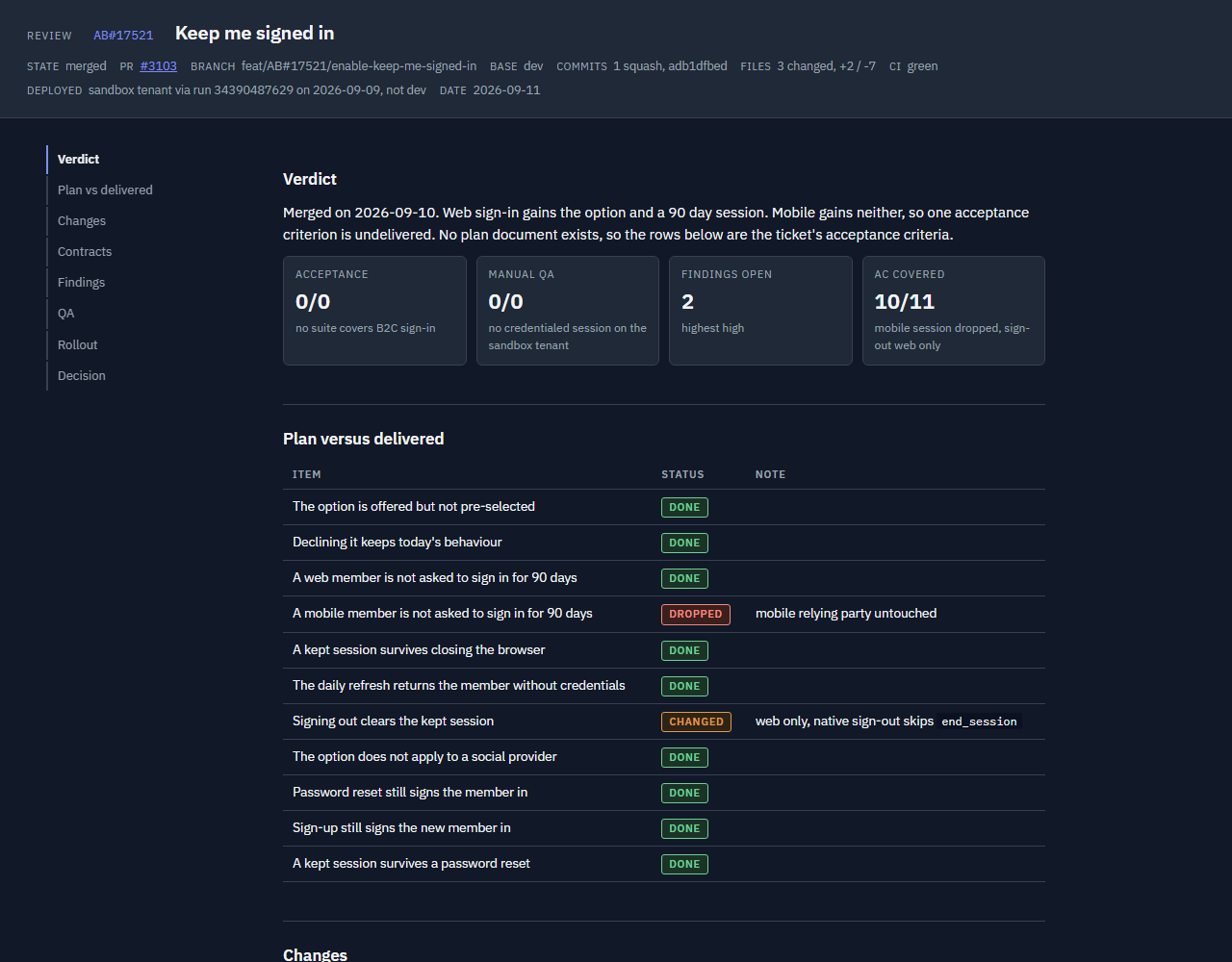
Use to review a branch or PR. It combines the approved plan, actual diff, sweep
findings and QA evidence into review.md and review.html. When no sweep is fresh
for the branch, it runs one first, so a branch nobody implemented in this session can
still be reviewed.
The page includes verdict counts, plan versus delivered, a change diagram (click it to open full size), file links to full diffs, findings, the QA report and a rollout checklist. Choose Approve or Request changes and press Send decision. The page passes the decision to the session, which reads it with each open finding's fix or accept choice; on Approve it goes straight on to the pull request stage. Say "decided" in chat if the page asks.
Use to run the workflow from the current stage. It reads live signals
alongside ~/.claude/dotnet-workflow-kit/pipeline/<slug>.json and updates stage completion.
Live evidence overrides saved state; sweeps, test runs and reviews older than new
commits must run again. State files written by 0.5.0 are migrated on first read.
To inspect progress without running a stage:
/next status
The skills now carry the names of the stages they run. Old names are not aliased;
update any saved prompts or /goal text.
| Before | Now |
|---|---|
| start-ticket | start |
| visual-plan | plan |
| Execute stage inside next, plus mega-review | implement (the sweep lives at skills/review/sweep.md) |
| qa-report, plus the QA stage inside next | test |
| visual-review | review |
| Draft PR, Resolve comments and Publish and hand off stages | next stage 5, Pull request |
The kit ships a Claude Code mod that draws a progress bar above the prompt, in the
terminal and the desktop Code tab. It shows the work item on the session's own branch:
the ticket id and a short title, a bar with a segment per stage, the current stage, the
percentage and what Claude is doing right now. A stage waiting on you turns amber. The
bar reads the pipeline state file that start, plan and next write.
Other items on branches of the same repository, touched in the last day, appear as a
+N chip at the end of the bar; it turns amber when one of them is waiting on you.
Pressing the chip, or /sessions, opens the Sessions pane: every item grouped as
Needs you, Running and Done. Open items are cards with their stages, status and a Show
button that names the branch whose session to open; the item you are viewing has a
purple edge and one waiting on you an amber one. A plugin cannot switch the app to
another session, so Show points you to it instead. Finished items take one line each,
with a cross to hide one and Dismiss all to hide the lot. A toast when another item
reaches a gate is off by default, because the app's own notifications already cover a
session waiting on you; the last row of the pane turns it on. /progress hides or
shows the bar, and the cross on a finished item hides it.
An item closes by itself when its pull request merges or closes, or when the worktree it
was started in is gone, as it is once a worktree chat is archived; /progress done
closes the current branch's item by hand. A closed item shows every stage done, and a
day later its row goes and scripts/close_items.py deletes its state file. The PR check
asks gh (or az for Azure Repos) every ten minutes.
The bar turns on by itself once the plugin is installed: mods load in every new session,
with nothing to enable. It stays empty until a work item is started. An organisation's
managed settings can block user-installed mods, for example with allowManagedModsOnly.
/next runs stage after stage inside one turn, but nothing restarts it if the turn
ends early. The kit's hooks wrap each half of the run in a goal for you:
| When | The hooks set |
|---|---|
| The plan is approved | /goal /next has reached the review checkpoint |
| The review is approved | /goal complete /next: the pull request is ready |
Each goal is met by the message /next ends that half with, so it clears on its own
instead of re-prompting while you decide. While /next is stopped on a blocker the
hooks keep the goal quiet until you answer. Sending from the plan or review page wakes
the session through Send to Claude, and an approval carries the run on by itself. When a
page cannot reach the session, it says so; tell the session "decided" instead.
Without function hooks, set a goal yourself after each gate:
/goal /next has stopped at a gate
Tool permission prompts may still require input. When the pipeline reports a blocker, resolve it before continuing.
Set artifacts to false through setup when the Artifact tool is unavailable.
The skills build the same HTML pages and give you local file paths to open.
Local forms cannot save answers or decisions. Reply in chat with question numbers and choices, or with "approve" or "changes" and your finding decisions. Rollout checklist ticks do not persist; track rollout outside the kit. See Running without the Artifact tool.
The plan and review pages use the Delivery Labs
colours and carry an attribution footer linking there. Set branding to false through
setup, or in the profile file, to render the neutral palette with no footer.
Setup writes .claude/dotnet-workflow-kit.json in the project. Profile resolution
uses an explicit path first, then the project file, then the user file at
~/.claude/dotnet-workflow-kit.json, then defaults. Missing fields receive defaults.
Each row below names a field, including nested fields in dotted form.
For example, testing.tdd lives inside the testing object. Empty strings appear as "".
| Field | Allowed values | Default | Purpose |
|---|---|---|---|
| schema | Integer | 1 | Profile schema version. |
| user | Free text | "" | Assignee and name used in page prose. |
| architecture | clean, vertical, ddd-clean, modular-monolith | "clean" | Plan section order and review rules. |
| testing.tdd | strict, encouraged, none | "encouraged" | TDD expectation; strict means tests first during execution. |
| testing.unit | xunit, nunit, mstest | "xunit" | Unit test framework. |
| testing.integration | webapplicationfactory, testcontainers, none | "webapplicationfactory" | Integration test approach. |
| testing.acceptance | reqnroll, specflow, none | "none" | Acceptance test runner; none keeps scenarios without a BDD runner. |
| qa.owner | qa-team, self, none | "self" | Who tests and signs off. |
| qa.evidence | work-item, pr-comment, none | "none" | Where approved QA reports go. |
| qa.handoff_label | Free text | "" | PR label for QA hand-off. |
| qa.deploy_label | Free text | "" | PR label to deploy to QA. |
| qa.environment | Free text | "local" | Environment named in QA evidence. |
| tracker | azure-boards, github-issues, jira, none | "none" | Ticket adapter; none uses your description. |
| tracker_project | Free text | "" | Project or organization identifier for tracker calls. |
| scm | github, azure-repos | "github" | PR and diff adapter. |
| base_branch | Free text | "main" | Starting branch and fallback PR base; stacked work uses its parent. |
| branch_pattern | Free text containing {slug}; supports {kind} and {id} | "{kind}/{id}-{slug}" | Branch naming template. |
| branch_kinds.feature | Non-empty text | "feat" | Feature value for the kind token. |
| branch_kinds.bug | Non-empty text | "bug" | Bug value for the kind token. |
| tracker_states.active | Free text | "" | State when work starts; blank uses the adapter default. |
| tracker_states.qa_ready | Free text | "" | QA hand-off state; blank uses the adapter default. |
| artifacts | true, false | true | Publish Artifacts, or build local HTML and take answers in chat. |
| branding | true, false | true | Delivery Labs colours and an attribution footer on the plan and review pages; false renders the neutral palette with no footer. |
| stack.data | ef-core, dapper, cosmos, other | "ef-core" | Data access conventions. |
| stack.api | minimal-api, controllers, graphql, grpc | "minimal-api" | API contract style. |
| stack.messaging | masstransit, wolverine, service-bus, none | "none" | Messaging conventions. |
| stack.errors | result, exceptions | "exceptions" | Error handling conventions. |
| stack.local_run | aspire, docker, plain | "plain" | How to start the system for local QA. |
| stack.frontend | none, blazor, razor, react, angular, vue, javascript | "none" | Whether the repo has a frontend and which kind; see the plan skill. |
| reviewers | bug-hunt, conventions, kit, security-scan, convention-learner, code-review-workflow | ["bug-hunt", "conventions"] | Reviewer sweep passes; the two built-ins always run. |
| pipeline.execute | Free text | "" | Execution command; blank implements the plan directly. |
| pipeline.resolve_comments | Free text | "" | Comment-resolution command; blank uses the SCM adapter. |
| pipeline.qa | Free text | "" | QA command; blank runs plan Specs manually per the QA adapter. |
| pipeline.open_pr_in_browser | true, false | true | In Claude desktop, open a newly created PR in the Claude browser pane. Set false to only report the link. |
| pipeline.auto_fix_pr | true, false | true | In Claude desktop, turn on CI auto-fix and comment handling for a newly created PR, so the session wakes on CI failures, conflicts and review comments. Set false to leave it off. |
| optional.dotnet-claude-kit | true, false | false | Companion plugin availability. |
| optional.codex | true, false | false | Enable the Codex second-opinion reviewer. |
| optional.roslyn-mcp | true, false | false | Roslyn MCP availability for code-review-workflow. |
| optional.jev | true, false | false | Jev availability: a TYPESAFE_API_KEY or a jev MCP server. Detected by setup. See Jev. |
| jev.flag_at | Number from 0 to 1 | 0.75 | Probability at or above which a scored check becomes a finding at the rule's severity. |
| jev.review_at | Number from 0 to 1, at most flag_at | 0.4 | Probability at or above which a scored check is listed as low with "confirm by reading". |
| checks | List of {id, rule, severity, files} | [] | Review checks the conventions reviewer enforces; files is an optional glob. Edited in the file, validated by scripts/doctor.py. |
| extra_stages | List of {id, label, after, run, done_when, gate} | [] | The team's own /next stages. after names a built-in stage other than pull_request, or an earlier extra stage; run is a slash command or an instruction; done_when is the yes/no question that marks it done; gate: true stops for you after it. label is at most 12 characters and shows on the progress bar. Edited in the file. |
| stage_checks | Object of stage name to a list of {id, prompt, on_fail} | {} | Yes/no prompts a /next stage must pass before it is marked done. Stages: start, plan, implement, test, review, pull_request. on_fail is fix (default, keep working the stage) or stop (blocker). Edited in the file. |
Validation requires a tracker when qa.evidence is work-item. Both bug-hunt and
conventions remain in the reviewer list.
The clean, ddd-clean and modular-monolith profiles share Domain, Application,
Infrastructure, API and Tests slices. Their adapters define different review rules.
The vertical profile uses Slice, Persistence, Integration, Endpoint and Tests.
See Adapters for supported tools and extension points.
Setup recommends the companion plugin when your answers need its skills, and asks
before installing it. These mappings come from scripts/kit_profile.py:
| Answer | dotnet-claude-kit skills it needs |
|---|---|
| architecture: clean | clean-architecture |
| architecture: ddd-clean | clean-architecture, ddd |
| architecture: vertical | vertical-slice |
| testing.tdd: strict | tdd |
| stack.data: ef-core | ef-core, migration-workflow |
| stack.api: minimal-api | minimal-api, openapi, api-versioning |
| stack.messaging: masstransit | messaging |
| stack.messaging: wolverine | messaging |
| stack.errors: result | error-handling |
| stack.local_run: aspire | aspire |
| reviewers: kit | code-review, 80-20-review, de-sloppify, verification-loop |
| reviewers: security-scan | security-scan |
| reviewers: convention-learner | convention-learner |
| reviewers: code-review-workflow | code-review-workflow (also needs a Roslyn MCP server) |
The workflow kit also runs without the companion. Built-in adapters still guide the
pages; unavailable companion reviewers are recorded as skipped. The
code-review-workflow reviewer also requires a Roslyn MCP server.
Jev is TypeSafe's
System One model: a fast, calibrated judge that returns probabilities, never text. With
optional.jev true the kit uses it wherever a skill would otherwise decide on gut feel,
and every call is skipped, never failed, when it is absent. Setup detects a
TYPESAFE_API_KEY or a jev MCP server. Register the MCP at user scope so it loads in
every project:
claude mcp add -s user jev -e TYPESAFE_API_KEY=<your key> -- npx -y @jkudish/jev-mcp
Add your own stage checks too. Each is a yes/no question a /next stage must answer yes to
before it is marked done, judged on that stage's evidence. Jev scores them when enabled, and
Claude answers them otherwise:
"stage_checks": {
  "implement": [{"id": "migration-reviewed", "prompt": "Does every new EF Core migration have a matching Down method?"}],
  "test": [{"id": "e2e-ran", "prompt": "Does the test output show the Playwright suite ran and passed?", "on_fail": "stop"}]
}
Add your own stages to the pipeline. /next runs each after the stage it names, and the
progress bar gets a segment for it:
"extra_stages": [
  {"id": "security", "label": "Security", "after": "implement",
   "run": "/dotnet-claude-kit:security-scan",
   "done_when": "Did the scan report no high or critical findings?"}
]
Add your own review checks to the profile; the conventions reviewer enforces them on
every sweep, and with Jev scripts/jev_checks.py scores every added hunk against them
first:
"checks": [
  {"id": "cancellation", "rule": "Every new async method that performs I/O accepts and forwards a CancellationToken", "severity": "high", "files": "**/*.cs"},
  {"id": "clock", "rule": "Use the injected IClock, never DateTime.Now", "severity": "medium", "files": "src/**/*.cs"}
]
| Stage | What Jev does | |---|---| | start, plan | Screens ticket text and linked items for injected instructions; ranks linked items so only the relevant ones are read. | | plan | Settles open questions from the research facts, or preselects the recommended option and names the fact that would decide it. | | implement | Classifies open sweep findings as fixable in scope or scope-changing. | | sweep | Scores profile checks and the CLAUDE.md rubric per hunk; deduplicates findings; gates the verdict's claims against the diff and test output. | | test | Buckets failing tests as regression, refactor fallout, flaky or environment before fixing. | | review | Verifies Plan versus delivered rows, QA Pass evidence and Verdict tiles. | | next | Classifies red CI jobs; screens, classifies and ranks review threads. |
Diff hunks, claims, test output and ticket text are sent to api.typesafe.ai when a
touchpoint runs; files matching the secret patterns never are. Set optional.jev to
false when policy forbids it. docs/jev.md has the call shapes, the
skipped wording and the checks reference.
| Path | Contents |
|---|---|
| .claude-plugin/ | Plugin and marketplace manifests. |
| commands/setup.md | Setup command instructions. |
| skills/ | Six skills, the reviewer sweep and their supporting files. |
| adapters/ | Tracker, source control, architecture, QA and stack instructions. |
| assets/ | Shared page shell. |
| scripts/ | Profile, setup, checks, rendering and the Jev checks scorer. |
| docs/ | Usage guides, writing rules, the Jev reference and screenshots. |
| tests/ | Fixtures and automated checks. |
Run the tests and plugin validation from the repository root before opening a PR:
python -m pytest
claude plugin validate .
Keep examples generic. Hygiene tests check for private identifiers and em dashes. Follow the writing rules for plan and review content.
MIT. See LICENSE.
Author: Chris Ainsley

Ruflo メモリ基盤のプラグイン。AgentDB コントローラーブリッジ(15 個の agentdb_* MCP ツール)、RuVector ONNX 埋め込み(RaBitQ 32x 量子化を含む 10 個の embeddings_* ツール)、WASM HNSW パターンルーター(3 個の ruvllm_hnsw_* ツール)を提供します。mod(ADR-445)として、プロンプトへの安全な任意リコール、秘密をメモリから遠ざける書き込みガード、/agentdb、コンソールが表示するステータスファイルを備えます。

rayfin CLI に追従するペインとして説明されている、data-goblin/power-bi-agentic-development Claude Code プラグイン marketplace の Fabric Data App プラグイン。


プロンプトの上、ステータス行、トーストに未読 AMP メッセージを表示し、アイドル状態の Claude Code セッションを起こして読ませます。Claude Code 2.1.287 以降が必要です。
