
KyongSik-Yoon@KyongSik-Yoon
KyongSik-Yoon/claude-mods/tree/main/desktop-look
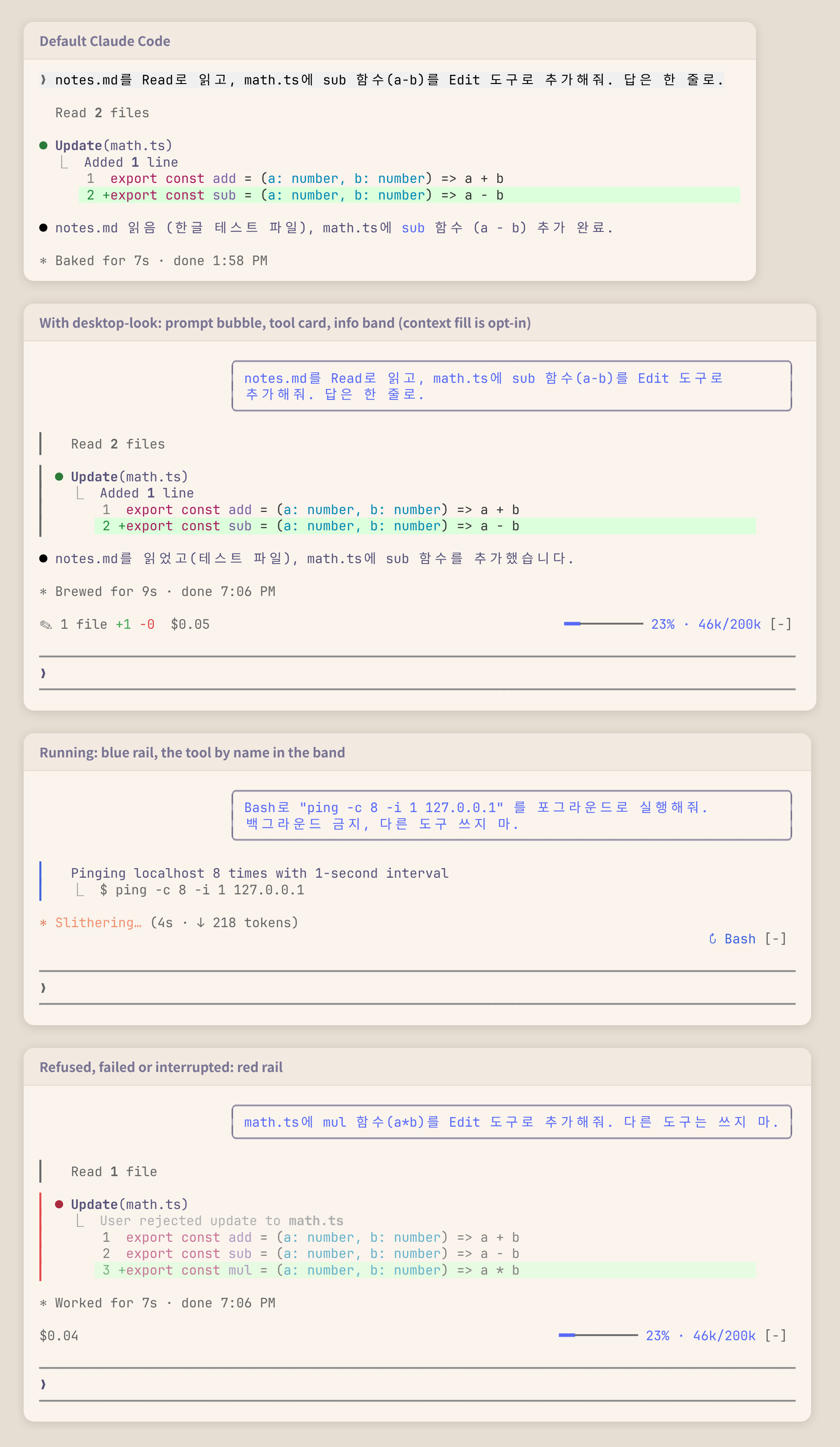
ターミナルのトランスクリプトを Claude Code のデスクトップ アプリのようにする mod。プロンプト バブル、ツール カード、情報バンドを表示します。
KyongSik-Yoon/claude-mods/tree/main/desktop-look
ターミナルのトランスクリプトをデスクトップ アプリに近づける Claude Code mod です。

✎ 2 files +7 -0)と費用($0.05)、右には実行中のツール(↻ Read ×3, Grep、狭い場合は ↻ 4 running)を表示し、何もなければ隠しますclaude plugin marketplace add KyongSik-Yoon/claude-mods
claude plugin install desktop-look@kyongsik-mods
その後 /reload-plugins を実行するか、新しいセッションを開始します。mods 対応の Claude Code ビルドが必要です(2.1.289、全画面、ライト/ダーク テーマでテスト済み)。
設定は不要です。変更するには /plugin configure desktop-look@kyongsik-mods(または /config)を実行します。
| オプション | デフォルト | |
| --- | --- | --- |
| バブル幅 | 75% | ターミナルの 60%、75%、90% |
| 情報バンド | on | プロンプト上のバンド |
| バンド:モデル | off | モデルと effort。表示しないステータス行向け |
| バンド:コンテキスト | off | コンテキストの使用量。落ち着いている間は青、300k token または 70% から黄、500k token または 90% から赤。先に到達した方を使います |
費用は Claude Code が API 価格で計算したものです。サブスクリプションの請求額ではありません。
UserMessage(自分のプロンプトだけ。タスク通知や他のセッションのメッセージは除く)は、右寄せで丸い境界線の Box として描画されます。ToolUse、ToolGroup、ToolProgress、ToolResult は別々の描画箇所なので、1つの境界線をまたがせられません。それぞれがエンジンの行(await next(e))を包み、行の高さまで伸びる絶対位置の1列レールを加えます。エンジンがツール行の先頭に入れる空行は飛ばします。isRunning、isErrored、isInterrupted、グループの呼び出しから決まります。$.state の値を読む AbovePrompt hook です。tool.call(実行中のツールと、各 Edit / Write 結果のパッチにある + / - 行)、session.measure(費用、コンテキスト)、turn.step(モデル)が値を書き込みます。新しいセッション(/clear)で集計をやり直し、reload では保持します。claude plugin validate .
claude plugin test .
まず作者の README で marketplace とプラグイン名を確認してください。コマンドはリポジトリの構成によって変わる場合があります。
claude plugin marketplace add KyongSik-Yoon/claude-mods
claude plugin install desktop-look
A Claude Code mod that makes the terminal transcript look more like the desktop app.
✎ 2 files +7 -0) and spent ($0.05) on the left, the tools running (↻ Read ×3, Grep, or ↻ 4 running when narrow) on the right; hidden when there is nothing to showclaude plugin marketplace add KyongSik-Yoon/claude-mods
claude plugin install desktop-look@kyongsik-mods
Then run /reload-plugins or start a new session. Requires a Claude Code build with mods support (tested on 2.1.289, fullscreen and light/dark themes).
No setup needed. To change one, run /plugin configure desktop-look@kyongsik-mods (or open /config):
| Option | Default | |
| --- | --- | --- |
| Bubble width | 75% | 60%, 75% or 90% of the terminal |
| Info band | on | The band above the prompt |
| Band: model | off | Model and effort, for a status line that does not show them |
| Band: context | off | Context fill, for a status line that does not show it: blue while calm, yellow from 300k tokens or 70%, red from 500k tokens or 90%, whichever comes first |
The cost is what Claude Code computes at API prices; on a subscription it is not what you are billed.
UserMessage (your own prompts only, not task notifications or other sessions' messages) is drawn as a right-aligned Box with a round border.ToolUse, ToolGroup, ToolProgress and ToolResult are separate render sites, so one border cannot span them. Each wraps the engine's own row (await next(e)) and adds an absolutely positioned one-column rail that stretches to the row's height, skipping the blank line the engine opens a tool row with.isRunning, isErrored, isInterrupted, and the calls of a group.AbovePrompt hook reading values in $.state, written by tool.call (tools running, and the +/- lines of each Edit and Write result's patch), session.measure (cost, context) and turn.step (model). A new session (/clear) starts the tally over; a reload keeps it.claude plugin validate .
claude plugin test .

Ruflo メモリ基盤のプラグイン。AgentDB コントローラーブリッジ(15 個の agentdb_* MCP ツール)、RuVector ONNX 埋め込み(RaBitQ 32x 量子化を含む 10 個の embeddings_* ツール)、WASM HNSW パターンルーター(3 個の ruvllm_hnsw_* ツール)を提供します。mod(ADR-445)として、プロンプトへの安全な任意リコール、秘密をメモリから遠ざける書き込みガード、/agentdb、コンソールが表示するステータスファイルを備えます。

pbir CLI に従うレポートペインで Claude が読み取り、変更する内容を表示しながら、インタラクティブな Power BI レポートの作成、整形、最適化、レビューを行います。


プロンプトの上、ステータス行、トーストに未読 AMP メッセージを表示し、アイドル状態の Claude Code セッションを起こして読ませます。Claude Code 2.1.287 以降が必要です。
