
cjavdev@cjavdev
cjavdev/mods/tree/main/context-meter
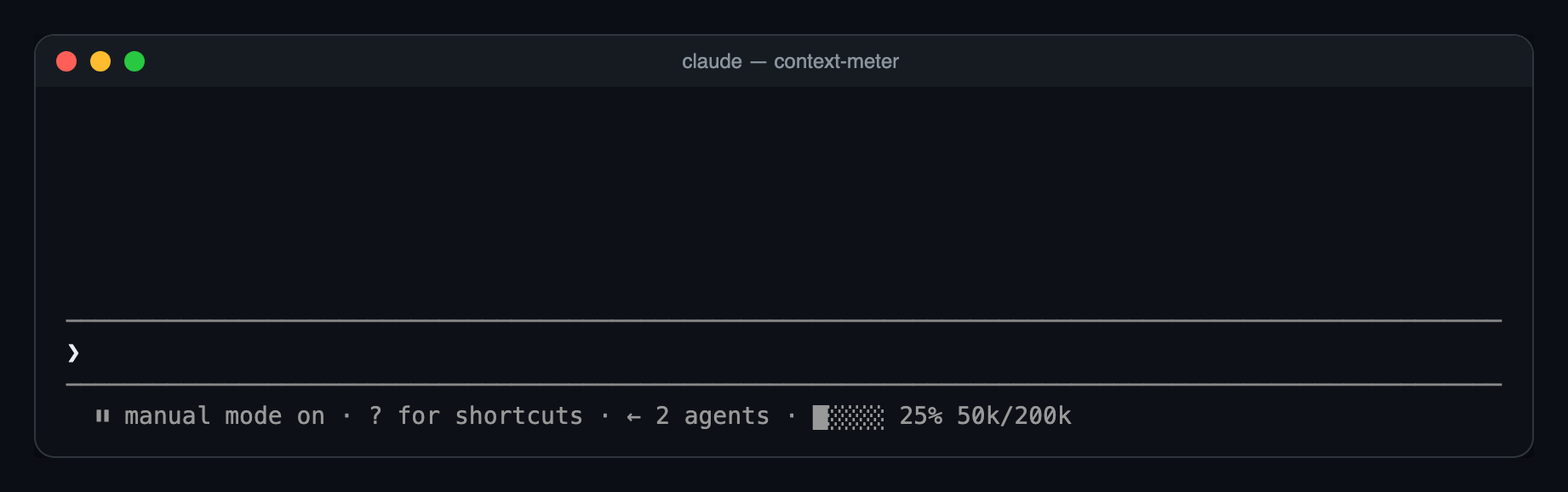
プロンプト下のヒントバーに小さなメーターを表示し、コンテキストウィンドウの使用量を示す Claude Code mod です。
cjavdev/mods/tree/main/context-meter
context-meter は Claude Code plugin です。プロンプトのヒントバーに小さなメーターを描画し、コンテキストウィンドウの使用量として 5 つのセル、使用率(ステータス行の used_percentage と一致)、token 数を表示します。セッション開始、ツール呼び出し完了、session.measure、3 秒タイマーで更新されるため、モデル切り替え、/compact、/clear を捉えます。Claude Code 2.1.287+ が必要で、--plugin-dir または CLAUDE_CODE_PLUGIN_DIRS からインストールでき、/config の enabled オプションで切り替えられます。
まず作者の README で marketplace とプラグイン名を確認してください。コマンドはリポジトリの構成によって変わる場合があります。
claude plugin marketplace add cjavdev/mods
claude plugin install context-meter
A Claude Code mod that shows how full your context window is, as a tiny meter in the bar under the prompt. You can see a /compact coming before it happens.
⏵⏵ auto mode on · ████░ 76% 152k/200k
used_percentage.49k/1M.Nothing shows until the first response of a session, or the first one after /compact or /clear, because there's no reading yet.
You need Claude Code 2.1.287 or newer.
git clone https://github.com/cjavdev/mods.git ~/mods
claude --plugin-dir ~/mods/context-meter
To load it in every session, add the folder to CLAUDE_CODE_PLUGIN_DIRS in the env block of ~/.claude/settings.json (separate several folders with :):
{ "env": { "CLAUDE_CODE_PLUGIN_DIRS": "~/mods/context-meter" } }
It shares the bar with cache-shot-clock: the meter comes first, then the clock.
In /config, or under pluginConfigs["context-meter"].options in settings:
| Option | Default | |
| --- | --- | --- |
| enabled | true | Turns the meter off without unloading the mod. |
Near the top, Claude Code shows its own warning, such as 93% context used, while the meter reads 84%. Claude Code measures against the auto-compact threshold, which is a little below the full window. context-meter measures against the full window. As a result, auto-compact usually fires while the meter reads around 85–90%.
The mod is one hooks module, hooks/register.tsx:
$.session.usage() reads the window's fill. The plain call doesn't count tokens, so it costs nothing.$.state, declared in types/index.d.ts). The bar redraws whenever the reading changes.session.measure fires; the engine pushes it after each turn/compact or /clear between turnsui.render hook on the PromptHint component adds the meter as the hint line's tail. The terminal draws that line dim, so the meter has no color of its own. Other surfaces don't draw the tail yet.The bar and token formatting are pure functions in hooks/meter.ts.
claude plugin validate ~/mods/context-meter   # manifest and hooks check
claude plugin test ~/mods/context-meter       # runs tests/*.test.tsx
The screenshot is a real capture of Claude Code running the mod in tmux (tmux capture-pane -p -e), turned into a page with scripts/ansi2html.py and screenshotted.

ドキュメント生成、ドリフト検出、API ドキュメント自動化プラグイン。秘密情報を含むドキュメント書き込みやワーカーのディスパッチを拒否する function-hook ガードとしても動作します。

Claude デスクトップアプリ用のステータスバー。プロンプト上に表示され、セッション品質、コンテキストの充填量、キャッシュのカウントダウン、5 時間および週間制限を示し、Clawd がセッションの動作を演じます。

databricks CLI に沿って Databricks のワークスペース、Unity Catalog、コンピュート、ジョブ、パイプライン、アプリ、ダッシュボードをツリー表示する /databricks-pane を提供する Claude Code プラグイン mod。ライブハイライト、プロファイル切り替え、CLI 引数のコピーにも対応します。
