
rodbegbie@rodbegbie
rodbegbie/rod-claude-mods/tree/main/plugins/context-bar
rodbegbie/rod-claude-mods/tree/main/plugins/context-bar
Rod Begbie が Claude Code 向けに作成したモッド。プラグインマーケットプレイスとして公開されています。
マーケットプレイスを追加してから、希望するモッドをインストールします。
/plugin marketplace add rodbegbie/rod-claude-mods
/plugin install context-bar@rod-claude-mods
/plugin install pro-limits@rod-claude-mods
/plugin install sportsball@rod-claude-mods
ローカルチェックアウトからマーケットプレイスを試す場合は、フォルダを指定します。
/plugin marketplace add /path/to/rod-claude-mods
| モッド | 機能 | | --- | --- | | context-bar | プロンプト上の積み重ねたコンテキストウィンドウバー | | pro-limits | プロンプト上の 5 時間および週間使用制限ゲージ | | sportsball | プロンプト上のフォロー中のチームのライブスコア |
/context に表示されるようにカテゴリごとに 1 色ずつで、コンテキストウィンドウを積み重ねたバーとしてプロンプト上に表示します。下部の凡例には各カテゴリのトークン数とウィンドウ内のシェア、その後に合計が表示されます。
/context-bar で切り替えます。デフォルトではオンで、セッション開始時と各ターン後に更新されます。
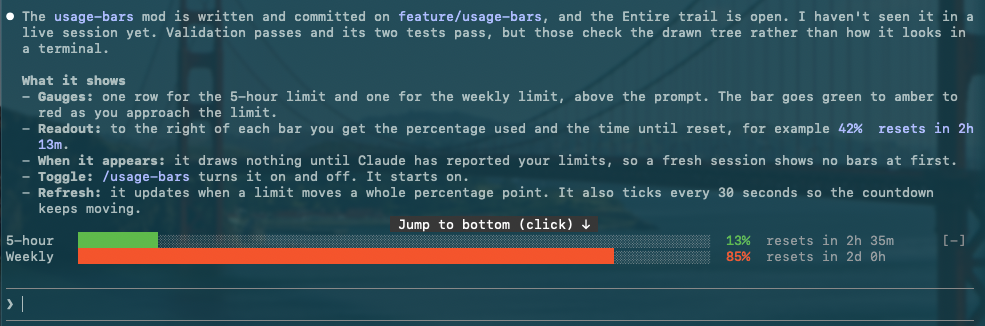
プロンプト上に各サブスクリプション制限(5 時間および週間)ごとに 1 つのゲージを表示します。各バーは制限に近づくにつれて緑色からアンバー色を経て赤色に変わり、その後に使用パーセンテージとそのウィンドウがリセットされるまでの時間が続きます。Claude がそれらを報告した後にのみウィンドウが表示されるため、API キーアカウントには何も表示されません。

ウィンドウが 20%、40%、60%、80%、90%、95% を超えるたびにトーストが表示されます。100% に達するとパーセンテージが 2 つのスカルに変わります。セッション開始時に表示された値はトーストされません。その後の変化のみトーストされます。
/pro-limits で切り替えます。デフォルトではオンで、制限が 1 ポイント動くたびに更新され、30 秒ごとにチェックしてカウントダウンを正確に保ちます。
1 つのチームをフォローし、プロンプト上にそのライブゲームを表示します: スポーツ絵文字、両チーム名、スコア、ゲームステータス、競技が 1 行に表示されます。「Powered by SportScore」クレジットは sportscore.com にリンクしており、その行の右側に位置します。表示されるチーム数に関わらず 1 回、最後のゲーム行に表示され、ターミナルが狭い場合のみ下の独立した行に落ちます。チームがライブゲームを持たない場合、バーは空です。
<!-- スクリーンショットプレースホルダー -->/follow-team <name> はチームをフォローします。例: /follow-team golden state valkyries または /follow-team club atletico tigre。バスケットボールとアメリカンフットボールを同時に検索します。複数のチームが名前に一致する場合、完全一致でも確認を求めます。各選択肢にはスポーツ絵文字、チーム名、最新ゲームのリーグが表示されます(検索が失敗またはチームがゲームを持たない場合は省略)。最大 4 つのチームが質問ダイアログで提供されます。4 つ以上の場合はペインでリストが開き、カットオフされません。いずれかを閉じるとフォローが中止され、現在のチームが保持されます。単一チームに一致する名前は直ちにフォローされます。SportScore の検索がチームに対して別のチームを返す場合(例: Glasgow Rangers F.C.)、そのチームは除外され、返信で命名されます。/unfollow-team [name] でフォローを中止します。/sportsball はバーを表示または非表示にします。フォロー中のチームはどちらの場合でもセッション間で保持されます。ゲームが新しいピリオド(例: 「ハーフタイム」または「第 4 クォーター」)に移るときと試合終了時にトーストが表示され、各トーストには常にスコアが付きます。アメリカンフットボールでは、スコア変更もトーストします(「ゴール 60'」またはゴールが無効化された場合は「スコア変更」)。マッチ分数がある場合は付与されます。バスケットボールのスコア変更は頻繁すぎるため、ピリオドのみがトーストされます。ロード後の最初の読み込みはサイレントなので、ゲーム中に Claude を起動してもトーストされません。/sportsball オフはトーストをミュートし、トラッキングを失いません。
アメリカンフットボールゲームはステータスの隣にマッチ分数も表示します。例: 2nd half 84'。これは各ポーリングの 2 番目のリクエストから来ているため、失敗したルックアップは分数を空のままにします。
ゲームがライブ中は 30 秒ごと、そうでなければ 5 分ごとにポーリングされます。ポーリングが失敗すると、最後のスコアは画面に薄く最大 10 分間保持されます。バスケットボールとアメリカンフットボールがサポートされています。
スコアは SportScore パブリック API からのもので、表示可能な「Powered by SportScore」リンクを求めているため、クレジット行があります。ハイパーリンクをサポートしていないターミナルは URL を名前の横に表示します。
チーム名の色はそれらのロゴから来ています。そのために、モッドはあなたのマシンで短い Python 3 スクリプト(標準ライブラリのみ)を実行し、ロゴごとに 1 回、結果をキャッシュします。これはオプションです: python3 がない場合、名前は単にデフォルト色で描画されます。これについて知っておくべき 2 つのことがあります:
Command Line Tools がない Mac では、モッドはインストールダイアログをトリガーするのではなくスクリプトをスキップします。
各モッドは plugins/ の独自フォルダに存在し、.claude-plugin/marketplace.json に記載されています。以下ですべてをチェックします:
claude plugin validate .
claude plugin validate plugins/<mod-name>
claude plugin test plugins/<mod-name>
まず作者の README で marketplace とプラグイン名を確認してください。コマンドはリポジトリの構成によって変わる場合があります。
claude plugin marketplace add rodbegbie/rod-claude-mods
claude plugin install context-bar
Rod Begbie's mods for Claude Code, published as a plugin marketplace.
Add the marketplace, then install the mods you want:
/plugin marketplace add rodbegbie/rod-claude-mods
/plugin install context-bar@rod-claude-mods
/plugin install pro-limits@rod-claude-mods
/plugin install sportsball@rod-claude-mods
To try the marketplace from a local checkout, point at the folder instead:
/plugin marketplace add /path/to/rod-claude-mods
| Mod | What it does | | --- | --- | | context-bar | Stacked context-window bar above the prompt | | pro-limits | 5-hour and weekly usage-limit gauges above the prompt | | sportsball | Live score of a followed team above the prompt |
Draws the context window as a stacked bar above the prompt, with one
colour per category as in /context. A legend underneath lists each
category's tokens and share of the window, then the total.
Toggle it with /context-bar. It starts on, and refreshes at session
start and after every turn.
Draws one gauge per subscription limit (5-hour and weekly) above the prompt. Each bar shifts from green through amber to red as you approach the limit, followed by the percentage used and the time until that window resets. Windows only appear once Claude has reported them, so nothing shows on API-key accounts.
A toast pops up each time a window passes 20%, 40%, 60%, 80%, 90% or 95%. Hit 100% and the percentage turns into two skulls. Readings seen at session start never toast, only crossings after that.
Toggle it with /pro-limits. It starts on, refreshes whenever a limit
moves a whole point, and ticks every 30 seconds to keep the countdown
honest.
Follows one team and draws its live game above the prompt: a sport emoji, both team names, the score, the game status and the competition, on a single line. A "Powered by SportScore" credit, linking to sportscore.com, sits at the right of that row. It appears once, on the last game row, however many teams are shown, and drops to a row of its own underneath only when the terminal is too narrow for both. The band is empty when the team has no live game.
<!-- screenshot placeholder -->/follow-team <name> follows a team, for example
/follow-team golden state valkyries or /follow-team club atletico tigre. It searches basketball and football together. If the name
matches more than one team, even exactly, it asks which. Each choice
shows a sport emoji, the team name and the league of its latest game
(left off when the lookup fails or the team has no games). Up to four
teams are offered in a question dialog. More than that opens a pane
with a list, so none are cut off. Dismissing either follows nothing
and keeps your current team. A name that matches a single team is
followed straight away. A team is left out, and named in the reply,
when SportScore's lookup for it returns a different team, as it does
for Rangers F.C. (Glasgow)./unfollow-team [name] stops following./sportsball shows or hides the band. The followed team is kept
across sessions either way.A toast appears when the game moves to a new period (for example
"Half time" or "4th quarter") and at full time, each with the score.
In football, a change of score also toasts (Goal 60', or Score change
if a goal is ruled out), with the match minute when there is one.
Basketball scores change too often, so only periods toast there.
The first reading after a load is silent, so starting Claude mid-game
doesn't toast. /sportsball off mutes toasts without losing track.
Football games also show the match minute next to the status, for
example 2nd half 84'. It comes from a second request per poll, so a
failed lookup just leaves the minute off.
It polls every 30 seconds while a game is live and every 5 minutes otherwise. If a poll fails, the last score stays on screen, dimmed, for up to 10 minutes. Basketball and football are supported.
Scores come from the SportScore public API, which asks for a visible "Powered by SportScore" link, hence the credit row. Terminals without hyperlink support show the URL next to the name.
Team names are coloured from their logos. To do that the mod runs a
short Python 3 script (standard library only) on your machine, once per
logo, and caches the result. This is optional: without python3 the
names simply draw in the default colour. Two things to know about it:
On a Mac without the Command Line Tools the mod skips the script rather than trigger the install dialog.
Each mod lives in its own folder under plugins/ and is listed in
.claude-plugin/marketplace.json. Check the lot with:
claude plugin validate .
claude plugin validate plugins/<mod-name>
claude plugin test plugins/<mod-name>

Ruflo メモリ基盤のプラグイン。AgentDB コントローラーブリッジ(15 個の agentdb_* MCP ツール)、RuVector ONNX 埋め込み(RaBitQ 32x 量子化を含む 10 個の embeddings_* ツール)、WASM HNSW パターンルーター(3 個の ruvllm_hnsw_* ツール)を提供します。mod(ADR-445)として、プロンプトへの安全な任意リコール、秘密をメモリから遠ざける書き込みガード、/agentdb、コンソールが表示するステータスファイルを備えます。

rayfin CLI に追従するペインとして説明されている、data-goblin/power-bi-agentic-development Claude Code プラグイン marketplace の Fabric Data App プラグイン。


プロンプトの上、ステータス行、トーストに未読 AMP メッセージを表示し、アイドル状態の Claude Code セッションを起こして読ませます。Claude Code 2.1.287 以降が必要です。
