
shengyy@shengyy
shengyy/ccoverhead/tree/main/plugin
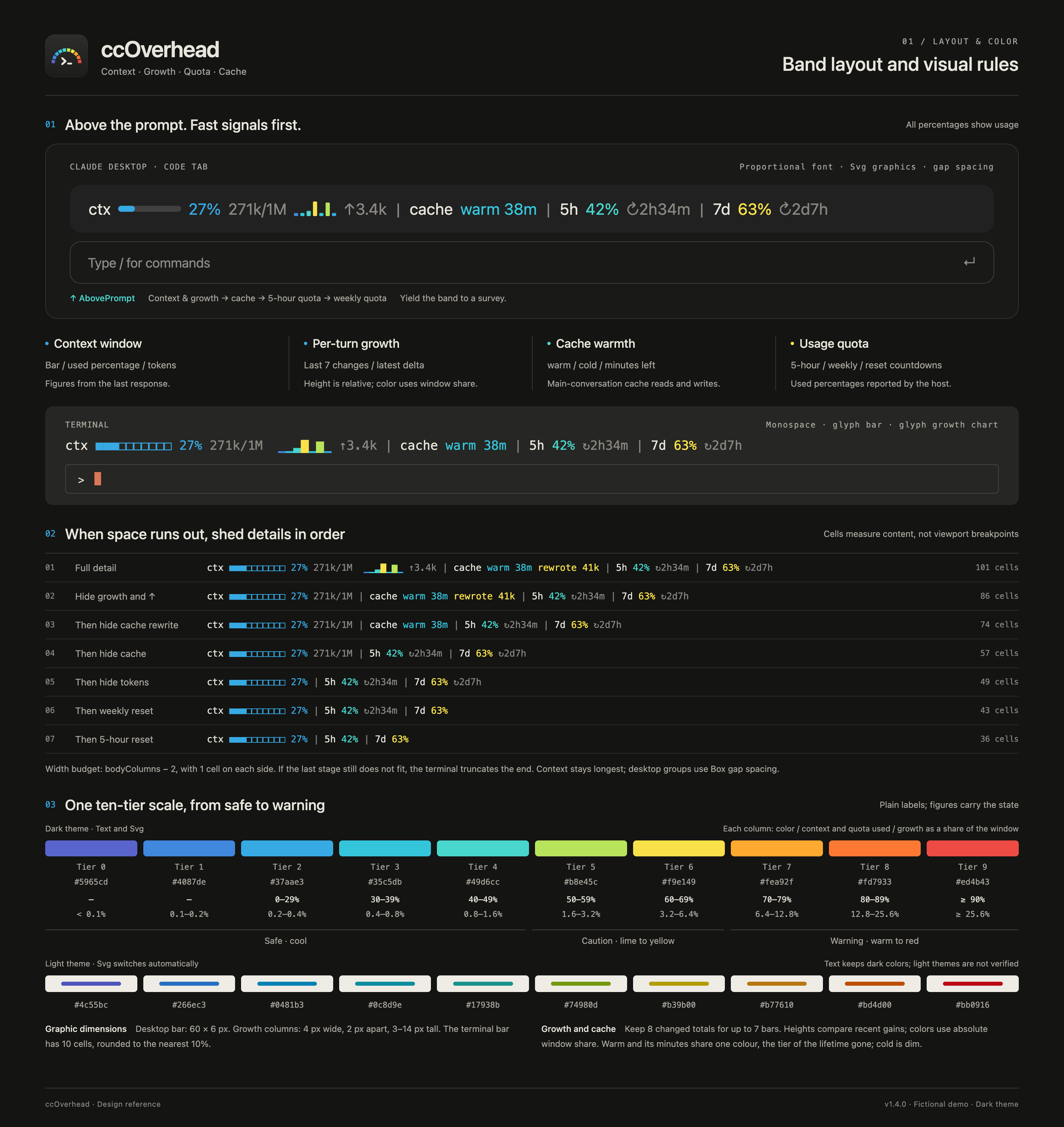
Claude Code のプロンプト上に、コンテキスト、ターンごとの増加、5 時間/週次クォータ、プロンプトキャッシュの温度を色帯で表示します。
shengyy/ccoverhead/tree/main/plugin
ccOverhead はプロンプト上の色帯に、コンテキスト使用量、各ターンの増加、5 時間および週次クォータ、プロンプトキャッシュの温度を表示します。/ccoverhead で詳細ペインを開くと、自動コンパクション位置、カテゴリと MCP サーバー別の内訳、増加とコンパクション、キャッシュヒット率、クォータ、サブエージェントを確認できます。Claude Code が既に報告する数値だけを読み、ユーザーファイル、ネットワーク要求、モデル要求、テレメトリは扱いません。/plugin marketplace add shengyy/ccoverhead、/plugin install ccoverhead@ccoverhead、/reload-plugins で導入します。セッション値はメモリに留まり、最後のクォータ値だけがプラグインストアに保存されます。MIT ライセンスで Anthropic とは独立しています。
まず作者の README で marketplace とプラグイン名を確認してください。コマンドはリポジトリの構成によって変わる場合があります。
claude plugin marketplace add shengyy/ccoverhead
claude plugin install ccoverhead
Your Claude Code overhead, right overhead. ccOverhead is a Claude Code mod that puts context usage,
per-turn growth, 5-hour and weekly quota, and prompt-cache warmth in one quiet
band above the prompt. One cool-to-warm color scale makes changes easy to notice while you work. Type
/ccoverhead for a pane with the detail: where auto-compaction runs, the window by category and MCP server, growth and compactions,
cache hit rate, quota with how much of each window's time is gone, and subagents.
The band uses text and glyphs in the terminal, and vector graphics in the Claude desktop app's Code tab. It reads only figures Claude Code already reports: no user files, network requests, model requests or telemetry. Compacting, pausing and switching models remain your decisions.
In Claude Code:
/plugin marketplace add shengyy/ccoverhead
/plugin install ccoverhead@ccoverhead
/reload-plugins
The band appears above the prompt when figures are available. Quota appears only when the host reports
it. /ccoverhead opens the pane on every surface, VS Code and mobile included. See the full English README for requirements,
updates and the group-by-group explanation, and
verified behavior for tested surfaces
and remaining limitations.
Four signals share one band and one visual scale. Secondary details yield first when space is tight, keeping context visible longest. The following diagrams use fictional figures and illustrate the design specification.
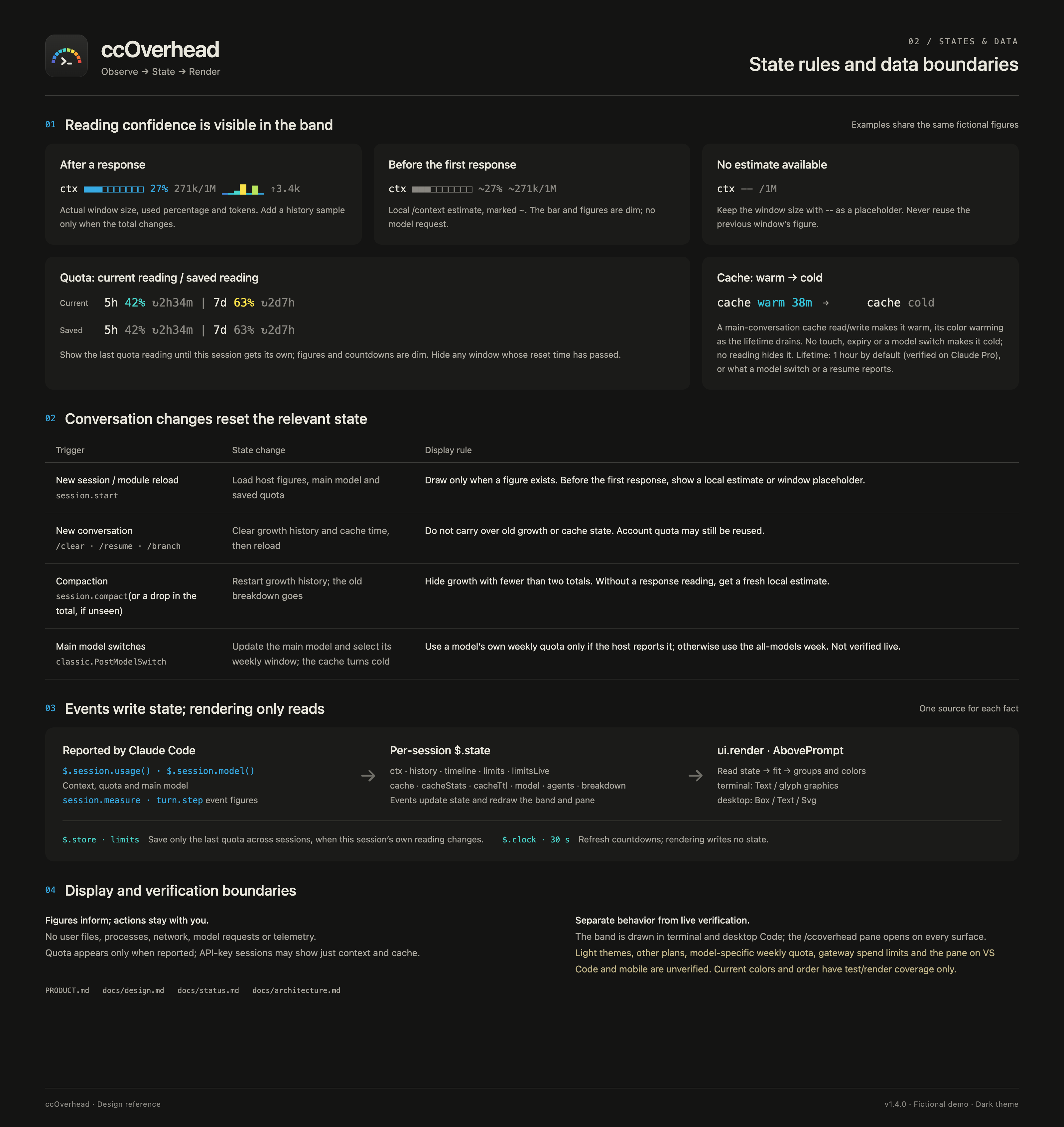
On session start and after /clear, /resume or /branch, the lifecycle hook refreshes only
ccOverhead's numeric state and clears its growth, cache and subagent history. It forwards the original event and
the downstream result unchanged, preserving the first message, instructions and permission decisions.
Other hooks observe usage and model changes; the render hooks only draw the band and the pane, and the
/ccoverhead command adds nothing to the conversation.
Session figures stay in memory. Only the last quota reading is kept in Claude Code's plugin store so a new session can show it until its own arrives. See the privacy details.
Released under the MIT license. ccOverhead is an independent project, not affiliated with or endorsed by Anthropic.

ドキュメント生成、ドリフト検出、API ドキュメント自動化プラグイン。秘密情報を含むドキュメント書き込みやワーカーのディスパッチを拒否する function-hook ガードとしても動作します。

A status bar for the Claude desktop app. It draws above your prompt and shows session quality, context fill, cache countdown, and your 5-hour and weekly limits, with Clawd acting out what the session is doing.

databricks CLI に沿って Databricks のワークスペース、Unity Catalog、コンピュート、ジョブ、パイプライン、アプリ、ダッシュボードをツリー表示する /databricks-pane を提供する Claude Code プラグイン mod。ライブハイライト、プロファイル切り替え、CLI 引数のコピーにも対応します。
