
iamomiid@iamomiid
iamomiid/cache-countdown
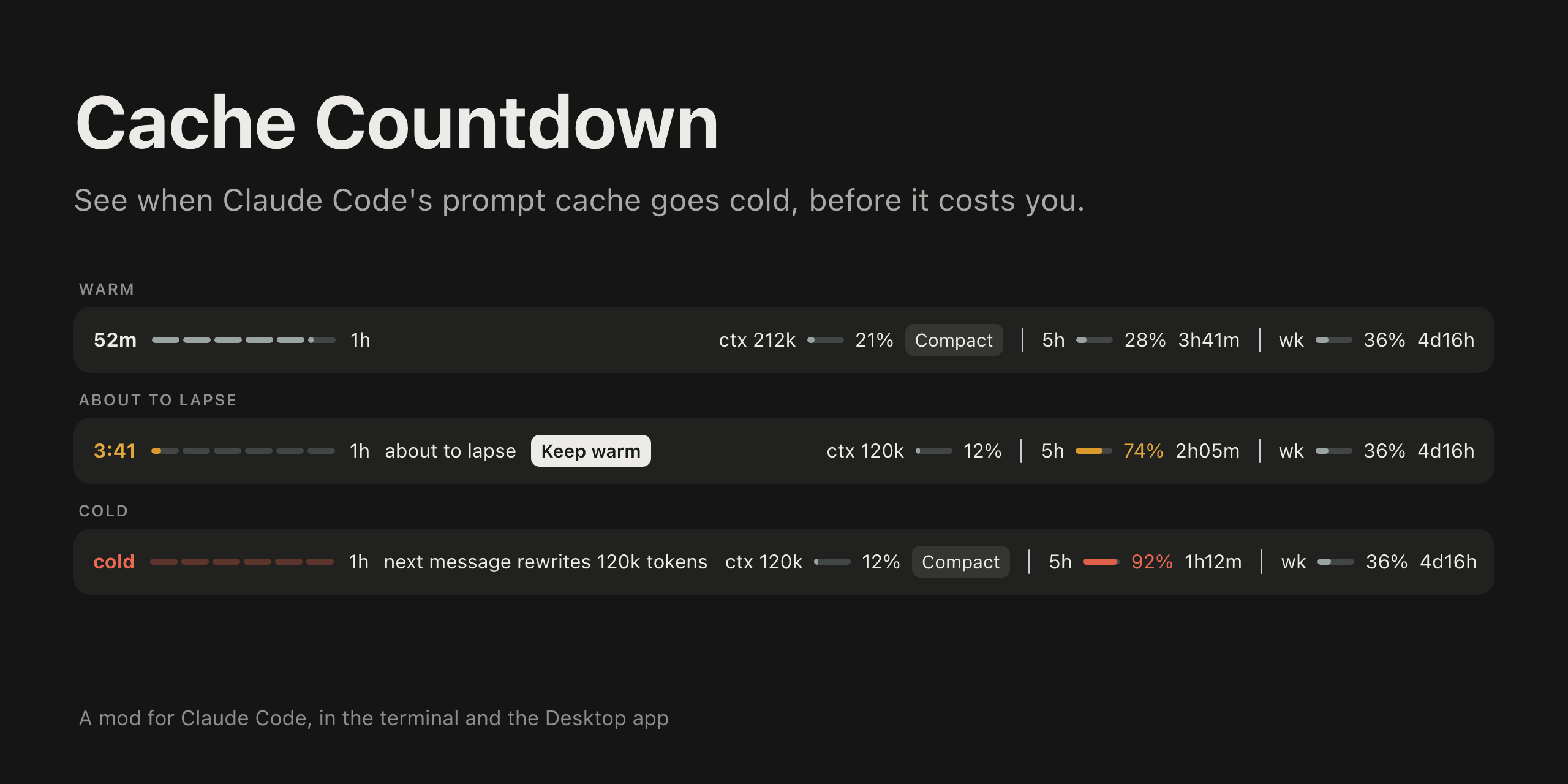
プロンプトの上で、プロンプトキャッシュが温かい状態を保てる残り時間を導火線として表示する Claude Code mod。ターミナルと Claude Desktop アプリの Code タブに描画します。
iamomiid/cache-countdown
プロンプトの上で、プロンプトキャッシュが温かい状態を保てる残り時間を導火線として表示する Claude Code mod。ターミナルと Claude Desktop アプリの Code タブに描画します。
Anthropic のプロンプトキャッシュには 5 分と 1 時間の 2 種類の有効期間があり、料金も異なります。メイン会話への各リクエストがエントリを更新します。期限が切れると、次のリクエストでコンテキスト全体を再びキャッシュに書き込む料金が発生します。この mod は残り時間と、時間切れになったときの料金を表示します。
Claude Code v2.1.287 以降が必要です。/plugin marketplace add iamomiid/cache-countdown と /plugin install cache-countdown@cache-countdown でインストールするか、claude --plugin-dir ./cache-countdown でフォルダーを読み込みます。
プロンプトの上に 1 行で表示します。燃えている導火線による残り時間、適用中の有効期間(5m または 1h)、about to lapse や next message rewrites 212k tokens などの警告に加え、コンテキストとレート制限のメーターを表示します。期限の少し前と期限切れの時点でトーストを表示し、/cache-countdown はバンドのない画面向けに数値をテキストで出力します。
Keep warm は短い質問を 1 つ実行してキャッシュエントリを読み取り、更新します。会話が 200k tokens を超えたとき、またはキャッシュが冷えているとき、Compact はコンテキストメーターの横で /compact を実行します。
ttl(auto、5m、1h)と toast(true、false)は /plugin configure または /config パネルで設定します。MIT ライセンスです。
まず作者の README で marketplace とプラグイン名を確認してください。コマンドはリポジトリの構成によって変わる場合があります。
claude plugin marketplace add iamomiid/cache-countdown
claude plugin install cache-countdown
A Claude Code mod that shows how long the prompt cache stays warm, as a fuse above the prompt. It draws in the terminal and in the Code tab of the Claude Desktop app.
Anthropic's prompt cache has two lifetimes, 5 minutes and 1 hour, priced differently. Every request of the main conversation refreshes the entry. Once it lapses, the next request pays to write the whole context to the cache again. This mod shows how long you have left, and what it costs when the time runs out.
Requires Claude Code v2.1.287 or later.
In a Claude Code session:
/plugin marketplace add iamomiid/cache-countdown
/plugin install cache-countdown@cache-countdown
Or from your shell:
claude plugin marketplace add iamomiid/cache-countdown
claude plugin install cache-countdown@cache-countdown
To try it for one session without installing, clone the repository and load the folder:
claude --plugin-dir ./cache-countdown
The band appears after the first reply of a conversation.
A mod runs with your permissions. To see what this one hooks and calls before loading it, run claude plugin validate on the cloned folder. It reads the session transcript, runs tail on it, and makes a model request only when you press Keep warm.
One row above the prompt. In the Desktop app:

In a terminal:
52m ━━━━━━━━━━━━━━━━━━━━━─── 1h ctx 212k 21% │ 5h 28% 3h41m │ wk 36% 4d16h
Both images on this page are illustrations drawn to match the app, with example figures.
The row holds:
5m or 1h.about to lapse in the last five minutes (1h) or last minute (5m), next message rewrites 212k tokens once the cache is cold, and last request rewrote 203k tokens after a request that missed the cache.5h, wk, and any other) with the share used and the time until it resets.Nothing is colored while all is well. The time and fuse take the warning color when the cache is about to lapse and the error color when it is cold. A meter takes the warning color at 70% and the error color at 90%.
It also shows a toast shortly before the cache lapses and when it does, for conversations of 20k tokens or more. /cache-countdown prints the figures as text, for surfaces that draw no band (VS Code, claude -p).
If another mod draws above the prompt too, its row stays, under this one.
/compact, as if you had typed it, with no confirmation step. Pressed while a turn is running, it waits for the turn to end. Compacting a cold conversation still reads the whole context once, as any next message would; what it saves is carrying that context into every message after.Set them with /plugin configure cache-countdown@cache-countdown, or in the /config panel.
| Option | Values | Default | What it does |
| :- | :- | :- | :- |
| ttl | auto, 5m, 1h | auto | Which lifetime to count down. auto reads it from the transcript. |
| toast | true, false | true | Toasts before and at expiry. |
ephemeral_5m_input_tokens and ephemeral_1h_input_tokens. Until that is known, the fuse counts the 5 minute lifetime first and the 1 hour lifetime after it, and says so.tail. Where tail is missing, as on Windows, the whole file is read, which works up to 4 MiB. Past that, the lifetime stays unconfirmed unless ttl is set./resume and /branch the countdown starts from the resumed conversation's last response.Load the folder with --plugin-dir, or name it in CLAUDE_CODE_PLUGIN_DIRS under env in ~/.claude/settings.json for sessions the Desktop app starts. Claude Code reloads the mod when a file changes.
claude plugin validate .
claude plugin test .
MIT. See LICENSE.

ドキュメント生成、ドリフト検出、API ドキュメント自動化プラグイン。秘密情報を含むドキュメント書き込みやワーカーのディスパッチを拒否する function-hook ガードとしても動作します。

Claude デスクトップアプリ用のステータスバー。プロンプト上に表示され、セッション品質、コンテキストの充填量、キャッシュのカウントダウン、5 時間および週間制限を示し、Clawd がセッションの動作を演じます。

databricks CLI に沿って Databricks のワークスペース、Unity Catalog、コンピュート、ジョブ、パイプライン、アプリ、ダッシュボードをツリー表示する /databricks-pane を提供する Claude Code プラグイン mod。ライブハイライト、プロファイル切り替え、CLI 引数のコピーにも対応します。
