
sebi75@sebi75
sebi75/agent-canvas
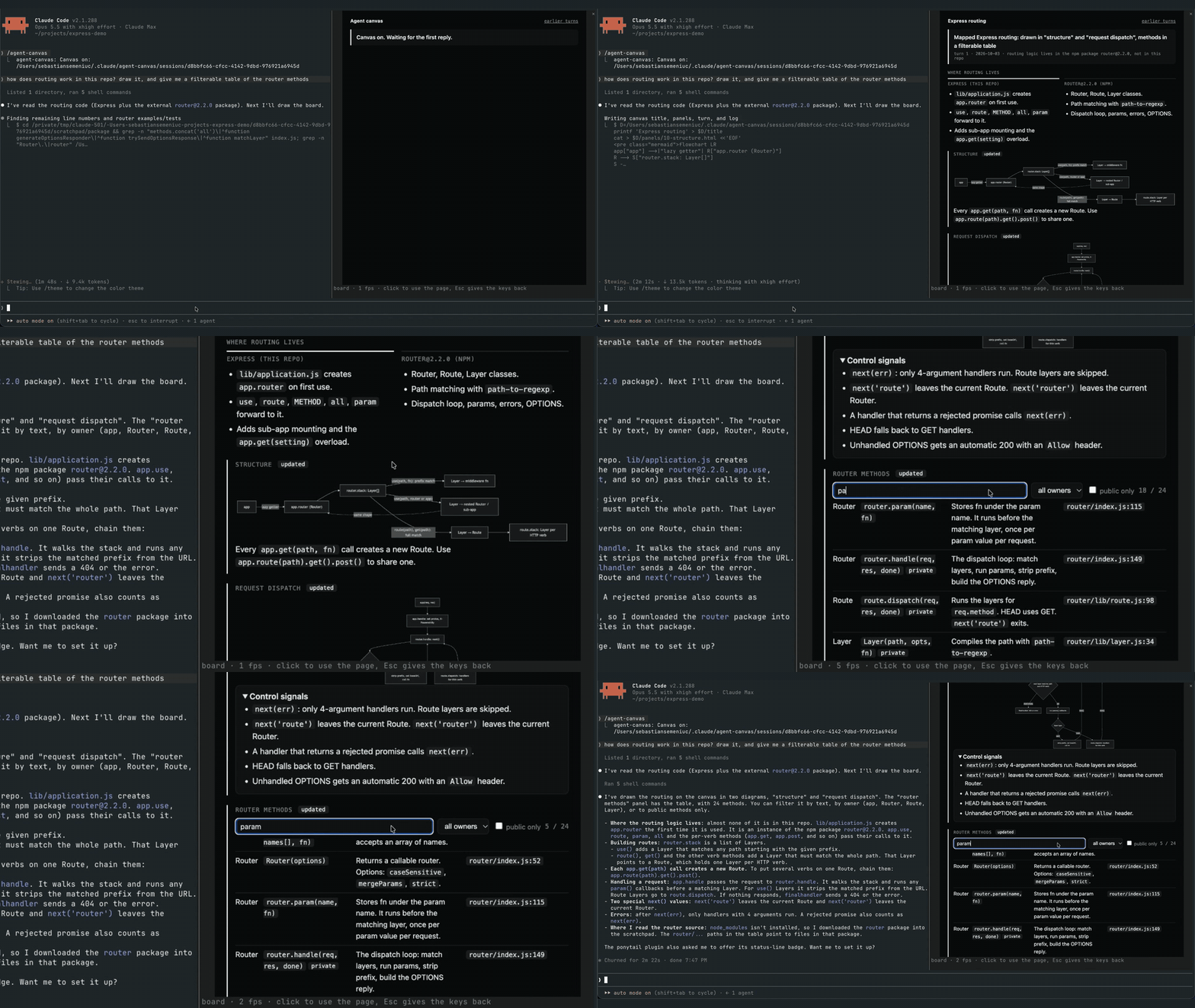
ヘッドレス Chrome がトランスクリプト横のペインに描画する、Claude Code の各セッション用ライブでクリック可能なボード。
sebi75/agent-canvas
agent-canvas は、トランスクリプトの横にあるペインへ各 Claude Code セッションのライブボードを表示する mod です。エージェントは各返信で turn.html を書き直し、panels/<name>.html を編集し、~/.claude/agent-canvas/sessions/<session id>/ の log.txt に追記してボードを最新に保ちます。エージェントが turn.html を書かずにターンを終えると、フックが Stop イベントをブロックします。ブリッジ(bridge/bridge.mjs)は board.html を作り、開放ポートなしでパイプ越しにヘッドレス Chrome を実行し、mod が Image 要素で描画して $.ui.blit で入れ替える PNG フレームを出力します。Client 領域はクリック、キー、ペインサイズを Chrome に転送し、ホイールでスクロールします。Claude Code 2.1.287+、画像対応ターミナル(Ghostty、kitty、WezTerm のいずれか)、Chrome/Chromium、Node.js 18+ が必要です。/plugin marketplace add sebi75/agent-canvas でインストールします。既知の制限:ページのテキストは選択できず、Desktop アプリと VS Code 拡張には Image 要素がありません。
まず作者の README で marketplace とプラグイン名を確認してください。コマンドはリポジトリの構成によって変わる場合があります。
claude plugin marketplace add sebi75/agent-canvas
claude plugin install agent-canvas
A live board for each Claude Code session, in a pane beside the transcript. The agent keeps it current every reply, with diagrams, tables, charts and the state of the work. The board is a real web page drawn by headless Chrome, so you can click, type, hover and scroll in it. Nothing opens in a browser tab, and the board belongs to the session that made it.
It is a Claude Code mod: a plugin whose hooks run inside Claude Code.
turn.html (this reply's news), edits the panels that changed (panels/<name>.html, kept across turns) and appends a line to log.txt. The files live in ~/.claude/agent-canvas/sessions/<session id>/.turn.html after its last tool call, the mod blocks the Stop event and tells it why.bridge/bridge.mjs builds board.html from those files, runs headless Chrome on it over a pipe (no open port), and writes each frame as a PNG. Panels written this turn come first, marked "updated". Every turn keeps a snapshot, linked from "earlier turns".Image element and swaps each new one in with $.ui.blit. A Client region laid over the picture sends clicks, keys and the pane size back to Chrome, and the mouse wheel scrolls the page.From a Claude Code session:
/plugin marketplace add sebi75/agent-canvas
/plugin install agent-canvas@agent-canvas
Or clone the repository and load the folder in every session by adding CLAUDE_CODE_PLUGIN_DIRS with the clone's path to the env block of ~/.claude/settings.json.
| command | what it does |
|---|---|
| /agent-canvas | turns the board on and opens its pane; when it shows another page, goes back to the board |
| /agent-canvas off | turns the board off and closes the pane |
| /agent-canvas <url or path> | shows that page instead, for example a local dev server |
Click the page to type into it. Esc gives the keyboard back to Claude Code. The board stays on across a plugin reload, and AGENT_CANVAS_OPEN=1 turns it on when a session starts.
Claude Code turns images off when the terminal reports itself as "libghostty", which Herdr does. Its own switch turns them back on: set CLAUDE_CODE_FORCE_TERMINAL_IMAGES=1 in the shell that starts claude inside Herdr, for example in ~/.zshrc when HERDR_ENV is set.
Use Herdr 0.9 or later. On Herdr 0.9.3 an animated page measured about 42 frames per second on screen, against about 53 in plain Ghostty. Herdr 0.7 drew about 3; there, set AGENT_CANVAS_FPS=4 so frames do not queue up.
| variable | default |
|---|---|
| AGENT_CANVAS_FPS | 60 |
| AGENT_CANVAS_SCALE | 2 device pixels per CSS pixel |
| AGENT_CANVAS_CHROME | the first Chrome or Chromium found |
| AGENT_CANVAS_OPEN | unset; 1 turns the board on at session start |
Image element. The pane says so there.agent-canvas started as herdr-canvas, which rendered the same kind of board to a static image in a Herdr pane next to the agent. Claude Code mods made it possible to put a live, clickable page inside Claude Code itself.
node test/board.test.mjs
MIT

ドキュメント生成、ドリフト検出、API ドキュメント自動化プラグイン。秘密情報を含むドキュメント書き込みやワーカーのディスパッチを拒否する function-hook ガードとしても動作します。

Claude デスクトップアプリ用のステータスバー。プロンプト上に表示され、セッション品質、コンテキストの充填量、キャッシュのカウントダウン、5 時間および週間制限を示し、Clawd がセッションの動作を演じます。

databricks CLI に沿って Databricks のワークスペース、Unity Catalog、コンピュート、ジョブ、パイプライン、アプリ、ダッシュボードをツリー表示する /databricks-pane を提供する Claude Code プラグイン mod。ライブハイライト、プロファイル切り替え、CLI 引数のコピーにも対応します。
