
LorcanChinnock@LorcanChinnock
LorcanChinnock/claude-desk-neighbours/tree/main/plugins/your-serve
LorcanChinnock/claude-desk-neighbours/tree/main/plugins/your-serve
當 Claude 正等你回應時提醒你,這樣長篇回答底部的問題就不會漏看。

/plugin install your-serve@claude-desk-neighbours
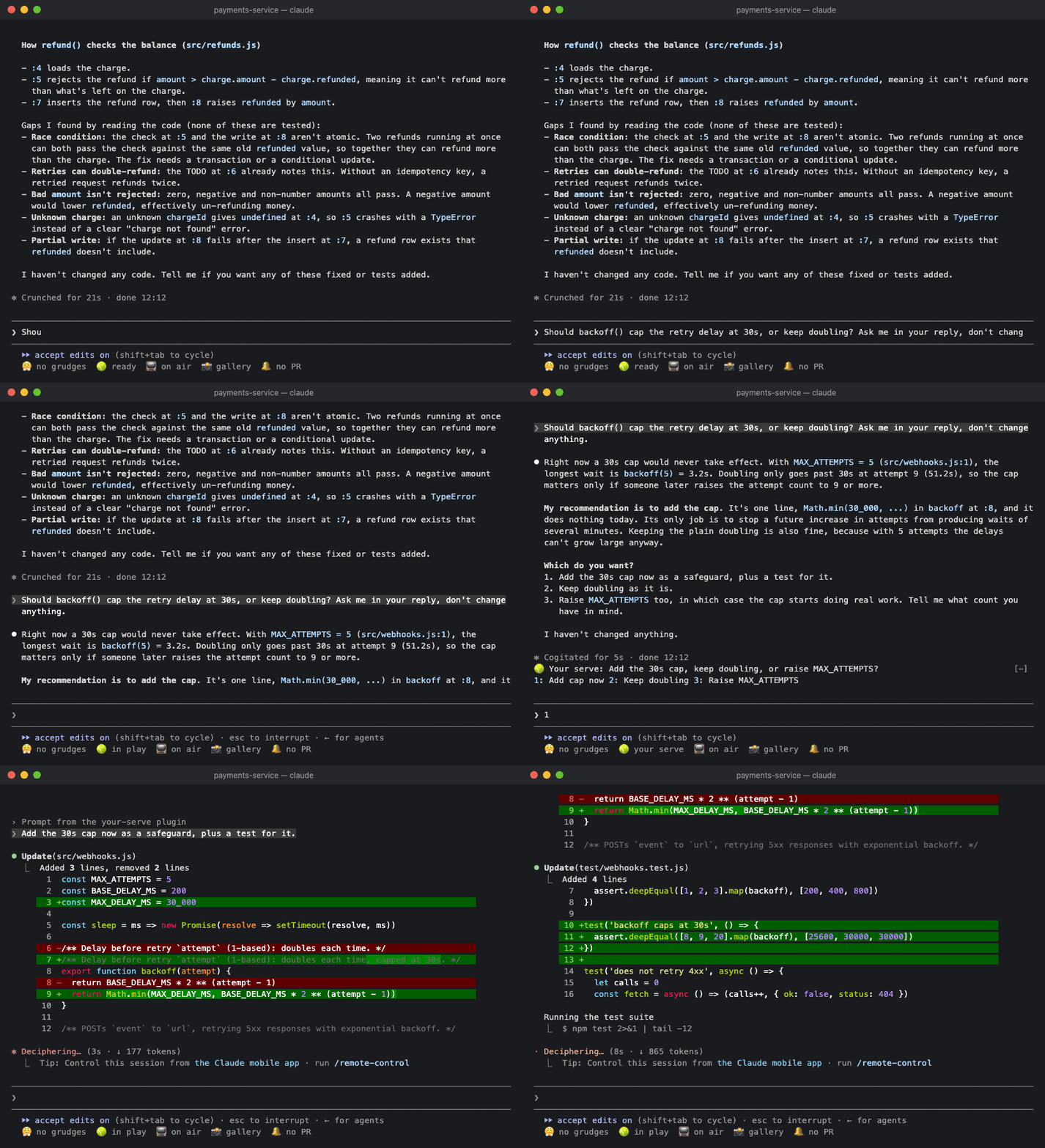
當一個工作階段以問題、選項選擇,或「should I also…」結束時,問題會顯示在狀態列第一行:
🎾 Your serve: 保留舊快取還是丟掉? 1: 保留 2: 丟掉 3: 其他
按下答案後,自然語氣的回覆(「Drop the old cache.」)會直接送給 Claude。你可以在空白提示列輸入對應數字,也可以點按鈕。如果你已經開始輸入,回覆會接在草稿尾端,讓你繼續編輯後再送出。如果沒有明確選項,就只會顯示問題。不論是哪種情況,它都會留著,直到你送出提示訊息。沒有提出問題的答案不會產生任何內容,子代理的工作階段會被忽略。
如果 Claude 一次問了好幾件事,會依序一次顯示一個,不論總共有幾個:
🎾 Your serve (2/3): 新的逾時應該設為多少? 1: 30s 2: 60s other skip
每個答案都會帶你前往下一個問題。完成最後一題後,所有答案會合併成一則回覆送給 Claude:
1. 保留舊快取還是丟掉?Drop the old cache.
2. 新的逾時應該設為多少?Make it 30 seconds.
3. 要加入重試嗎?Yes, add a retry.
如果沒有適合的答案,點選 other 後輸入自己的內容。按 Enter 會用你輸入的內容回答問題並繼續,和按下某個答案一樣。如果你跳過問題,或在空白的 other 上按 Enter,問題會保持未回答,回覆也會進入提示列而不是送出;你可以先輸入答案,再送出。你必須點選 other 和 skip(或用 Tab 移到它們),因為 3 之後的數字屬於其他 Desk Neighbours。行動版應用程式無法顯示文字輸入欄,因此那裡只能使用 skip。
內容不會被截斷。如果問題和答案放不進同一行,答案會換到下一行。只有 3 個答案會顯示成按鈕。其他情況請使用 other;只有一個問題時,也可以直接在提示列輸入。
Your Serve 會讀取 Claude 回覆的文字,因此不會顯示 Claude 透過自己的問題選擇器提出的問題。反正你眼前已經有那個選擇器了。
如果工作階段超過 1 分鐘,你還會收到 🎾 Claude needs a decision 通知,以免你暫時離開。
點選狀態列中的 🎾 ready,或執行 /your-serve,就能查看等待你回答的問題和答案,也能看到 Claude 在這個工作階段稍早提出的問題。

| 設定 | 預設值 | |---|---| | 需要你回應的工作階段超過幾秒後顯示通知 | 60 | | 同時朗讀通知(macOS) | off |
Haiku 只會辨識以問號結尾、列出選項,或措辭本身像問題的回答。它會找出每個問題,以及每題最多 3 個答案。
請先查看作者 README,確認 marketplace 與外掛名稱;指令可能隨儲存庫結構而變動。
claude plugin marketplace add LorcanChinnock/claude-desk-neighbours
claude plugin install your-serve
Lets you know when Claude is waiting on you, so you don't miss the question at the bottom of a long answer.
/plugin install your-serve@claude-desk-neighbours
When a turn ends with a question, a choice between options, or a "should I also…", it shows up on the top line of the band:
🎾 Your serve: Keep the old cache or drop it? 1: Keep 2: Drop 3: Something else
Press an answer and a natural-sounding reply ("Drop the old cache.") goes straight to Claude. You can type its digit into an empty prompt or click it. If you've already started typing, the reply goes on the end of your draft instead, for you to finish and send. If there aren't any clear options, you just get the question. Either way it stays put until you send a prompt. Answers that don't ask anything produce nothing, and subagent turns are ignored.
If Claude asks several things at once, you get them one at a time, however many there are:
🎾 Your serve (2/3): What should the new timeout be? 1: 30s 2: 60s other skip
Each answer takes you to the next question. After the last one, they all go to Claude as a single reply:
1. Keep the old cache or drop it? Drop the old cache.
2. What should the new timeout be? Make it 30 seconds.
3. Add a retry? Yes, add a retry.
If none of the answers fit, click other and type your own. Enter answers the question with what you typed and
moves on, the same as pressing an answer. If you skip a question, or press Enter on an empty other, it's left
unanswered, and the replies go into your prompt instead of being sent, so you can type that answer before
sending. You have to click other and
skip (or reach them with Tab) because the digits after 3 belong to the other Desk Neighbours. The mobile app
can't show a text field, so there you only get skip.
Nothing gets cut off. If the question and its answers don't fit on one line, the answers wrap onto the next one.
Only three answers get buttons. For anything else, use other, or with a single question just type it in the
prompt.
Your Serve reads the text of Claude's answer, so it won't show questions Claude asks through its own question picker. You've already got the picker in front of you anyway.
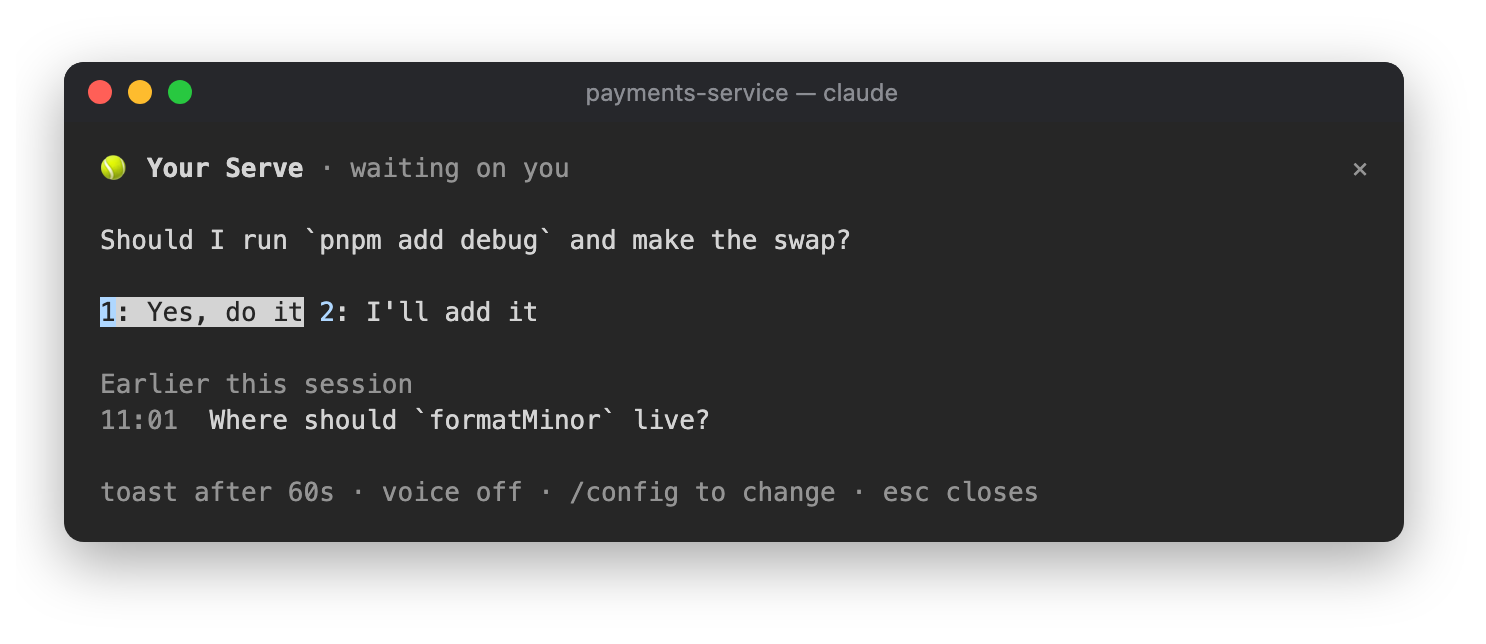
If the turn took longer than a minute, you'll also get a 🎾 Claude needs a decision toast in case you'd
wandered off.
Click 🎾 ready in the status row, or run /your-serve, to see the question waiting on you with its answers,
plus the questions Claude asked earlier in the session.
| Setting | Default | |---|---| | Toast when a turn that needs you took longer than (seconds) | 60 | | Also say it out loud (macOS) | off |
Haiku only sees answers that end with a question mark, a list of options or something phrased as a question. It picks out every question and up to three answers for each one.

Ruflo 記憶系統的基底層外掛:AgentDB 控制器橋接(15 個 agentdb_* MCP 工具)、RuVector ONNX 嵌入(10 個 embeddings_* 工具,包含 RaBitQ 32x 量化)和 WASM HNSW 模式路由器(3 個 ruvllm_hnsw_* 工具)。作為 mod(ADR-445):可選的安全召回會進入提示,寫入守衛會把機密排除在記憶之外,還提供 /agentdb 和控制台顯示的狀態檔。

建立、格式化、最佳化及檢視互動式 Power BI 報表,並提供遵循 pbir CLI 的報表面板,顯示 Claude 讀取與修改的內容。


在提示列上方、狀態列與通知中顯示未讀 AMP 訊息,還能喚醒閒置的 Claude Code 工作階段來讀取。需要 Claude Code 2.1.287 或更新版本。
