
degterev@degterev
degterev/swiftui-preview-mod
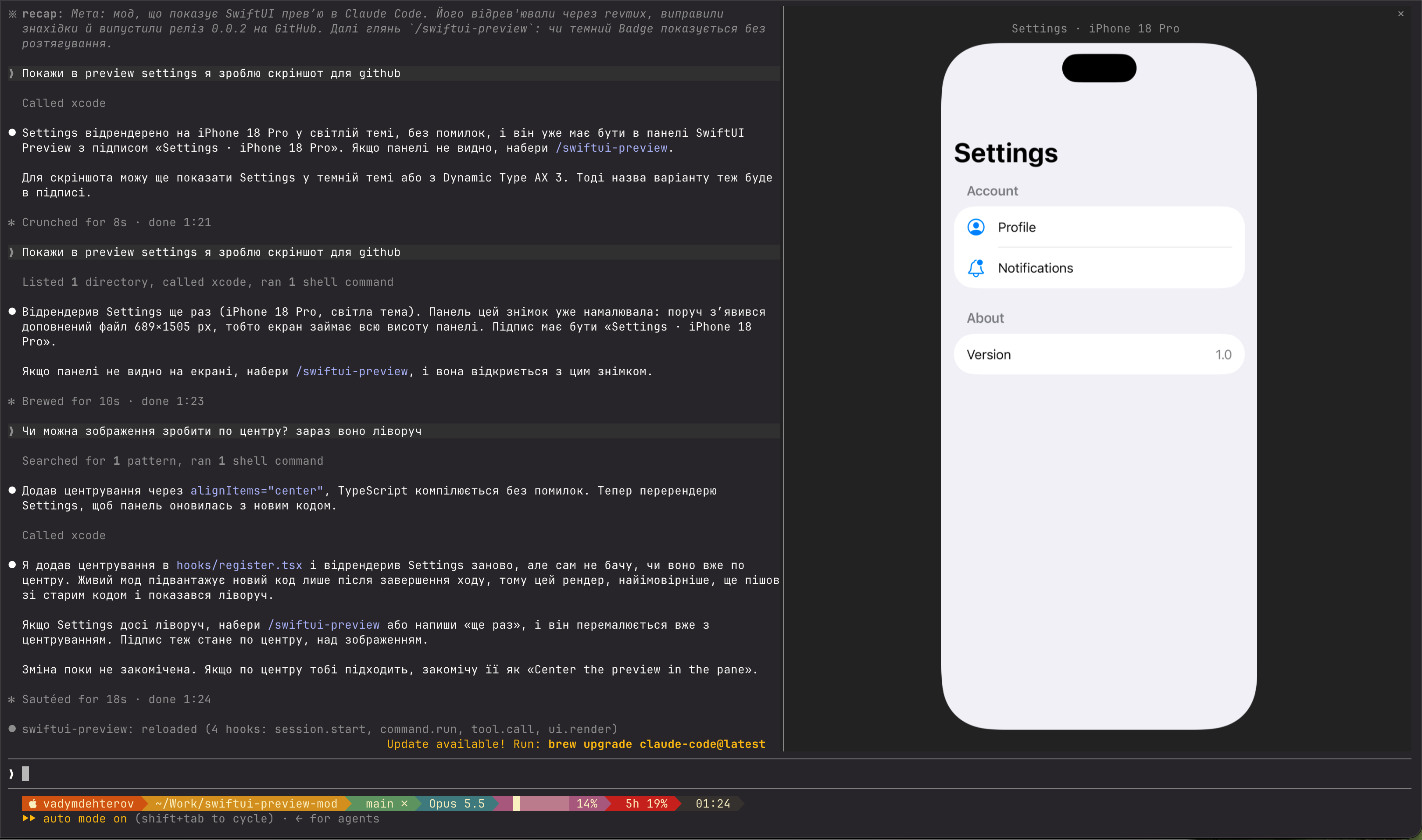
A Claude Code mod that shows SwiftUI previews right in the terminal, rendered by Xcode itself.
degterev/swiftui-preview-mod
Claude calls Xcode's RenderPreview MCP tool on a #Preview; the mod shows the snapshot in a SwiftUI Preview pane with variants like dark mode, Dynamic Type and orientation. Requires macOS with Xcode 27, MCP enabled, the project open in Xcode, and an image-capable terminal such as Ghostty or kitty.
請先查看作者 README,確認 marketplace 與外掛名稱;指令可能隨儲存庫結構而變動。
claude plugin marketplace add degterev/swiftui-preview-mod
claude plugin install swiftui-preview@swiftui-preview
A Claude Code mod that shows SwiftUI previews right in the terminal, rendered by Xcode itself.
Claude calls Xcode's RenderPreview MCP tool on a #Preview; the mod shows the snapshot in a
SwiftUI Preview pane — components 1:1 in points like Xcode's canvas at 100%, whole screens
fit to the pane. Variants (dark mode, Dynamic Type, orientation), localizations and
#Preview(arguments:) come from RenderPreview itself.
sudo xcrun mcp-server enable)claude mcp add xcode -s user -- xcrun mcpbridge
then, at a Claude Code prompt:
/plugin install swiftui-preview --marketplace degterev/swiftui-preview-mod
Answer y to add the marketplace, then pick a scope.
Ask Claude in plain words; if the file has no #Preview, Claude adds one.
The pane opens with each render, labelled with the preview, device and variant
(Settings · iPhone 18 Pro · Dark Appearance). When the terminal is too narrow to place it,
a toast says so; /swiftui-preview reopens the pane with the last render.
[ − ] [ 100% ] [ + ] beside the label zoom from 50% to 400%; click the percentage to reset.
With the pane focused (click it), i zooms in, o out, 0 resets. Zoomed in, the picture can
outgrow the pane's height, which scrolls, but never its width. The terminal passes no pinch to
apps, so a trackpad scrolls the pane but does not zoom it.
claude plugin validate .
claude plugin test .
MIT

由 neural-trader(v2.7+)驅動的神經交易策略:自我學習的 LSTM/Transformer/N-BEATS 模型、Rust/NAPI 回測、112+ 個 MCP 工具、群體協調和投資組合最佳化。

作者表示,他把 'npx RuFlo' 移植到新的 Claude Code Mod 系統,靈感來自他在 1990 年經營的 Wildcat BBS。文章說明,Mod 是一種 Claude Code 外掛,其 hooks 模組會匯出 `register(on, options)`;hooks 將中介軟體接到執行階段事件上,可以監看、重寫或回答這些事件。文中提供安裝指令與 GitHub 連結,同時註明 GitHub manifest 與 hooks 模組尚未驗證。
 ▶ ♫
▶ ♫
claude-seo 的選用 mods companion。它在 Claude Code 內以 mod(function-hook 外掛)執行,因此能強制執行 skill 只能要求的事項。